
How I add Gemini 1.5 Pro API to my app? (Chat with Videos, Images and Audios)
Repo and deployed app:
Index
- Intro to the new Google’s Gemini 1.5 models
- Gemini API setup and initial experiments
- Integrating Gemini 1.5 multi-modal capabilities to our chat web app
- Deploying the Streamlit OmniChat app online for free 🚀
1- Intro to the new Google’s Gemini 1.5 models
Although OpenAI tried to eclipse it the day before announcing GPT-4o, on May’s 14th 2024, Google announced an update of the Gemini Flash and Pro models during the Keynote of Google I/O ‘24.
These new models really compete with OpenAI as they are better in certain areas:
- Between 1M and 2M context window lengths (8–16 times more than GPT-4o):
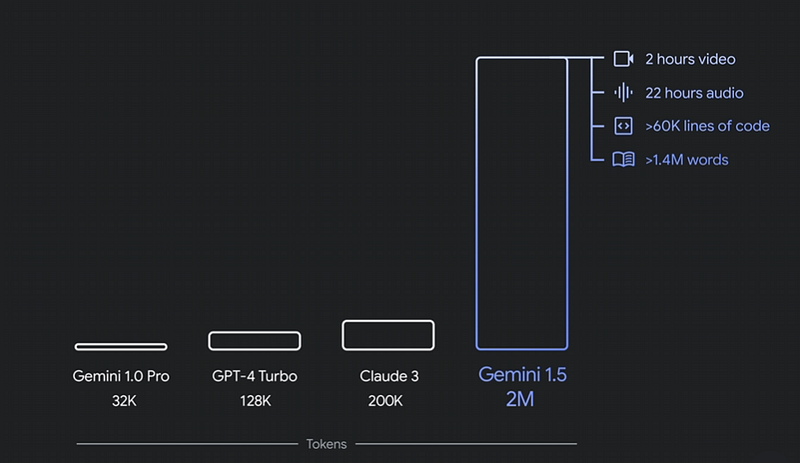
- Native Text, Documents, Audio, Images and Video data modalities already available from the API (GPT-4o, even being called omni-modal, for now only accepts text and images through the API).
- Lower pricing:
- >>>> The 1.5 Flash costs $0.35 / 1 million tokens for input prompts under 128K tokens and $0.70 / 1 million tokens beyond that. The output tokens cost $1–2 / 1 million tokens.
- >>>> The 1.5 Pro costs $1.75 / 1 million tokens for input prompts under 128K tokens and $3.5 / 1 million tokens beyond that. The output tokens cost $10–21 / 1 million tokens. This is around 2–5 times cheaper compared to GPT-4 Turbo and GPT-4o!
Even so, Gemini 1.5 Pro is slightly worse than GPT-4 Turbo and GPT-4o in terms of general accuracy, information quality, code generation and other different tasks.
When compared to the previous generation of Gemini models:
Gemini 1.5 Pro achieves comparable quality to Gemini 1.0 Ultra, while using less compute (article)
What’s more, Gemini 1.0 Ultra, which was the first model to outperform human experts on MMLU (Massive Multitask Language Understanding), had only 32K tokens of context windows. This is 30–60 times less context than these new ones. One may think it cannot be much difficult to have larger context windows, only by increasing the size of some of the internal LLM vectors could do it. The problem is that this not only scales quadratically in terms of compute cost, but also it often makes parts of the input context lost for the model at the time to predict the response based on them. This problem is evaluated with the “Needle In A Haystack” (NIAH) evaluation, where a small piece of text containing a particular fact or statement is purposely placed within a long block of text. So, Gemini 1.5 Pro found the embedded text 99% of the time, in blocks of data as long as 1 million tokens.
One of the key components making the 1.5 models successful is a new and secret architecture of MoE (Mixture of Experts) and Transformers that allow them to be better at a wider amount of tasks while being smaller and faster.
2- Gemini API setup and initial experiments
In order to use the Gemini API, we will need to get our API token first. You can get it from the Google AI Studio website:
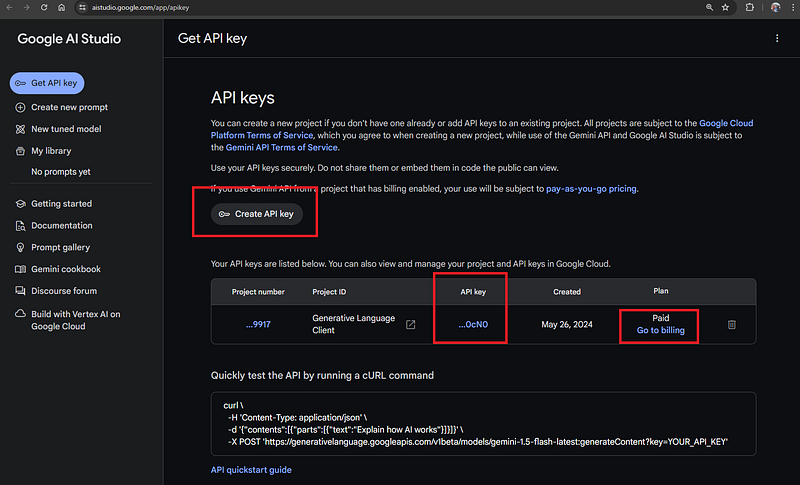
For now, the use of the API is free with some rate limits, but if you are from Europe, UK or Switzerland you will need to create a billing account and pay for it already (I had to do it and so far I spent less than 10 cents for many different experiments with text, images, and videos, so it’s cheap 😛).
Then create a folder for your project if you haven’t done it yet, open your favorite IDE (I will use VSCode), and create a .env file where we will place our API Key as an environment variable (if you saw my previous blog on how to use the OpenAI API, you can just add this new key next to the other ones):
# /.env

GOOGLE_API_KEY=<your-api-key>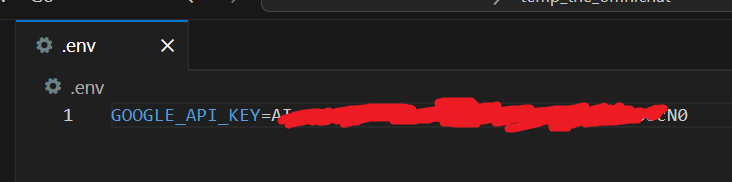
We will need to install the following Python libraries from the terminal:
# You can create and activate a virtual environment first if you want

pip install python-dotenv google-generativeai iprogress ipykernel
Now we will create or open our api_experiments.ipynb file and introduce the following code:
import os
import google.generativeai as genai
import dotenv


dotenv.load_dotenv()

genai.configure(api_key=os.getenv("GOOGLE_API_KEY"))

# Set up the model
generation_config = {
    "temperature": 0.2,
    "top_p": 0.8,
    "top_k": 64,
    "max_output_tokens": 8192,
}

model = genai.GenerativeModel(
    model_name="gemini-1.5-flash",
    generation_config=generation_config,
)

response = model.generate_content("What is the chemical formula of glucose?")

try:
    print(response.text)
except Exception as e:
    print("Exception:\n", e, "\n")
    print("Response:\n", response.candidates)
The chemical formula of glucose is **C₆H₁₂O₆**.
Simple like this we can query the Gemini API with text. I had to add the try-except block as Google has implemented a quite strict filter and many basic questions can trigger it and return a response without text, but with some basic flags to understand why the request failed.
We can change the model configs and we can also change from the Gemini 1.5 flash to the pro, by setting model_name=”gemini-1.5-pro”:
model = genai.GenerativeModel(
    model_name="gemini-1.5-pro",
    generation_config=generation_config,
)
Now let’s try to chat with an image, I have added the following image to my project’s folder as fridge_food.jpg:
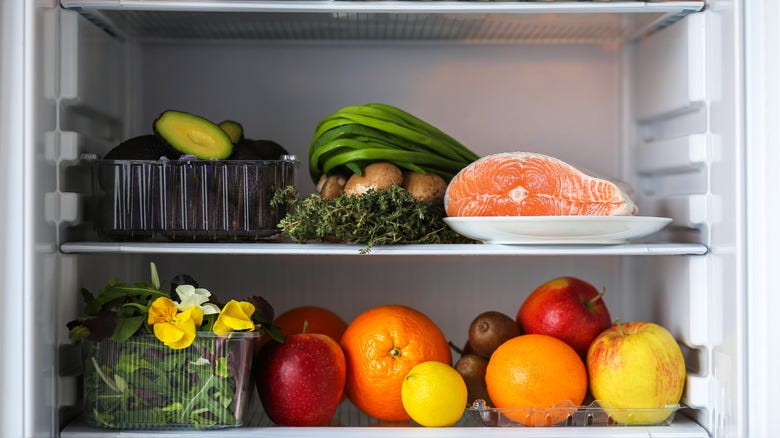
And in a new code cell of our api_experiment.ipynb we will try to see if the model lists the food that we have:
generation_config = {
    "temperature": 0.2,
    "top_p": 0.8,
    "top_k": 64,
    "max_output_tokens": 8192,
}

model = genai.GenerativeModel(
    model_name="gemini-1.5-flash",
    generation_config=generation_config,
)

prompt_parts = [
    genai.upload_file("fridge_food.jpg"),
    "List the food items in the fridge and their quantities."
]

response = model.generate_content(prompt_parts)

try:
    print(response.text)
except Exception as e:
    print("Exception:\n", e, "\n")
    print("Response:\n", response.candidates)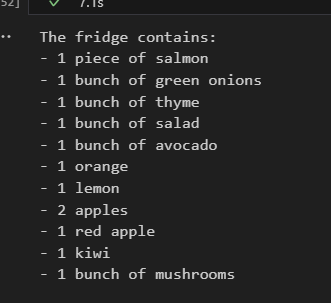
Nice, almost perfect! Gemini 1.5 Flash got all the ingredients and it counted almost all of them good. Let’s try it with the 1.5 Pro:
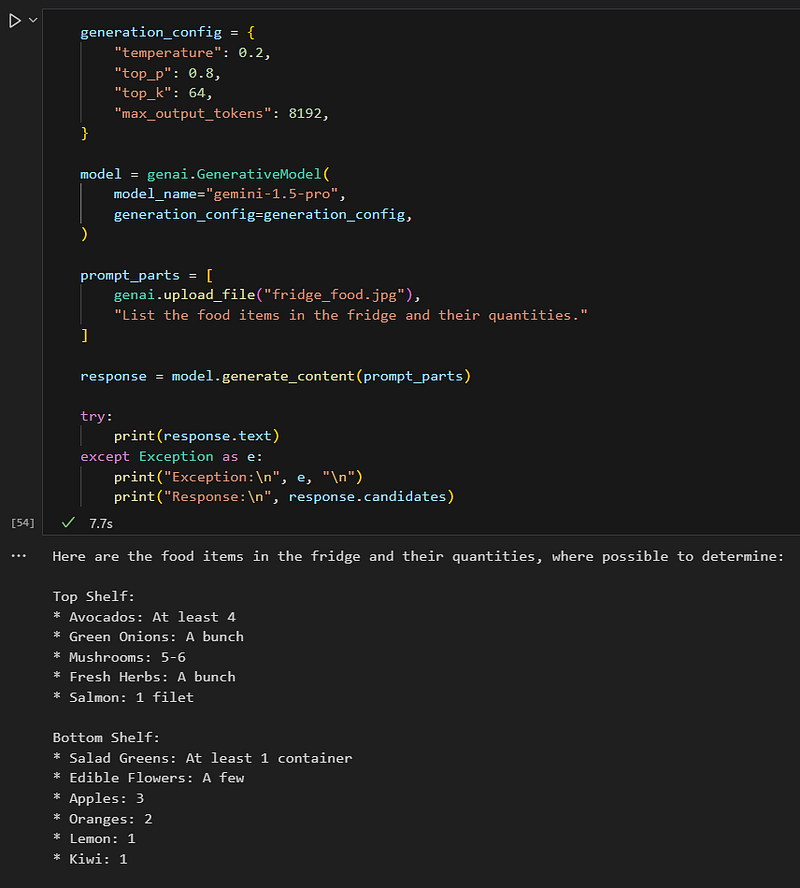
The result now is even better! I would say that perfect, specially taking into account that there are some fruits occluded and with differents colors and shapes.
So we can chat with image files, but also videos, audios, and documents with the same method: genai.upload_file(“<file-path>”)
If we want to have a longer conversation, we can add the chat history context in two different ways:
A) Manually creating a chat history list in the following format:
model = genai.GenerativeModel("gemini-1.5-flash")

chat_history = [
    {
        "role": "user",
        "parts": ["Hi!"]
    },
    {
        "role": "model",
        "parts": ["Hi there! How can I help you today?"],
    },
    {
        "role": "user",
        "parts": ["Translate 'Large Language Models are awesome!' to French."],
    }
]

response = model.generate_content(chat_history )

try:
    print(response.text)
except Exception as e:
    print("Exception:\n", e, "\n")
    print("Response:\n", response.candidates)
“Les grands modèles de langage sont géniaux !”
Where parts could have also files added to its list as we saw before, and the model response can be added iteratively to the chat history with the “role”: “model” in order to keep asking things to it while keeping the conversation context.
B) Using the method start_chat() and send_message() that will take care of the chat history for us:
model = genai.GenerativeModel("gemini-1.5-flash", generation_config={"temperature": 0.3})
chat = model.start_chat(history=[])

prompt_parts = ["My favourite food is pizza."]
response = chat.send_message(prompt_parts)
print(response.text)
That’s awesome! Pizza is a classic for a reason. What’s your favorite kind of pizza? 🍕
prompt_parts = ["What is my favourite food?"]
response = chat.send_message(prompt_parts)
print(response.text)
As an AI, I don’t have access to your personal information, including your favorite food. You told me your favorite food is pizza, but is that still true? 😊
So we see that internally it keeps track of the chat conversation, we can check it like this if we want:
chat.history
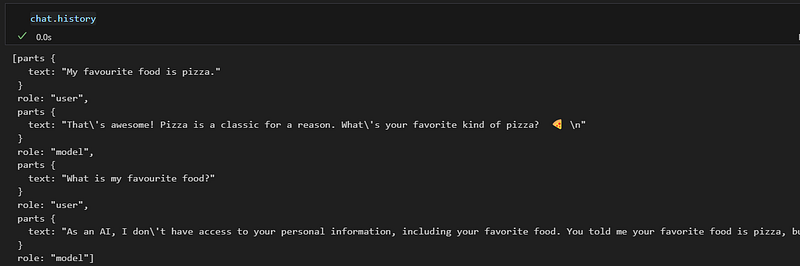
In the following section, we will be using the first way in order to integrate Gemini 1.5 together with the OpenAI models that we already had in the OmniChat Streamlit app 💪 which will be the best one overall? 🤔
3- Integrating Gemini 1.5 multi-modal capabilities to our chat web app
Now we will see part by part how the app.py file from my previous blog/video is modified in order to integrate Gemini, I will go chunk by chunk commenting the changes, you will need to put all of them together with proper indentation in order to make it work.
- First we add google.generativeai and random to our imported libraries:
import streamlit as st
from openai import OpenAI
import google.generativeai as genai
import dotenv
import os
from PIL import Image
from audio_recorder_streamlit import audio_recorder
import base64
from io import BytesIO
import random

dotenv.load_dotenv()- We list the models we want to include in our app from each provider:
google_models = [
    "gemini-1.5-flash",
    "gemini-1.5-pro",
]

openai_models = [
    "gpt-4o",
    "gpt-4-turbo",
    "gpt-3.5-turbo-16k",
    "gpt-4",
    "gpt-4-32k",
]- Before starting the main() function of the app, we will add some more utils to our code. The first one will allow us to convert the Streamlit and OpenAI chat history format to the Google Gemini one as they differ a little:
# Function to convert the messages format from OpenAI and Streamlit to Gemini
def messages_to_gemini(messages):
    gemini_messages = []
    prev_role = None
    for message in messages:
        if prev_role and (prev_role == message["role"]):
            gemini_message = gemini_messages[-1]
        else:
            gemini_message = {
                "role": "model" if message["role"] == "assistant" else "user",
                "parts": [],
            }

        for content in message["content"]:
            if content["type"] == "text":
                gemini_message["parts"].append(content["text"])
            elif content["type"] == "image_url":
                gemini_message["parts"].append(base64_to_image(content["image_url"]["url"]))
            elif content["type"] == "video_file":
                gemini_message["parts"].append(genai.upload_file(content["video_file"]))
            elif content["type"] == "audio_file":
                gemini_message["parts"].append(genai.upload_file(content["audio_file"]))

        if prev_role != message["role"]:
            gemini_messages.append(gemini_message)

        prev_role = message["role"]

return gemini_messages- Now we will adapt the stream_llm_response() function to have Gemini streaming responses (so we can already start displaying the generated response while it’s being created, we don’t need to wait it to be completely finished to start reading it):
# Function to query and stream the response from the LLM
def stream_llm_response(model_params, model_type="openai", api_key=None):
    response_message = ""

    if model_type == "openai":
        client = OpenAI(api_key=api_key)
        for chunk in client.chat.completions.create(
            model=model_params["model"] if "model" in model_params else "gpt-4o",
            messages=st.session_state.messages,
            temperature=model_params["temperature"] if "temperature" in model_params else 0.3,
            max_tokens=4096,
            stream=True,
        ):
            chunk_text = chunk.choices[0].delta.content or ""
            response_message += chunk_text
            yield chunk_text

    elif model_type == "google":
        genai.configure(api_key=api_key)
        model = genai.GenerativeModel(
            model_name = model_params["model"],
            generation_config={
                "temperature": model_params["temperature"] if "temperature" in model_params else 0.3,
            }
        )
        gemini_messages = messages_to_gemini(st.session_state.messages)
        print("st_messages:", st.session_state.messages)
        print("gemini_messages:", gemini_messages)
        for chunk in model.generate_content(gemini_messages):
            chunk_text = chunk.text or ""
            response_message += chunk_text
            yield chunk_text

    st.session_state.messages.append({
        "role": "assistant",
        "content": [
            {
                "type": "text",
                "text": response_message,
            }
]})- We will also need some more file conversion functions:
# Function to convert file to base64
def get_image_base64(image_raw):
    buffered = BytesIO()
    image_raw.save(buffered, format=image_raw.format)
    img_byte = buffered.getvalue()

    return base64.b64encode(img_byte).decode('utf-8')


def file_to_base64(file):
    with open(file, "rb") as f:

        return base64.b64encode(f.read())


def base64_to_image(base64_string):
    base64_string = base64_string.split(",")[1]

return Image.open(BytesIO(base64.b64decode(base64_string)))- Now we can already jump into our main() function for the app, we will need to add a way to add the Google API key next to the OpenAI one in the sidebar and check if any of them at least has been introduced by the user:
def main():

    # --- Page Config ---
    st.set_page_config(
        page_title="The OmniChat",
        page_icon="🤖",
        layout="centered",
        initial_sidebar_state="expanded",
    )

    # --- Header ---
    st.html("""<h1 style="text-align: center; color: #6ca395;">🤖 <i>The OmniChat</i> 💬</h1>""")

    # --- Side Bar ---
    with st.sidebar:
        cols_keys = st.columns(2)
        with cols_keys[0]:
            default_openai_api_key = os.getenv("OPENAI_API_KEY") if os.getenv("OPENAI_API_KEY") is not None else ""  # only for development environment, otherwise it should return None
            with st.popover("🔐 OpenAI"):
                openai_api_key = st.text_input("Introduce your OpenAI API Key (https://platform.openai.com/)", value=default_openai_api_key, type="password")

        with cols_keys[1]:
            default_google_api_key = os.getenv("GOOGLE_API_KEY") if os.getenv("GOOGLE_API_KEY") is not None else ""  # only for development environment, otherwise it should return None
            with st.popover("🔐 Google"):
                google_api_key = st.text_input("Introduce your Google API Key (https://aistudio.google.com/app/apikey)", value=default_google_api_key, type="password")


    # --- Main Content ---
    # Checking if the user has introduced the OpenAI API Key, if not, a warning is displayed
    if (openai_api_key == "" or openai_api_key is None or "sk-" not in openai_api_key) and (google_api_key == "" or google_api_key is None):
        st.write("#")
st.warning("⬅️ Please introduce an API Key to continue...")- The first thing then will be to display the messages history if this there is any (so we have been already interacting with the model before). The difference here is that we introduced the content types video_file and audio_file so Streamlit can display and reproduce them, we didn’t have them before as GPT-4o cannot directly interact with them, but Gemini 1.5 does.
    else:
        client = OpenAI(api_key=openai_api_key)

        if "messages" not in st.session_state:
            st.session_state.messages = []

        # Displaying the previous messages if there are any
        for message in st.session_state.messages:
            with st.chat_message(message["role"]):
                for content in message["content"]:
                    if content["type"] == "text":
                        st.write(content["text"])
                    elif content["type"] == "image_url":
                        st.image(content["image_url"]["url"])
                    elif content["type"] == "video_file":
                        st.video(content["video_file"])
                    elif content["type"] == "audio_file":
st.audio(content["audio_file"])- The side bar will receive now some more updates in order to deal with all the different scenarios in terms of models, types of data and input interactions. We need to list the available models depending the API keys that are available and to detect what type of model the user is selecting. We will also need to add the possibility to upload video files if we are using the Google models and to deal differently with the recorded audio files as we won’t need Whisper to transform them into text. We will be uploading those files with a random name, in order to display them to the Streamlit app in the chat, but also to use the gemini.upload_file() function and append them to the chat conversation later.
        # Side bar model options and inputs
        with st.sidebar:

            st.divider()

            available_models = [] + (google_models if google_api_key else []) + (openai_models if openai_api_key else [])
            model = st.selectbox("Select a model:", available_models, index=0)
            model_type = None
            if model.startswith("gpt"): model_type = "openai"
            elif model.startswith("gemini"): model_type = "google"

            with st.popover("⚙️ Model parameters"):
                model_temp = st.slider("Temperature", min_value=0.0, max_value=2.0, value=0.3, step=0.1)

            audio_response = False
            if openai_api_key:
                audio_response = st.toggle("Audio response", value=False)
                if audio_response:
                    cols_audio = st.columns(2)
                    with cols_audio[0]:
                        tts_voice = st.selectbox("Select a voice:", ["alloy", "echo", "fable", "onyx", "nova", "shimmer"])
                    with cols_audio[1]:
                        tts_model = st.selectbox("Select a model:", ["tts-1", "tts-1-hd"], index=1)

            model_params = {
                "model": model,
                "temperature": model_temp,
            }

            def reset_conversation():
                if "messages" in st.session_state and len(st.session_state.messages) > 0:
                    st.session_state.pop("messages", None)

            st.button(
                "🗑️ Reset conversation",
                on_click=reset_conversation,
            )

            st.divider()

            # Image Upload
            if model in ["gpt-4o", "gpt-4-turbo", "gemini-1.5-flash", "gemini-1.5-pro"]:

                st.write(f"### **🖼️ Add an image{' or a video file' if model_type=='google' else ''}:**")

                def add_image_to_messages():
                    if st.session_state.uploaded_img or ("camera_img" in st.session_state and st.session_state.camera_img):
                        img_type = st.session_state.uploaded_img.type if st.session_state.uploaded_img else "image/jpeg"
                        if img_type == "video/mp4":
                            # save the video file
                            video_id = random.randint(100000, 999999)
                            with open(f"video_{video_id}.mp4", "wb") as f:
                                f.write(st.session_state.uploaded_img.read())
                            st.session_state.messages.append(
                                {
                                    "role": "user",
                                    "content": [{
                                        "type": "video_file",
                                        "video_file": f"video_{video_id}.mp4",
                                    }]
                                }
                            )
                        else:
                            raw_img = Image.open(st.session_state.uploaded_img or st.session_state.camera_img)
                            img = get_image_base64(raw_img)
                            st.session_state.messages.append(
                                {
                                    "role": "user",
                                    "content": [{
                                        "type": "image_url",
                                        "image_url": {"url": f"data:{img_type};base64,{img}"}
                                    }]
                                }
                            )

                cols_img = st.columns(2)

                with cols_img[0]:
                    with st.popover("📁 Upload"):
                        st.file_uploader(
                            f"Upload an image{' or a video' if model_type == 'google' else ''}:",
                            type=["png", "jpg", "jpeg"] + (["mp4"] if model_type == "google" else []),
                            accept_multiple_files=False,
                            key="uploaded_img",
                            on_change=add_image_to_messages,
                        )

                with cols_img[1]:
                    with st.popover("📸 Camera"):
                        activate_camera = st.checkbox("Activate camera (only images)")
                        if activate_camera:
                            st.camera_input(
                                "Take a picture",
                                key="camera_img",
                                on_change=add_image_to_messages,
                            )

            # Audio Upload
            st.write("#")
            st.write(f"### **🎤 Add an audio{' (Speech To Text)' if model_type == 'openai' else ''}:**")

            audio_prompt = None
            audio_file_added = False
            if "prev_speech_hash" not in st.session_state:
                st.session_state.prev_speech_hash = None

            speech_input = audio_recorder("Press to talk:", icon_size="3x", neutral_color="#6ca395", )
            if speech_input and st.session_state.prev_speech_hash != hash(speech_input):
                st.session_state.prev_speech_hash = hash(speech_input)
                if model_type == "openai":
                    transcript = client.audio.transcriptions.create(
                        model="whisper-1",
                        file=("audio.wav", speech_input),
                    )

                    audio_prompt = transcript.text

                elif model_type == "google":
                    # save the audio file
                    audio_id = random.randint(100000, 999999)
                    with open(f"audio_{audio_id}.wav", "wb") as f:
                        f.write(speech_input)

                    st.session_state.messages.append(
                        {
                            "role": "user",
                            "content": [{
                                "type": "audio_file",
                                "audio_file": f"audio_{audio_id}.wav",
                            }]
                        }
                    )

audio_file_added = True- Now we will need to adapt slightly the chat interaction, making it possible to query the model directly from a recorded audio if we are using Gemini, and adapting the stream_llm_response() function with the new parameters interface.
        # Chat input
        if prompt := st.chat_input("Hi! Ask me anything...") or audio_prompt or audio_file_added:
            if not audio_file_added:
                st.session_state.messages.append(
                    {
                        "role": "user",
                        "content": [{
                            "type": "text",
                            "text": prompt or audio_prompt,
                        }]
                    }
                )

                # Display the new messages
                with st.chat_message("user"):
                    st.markdown(prompt)

            else:
                # Display the audio file
                with st.chat_message("user"):
                    st.audio(f"audio_{audio_id}.wav")

            with st.chat_message("assistant"):
                st.write_stream(
                    stream_llm_response(
                        model_params=model_params,
                        model_type=model_type,
                        api_key=openai_api_key if model_type == "openai" else google_api_key)
                )

            # --- Added Audio Response (optional) ---
            if audio_response:
                response =  client.audio.speech.create(
                    model=tts_model,
                    voice=tts_voice,
                    input=st.session_state.messages[-1]["content"][0]["text"],
                )
                audio_base64 = base64.b64encode(response.content).decode('utf-8')
                audio_html = f"""
                <audio controls autoplay>
                    <source src="data:audio/wav;base64,{audio_base64}" type="audio/mp3">
                </audio>
                """
st.html(audio_html)- Finally, we will call the main() function:
if __name__=="__main__":
    main()
And we can save the app.py file to run it from the terminal and see if our evolved app works:
# activate the venv if needed
# make sure to install all requeriments.txt dependencies

streamlit run app.py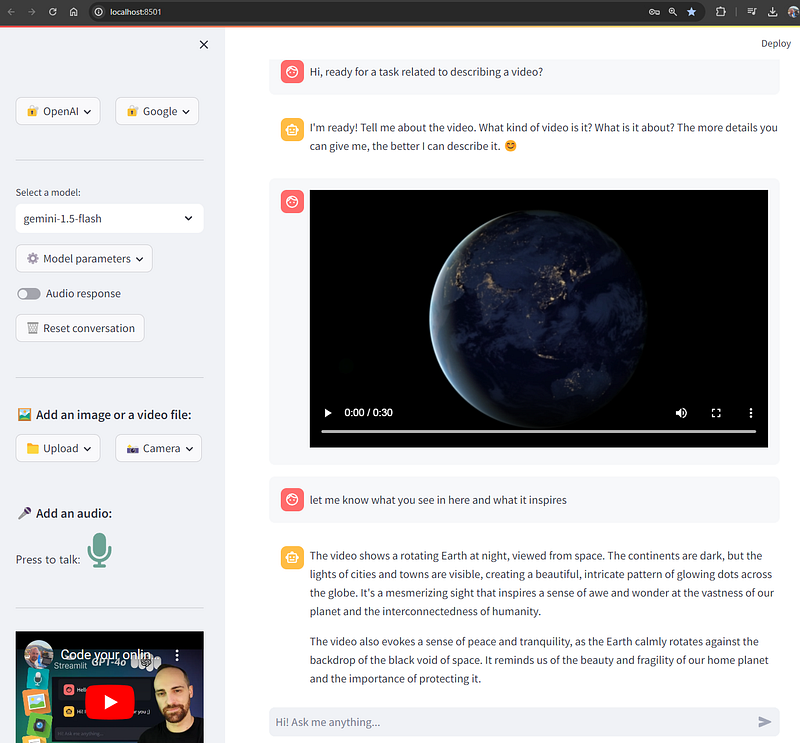
4- Deploying the Streamlit OmniChat app online for free! 🚀
In the last blog/video we created a GitHub repo and we deployed it to the Streamlit Community Cloud alredy. Now, if we commit and push the added changes to our repo, it will automatically trigger the update pipeline from the Streamlit Cloud so we will see the changes in some seconds:
git add .
git commit -m "Add Gemini 1.5 models and adapt workflow for them"
git push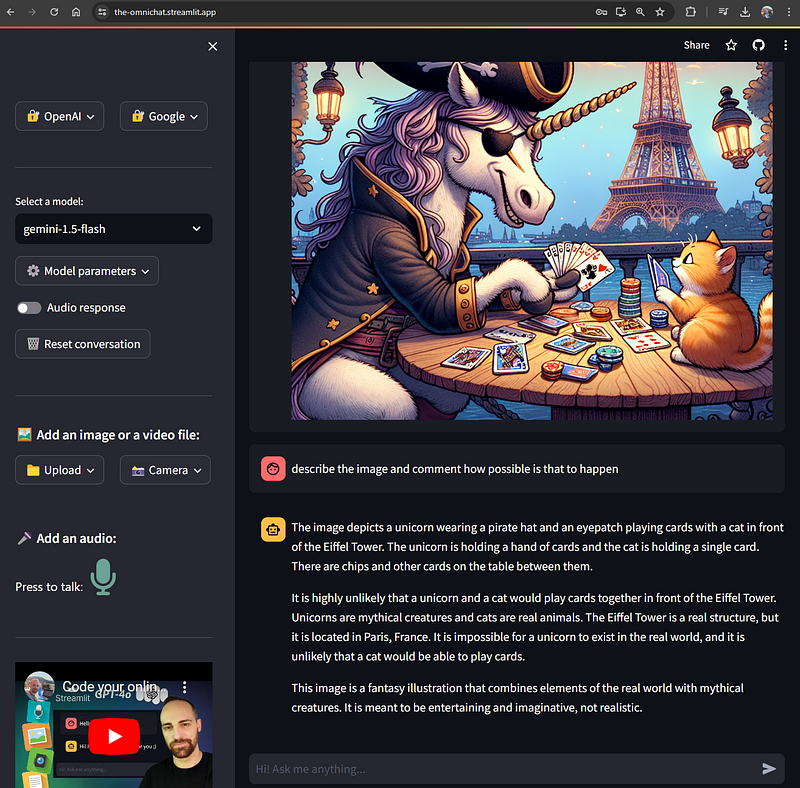
For some reason apparently related to the Gemini API or the communication between Streamlit Cloud and it, videos normally fail in the online app.
I hope you enjoyed this content and learnt how to create amazing online AI apps from it. Consider leaving an applause, like and subscribe if so! 🤗
See you in the next one!! 🤖🚀


