
How good is your ad tech performance?

…here’s how to measure it in SpeedCurve
The performance of your site also means the performance of your ads.
(Those of you who are using AdTech (now a part of AOL) and want to measure technical performance should read this article.)
Please note: This article has been updated (April 24th, 2017) with the new scripting variable in SpeedCurve. See more below.
A couple of weeks ago, I wrote an article on our search for a performance tool that can measure the performance of our ad providers:
What was wrong?
The problem was was that test browsers in our tool of choice, SpeedCurve (which is based on WebPageTest) includes the letters ‘PTST’ in the user agent string. Our ad technology provider sees this and blocks the ads from rendering, so as not to waste ad displays on test views.
(Not every ad tech provider does this, however, apparently Google’s DFP doesn’t block PTST’s browsers.)
That meant that our performance tests didn’t have our ads in them. As we are working with the performance of our entire site, we obviously need to have the ads included.
Since then, we’ve been in touch with the people behind SpeedCurve.
What is the solution?
The good news is that SpeedCurve now has a built-in feature which allows us to set a new user agent and thereby remove ‘PTST’. This is a feature in WebPageTest but that would mean manual test — and automation is one of the main reasons why we chose SpeedCurve.
So “goodbye ad tech blocklist” and “hello entire page load”.
Here’s what you need to do:
The Enterprise edition of SpeedCurve supports WebPageTest scripting. The new feature is a scripting option called ‘speedcurve_removePTST’ (previously ‘setKeepUA’). Set this to 1, and you get to keep your user agent! In WebPageTest scripting you type a command, hit
Here’s the simple script I use in SpeedCurve to measure the full render of the frontpage at ekstrabladet.dk:
speedcurve_removePTST 1 navigate http://ekstrabladet.dk/
Remember: You need tabs between ‘speedcurve_removePTST’ and ‘navigate’. Otherwise it won’t work.
A new feature in SpeedCurve are the so-called ‘Script Templates’. They give you easy access to some of the most common scripting options:

As I mention above, you need the Enterprise version of SpeedCurve to be able to do this.
The results
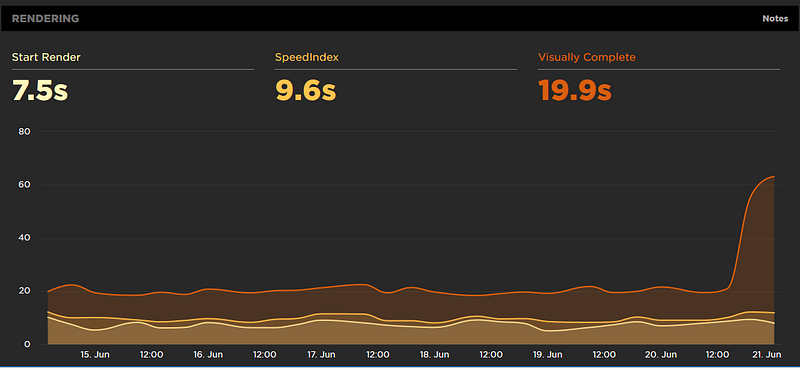
This is how the results look in SpeedCurve after adding the ‘speedcurve_removePTST’ command.
Front page:
Article:
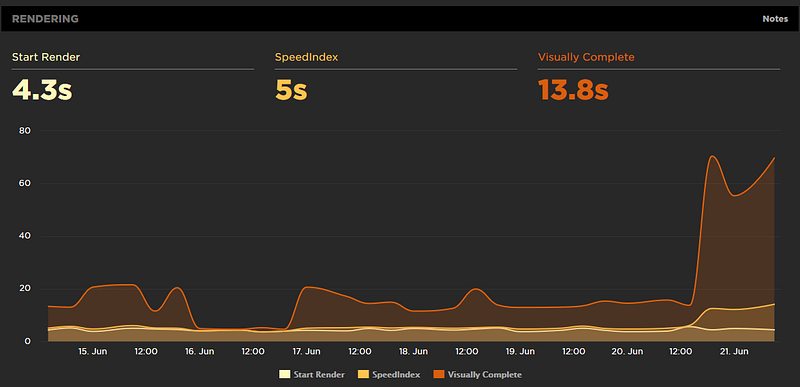
Even though the change in measurement is recent new you can easily see the effect. That increase in the graph from the evening on June 20th and onwards confirms that we are now including ads in our tests.
Also, take a look at this browser waterfall (2,7 MB image) which shows all the resources that are being loaded when you load the front page of ekstrabladet.dk.
That’s a lot of requests…
Speed Curve also gives you a pretty nice waterfall of third party providers on your site:
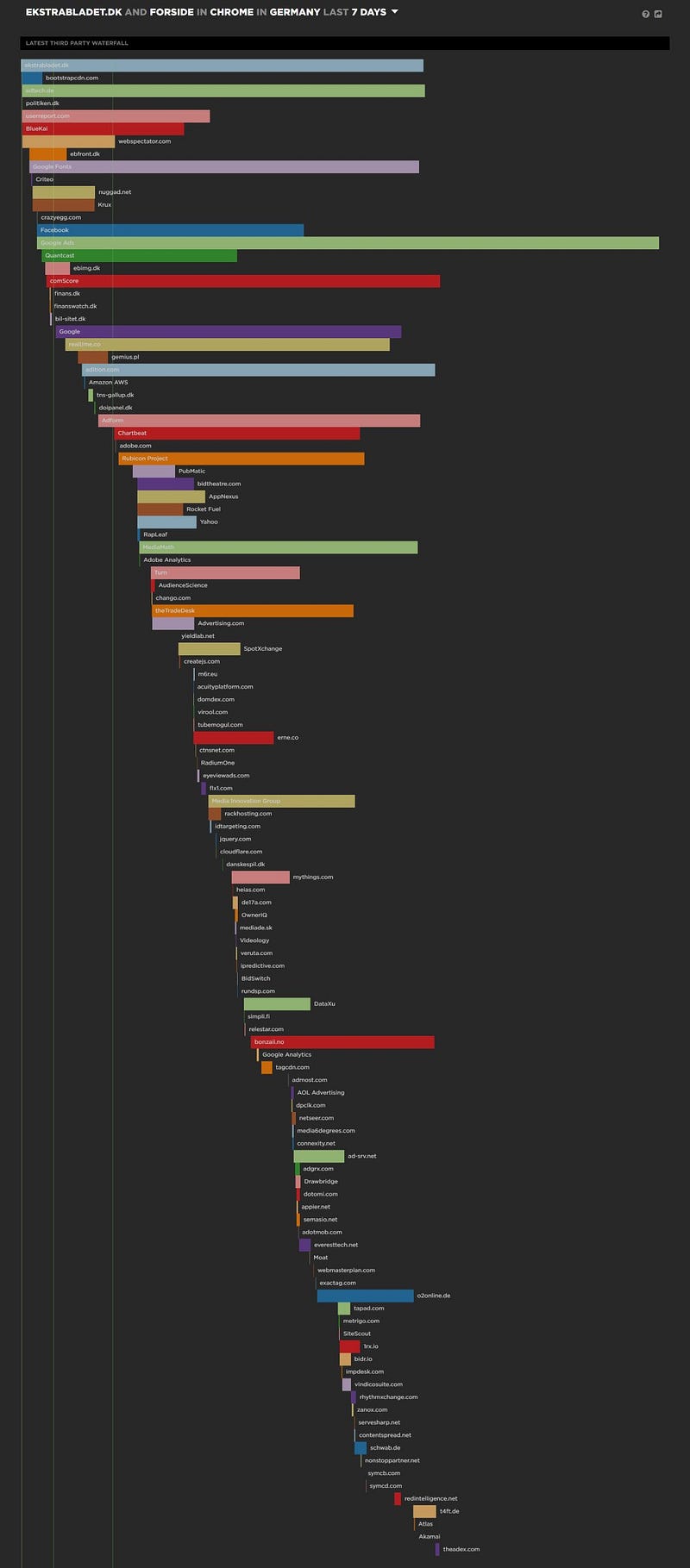
This really tells you something about the complexity of both the web in general and ads nowadays.
You can click on one of the providers and see various metrics for it:
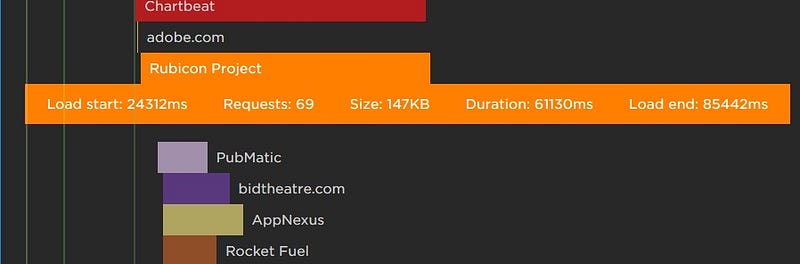
(I am not quite sure how SpeedCurve aggregates these data over time but they can point you in a direction.)
We do our testing from Germany, which means that some of these times shouldn’t be taken as factual speeds. Instead, we use them relatively. So, if we can get something to load in 10 seconds in stead of 20 seconds, that is not a 10 second increase, but a 50 percent increase.
Here you can see the various regions you can test from in SpeedCurve at the moment:

Here we are now
This means that we can now (once again) measure the performance of our entire website. I can’t stress enough how important it is for us (and others with ads on their website) to have the full page (everything your users are seeing) rendered in your performance measuring tool.
As I explained in my earlier article, banner ads (plus the way some of them are found programmatically) are a huge performance culprit. If you don’t have these in your tests you are practically analyzing or optimizing blindfolded.
A note on performance budgeting
There are a lot of articles out there suggesting you do a performance budget (and budgets are quite easy to set up in SpeedCurve). This can be a very good guideline and a way of making sure you are actually doing something with your tests and measurements.
But if your website is like ours and the main influences on performance are third party code and products (banners, detection scripts, video players etc.) you need to make sure that they are somewhat within your control — or the control of you co-workers, for example tech people in Sales, Research/Analysis and so on.
There is no point in having a budget if you can’t turn a knob or tweak something once the budget isn’t met.