avatarBenjamin A.

Free AI web copilot to create summaries, insights and extended knowledge, download it at here

1829

Abstract

n it to generate prompts the way we want them to be.</p><p id="3701">To do this, create a new chat and input the following formula:</p><p id="8301" type="7">Here is a Midjourney formula :</p><p id="9f10" type="7">(image we are prompting), (5 descriptions keywords), (camera type), (style of photograph), (type of film)</p><p id="02a8">Once the formula is entered, ask Chat GPT if it understands and is training it into the chat.</p><p id="f225" type="7">Please respond “Yes” if you understand the formula.</p><p id="6b5c">When it responds positively, it’s ready to generate prompts.</p><figure id="9265"><img src="https://cdn-images-1.readmedium.com/v2/resize:fit:800/1*2mr4nuuaVVC_h8Dt5pMqRQ.jpeg"><figcaption></figcaption></figure><h1 id="dacd">Generating Prompts</h1><p id="571d">Now that Chat GPT is trained, we can ask it to write prompts for us. For example, you can ask it to “Write five Mid-Journey prompts for urban photography.” The results will follow the formula that we provided earlier, such as “Image of a bustling City street vibrant energetic diverse chaotic gritty DSLR wide angle lens late afternoon street photography black and white film.”</p><figure id="ea65"><img src="https://cdn-images-1.readmedium.com/v2/resize:fit:800/1*lKlYztTDEyB5FKBoFC9ziQ.jpeg"><figcaption></figcaption></figure><h1 id="699b">Trying Out the Prompts</h1><p id="4f1d">Once you have the prompts, it’s time to put them to the test. Copy and paste the prompts into <a href="https://discord.com/channels/662267976984297473/@home">Mid-Journey</a> or <a href="https://discord.com/channels/1046979304547954728/1061030698762379345">BlueWillow</a> if you don’t have a Mid-Journey subscription, and see what results you get. For example, if you paste in the prompt for urban photography, you may get a convincing image of a city street in blac

Options

k and white, bustling and gritty.</p><figure id="ee0f"><img src="https://cdn-images-1.readmedium.com/v2/resize:fit:800/1*5XZdt1pQhin_Kmiw85zLFg.jpeg"><figcaption>Image generated by BlueWillow</figcaption></figure><h1 id="bee7">Bottom Line</h1><p id="057c">As you can see, we can do so much with this model, and we are still exploring its potential at some point. Training ChatGPT on the Mid-Journey formula is just a simple example to show how far it can go, creating cool prompts is a quick and easy way to generate the kind of writing prompts you need. With a little training and some experimentation, you can get some great results that will help you in your writing endeavors. As always, thanks for reading!</p><p id="0caf"><b><i>If you like the article and would like to support me make sure to:</i></b></p><ul><li><b>👏 Clap for the story (50 claps) to help this article be featured</b></li><li><b>Follow me on <a href="https://medium.com/@benjaminampouala"></a></b><a href="https://medium.com/@benjaminampouala">Medium</a></li><li><b>📰 View more content on my <a href="https://medium.com/@benjaminampouala"></a></b><a href="https://medium.com/@benjaminampouala">medium profile</a></li><li><b>🔔 Follow Me: <a href="https://www.linkedin.com/in/benjamin-a-83a153201/">LinkedIn</a> | <a href="https://twitter.com/benjiDev19">Twitter</a></b></li></ul><p id="b4a8"><b>Join the <a href="https://medium.com/@benjaminampouala/membership">Medium membership</a> program for only 5$ to continue learning without limits. I’ll receive a small portion of your membership fee if you use the following link, at no extra cost to you.</b></p><p id="c5c2"><i>Stay updated with the latest news and updates in the creative AI space — follow the <a href="https://medium.com/generative-ai">Generative AI</a> publication.</i></p></article></body>

How do you train ChatGPT for a specific task?
Image by MidJourney

Hello and happy Tuesday! Have you ever wanted to generate prompts for a specific task but found it difficult to get the results you wanted? Well, in this article, we’re going to see, how we can train ChatGPT to create really cool prompts that are just what you’re looking for.

Join the Medium membership program for only $5 to continue learning without limits. I’ll receive a small portion of your membership fee if you use the following link, at no extra cost to you.

Training Chat GPT to Generate Prompts

We are going to train ChatGPT on the Mid-Journey formula because, in the past, using Mid-Journey to write prompts was not always straightforward. Often, the prompts generated would be long and not written in a way that was useful for the task at hand. However, with the help of Chat GPT, we can train it to generate prompts the way we want them to be.

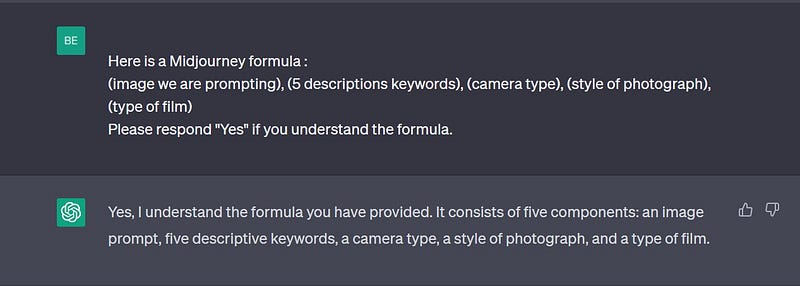
To do this, create a new chat and input the following formula:

Here is a Midjourney formula :

(image we are prompting), (5 descriptions keywords), (camera type), (style of photograph), (type of film)

Once the formula is entered, ask Chat GPT if it understands and is training it into the chat.

Please respond “Yes” if you understand the formula.

When it responds positively, it’s ready to generate prompts.
Generating Prompts

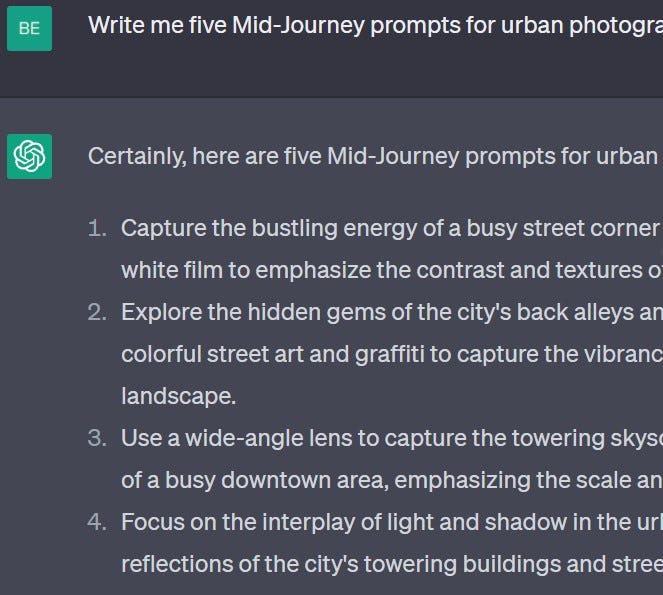
Now that Chat GPT is trained, we can ask it to write prompts for us. For example, you can ask it to “Write five Mid-Journey prompts for urban photography.” The results will follow the formula that we provided earlier, such as “Image of a bustling City street vibrant energetic diverse chaotic gritty DSLR wide angle lens late afternoon street photography black and white film.”
Trying Out the Prompts

Once you have the prompts, it’s time to put them to the test. Copy and paste the prompts into Mid-Journey or BlueWillow if you don’t have a Mid-Journey subscription, and see what results you get. For example, if you paste in the prompt for urban photography, you may get a convincing image of a city street in black and white, bustling and gritty.
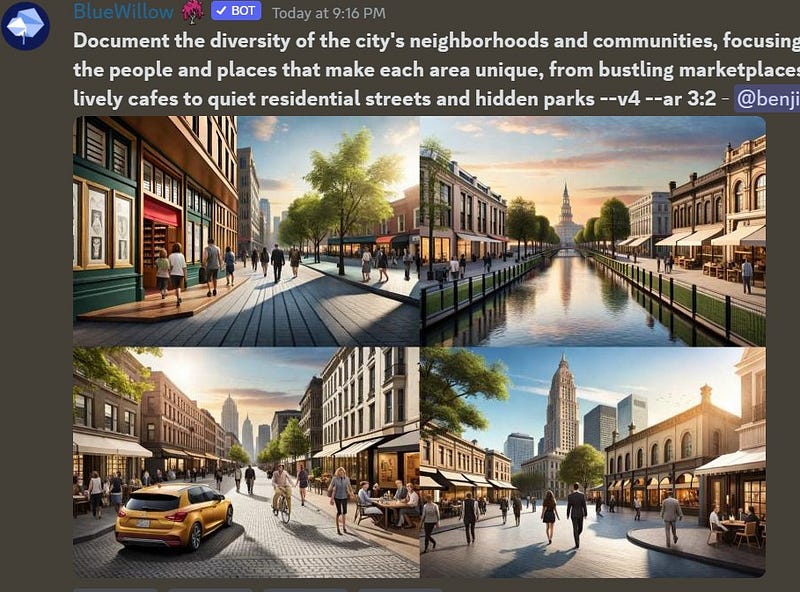
Image generated by BlueWillow

Bottom Line

As you can see, we can do so much with this model, and we are still exploring its potential at some point. Training ChatGPT on the Mid-Journey formula is just a simple example to show how far it can go, creating cool prompts is a quick and easy way to generate the kind of writing prompts you need. With a little training and some experimentation, you can get some great results that will help you in your writing endeavors. As always, thanks for reading!

If you like the article and would like to support me make sure to:

Join the Medium membership program for only 5$ to continue learning without limits. I’ll receive a small portion of your membership fee if you use the following link, at no extra cost to you.

Stay updated with the latest news and updates in the creative AI space — follow the Generative AI publication.

Technology
Followers
ChatGPT
Self Improvement
100 Followers
Recommended from ReadMedium