avatarBrett Whitmarsh
# Summary

To embed a GIF from Giphy on Medium, use the HTML 5 Video embed code found under the "copy link" section on Giphy, which provides a smoother experience than the Giphy Embed Player tool.

# Abstract

When embedding a GIF from Giphy into a Medium blog post, it is recommended to utilize the HTML 5 Video embed option rather than the provided "Giphy Embed Player." This option is available within the "copy link" section on Giphy. After copying the embed code, you can prompt the embed option on Medium by hitting return in the blog text editor. Pasting the HTML 5 Video code and pressing return again should display the GIF in your post. The author has found this method to be more reliable and less cumbersome than the standard Giphy embed option, suggesting that the issue may lie with Medium's handling of embeds rather than Giphy's tools.

# Opinions

- The author prefers the HTML 5 Video embed option over the Giphy Embed Player due to its smoother functionality.
- There is an implication that Medium's platform may be responsible for the clunkiness of the standard Giphy embed option.
- The author's preference is based on personal experience and observation, indicating a level of subjectivity in their recommendation.

How do I embed a Gif from Giphy on Medium?

If you’re trying to embed a Gif from Giphy.com on your Medium blog, use the HTML 5 Video embed option rather than the “Giphy Embed Player” tool. The HTML 5 Video option is located under the “copy link” section on Giphy.
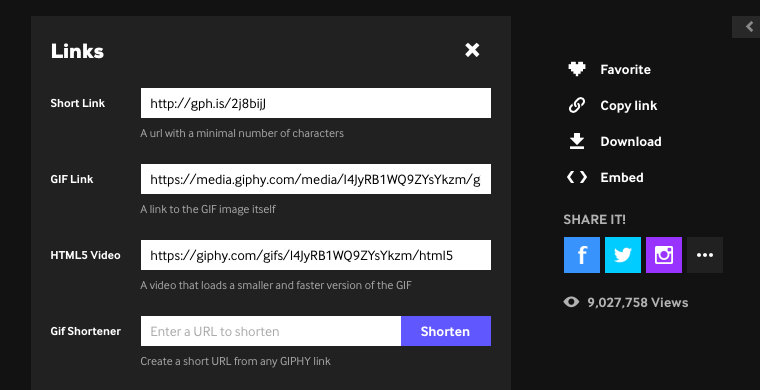
From Giphy.com under “copy link” options

Once you’ve copied your code, hit return on your Medium blog text to prompt the option to embed. Click on the embed option and paste the HTML 5 Video code. Hit return again and the Gif should pop up.

I’ve found this option works more smoothly over the more clunky embed option. I think it has more to do with Medium than Giphy, but I’m not sure.

And now for the required Cat Gif:

Tech
Medium
GIF
Giphy
Recommended from ReadMedium