avatarTree Langdon

Free AI web copilot to create summaries, insights and extended knowledge, download it at here

1785

Abstract

post. The more you read, the more you'll learn. By signing up, you will create a Medium…</h3></div> <div><p>treelangdon.medium.com</p></div> </div> <div> <div style="background-image: url(https://miro.readmedium.com/v2/resize:fit:320/0*KFE5Vabsp2aJchDY)"></div> </div> </div> </a> </div><h1 id="b09d">Here’s my answer:</h1><p id="180f">In your<b> settings</b>, look for <b>Publishing. </b>Scroll down a bit, to find <b>Promote email subscriptions.</b></p><figure id="3cd9"><img src="https://cdn-images-1.readmedium.com/v2/resize:fit:800/1*BhO8kmI37okFcXZYS0RN1A.jpeg"><figcaption>screenshot by author</figcaption></figure><p id="1c56">You will see directions to share your subscribe page. This will take you to a link you can use to promote subscriptions to your account.</p><figure id="bc2d"><img src="https://cdn-images-1.readmedium.com/v2/resize:fit:800/1*Pe155yq-klPQ2Cf02wYOwQ.jpeg"><figcaption>screenshot by author</figcaption></figure><p id="49bf">Just click through and then copy the link that shows up at the top of your screen. It will look something like this:</p><p id="f4dc"><a href="https://treelangdon.medium.com/subscribe">https://treelangdon.medium.com/subscribe</a></p><p id="54fa">This page allows readers to sign up to get all of your stories via email. Use the link in your stories or social media posts.</p><h2 id="c051">What about the cool box?</h2><p id="6d7c">Copy the link, then go to your story where you want the link box.</p><ul><li>In Edit mode, click on the location where you want the box.</li><li>Hit Enter, so you begin on a new line.</li><li>Then paste your link into that new line.</li><li>Now you can hit ENTER, and in seconds the new shiny box

Options

will show up!</li></ul><p id="2876"><b>Bingo!</b></p><div id="789d" class="link-block"> <a href="https://treelangdon.medium.com/subscribe"> <div> <div> <h2>Don't miss a single juicy post.</h2> <div><h3>Don't miss a single juicy post. The more you read, the more you'll learn. By signing up, you will create a Medium…</h3></div> <div><p>treelangdon.medium.com</p></div> </div> <div> <div style="background-image: url(https://miro.readmedium.com/v2/resize:fit:320/0*KFE5Vabsp2aJchDY)"></div> </div> </div> </a> </div><h1 id="69eb">Customizing your subscription message</h1><p id="1640">You can also edit your subscription message on this same page. It’s easy to figure out.</p><figure id="bcdb"><img src="https://cdn-images-1.readmedium.com/v2/resize:fit:800/1*qH4RDHYC69z-gx_8FUeGJw.jpeg"><figcaption>screenshot by author</figcaption></figure><p id="0d1a">When you click through this link, you’ll get a screen that lets you create a Headline and the Body of your message. It even gives you a cool preview of your message as you go.</p><figure id="a63a"><img src="https://cdn-images-1.readmedium.com/v2/resize:fit:800/1*KtkqCsYDoZgpTIKaMI81yA.jpeg"><figcaption>screenshot by author</figcaption></figure><h2 id="aa83">Go to Customize your message and attract more subscribers!</h2><p id="617c">I hope you found something useful in this article. If you’re not already a subscriber, <a href="https://treelangdon.medium.com/subscribe">Join us here</a>.</p><p id="fac6">If you are a subscriber and you loved this information, please share this story so more people can benefit from these wise words.</p></article></body>

How Do I Edit My Subscriber Link and Create That Cool Box With My Image?

Customize your message to attract more readers

Photo by Jarritos Mexican Soda on Unsplash

I’ve been a writer at Medium for a few years, and I’m an editor for several different publications as well. I‘m often asked questions about Medium and how things work here.

I know it’s possible to find answers if you search, but I remember what it was like when I first arrived.

I was so thankful when someone would take pity on me and help me figure things out. (You know who you are. )

Well, here’s me, paying it forward.

Here’s a recent question from a new writer:

“I hope you can help me with this issue.

I’m trying to encourage readers to subscribe to my Medium account so they don’t miss any of my posts. At the end of each article, I have written this:

Click this link to become a member of my Medium family. You’ll get all the goods, every single juicy post, whenever I write a new one.

How do I make it look like this cool box?”

Here’s my answer:

In your settings, look for Publishing. Scroll down a bit, to find Promote email subscriptions.
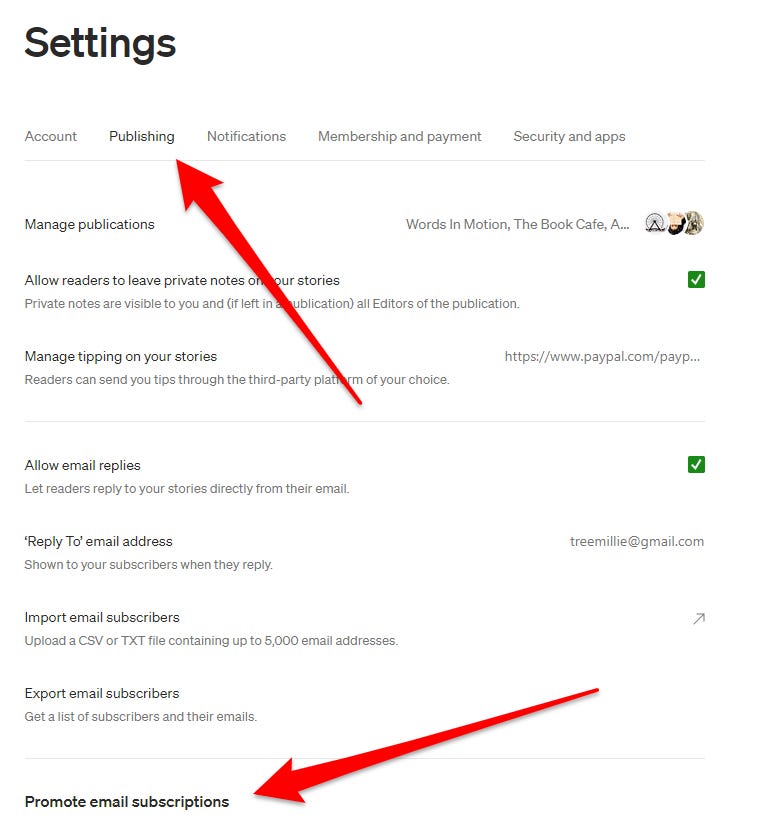
screenshot by author

You will see directions to share your subscribe page. This will take you to a link you can use to promote subscriptions to your account.
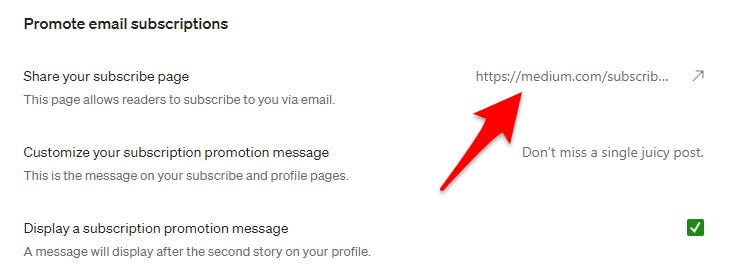
screenshot by author

Just click through and then copy the link that shows up at the top of your screen. It will look something like this:

https://treelangdon.medium.com/subscribe

This page allows readers to sign up to get all of your stories via email. Use the link in your stories or social media posts.

What about the cool box?

Copy the link, then go to your story where you want the link box.

  • In Edit mode, click on the location where you want the box.
  • Hit Enter, so you begin on a new line.
  • Then paste your link into that new line.
  • Now you can hit ENTER, and in seconds the new shiny box will show up!

Bingo!

Customizing your subscription message

You can also edit your subscription message on this same page. It’s easy to figure out.
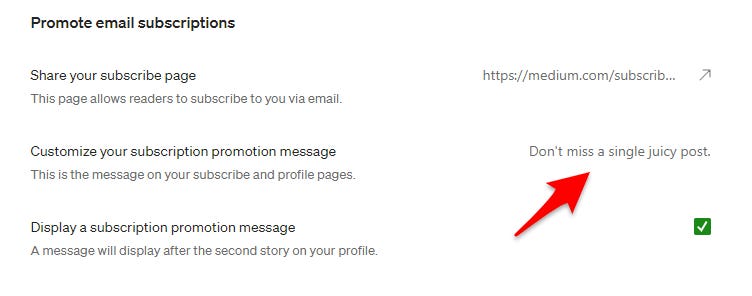
screenshot by author

When you click through this link, you’ll get a screen that lets you create a Headline and the Body of your message. It even gives you a cool preview of your message as you go.
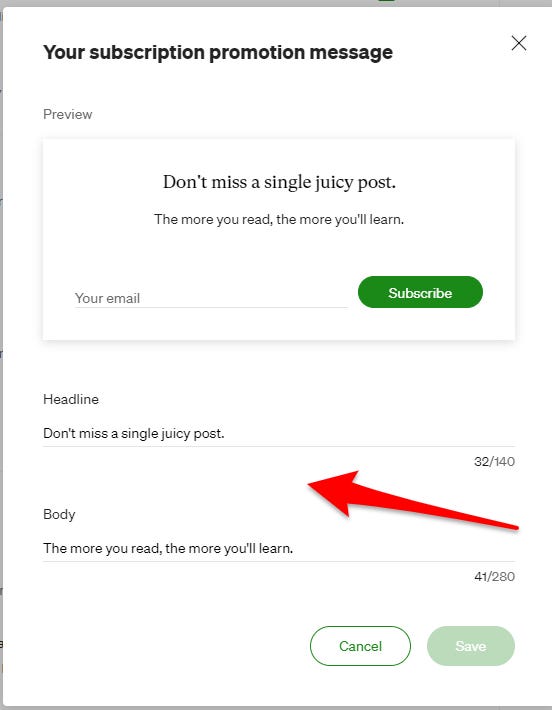
screenshot by author

Go to Customize your message and attract more subscribers!

I hope you found something useful in this article. If you’re not already a subscriber, Join us here.

If you are a subscriber and you loved this information, please share this story so more people can benefit from these wise words.

Business
Marketing
Mentorship
Tips
Support
Recommended from ReadMedium