avatarLife-Guide

Free AI web copilot to create summaries, insights and extended knowledge, download it at here

1297

Abstract

m fonts in Notion</h1><h2 id="3634">1. Insert a Math Block</h2><p id="6b2e">In Notion, type <code>/math</code> to insert a math block.</p><figure id="3c86"><img src="https://cdn-images-1.readmedium.com/v2/resize:fit:800/1*K3P0OYckwZ7RVDWvpkkf5g.png"><figcaption>Math Block in Notion(either is OK)</figcaption></figure><h2 id="e02e">2. Enter the KaTeX Code</h2><p id="d0fe">To change the <b>Font Color</b>, use the following format:</p><div id="591c"><pre><span class="language-xml">\color</span><span class="hljs-template-variable">{desired_color}</span><span class="hljs-template-variable">{text}</span></pre></div><p id="6b92">For example, to make the text “Life-Guide” appear in red, you’d enter:</p><figure id="7c93"><img src="https://cdn-images-1.readmedium.com/v2/resize:fit:800/1*VzF7U0ModKf821yOCxoPpg.png"><figcaption></figcaption></figure><p id="8988"><b>also, you can use totally custom color like this:</b></p><figure id="5e50"><img src="https://cdn-images-1.readmedium.com/v2/resize:fit:800/1*SX3jJ7g8zKwx7hQ-XxtX4Q.png"><figcaption>Custom Color</figcaption></figure><p id="2bc7">To change the <b>Font Size</b>, use the following format:</p><figure id="d62b"><img src="https://cdn-images-1.readmedium.com/v2/resize:fit:800/1*LE20D0svnkeeEDv-tPWDKA.png"><figcaption>On the right are the

Options

adjustable font sizes and their corresponding codes</figcaption></figure><p id="e7dd">To change the <b>Font Borders</b>, use the following 2 format:</p><figure id="1bfb"><img src="https://cdn-images-1.readmedium.com/v2/resize:fit:800/1*i70cxGdAwQeRpDOmtLUFCQ.png"><figcaption>black border</figcaption></figure><figure id="b2c6"><img src="https://cdn-images-1.readmedium.com/v2/resize:fit:800/1*5M4W-fA_u2yd0Jro7CEzfg.png"><figcaption>colorful border</figcaption></figure><p id="6f08">So, by using the techniques mentioned above, you can choose any color you desire to modify the font in Notion, change the background color, add borders, alter font colors, and so on. This will enhance the visual experience of your Notion page manifold.</p><h1 id="8c59">Welcome to follow us</h1><p id="ce09">This is how I achieve font freedom in Notion using the KaTeX language. If you’re interested in KaTeX, you can visit <a href="https://katex.org/docs/support_table.html#l"><b>here</b></a> to see more of its applications. <b>If you found this share valuable, please follow us. We’ll bring more Notion templates and technique shares in the future!</b></p><p id="f933">Click here to get Free Notion Templates: <a href="https://lifeguide00.gumroad.com/">https://lifeguide00.gumroad.com/</a></p></article></body>

How can I achieve font freedom in Notion

Notion.so

Today, I’m going to start sharing more tips and tricks for using Notion. If you also use Notion and want to learn more about templates or techniques, please follow us. Together, let’s achieve personal growth through Notion.

If you’d like to get free Notion templates, click: https://lifeguide00.gumroad.com/

As the title suggests, today, we want to teach everyone how to achieve font freedom on Notion. You can adjust the font color, size, weight, and even add borders using the methods below, just like what’s shown in the following images:
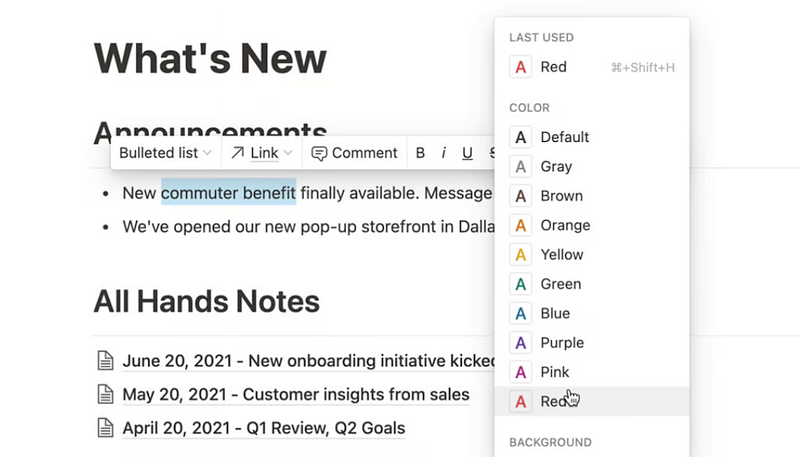

The default font color provided by Notion
My custom fonts in Notion

How to achieve custom fonts in Notion

1. Insert a Math Block

In Notion, type /math to insert a math block.
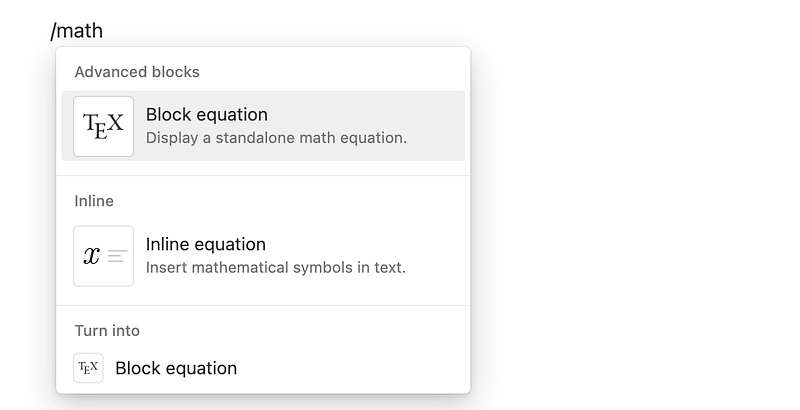
Math Block in Notion(either is OK)

2. Enter the KaTeX Code

To change the Font Color, use the following format:

\color{desired_color}{text}

For example, to make the text “Life-Guide” appear in red, you’d enter:
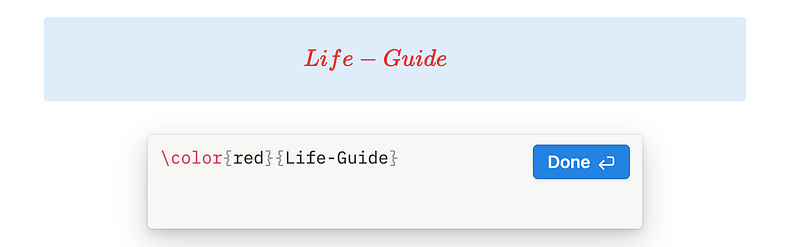
also, you can use totally custom color like this:

Custom Color

To change the Font Size, use the following format:
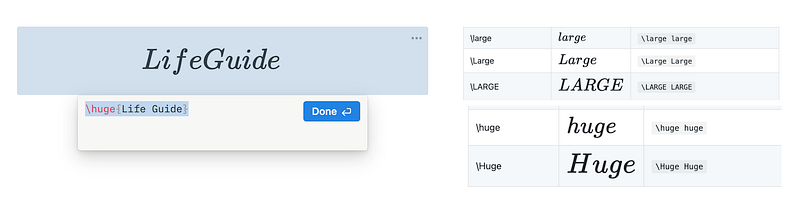
On the right are the adjustable font sizes and their corresponding codes

To change the Font Borders, use the following 2 format:
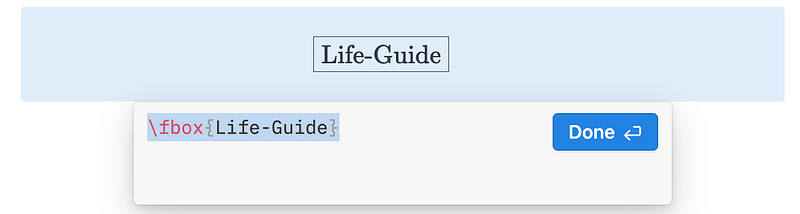
black border
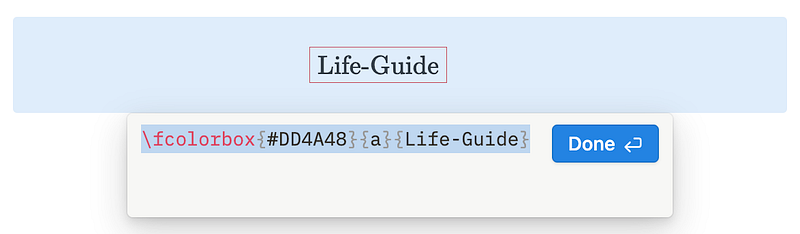
colorful border

So, by using the techniques mentioned above, you can choose any color you desire to modify the font in Notion, change the background color, add borders, alter font colors, and so on. This will enhance the visual experience of your Notion page manifold.

Welcome to follow us

This is how I achieve font freedom in Notion using the KaTeX language. If you’re interested in KaTeX, you can visit here to see more of its applications. If you found this share valuable, please follow us. We’ll bring more Notion templates and technique shares in the future!

Click here to get Free Notion Templates: https://lifeguide00.gumroad.com/

Notion
Notion Template
Recommended from ReadMedium