
How an EIPAssociation in CloudFormation can Help Prevent Dependency Issues
ACM.104 Maintaining a static IP address when you need to delete and recreate an EC2 instance
~~~~~~~~~~~~~~~~~~~~~~~~~~~~~~~~~~~~~~~~~~~~~~~~~~~~~~~~~~~
⚙️ Check out my series on Automating Cybersecurity Metrics. The Code.
🔒 Related Stories: Cloud Architecture | Network Security | Cybersecurity
💻 Free Content on Jobs in Cybersecurity | ✉️ Sign up for the Email List
~~~~~~~~~~~~~~~~~~~~~~~~~~~~~~~~~~~~~~~~~~~~~~~~~~~~~~~~~~~
We ran into a snag in the last post and we’re going to fix it in this post. In that post, we used an AWS-managed prefix list ot add rules to our security group instead of adding every CIDR used by the S3 service.
Updating security groups on an EC2 instance in CloudFormation apparently requires it to delete and recreate an EC2 instance. I don’t know why because you can change security groups in the AWS console with an EIP assigned and have no such issues. It seems like AWS could fix whatever is causing that (#awswishlist).
CloudFormation denied deleting and recreating the AWS EC2 instance due to the fact that another stack was depending on an output of our EC2 stack. That other stack was our EIP (Elastic IP Address) created this post:
If we delete the EIP, we lose the IP address assigned to us and we need to create a new one. And if we have to create a new IP address than we have to go back and fix all our local network rules here that was setup in this post:
To ensure we did not lose our EIP but could redeploy our VM, we removed the output dependency in our EIP stack. We had to actually change our EIP template code. That’s not a good long term solution. We don’t want to have to change code to create, delete, and redeploy resources. There are various solutions to that problem but the one we are going to use is a CloudFormation EIP association:
Leveraging the EIPAssociation resource
When we create an EIP association, we pass in an EIP address and an Instance ID.
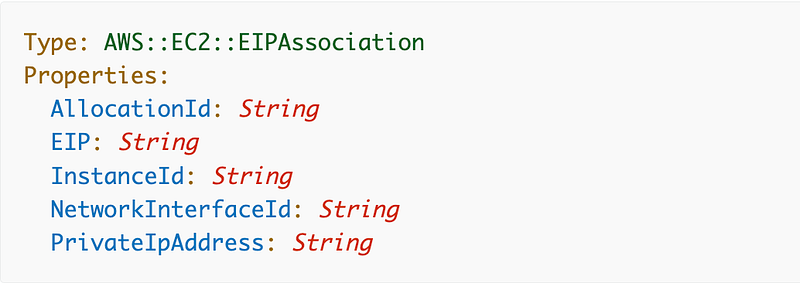
The EIPAssociation CloudFormation documentation says we have to pass in an allocation ID:
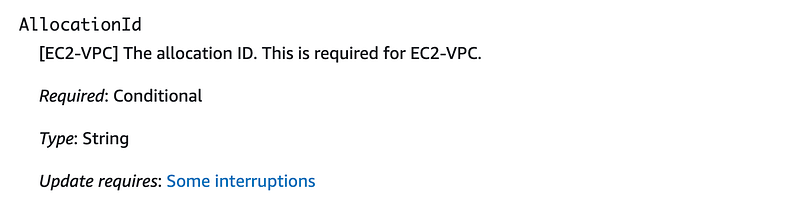
Well, where do we get that, since the output returned by an EIP is an IP address? We can glean how to get the allocation ID from the code at the bottom of the page.
The sample code deploys an EIP:

Then it deploys an EIPAssociation and gets the ID using GetAtt and [EIP].AllocationId.
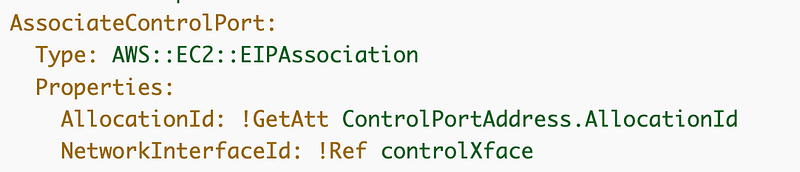
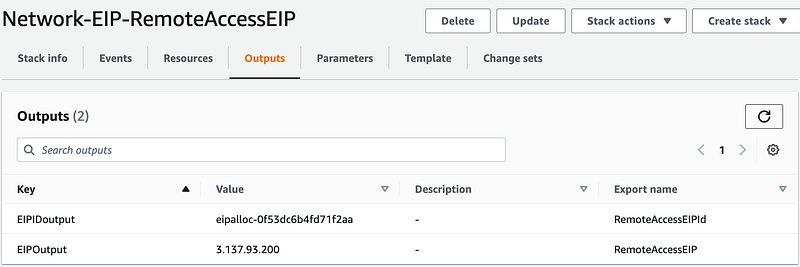
So apparently that’s how you get the ID and we need to add that to our outputs in our EIP template:
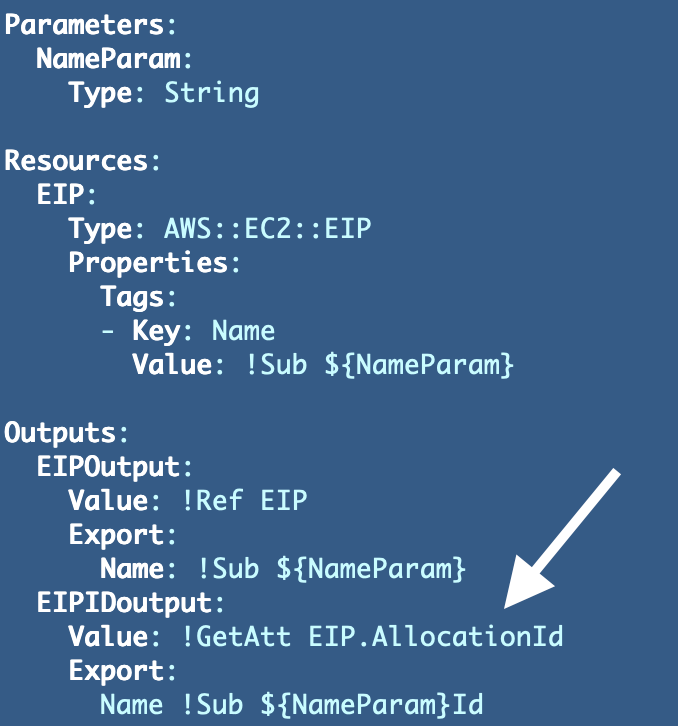
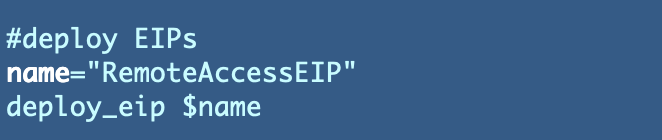
Since our EIP has no dependencies now, we can deploy it in our primary deploy script. Recall that we removed the Instance ID dependency.
Test that out and we now have an output with the EIP ID in the CloudFormation stack:
Test the EIPAssociation
Now we can reference that in our EIPAssociation template. We can also reference the export value for the EC2 instance to which we want to associate the IP address.
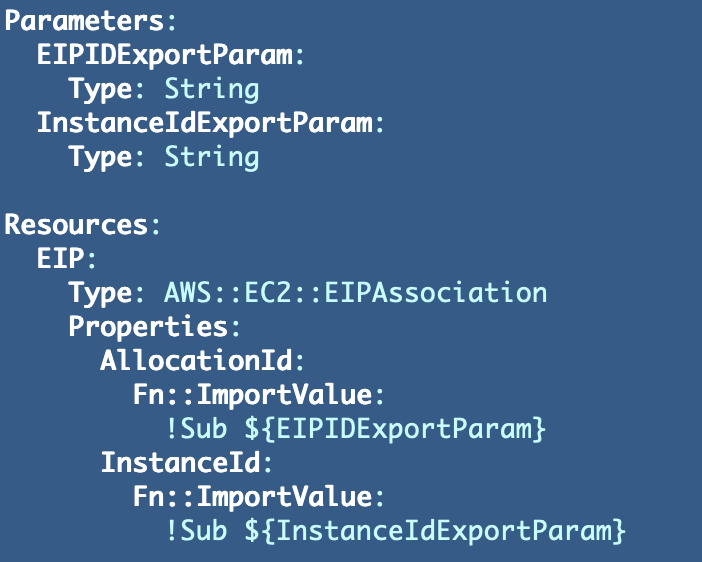
With the above resource we can delete and recreate it without losing our EIP or fixed IP address that we are using in our firewall rules.
Rename deploy_eips.sh to deploy_eip_alloc.sh and add the code there to deploy an EIP Association.
Deploy the EIP association and verify it works.

Check to see we have the same IP associated with your EC2 instance that you had before. I Do. That means I won’t have to change any network rules.
Now we should have the S3 prefix list in the security group assigned to our EC2 instance in that last post.

That rule allows our EC2 instance to connect to S3 on port 443. That, in turn, allows us to call yum commands on AWS since yum on AWS stores packages in S3. Let’s try it.
SSH into the Developer EC2 instance we created in this series. Remember that since the underlying host changed you’ll have to delete your known hosts file as I explained in a prior post.

Run this command:
sudo yum install gitSuccess!
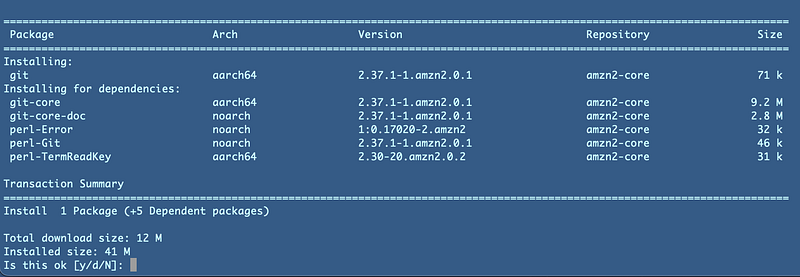
While we’re at it you should also run the following command to update any out of date software on the system:
sudo yum updateNow that we have installed git on an EC2 instance, let’s use it. In our next post I’ll show you how to add networking rules to allow your EC2 instance to contact GitHub to retrieve code.
Follow for updates.
Teri Radichel | © 2nd Sight Lab 2022
About Teri Radichel:
~~~~~~~~~~~~~~~~~~~~
⭐️ Author: Cybersecurity Books
⭐️ Presentations: Presentations by Teri Radichel
⭐️ Recognition: SANS Award, AWS Security Hero, IANS Faculty
⭐️ Certifications: SANS ~ GSE 240
⭐️ Education: BA Business, Master of Software Engineering, Master of Infosec
⭐️ Company: Penetration Tests, Assessments, Phone Consulting ~ 2nd Sight Lab
Need Help With Cybersecurity, Cloud, or Application Security?
~~~~~~~~~~~~~~~~~~~~~~~~~~~~~~~~~~~~~~~~~~~~~~~~~~~~~~~~~~~~~
🔒 Request a penetration test or security assessment
🔒 Schedule a consulting call
🔒 Cybersecurity Speaker for PresentationFollow for more stories like this:
~~~~~~~~~~~~~~~~~~~~~~~~~~~~~~~~~~~~~~~~~~~~~~~~~~~~~~~~~~~~~
❤️ Sign Up my Medium Email List
❤️ Twitter: @teriradichel
❤️ LinkedIn: https://www.linkedin.com/in/teriradichel
❤️ Mastodon: @teriradichel@infosec.exchange
❤️ Facebook: 2nd Sight Lab
❤️ YouTube: @2ndsightlab


