avatarStephen Chapendama

Free AI web copilot to create summaries, insights and extended knowledge, download it at here

4652

Abstract

OTA.png"><figcaption>Select your honeypot — Screenshot by <a href="undefined">Stephen Chapendama</a></figcaption></figure><p id="57b0">Upon completion, the system will reboot and you will now be locked out. Please don’t try SSH back in as the system now has <i>Fail2Ban </i>installed and after 3 attempts, <b>it will blacklist your IP address</b>. What you now need to do is return to Azure Portal, and now it’s time for Networking!</p><p id="88a6">T-Pot is designed to be deployed and left to run on its own. During the creation process, it created over 30 honeypots using Docker and containerized them. You won’t need to change any of the configs as, after reboot, everything will work as needed. But sometimes we might want to monitor the host and see if we are utilizing resources or perhaps install other monitoring tools to the host server. But with SSH Port 22 now disabled on the honeypot, we will have to open up a port on Azure. As per the config, the following ports will become available for the management of your honeypot:</p><div id="fee6"><pre><span class="hljs-attribute">Allow</span> port <span class="hljs-number">64295</span>, Protocol: TCP , Source:<Your IP> , Destination: Any</pre></div><p id="49da"><b>TCP Port 64295 will be used for SSH</b></p><div id="34bd"><pre><span class="hljs-string">Allow</span> <span class="hljs-string">port</span> <span class="hljs-number">64297</span><span class="hljs-string">,</span> <span class="hljs-attr">Protocol:</span> <span class="hljs-string">TCP,</span> <span class="hljs-attr">Source:</span> <span class="hljs-string"><Your</span> <span class="hljs-string">IP>,</span> <span class="hljs-attr">Destination:</span> <span class="hljs-string">Any</span></pre></div><p id="57a2"><b>TCP Port 64297 will be used for the T-Pot web UI landing page: <i>https://<your.ip>:64297</i></b></p><div id="ae84"><pre><span class="hljs-attribute">Allow</span> ports <span class="hljs-number">0</span><span class="hljs-number">64293</span>,<span class="hljs-number">64298</span><span class="hljs-number">65535</span>, Protocol: TCP, Source: Any, Destination: Any</pre></div><p id="45ca">The last rule will also open up <b>TCP Port 64294</b> which gives you access to the Web Admin portal where you can run the VM and monitor the containers.</p><figure id="dfa3"><img src="https://cdn-images-1.readmedium.com/v2/resize:fit:800/1*n0xDr6Of93DRz8YhOs5oXw.png"><figcaption>For the purpose of the test machine (<b>which has now been decommissioned),</b> I chose the unconventionally unsafe decision of <b>allowing any IP</b> as I was switching between two laptops as you can see in the screenshot above. — Screenshot by <a href="undefined">Stephen Chapendama</a></figcaption></figure><h2 id="ccb4">Recommended Microsoft Documentation 📚</h2><ul><li><a href="https://docs.microsoft.com/en-us/azure/virtual-machines/linux/nsg-quickstart">Open ports and endpoints to a VM with the Azure CLI</a></li><li><a href="https://docs.microsoft.com/en-us/azure/virtual-machines/linux/nsg-quickstart#create-a-network-security-group-and-rules">Creating Network Security Groups and Rules</a></li><li><a href="https://docs.microsoft.com/en-us/azure/virtual-network/network-security-groups-overview">Understanding Network Security Groups (NSGs)</a></li></ul><h2 id="7ee1">Let’s see what’s inside 🤲🏿</h2><p id="b902">You will now be able to access the VM via SSH again. To access it:</p><div id="a8a4"><pre>ssh username@XX<span class="hljs-selector-class">.XXX</span><span class="hljs-selector-class">.XXX</span><span class="hljs-selector-class">.XXX</span> -<span class="hljs-selector-tag">p</span> <span class="hljs-number">64295</span></pre></div><figure id="29c5"><img src="https://cdn-images-1.readmedium.com/v2/resize:fit:800/1*DTyJF5SRjJhCh7rHdX-ngQ.png"><figcaption>And here it is 🤩</figcaption></figure><p id="2406">To maintain the system and get a good overview, I tend to use <a href="https://nicolargo.github.io/glances/">Glances</a>, a cross-platform system monitoring tool written in Python. As we only have 30GB of storage, it’s worth keeping an eye on the honeypot and Glances gives you that nice view and other system metrics which will be necessary in case the 16GB of RAM isn’t enough.</p><h2 id="703c">Installation of Glances:</h2><div id="c75b"><pre><span class="hljs-variable">$ </span>curl -L <span class="hljs-symbol">https:</span>/<span class="hljs-regexp">/bit.ly/glances</span> | <span class="hljs-regexp">/bin/bash</span></pre></div><p id="088e">And for the Dockers? I use <a href="https://github.com/jesseduffield/lazydocker">lazydocker</a>. I’m able to access Docker logs and syst

Options

em performance and also try to understand why a docker went down before I reboot it.</p><figure id="e319"><img src="https://cdn-images-1.readmedium.com/v2/resize:fit:800/1*DD6SIU2Q4zencXDA2ongAw.png"><figcaption>Lazydocker — screenshot by <a href="undefined">Stephen Chapendama</a></figcaption></figure><h2 id="55c6">Installation of lazydocker:</h2><div id="2e13"><pre>curl https:<span class="hljs-regexp">//</span>raw.githubusercontent.com<span class="hljs-regexp">/jesseduffield/</span>lazydocker<span class="hljs-regexp">/master/</span>scripts/install_update_linux.sh | bash</pre></div><h2 id="0833">24 hours later…</h2><figure id="282f"><img src="https://cdn-images-1.readmedium.com/v2/resize:fit:800/1*aESM7l9vbL1tveOSJ7vcLA.png"><figcaption>24 Hours of attacks</figcaption></figure><p id="7aea">And the system is live! T-Pot utilizes Elasticsearch, Logstash and Kibana so if you’re looking to get to grips with the ELK Stack, this is one of the best ways to learn some of the most basic features, as you have a constant stream of fresh logs, access to dashboards for inspiration. It’s also worth remembering that as this system only has 30GB storage…you will need to set up a policy to delete data after like 5 days or so, as it’s a single node container system. With this VM hosted in the UK region, I was surprised to see the top attackers of the honeypot. The usual suspects, Russia, China and North Korean bots often always feature heavily in the top 5. But in its instance, over a 24 hour period, most of the attacks originated from Ireland 🇮🇪.</p><h2 id="ee3f">Honeypot Resources</h2><p id="b688">If you are interested in deploying and exploring honeypots further, I’ve written the following guide for <a href="undefined">Google Cloud</a> Platform:</p><div id="6b65" class="link-block"> <a href="https://readmedium.com/deploying-monitoring-honeypots-on-gcp-with-kibana-899fef6fdf76"> <div> <div> <h2>Deploying & monitoring honeypots on GCP with Kibana</h2> <div><h3>Deploying a honeypot on Google Cloud Platform running Debian and utilising Kibana & Elasticsearch to view the data.</h3></div> <div><p>medium.com</p></div> </div> <div> <div style="background-image: url(https://miro.readmedium.com/v2/resize:fit:320/1*l-peNtI9b0jFSUmriAz5uA.png)"></div> </div> </div> </a> </div><h2 id="47c9">Key Learnings</h2><p id="c2bb">AZ-900 plus the credits is a really great way to be introduced to cloud management concepts and resourcing. I was able to get hands-on experience of deploying a VM, managing it’s network resource group and also make some mistakes without hitting my wallet. It also made me more comfortable navigating Azure Portal, getting to know the different deployment methods and also start exploring aspects of managing an Azure environment as I prepare to continue my journey in Azure. Whilst this article has focused on building a honeypot, there are so many tools you can build from the Azure Market place. Microsoft offers a Learning Path module which walks you through Azure in a Sandbox environment and this was a great start off point, but like all Sandboxes, it comes to an end. Where ever you can, I highly recommend going through the course material from Microsoft, getting practical experience even if it’s via Sandbox and then answering sample exam questions. I found this method of learning worked best for me as I was able to remember course material as I got lost and navigated my way around Azure Portal.</p><h2 id="713d">Recommended Resources for AZ-900</h2><ul><li><a href="undefined">A Cloud Guru</a><a href="https://acloud.guru/learn/az-900-microsoft-azure-fundamentals">AZ-900 Microsoft Azure Fundamentals 2020</a></li><li><a href="undefined">Microsoft UK Developer</a><a href="https://docs.microsoft.com/en-us/learn/paths/azure-fundamentals/">Microsoft Azure Fundamentals Learning Path</a></li><li><a href="undefined">freeCodeCamp</a><a href="https://www.youtube.com/watch?v=NKEFWyqJ5XA&amp;t=51s">AZ 900 Certification</a></li></ul><p id="d7b1">AZ-900 focuses specifically on Cloud, but if you are interested in AI and Data Science, you can take the <a href="https://docs.microsoft.com/en-gb/learn/certifications/azure-ai-fundamentals">Microsoft Azure AI Fundamentals</a> which focuses on deploying VMs, working and training machine learning models and also getting a better grasp of AI in Azure.</p><p id="5e64">By <a href="https://www.linkedin.com/in/stephenchapendama/">Stephen Chapendama</a></p></article></body>

Honey, I Containerized the Kids: Deploying Honeypots on Azure 🍯

Utilizing your £150 free Azure credits using honeypots as a learning tool for Exam AZ-900: Microsoft Azure Fundamentals.

If you’re new to cloud computing and are looking to gain knowledge in this space, one of the most recommended certifications you can get is the Microsoft Azure Fundamentals: AZ-900. If you have never used Microsoft Azure, you’re in luck. For creating your account, new users will get £150 cloud credits which you can use on the Azure Portal. If you are looking to pursue your Data Science Microsoft accreditation like I am, you have to start somewhere right?

For AZ-900, you will need to be able to (amongst other things):

  • Describe cloud concepts
  • Describe core Azure services
  • Describe security, privacy, compliance, and trust

And by deploying a honeypot, it actually gives you the perfect experience to play around with some of the services, config and also understand budgeting cloud resources and utilizing some more complex setups (Bastion).

Resources we will need:

  • A Microsoft Azure account (preloaded with the £150 Azure free subscription)
  • T-Pot Honeypot
  • A Standard build virtual machine running Debian 10 “Buster”

So let’s begin!

When you log in to Azure Services, you can visit the Marketplace and search for “Debian,” as of writing this (01/10/2020) we are currently on Debian 10 Buster. It’s up to you if you want the version with backports kernel. As you go through the config settings, as this is just a quick install, you can go about and create a resource group, setup networking, SSH and also tinker with the ports. These are some of the topics covered in AZ-900 and it’s a perfect opportunity to understand how this is setup. For my test box, I chose not to attach a disk as the 30GB standard build will be enough for testing. But if you choose to attach a disk, understand that it will cost more.
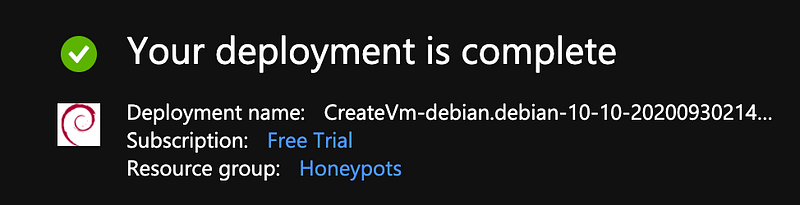
And before you know it, the deployment is complete.

You should now be able to SSH directly to your host using the settings you set up.

Recommended Microsoft Documentation 📚
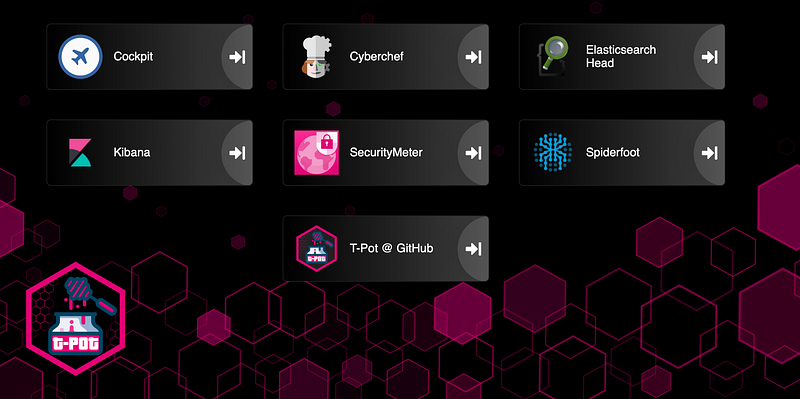
T-Pot — Honeypot system by T Mobile

What is a honeypot?

Honeypot is a system, whose sole purpose is to attract potential intruders and record their activity, to further analyse and investigate security breaches. In practice, a lot of devices can be classified as honeypots. By being enticing (i.e open ssh ports, unsecured S3 buckets etc), it is possible to generate logs from this into a SIEM platform like Graylog or Elastic and perform some threat intel. More often, honeypots 🤝 bot networks. — You can read more on my previous post on honeypots.

As we will be using T-Pot, it will utilize docker and encapsulate over 30 different honeypots into our system.

git clone https://github.com/dtag-dev-sec/tpotce
cd tpotce/iso/installer/
./install.sh — type=user

Once the installer starts, you will be able to choose the setup of your choosing. Standard is the recommended stable build, but for my test box, I’ve chosen NextGen as it’s the latest release. You can find out more about the different versions of T-Pot here.
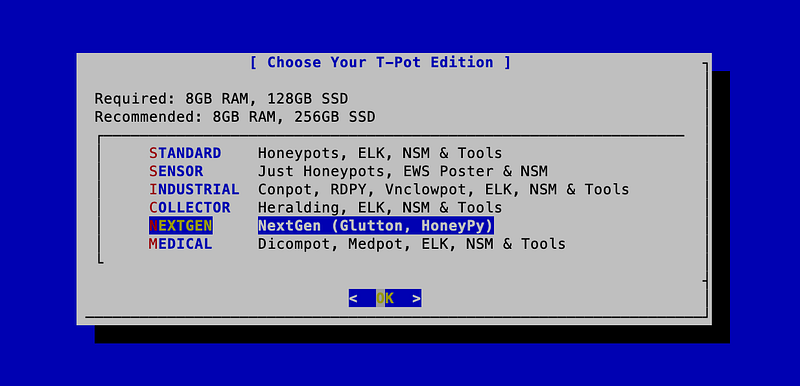
Select your honeypot — Screenshot by Stephen Chapendama

Upon completion, the system will reboot and you will now be locked out. Please don’t try SSH back in as the system now has Fail2Ban installed and after 3 attempts, it will blacklist your IP address. What you now need to do is return to Azure Portal, and now it’s time for Networking!

T-Pot is designed to be deployed and left to run on its own. During the creation process, it created over 30 honeypots using Docker and containerized them. You won’t need to change any of the configs as, after reboot, everything will work as needed. But sometimes we might want to monitor the host and see if we are utilizing resources or perhaps install other monitoring tools to the host server. But with SSH Port 22 now disabled on the honeypot, we will have to open up a port on Azure. As per the config, the following ports will become available for the management of your honeypot:

Allow port 64295, Protocol: TCP , Source:<Your IP> , Destination: Any

TCP Port 64295 will be used for SSH

Allow port 64297, Protocol: TCP, Source: <Your IP>, Destination: Any

TCP Port 64297 will be used for the T-Pot web UI landing page: https://<your.ip>:64297

Allow ports 064293,6429865535, Protocol: TCP, Source: Any, Destination: Any

The last rule will also open up TCP Port 64294 which gives you access to the Web Admin portal where you can run the VM and monitor the containers.
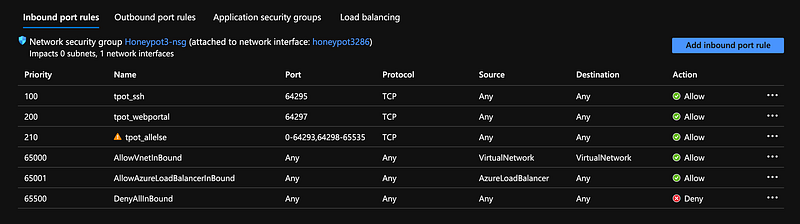
For the purpose of the test machine (which has now been decommissioned), I chose the unconventionally unsafe decision of allowing any IP as I was switching between two laptops as you can see in the screenshot above. — Screenshot by Stephen Chapendama

Recommended Microsoft Documentation 📚

Let’s see what’s inside 🤲🏿

You will now be able to access the VM via SSH again. To access it:

ssh username@XX.XXX.XXX.XXX -p 64295

And here it is 🤩

To maintain the system and get a good overview, I tend to use Glances, a cross-platform system monitoring tool written in Python. As we only have 30GB of storage, it’s worth keeping an eye on the honeypot and Glances gives you that nice view and other system metrics which will be necessary in case the 16GB of RAM isn’t enough.

Installation of Glances:

$ curl -L https://bit.ly/glances | /bin/bash

And for the Dockers? I use lazydocker. I’m able to access Docker logs and system performance and also try to understand why a docker went down before I reboot it.
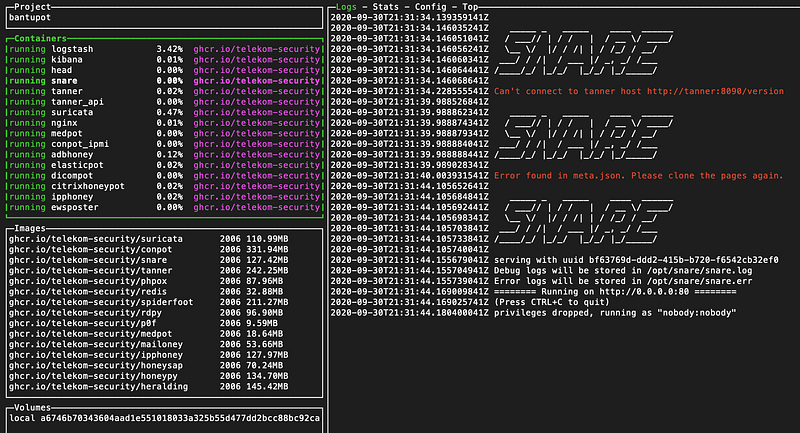
Lazydocker — screenshot by Stephen Chapendama

Installation of lazydocker:

curl https://raw.githubusercontent.com/jesseduffield/lazydocker/master/scripts/install_update_linux.sh | bash

24 hours later…

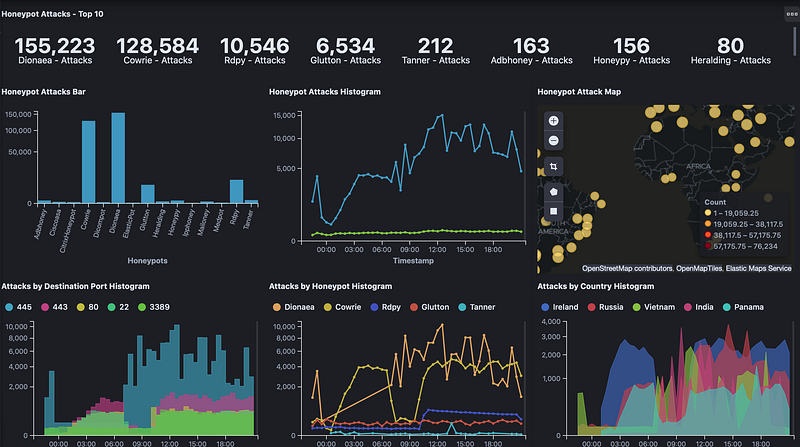
24 Hours of attacks

And the system is live! T-Pot utilizes Elasticsearch, Logstash and Kibana so if you’re looking to get to grips with the ELK Stack, this is one of the best ways to learn some of the most basic features, as you have a constant stream of fresh logs, access to dashboards for inspiration. It’s also worth remembering that as this system only has 30GB storage…you will need to set up a policy to delete data after like 5 days or so, as it’s a single node container system. With this VM hosted in the UK region, I was surprised to see the top attackers of the honeypot. The usual suspects, Russia, China and North Korean bots often always feature heavily in the top 5. But in its instance, over a 24 hour period, most of the attacks originated from Ireland 🇮🇪.

Honeypot Resources

If you are interested in deploying and exploring honeypots further, I’ve written the following guide for Google Cloud Platform:

Key Learnings

AZ-900 plus the credits is a really great way to be introduced to cloud management concepts and resourcing. I was able to get hands-on experience of deploying a VM, managing it’s network resource group and also make some mistakes without hitting my wallet. It also made me more comfortable navigating Azure Portal, getting to know the different deployment methods and also start exploring aspects of managing an Azure environment as I prepare to continue my journey in Azure. Whilst this article has focused on building a honeypot, there are so many tools you can build from the Azure Market place. Microsoft offers a Learning Path module which walks you through Azure in a Sandbox environment and this was a great start off point, but like all Sandboxes, it comes to an end. Where ever you can, I highly recommend going through the course material from Microsoft, getting practical experience even if it’s via Sandbox and then answering sample exam questions. I found this method of learning worked best for me as I was able to remember course material as I got lost and navigated my way around Azure Portal.

Recommended Resources for AZ-900

AZ-900 focuses specifically on Cloud, but if you are interested in AI and Data Science, you can take the Microsoft Azure AI Fundamentals which focuses on deploying VMs, working and training machine learning models and also getting a better grasp of AI in Azure.

By Stephen Chapendama

Cloud
Cybersecurity
Technology
Microsoft
Recommended from ReadMedium