HomeLab: AdGuard: The One Reason to Use Unbound DNS ( IMHO )
Researched about Unbound DNS, what it does, and when I want to use it.
Previous Post about AdGuard
Intro
Since I’ve done lots of reading and researches about AdGuard, I have had more chances to see how other people use and setup AdGuard in their HomeLab.
Recently, I saw some GitHub projects and Reddit posts that talked about Unbound DNS + AdGuard. I got curious, so researched about it.
In short, I found the one reason ( or one functionality ) that get me think to adopt Unbound DNS into my HomeLab DNS Resolution Design.
What is AdGuard exactly?
First, what is AdGuard ( more precisely AdGuard Home )?
In short, AdGuard Home is a DNS proxy which can block by DNS, maintain DNS cache, and answer to DNS requests ( or queries ) by using the configured upstream DNS servers if AdGuard doesn’t have the requested DNS in its Cache.
AdGuard Home is basically a DNS proxy that sends your DNS queries to the upstream servers. You can specify multiple upstream servers in AdGuard Home settings, or you can even specify a DNS server that will be used to resolve specific domains.
If you keep this field empty, AdGuard Home will use Quad9 by default. But you may switch to any other server you like. — ref: https://adguard.com/en/blog/in-depth-review-adguard-home.html
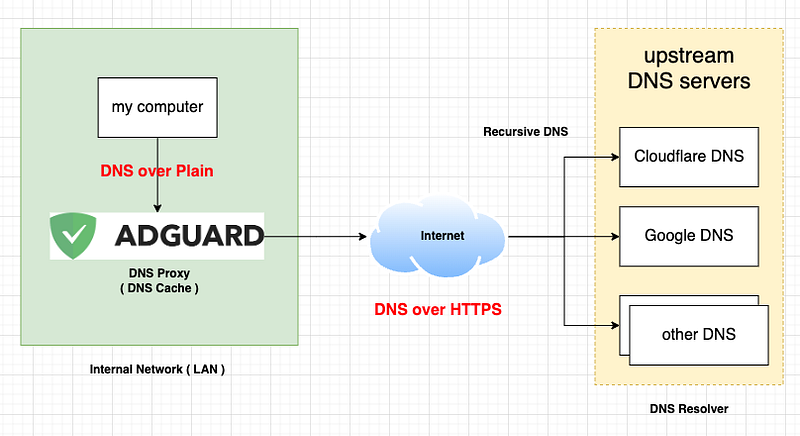
Current HomeLab DNS Resolution Design
Let me share my current DNS Resolution Design.
- Using AdGuard as DNS Proxy ( DNS Cache, Blocking by DNS )
- Using DNS over Plain between Local Clients and AdGuard ( Local Network )
- Using DNS over HTTPS between AdGuard and upstream public DNS servers
The overall steps how DNS requests are resolved in my Local Network is like below.
- When a Local Client asks DNS requests, the DNS requests go to AdGuard ( DNS Proxy ) through DNS over Plain ( not secure, but it’s ok since it’s in Local Network ).
- AdGuard ( DNS Proxy ) returns DNS Answers to the Local Client if they are in AdGuard DNS Cache.
- If NOT found in AdGuard DNS Cache, AdGuard ( DNS Proxy ) asks the DNS requests to the upstream public DNS servers ( Recursive DNS: Question — Answer ) through DNS over HTTPS. ( Secure than DNS over Plain )
- AdGuard ( DNS Proxy ) gets the DNS Answers from the upstream public DNS servers through DNS over HTTPS. And, AdGuard caches the DNS Answers into AdGuard DNS Cache. And, AdGuard returns the DNS Answers to the Local Client.
DNS traffic between AdGuard and upstream public DNS servers
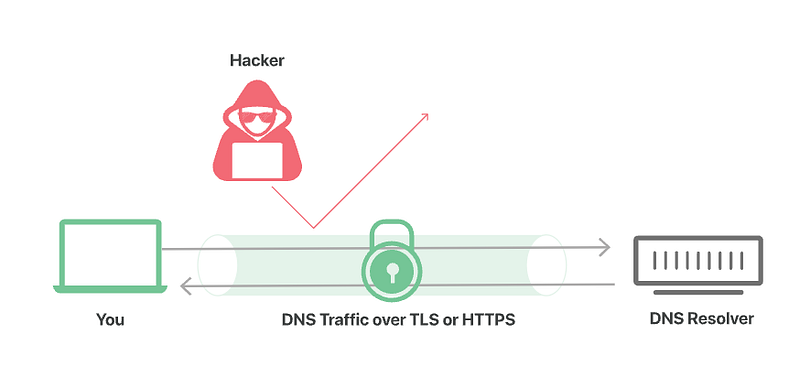
As described in the previous section, the DNS traffic between AdGuard and upstream public DNS servers are secured by using DNS over HTTPS.
I secure the DNS traffic to prevent any malicious monitoring or actions by any parties when the DNS requests go through Public Network ( Internet )
The DNS traffic from AdGuard is encrypted and reached to the upstream public DNS servers. And, the upstream DNS servers decrypts the traffic when the traffic is received.
And, the upstream public DNS servers encrypt the traffic before sending back the DNS traffic to AdGuard.
Question: Do I trust the upstream public DNS servers ( DNS Resolver )?
The DNS traffic between AdGuard and the upstream public DNS servers are secured by DNS over HTTPS.
About the DNS requests, only I and the upstream DNS servers know about it. Yes, there is more than me who know about the DNS requests.
The collected DNS requests by the upstream DNS servers can be used for some other purpose like building the Persona about me. ( it’s a extreme case, but it’s the reality. )
What if I trust the the upstream public DNS servers?
Then, the “Current HomeLab DNS Resolution Design” that I shared is good enough for HomeLab.
What if I DO NOT trust the the upstream public DNS servers?
Then, I need a replacement service that does the same things that the upstream DNS servers do. And, Unbound DNS is one of them.
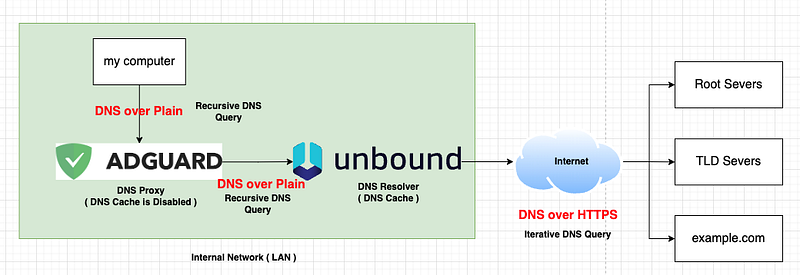
New DNS Resolution Design with Unbound DNS
The Unbound DNS can be used as the upstream DNS servers instead of Google DNS, Cloudflare DNS, Quad9 DNS, and other public DNS servers.
The Unbound DNS is in my Local Network ( in my control ) and it won’t share my DNS requests history ( Increased Privacy ).
Let me go through the new design.
- Using AdGuard as DNS Proxy. ( purely blocking DNS or content filtering . DNS cahce is disabled. )
- Using DNS over Plain between Local Clients and AdGuard ( Local Network )
- Using DNS over Plain between AdGuard and upstream private DNS server ( Unbound DNS )
- Using DNS Cache in Unbound DNS.
- Using DNS over HTTP when Unbound DNS does Iterative DNS queries.
If you are intested in these topics below, you can read this article. — https://www.cloudflare.com/learning/dns/dns-server-types/
- What is a DNS root nameserver?
- What is a TLD nameserver?
- What is an authoritative nameserver?
BTW, this is what I found in Pi-Hole community when it explains about Unbound DNS. I replaced the Pi-Hole to AdGuard. 😃 ( src: https://docs.pi-hole.net/guides/dns/unbound/ )
- Your client asks the AdGuard Who is AdGuard.net?
- Your AdGuard will check its cache and reply if the answer is already known. ( in AdGuard DNS Cache )
- Your AdGuard will check the blocking lists and reply if the domain is blocked.
- Since neither 2. nor 3. is true in our example, the AdGuard delegates the request to the (local) recursive DNS resolver. ( which is Unbound DNS )
- Your recursive server ( Unbound DNS ) will send a query to the DNS root servers: “Who is handling .net?”
- The root server answers with a referral to the TLD servers for .net.
- Your recursive server ( Unbound DNS ) will send a query to one of the TLD DNS servers for .net: “Who is handling AdGuard.net?”
- The TLD server answers with a referral to the authoritative name servers for AdGuard.net.
- Your recursive server ( Unbound DNS ) will send a query to the authoritative name servers: “What is the IP of AdGuard.net?”
- The authoritative server will answer with the IP address of the domain AdGuard.net.
- Your recursive server ( Unbound DNS ) will send the reply to your AdGuard which will, in turn, reply to your client and tell it the answer to its request.
- Lastly, your AdGuard will save the answer in its cache to be able to respond faster if any of your clients queries the same domain again.