
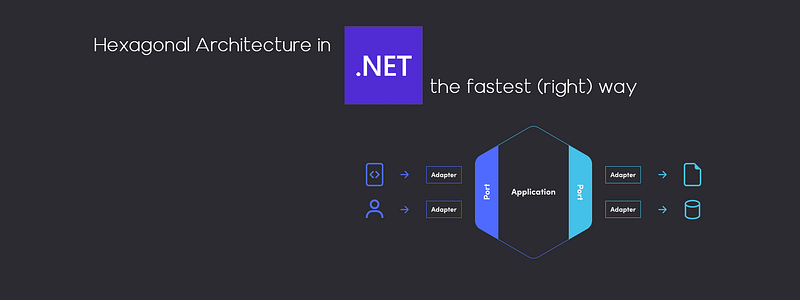
Hexagonal Architecture in .NET: the fastest (right) way
🟩🟩🟦 Confirmed
My goal is to provide you with a quick and easy-to-implement solution in order to adapt this architecture to your project. This story is .NET-oriented, but you could adjust its content for Java without effort.
Overview
Hexagonal Architecture has the wind in its sails. There are many blog posts about the theory but much fewer about practicals. But I need to introduce it before switching to the code.
Domain:
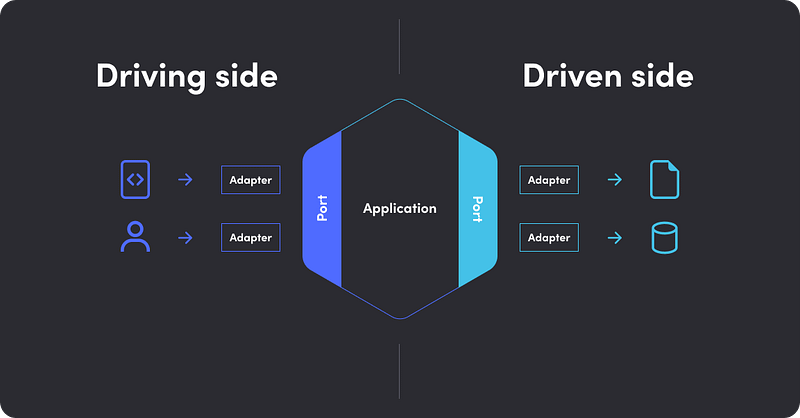
It’s the core of the system where all the business logic resides. We want to isolate it from both the driving and driven sides. Just remember one thing: no infrastructure code in the domain. (ex: Microsoft.AspNetCore.* or Microsoft.EntityFrameworkCore.* are forbidden here).
Driving (or primary) side:
Driving (or primary) actors are the ones that initiate the interaction with the application. Typically, your HTTP routes for an API or a Kafka consumer. (ex: Microsoft.AspNetCore.* should be found here).
Driven (or secondary) side:
The layer where we’ll find what your application needs, for example, a database adapter, is called by the application so that it fetches a specific data set from persistence. (ex: Microsoft.EntityFrameworkCore.* should be found here).
Main benefits:
- Easy to maintain: thanks to the decoupling provided by the hexagonal architecture, it is easy to add features without leading to refactoring. Indeed, changes in one area of the application don’t affect others.
- Easy to test: thanks to interfaces, you can mock dependencies and test each layer in isolation, as I have described here.
The term “hexagonal” comes from the graphical conventions that show the application component as a hexagonal cell. The purpose was not to suggest that there would be six borders but to leave enough space to represent the different interfaces needed between the component and the external world.
In practice
I am purposely bypassing the tests here to be as concise as possible. You could find some help to unit test the architecture in my previous story.
Domain
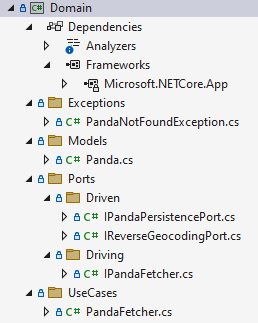
Consider an existing solution composed of an empty ASP.NET Core project named “Service.csproj”. Add a new class library project from the template list, name it “Domain.csproj” then remove the existing “Class1.cs” file. Edit the existing “Service.csproj” file to add a reference to the new “Domain” project.
⚠️ You could also add the code of the Domain layer within the Service project (without a dedicated Domain project, I mean). But you should need to add some more tests to verify the isolation of layers.
Then, add some business logic inside your Domain: a panda fetcher 🐼, an implementation of the IPandaFetcher interface (needed for the driving side), which uses an IPandaPersistencePort and an IReverseGeocodingPort (implemented on the driven side).
You could easily unit-test this part of your application by mocking IPandaPersistencePort and IReverseGeocodingPort.
Driving (or primary) side
Now, we are going to build a REST API to expose panda data as JSON. Because it’s a trigger of our domain (it uses IPandaFetcher), it’s implemented in the driving side of the application. The keyword “Controller” is dropped in favor of “RestAdapter” to be consistent with the philosophy behind this architecture.
Notice that Swagger integration, authentication scheme, and JWT readers should also be configured on the driving side. I tried to cover as many topics as possible without being confusing.
AutoMapper (or MapStruct for Java) is used to “convert” the domain model (Panda) to JSON format (PandaDto). It’s a great tool that requires some practice, but it is worth it.
Driven (or secondary) side
The IPandaFetcher implementation requires two ports: IPandaPersistencePort and IReverseGeocodingPort. These interfaces are implemented on the driven side of the application as PandaPersistenceAdapter and ReverseGeocodingAdapter.
The first is the database access layer (in our case, EF Core with the PostgreSQL provider), and the second is an API call to a mock reverse geocoding service.
Database access layer with EF Core.
I voluntarily highlighted only the access to the data, but the setup and the database migrations scripts are available on the GitHub repository (fully functional with DockerCompose).
Reverse geocoding API call with RestSharp.
To speed up the writing of this story, I used Beeceptor, an online API mocking tool. I could have used MockServer inside a Docker container, but the setup and expectations scripts are time-consuming.
Conclusion
I hope I have succeeded in demystifying this architecture proposal and helping you implement it in your application.
I advise using ArchUnitNET: a “frame” for your software architecture. It can help your team, especially with junior developers. I explain its use in my previous story.
You can access the entire source code of this story on GitHub, stay tuned!
Edit #1
Updated to .NET 7.0 !


