avatarNikhil Vemu

Free AI web copilot to create summaries, insights and extended knowledge, download it at here

3300

Abstract

he “Power-On Self-Test”.</p><p id="d210">Your Mac runs it just after boot to check if the keyboard, memory, drives, and other hardware and running correctly. If any issues persist, it immediately rectifies them so as to give you a flawless experience.</p><p id="6d03">This test stresses your CPU a bit, and if it happens several times a day, for months and years, your processing system wears out quicker than expected.</p><h1 id="847c">Now, why shouldn’t you shut your Mac down?</h1><ol><li><b>To have a faster experience: </b>You could just open your lid and have all your apps, drafts, and playlists ready saying “Hi! Nikhil’s MacBook!”</li><li><b>It puts less weight on CPU: </b>As discussed, not shutting down exempts your Mac from the POST test (often) and apps reloading.</li><li><b>It’s good for your batteries: </b>Apple uses the Li-ion batteries, which theoretically need their electrons constantly moving for a maximum lifespan. This happens only if you put your Mac on sleep. But if you shut it down altogether, the battery will not do this.</li></ol><h1 id="df87">Then, doesn’t my Mac suck up battery all night? 🔋🔻</h1><p id="7376">No it doesn’t. Your battery hardly falls by 1–2%.</p><p id="5537">Remember, your Mac isn’t awake all night to send your snore data to Apple. It’s only active for a few minutes and then it goes into <i>deep</i> hibernation.</p><h1 id="8e6a">And here’s what it does while it’s active (in sleep): 🧑‍🔧</h1><p id="f0a5">For a bit prior knowledge, the MacOS is partly built on Unix 🐧. It is an open-source OS that’s world famous for its reliability and stability. It could work perfectly well for prolonged periods of time and can perform vital maintenance tasks on its own.</p><p id="4cc6"><b>The catch: </b>it<b> </b>prioritises the immediate user experience before self-maintenance.</p><p id="9aaf">MacOS selflessly strives for its user satisfaction (unlike Windows, which thwarts the user’s experience by red-handedly installing updates even while he’s on an important work.)</p><p id="ca0b">It always allocates lion’s share of its RAM for you, for whatever you might be doing. This results in postponement of the self-maintenance tasks essential for smooth running of your lappy, as these tasks are set to be done only when your Mac is idle.</p><p id="9dfd">So just as you put your Mac into sleep, it does quite a lot of important stuff like</p><ul><li>cleaning up cache,</li><li>disk defragmentation,</li><li>deleting obsolete system files,</li><li>software updates,</li><li>search indexing,</li><li>file syncing, and many more…</li></ul><p id="e43d">Your Mac doesn’t usually perform these tasks when it is turned on and is being used, as these take up significant amount of RAM and might temporarily hamper your work flow.</p><p id="1852">And if you Shut down your Mac straight after your work, it means you simply aren’t giving it time to perform these important tasks, and this results in cludging it up over the long-term.</p><h1 id="fa31">And here’s what still bad…</h1><figure id="78b0"><img src="https://cdn-images-1.readmedium.com/v2/resize:fit:800/1*xdGd9tzaPQXP45-9IzCfPg.png"><figcaption>Screenshot by the author</figcaption></figure><p id="dd0f">If you enable the “Wake for network access” option and shut down your Mac, your PC keeps turn

Options

ing itself on at regular intervals for the ‘Find My’ and other tasks, which still degrades its performance and battery life.</p><h1 id="4b48">Finally, how often should you shut down your Mac?</h1><p id="a559">It is advised you should shut down your Mac only if you experience issues with apps or software. With that, you’re simply telling your laptop to run the POST test which could assist you with the issue.</p><p id="81bf">So maybe you probably might need to shut down your Mac once in a few weeks or so. Or if an update arrives, your Mac automatically restarts itself after installing it.</p><p id="83bd">And, if you’re traveling for a vacation leaving your Mac at home, you might consider shutting it down to preserve charge cycles.</p><h1 id="6520">PS: How to make a Mac sleep?</h1><ul><li>Choose Apple menu  > click Sleep 🛌, or</li><li>Just close the lid (don’t forget to close the apps by <b>⌘+Q</b>).</li></ul><p id="2eaa">You might want to turn off Wifi and Bluetooth if you’re at home, as it drains battery. But if you’re outside, you’re ought not to do it, as ‘Find My’ works on them.</p><h1 id="0028">Conclusion</h1><figure id="b1ad"><img src="https://cdn-images-1.readmedium.com/v2/resize:fit:800/0*2DBsi9JzIDOUdgqh"><figcaption>Photo by <a href="https://unsplash.com/@ppeng?utm_source=medium&amp;utm_medium=referral">彭业 陈</a> on <a href="https://unsplash.com?utm_source=medium&amp;utm_medium=referral">Unsplash</a></figcaption></figure><p id="e788">If you still hesitate, just treat your Mac like your iPhone. After you’ve used your iPhone, did you ever think of switching it off? Or do you just lock and keep it aside? Use your Mac the exact same way.</p><p id="6c21"><b>If you liked this, you might also like:</b></p><div id="c95e" class="link-block"> <a href="https://readmedium.com/apple-might-have-secretly-set-a-self-destruct-timer-in-your-iphone-898c2a959bcf"> <div> <div> <h2>Apple Might have Secretly Set a Self-Destruct Timer in Your iPhone</h2> <div><h3>And it slowly kills it</h3></div> <div><p>medium.com</p></div> </div> <div> <div style="background-image: url(https://miro.readmedium.com/v2/resize:fit:320/1*[email protected])"></div> </div> </div> </a> </div><div id="fb01" class="link-block"> <a href="https://readmedium.com/vertu-the-costliest-mobile-brand-whats-so-special-8d205c362ce2"> <div> <div> <h2>Vertu: The Costliest Mobile Brand. What’s So Special?</h2> <div><h3>It’s cheapest mobile costs tens of iPhones!</h3></div> <div><p>medium.com</p></div> </div> <div> <div style="background-image: url(https://miro.readmedium.com/v2/resize:fit:320/0*3suaKknvyFLbNUth.jpg)"></div> </div> </div> </a> </div><p id="aa6a"><i>Not a Medium member yet? Me too. But if you consider signing up for it, <a href="https://nikhilvemu.medium.com/membership">Sign up</a> now!</i></p><p id="0b0c"><i>(It’s an affiliate link so I receive a portion of your payment, with zero extra cost for you.)</i></p></article></body>

Here’s Why You Should “Never” Shut Down your MacBook

Until this happens

Photo by Ales Nesetril on Unsplash

Everyday when I open my MacBook’s lid for my online classes, I like the sound it plays for me. It feels as if I’m a gladiator going to fight a battle and my lappy is proud of me.

But today, when I learnt a new Apple thing from my geeky pals, I’m afraid I can’t listen the sound anytime soon. They said I shouldn’t “shut down” my laptop..!

I was confused. I thought, “Laptops are meant to be shut down after work. Why the hell do they say this?” Even so, they were successful in convincing the stubborn me. And here’s what that did it.

Firstly, what happens if you constantly shut down your Mac?

MacBook’s shut down option is for a different purpose altogether.

If you constantly shut down your Mac, it might do more harm than good. It results in poorer battery life, decreased performance, and a slower experience.

What happens to your Mac just as you shut down?

Your RAM is cleared. 🍀

While this seems like a good thing, it’s actually bad when happened often. If the memory is cleared, it means the next time you turn on your Mac, it has to reload all the essential apps and background tasks needed for its working. And it takes a lot longer than usual to fully equip itself for work.

Remember, your Mac is a pro when it comes to RAM management, and you don’t need to clear it every time after you work. The only exception is — If you experience slowness.

And when did that last happen, Mr. Apple geek?

“Turning on just makes a bit delay and that’s okay. Why should I worry?”

But it isn’t okay if it costs your lovely Mac.

Reloading essential things puts stress on your Mac’s CPU, motherboard, fan (err, my M1 is silent), and battery. And just as you turn on your Mac, it silently runs the stressful POST test.

What’s POST test?

The “Power-On Self-Test”.

Your Mac runs it just after boot to check if the keyboard, memory, drives, and other hardware and running correctly. If any issues persist, it immediately rectifies them so as to give you a flawless experience.

This test stresses your CPU a bit, and if it happens several times a day, for months and years, your processing system wears out quicker than expected.

Now, why shouldn’t you shut your Mac down?

  1. To have a faster experience: You could just open your lid and have all your apps, drafts, and playlists ready saying “Hi! Nikhil’s MacBook!”
  2. It puts less weight on CPU: As discussed, not shutting down exempts your Mac from the POST test (often) and apps reloading.
  3. It’s good for your batteries: Apple uses the Li-ion batteries, which theoretically need their electrons constantly moving for a maximum lifespan. This happens only if you put your Mac on sleep. But if you shut it down altogether, the battery will not do this.

Then, doesn’t my Mac suck up battery all night? 🔋🔻

No it doesn’t. Your battery hardly falls by 1–2%.

Remember, your Mac isn’t awake all night to send your snore data to Apple. It’s only active for a few minutes and then it goes into deep hibernation.

And here’s what it does while it’s active (in sleep): 🧑‍🔧

For a bit prior knowledge, the MacOS is partly built on Unix 🐧. It is an open-source OS that’s world famous for its reliability and stability. It could work perfectly well for prolonged periods of time and can perform vital maintenance tasks on its own.

The catch: it prioritises the immediate user experience before self-maintenance.

MacOS selflessly strives for its user satisfaction (unlike Windows, which thwarts the user’s experience by red-handedly installing updates even while he’s on an important work.)

It always allocates lion’s share of its RAM for you, for whatever you might be doing. This results in postponement of the self-maintenance tasks essential for smooth running of your lappy, as these tasks are set to be done only when your Mac is idle.

So just as you put your Mac into sleep, it does quite a lot of important stuff like

  • cleaning up cache,
  • disk defragmentation,
  • deleting obsolete system files,
  • software updates,
  • search indexing,
  • file syncing, and many more…

Your Mac doesn’t usually perform these tasks when it is turned on and is being used, as these take up significant amount of RAM and might temporarily hamper your work flow.

And if you Shut down your Mac straight after your work, it means you simply aren’t giving it time to perform these important tasks, and this results in cludging it up over the long-term.

And here’s what still bad…
Screenshot by the author

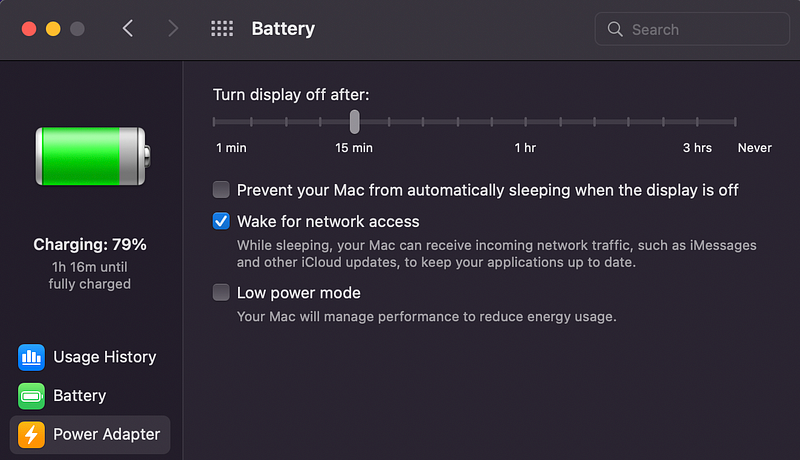
If you enable the “Wake for network access” option and shut down your Mac, your PC keeps turning itself on at regular intervals for the ‘Find My’ and other tasks, which still degrades its performance and battery life.

Finally, how often should you shut down your Mac?

It is advised you should shut down your Mac only if you experience issues with apps or software. With that, you’re simply telling your laptop to run the POST test which could assist you with the issue.

So maybe you probably might need to shut down your Mac once in a few weeks or so. Or if an update arrives, your Mac automatically restarts itself after installing it.

And, if you’re traveling for a vacation leaving your Mac at home, you might consider shutting it down to preserve charge cycles.

PS: How to make a Mac sleep?

  • Choose Apple menu  > click Sleep 🛌, or
  • Just close the lid (don’t forget to close the apps by ⌘+Q).

You might want to turn off Wifi and Bluetooth if you’re at home, as it drains battery. But if you’re outside, you’re ought not to do it, as ‘Find My’ works on them.

Conclusion
Photo by 彭业 陈 on Unsplash

If you still hesitate, just treat your Mac like your iPhone. After you’ve used your iPhone, did you ever think of switching it off? Or do you just lock and keep it aside? Use your Mac the exact same way.

If you liked this, you might also like:

Not a Medium member yet? Me too. But if you consider signing up for it, Sign up now!

(It’s an affiliate link so I receive a portion of your payment, with zero extra cost for you.)

Technology
Mac
Apple
Programming
Innovation
Recommended from ReadMedium