avatarMark Ellis

Free AI web copilot to create summaries, insights and extended knowledge, download it at here

2876

Abstract

en feels unwieldy in other scenarios. And as great as the iPad Air is as a do-it-all iPad, that too can feel a bit excessive at times.</p><p id="3b43">Both of the aforementioned devices could get away with slightly thicker bezels without denting the user experience. The iPad mini can’t, which is why the ‘Pro’ redesign feels most at home on Apple’s diminutive tablet.</p><h2 id="78c4">This is the device for the Apple Pencil 2</h2><p id="7311">I’ve had an odd relationship with the Apple Pencil. As impressed as I was with the first generation, its stupid charging method, inability to safely attach itself to the iPad for safe keeping, and unwieldily size quickly rendered it more of a hassle than useful a accessory.</p><p id="914f">The second generation felt like a huge leap forward — because it was. It’s hard to think of another Apple accessory that has been so comprehensively redesigned for all the right reasons.</p><p id="7e17">Alas, up until now, I still hadn’t really put the Apple Pencil to work. I’m a dreadful illustrator and have always preferred to write notes with a tradition pen and notepad. This was the main reason I wanted a redesigned iPad mini. Digital note taking is something I’ve wanted to get into for a long time, and this is the perfect device for that task.</p><div id="48fa" class="link-block"> <a href="https://readmedium.com/ipad-mini-6-vs-ipad-air-4-which-is-better-dc297ec01cde"> <div> <div> <h2>iPad mini 6 vs iPad Air 4: Which Is Better?</h2> <div><h3>The most unlikely purchasing decision</h3></div> <div><p>medium.com</p></div> </div> <div> <div style="background-image: url(https://miro.readmedium.com/v2/resize:fit:320/1*iQmL-jTjFv76oE5VzJMJrw.jpeg)"></div> </div> </div> </a> </div><p id="8a19">More importantly, it’s the perfect device for the second-generation Apple Pencil.</p><p id="f254">I’ve made no secret about my desire for Apple to <a href="https://markellisreviews.com/3-reasons-i-want-a-folding-iphone/">add a more interesting iPhone to its smartphone lineup</a>, and I’ve always lusted after the Galaxy Note. The iPad mini/Apple Pencil 2 combo is the closest thing to the dream I have of a small-screened Apple device with an ever-present stylus.</p><p id="cfe4">The 12.9" iPad Pro feels like more of a painting canvas than a notebook. The iPad Air gets close with its 11" screen. But the iPad mini is absolutely perfectly sized for note taking. My Apple Pencil won’t leave its side. Literally.</p><h2 id="0516">It’s the perfect consumption device</h2><p id="bf99">The idea of consuming content on the 12.9" iPad Pro is great — until you realise how big that device is. Don’t get me wrong — that screen is lovely. But it’s <i>massive</i>. And the

Options

device itself is huge, too, which makes holding it for long periods of time rather uncomfortable.</p><p id="b61c">Again, the iPad Air comes close to being the ideal consumption device in most scenarios, but nothing beats the iPad mini (yes, even though it has the dreaded ‘jelly scroll’ problem).</p><div id="dcaa" class="link-block"> <a href="https://readmedium.com/ipad-mini-6-jelly-scrolling-what-is-it-and-does-it-matter-eee5f2e85921"> <div> <div> <h2>iPad mini 6 Jelly Scrolling: What Is It (And Does It Matter?)</h2> <div><h3>It looks like we’re heading towards another Apple Gate…</h3></div> <div><p>medium.com</p></div> </div> <div> <div style="background-image: url(https://miro.readmedium.com/v2/resize:fit:320/1*FEsPKXD4whiotZur-RA05w.jpeg)"></div> </div> </div> </a> </div><p id="086e">Whether you’re watching YouTube videos, binging a full season of Ted Lasso, or reading your favourite magazine, it feels like you could do so for an awfully long time with this iPad. It never feels too small or too big, and I’ve not thought twice about taking it out with me if I know I’ll be stuck somewhere for a period of time and need to entertain myself. It’s even got me back into the Kindle app.</p><p id="c1f1">It’s early days, but I’m already using the iPad mini more than I’ve used any iPad for media consumption. And the same goes for web browsing; it feels perfect for both long research sessions and quick fact checking.</p><h2 id="43d5">Conclusion</h2><p id="97e2">I need to spend more time with the iPad mini, clearly. Do I have new device syndrome? Will its failings as a do-it-all iPad begin to poke through?</p><p id="058d">I’ll reveal more in my forthcoming video review (don’t forget to <a href="https://www.youtube.com/channel/UCwwuSBYcErVlOpveYubHv4g">subscribe to my channel</a>), but in the meantime, I’m going to continue enjoying this wonderful little iPad and bask in the glory of being right.</p><p id="edfc">This is <i>always</i> the path you should have taken, Apple. Bravo.</p><h2 id="39e8">Before you go</h2><p id="5cd3"><a href="https://markellisreviews.ck.page/newsletter"><b><i>Join my behind-the-scenes mailing list</i></b></a></p><p id="31aa"><i>If you enjoy my writing, it’s only a snippet of what’s on Medium. I’m a paying member myself and highly recommend joining. Click here to do so (a portion of your membership fee will be sent my way and therefore directly support my work!). <a href="https://markellisreviews.medium.com/membership"><b>Join here</b></a>.</i></p><p id="2534"><i>Originally published at <a href="https://markellisreviews.com/heres-why-i-was-right-about-the-ipad-mini/">https://markellisreviews.com</a> on October 4, 2021.</i></p></article></body>

Here’s Why I Was Right About the New iPad mini

THIS is what I was waiting for
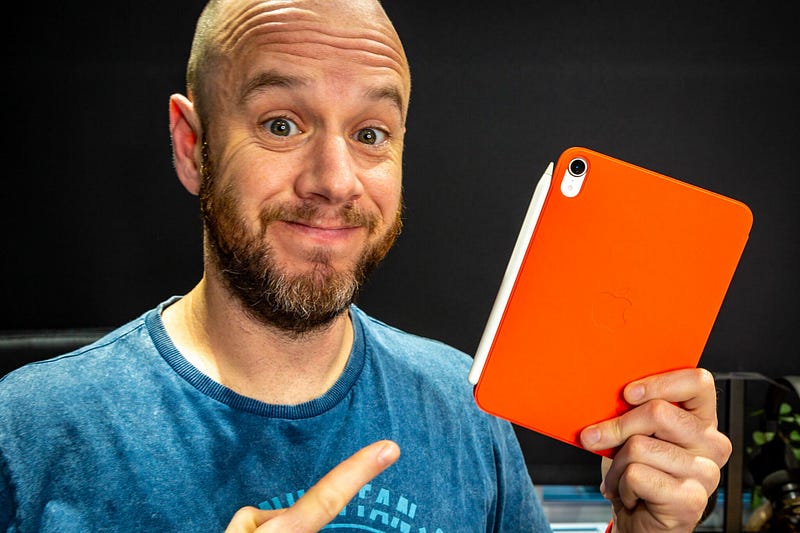
Image courtesy of author

Back in April, I got very shouty about the rumoured lack of a redesign for the iPad mini 6.

Thankfully — and in what has fast become a recurring theme for 2021 — those rumours turned out to be bogus.

During Apple’s California Streaming event in September, we were finally treated to a brand-new iPad mini that looked nothing like its predecessor.

I’ve spent a week with the smallest iPad money can buy, and it has immediately revealed why I was right all along.

The ‘Pro’ redesign finds its home

I was a huge fan of the iPad Pro redesign in 2018. It finally looked like the iPad Apple had always wanted to make; no buttons on the front of the device, small bezels, and a simple slab of squared-off, flat aluminium.

Carrying that design over to the iPad Air last year was a bold but brilliant move — even if in doing so, Apple has essentially rendered the M1-powered 11" iPad Pro completely useless.

But for some reason, this design feels even more at home on the iPad mini. Space is at an absolute premium on this device, which is why relocating the Touch ID sensor to the power button on the top the iPad is such a smart move.

The 12.9" iPad’s screen is superb for productivity and quasi-laptop-like ability. But it often feels unwieldy in other scenarios. And as great as the iPad Air is as a do-it-all iPad, that too can feel a bit excessive at times.

Both of the aforementioned devices could get away with slightly thicker bezels without denting the user experience. The iPad mini can’t, which is why the ‘Pro’ redesign feels most at home on Apple’s diminutive tablet.

This is the device for the Apple Pencil 2

I’ve had an odd relationship with the Apple Pencil. As impressed as I was with the first generation, its stupid charging method, inability to safely attach itself to the iPad for safe keeping, and unwieldily size quickly rendered it more of a hassle than useful a accessory.

The second generation felt like a huge leap forward — because it was. It’s hard to think of another Apple accessory that has been so comprehensively redesigned for all the right reasons.

Alas, up until now, I still hadn’t really put the Apple Pencil to work. I’m a dreadful illustrator and have always preferred to write notes with a tradition pen and notepad. This was the main reason I wanted a redesigned iPad mini. Digital note taking is something I’ve wanted to get into for a long time, and this is the perfect device for that task.

More importantly, it’s the perfect device for the second-generation Apple Pencil.

I’ve made no secret about my desire for Apple to add a more interesting iPhone to its smartphone lineup, and I’ve always lusted after the Galaxy Note. The iPad mini/Apple Pencil 2 combo is the closest thing to the dream I have of a small-screened Apple device with an ever-present stylus.

The 12.9" iPad Pro feels like more of a painting canvas than a notebook. The iPad Air gets close with its 11" screen. But the iPad mini is absolutely perfectly sized for note taking. My Apple Pencil won’t leave its side. Literally.

It’s the perfect consumption device

The idea of consuming content on the 12.9" iPad Pro is great — until you realise how big that device is. Don’t get me wrong — that screen is lovely. But it’s massive. And the device itself is huge, too, which makes holding it for long periods of time rather uncomfortable.

Again, the iPad Air comes close to being the ideal consumption device in most scenarios, but nothing beats the iPad mini (yes, even though it has the dreaded ‘jelly scroll’ problem).

Whether you’re watching YouTube videos, binging a full season of Ted Lasso, or reading your favourite magazine, it feels like you could do so for an awfully long time with this iPad. It never feels too small or too big, and I’ve not thought twice about taking it out with me if I know I’ll be stuck somewhere for a period of time and need to entertain myself. It’s even got me back into the Kindle app.

It’s early days, but I’m already using the iPad mini more than I’ve used any iPad for media consumption. And the same goes for web browsing; it feels perfect for both long research sessions and quick fact checking.

Conclusion

I need to spend more time with the iPad mini, clearly. Do I have new device syndrome? Will its failings as a do-it-all iPad begin to poke through?

I’ll reveal more in my forthcoming video review (don’t forget to subscribe to my channel), but in the meantime, I’m going to continue enjoying this wonderful little iPad and bask in the glory of being right.

This is always the path you should have taken, Apple. Bravo.

Before you go

Join my behind-the-scenes mailing list

If you enjoy my writing, it’s only a snippet of what’s on Medium. I’m a paying member myself and highly recommend joining. Click here to do so (a portion of your membership fee will be sent my way and therefore directly support my work!). Join here.

Originally published at https://markellisreviews.com on October 4, 2021.

Technology
Apple
iPad
Tech
Gadgets
Recommended from ReadMedium