
Here’s What I Learned About Keynote Speaking on Stage Day as a 1-Man Consultant
Preparation knows no boundaries
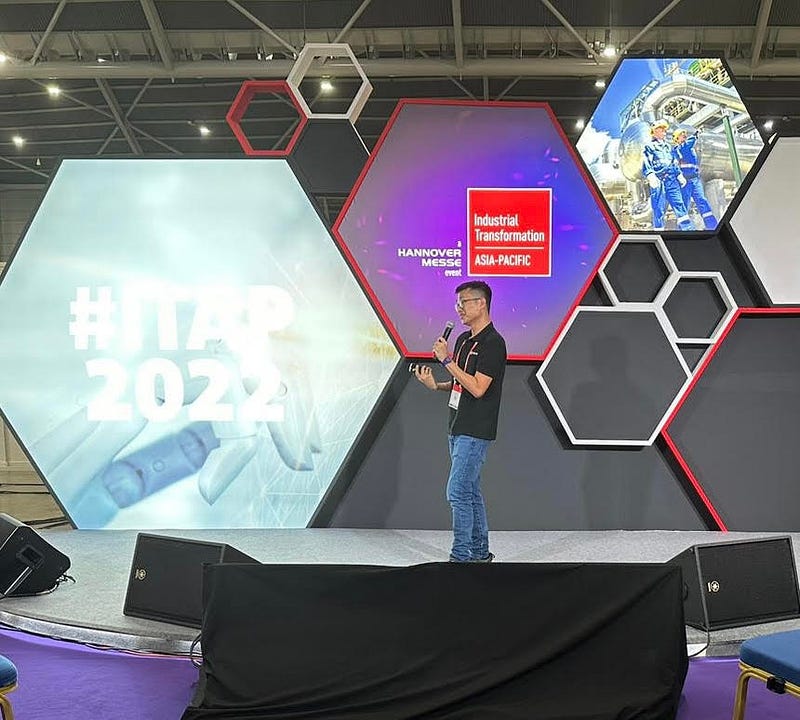
You want to be prepared for the speaking day. Actually… wrong. You want to be more than prepared.
When it comes to keynote speaking, no amount of preparation will be sufficient. That said, I am not encouraging you to wing it 100%.
Instead, it is way better to be adequately prepared and then relax. Come what may.
Trust your competence as a 1-Man consultant. You have been preparing for this day for months and years. You can handle all curveballs coming at you.
And excel.
The Initial Preparation — Do Your Best to Prepare All Things That Can Be Worked On
Preparation is king when it comes to keynote speaking.
I spent hours reviewing my presentation material, reading it out (loud), and ensuring it sounded smooth. 24 hours before stage day is not a time to add more content to your keynote.
You want to stay on point. And on time.
You must be concise in your delivery too. Remember. Conciseness applied appropriately does not sacrifice depth for brevity. You remove the jabs and keep all the punches.
This is what I did.
- I printed out all my slides on paper (1-slide per page)
- I used topic headers to organize my keynote
- I rehearsed it without adding to the slides
Your message becomes clearer as you approach stage day. Don’t fret. Keep rehearsing. And then forget about it.
Go to bed.
And get ready for the madness on Stage Day.
Orientate Yourself on Stage Day Before Your Speaking Slot
Make this your top priority when you arrive at the venue.
Some events invite you for a practice round the day before. Sign up for it. Stage orientation shores up Stage Day confidence.
The recent convention I attended did not have this arrangement. Instead, the event organizer invites all keynote speakers to visit the stage before the convention hall opens.
I accepted their invitation and arrived an hour earlier.
I shook hands with the stage crew and MC.
I asked them about the equipment setup.
I got them to flash my slides for checks.
I walked up and around the stage.
I checked the screens and timer.
I looked around for flashlights.
This is my opinion. These are things 1-Man consultants must do. Here’s why.
I wanted to be absolutely certain of the actual schedule executed by the stage crew. They are the production team on Stage Day. They call the shots.
The Stage Manager, Derrick, told me that all keynote speakers are given 15 minutes to deliver their message. It came as a surprise to me as the event organizer told me 20.
Derrick explained that the breakdown is 15 minutes for speaking and 5 minutes for Q&A from the MC and the audience. I nodded in alignment.
And then, Derrick passed me the microphone and a clicker. This is another bout of surprise. I was expecting an ear hook microphone (the ones you wear, not hold). It felt odd holding a microphone with my left hand and a clicker with my right.
I asked for an ear hook set. Derrick said they did not have them.
I quickly got up the stage and ran through my first 3 slides for practice. The microphone did not work. I thought it was a faulty piece.
It turns out to be a microphone that works (only) when it is activated by the stage crew.
Derrick explained that they need to turn off the microphone for speakers who cannot stop talking. I understood.
To prevent myself from speaking without voice amplification, I told Derrick I would reach backstage 10 minutes before my turn. The backstage crew can activate it as I walk up the stage.
I checked the screen that flashed my slides and the one showing the countdown timer. I am glad I had the script in my head. The countdown timer screen was 1.5 times bigger than the other one. It was visually distracting.
And then, I walked around the stage as I practiced speaking. It turns out that I need not move. There are 3 columns of seats, one to my left, one right in front, and one to my right, for the audience to choose from. They are angled to face the center of the stage.
Instead of walking around, I reminded myself to stay at the center where the lights were shining.
When I was done on stage, I walked down and took a seat in the back row. I clicked on and observed the slides flashing right beside the stage.
To my horror, the background color (light grey) and fonts (white, yellow) cannot be seen on the projected screens. I panicked briefly. Then, it came to me that the flashlights were yellow. It buries my selected color palette for the slides.
I took my laptop and quickly changed the background to black. The audience seated in the last row could see my changes.
I downloaded the PPT into a thumb drive and passed one copy to the stage crew for contingent purposes.
This entire preparatory process took me 40 minutes.
This, to me, is a necessary step for a successful keynote presentation later in the day. Many speakers who did not bother with pre-stage preparation got confused with holding a microphone and clicker and had an unengaging audience during Q&A.
I know because I attended some of these keynotes. I sat in the last row. Their slides cannot be seen.
And they got visibly annoyed when their microphones were turned off. They never found out that only 15-minutes were allocated.
Their keynote presentation felt incomplete.
Parting Keynotes
Stage Day preparation is the key to presentation success.
You want to be as comfortable as you can be on stage. To do so, you must do 2 things.
- Have your keynote material in your head the day before
- Focus on stage orientation on the actual speaking day.
One more tip. Avoid memorizing your material on the day of the keynote presentation. Nothing gets memorized.
Let your keynote content settle in, and trust your articulation on stage. Confidence comes when we are comfortable with the immediate environment.
Your audience can sense when you are comfortable being on stage.
They can sense your confidence and preparation.
And when you do… They will want to engage with you afterward.
As a content contributor, I write my observations from daily life and my business exposure. Because our life experience is the bedrock of our unique perspectives.
Get full access to Medium using this link and read gazillion exciting articles.