
Here’s how to get the most out of your PayPal funds if you’re from the Philippines

Ever find yourself in a dilemma about whether to keep on using your PayPal due to its ridiculous exchange rates, compared to actual exchange rates? Like, why PayPal when there are other — arguably, better — alternative options, like Wise, Payoneer, Skrill, Xoom, etc., right?
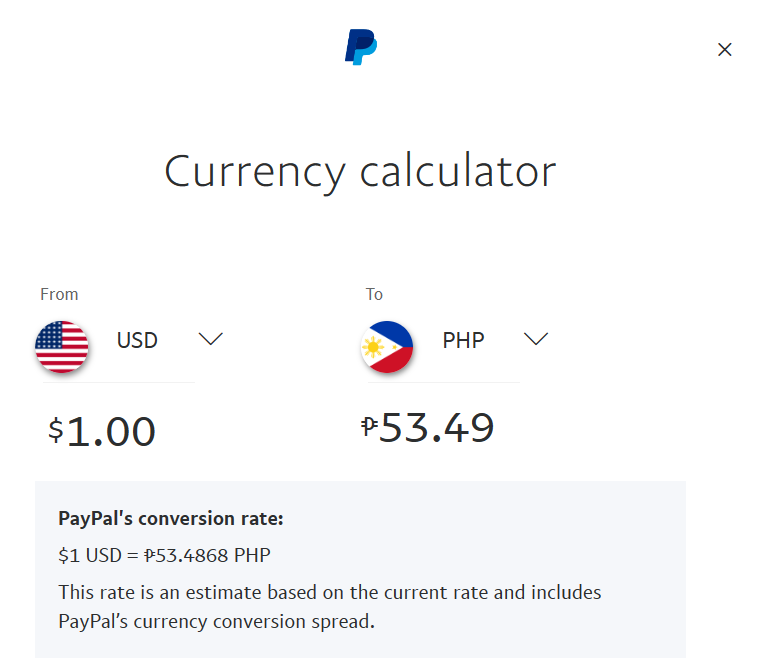
For instance, as of writing, PayPal’s current US Dollar (USD) to Philippine Peso (PHP) exchange rate is set at $1 to P53.49:
But a little bit of Google search shows that the global currency exchange rate between USD and PHP is set at $1 to P55.35:
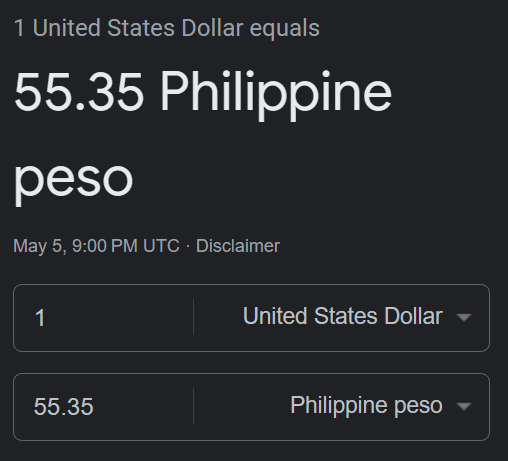
Doing simple math, that is a difference of P1.86 (nearly P2) for every peso exchange. That may seem a menial amount for small exchanges; but what about in larger quantities, say, $1000, $2000, or more? Again, by doing a simple computation, it is equivalent to P1,860 for at least $1000, which, for reference, is a good amount of money as it could feed a single person a decent meal for a few days in the Philippines.
If, by any chance, you hope there is not any such disparity, then chances are good that you are not alone. Millions of Filipino PayPal users will probably have wished the same, if they did not know better — well, wish no more, because that notion is actually a real thing and not just a figment of imagination.
The actual global exchange rate
So, there goes a very important question — how do you actually make PayPal give you an on-your-nose —albeit, fairer — exchange rate, based on actual global exchange rates?
The solution boils down to two things — having a VISA Debit Card linked to your PayPal account and its currency set to USD.
By default, any debit card linked to a PayPal account will be set in a currency of that country. For us, Filipinos, it would logically be our beloved Philippine Peso. But, again, no self-respecting and hardworking individual would want to get an exchange rate that is subpar with what’s truly existing. More so, anyone who is earning that sweet dollar!
Prior to knowing what I am sharing now, I was that one uninformed person who simply did not know any better, and who had stuck with lower-than-actual exchange rates with PayPal. Honestly, I felt cheated knowing what I know now, in retrospect, considering also the amount of money I have withdrawn from my PayPal account to my local savings account throughout the span of several years. In other words, I accrued losses behind everything I gained from the fruit of my labor while I was using PayPal at its most default. (Not that I blame PayPal for it as it is part of its business model!)
The waived PayPal fee of P50 (more or less $1 at the time) for withdrawals for a converted amount of at least P7000 meant nothing compared to what I could have gotten if I was doing the same based on actual exchange rates during those times, all for just a maximum fee of $10 per transaction.
But I digress.
Linking a VISA Debit Card and converting its currency to USD
So, how do you then get this benefit and not suffer the same losses I did?
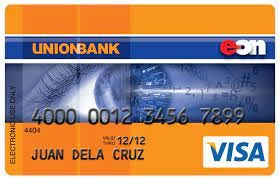
First, you need to have a VISA Debit Card from an issuing bank — be it the traditional kind, like BPI, UnionBank, Metrobank, etc. — or a digital kind, like GCash, Maya, CIMB, etc. You would know that your debit card is issued by VISA when you see the company’s logo — “VISA” — clearly embossed on the card itself.
Next, make sure that the account linked to your VISA Debit Card has at least some funds in it, P200 at least, for verification purposes, which PayPal will also eventually reimburse. That is, presuming that it is not linked to your PayPal account just yet. This is strictly a requirement for connecting your local bank or debit card with your PayPal account, with verification accounted for. If this step no longer applies to you, then simply skip it.
Now that you have a VISA Debit Card in conjunction with your PayPal account, the next step is to convert its currency from PHP to USD. This is a critical phase that will ensure that you are getting an exchange rate that is based on the global exchange rates. To do this, you would have to contact PayPal via their Customer Representative and request it, as this is a step that is inaccessible to any user:
- Log into your PayPal account.
- Scroll down to the bottom of the page to see the “Contact Us” option.
- Click on it.
- Scroll down a bit to find the “Message us” option.
- Click on it.


Initially, you will be greeted by a bot who will automatically ask you a few questions, based on your initial query. This is the screening process to gauge your concern. Sad to say to the bot, but it would not help here. Eventually, you will be asked whether to contact a Customer Representative about your problem — simply opt for it.
From there, it is just a matter of relaying your concern to the attending Customer Representative, which can be as simple as saying that you wanted your linked VISA Debit Card to be converted to USD. That is, set its currency to USD by default. The best time to do this is anytime during business hours in the USA, which is during the weekdays and around nighttime in the Philippines. Otherwise, you might find yourself chatting with no one.
One good thing about this process is that there is no strict requirement to get the request granted — not even a reason as to why you wanted the card’s default currency to be converted to USD. You simply ask for it upfront and the CS will automatically address the concern for you and would even inform you once the process is made successful.
Why a VISA debit card and not MasterCard or AMEX (or what have you?)
I honestly have no answer as to why this method is stringent exclusively for a VISA debit card. But this has been the case for the card issuer for as long as I can remember — and I did not bother to ask a PayPal customer representative or anyone from the forums about it, though that was an option. (But I might!)
Yet, this alone is even more reason you would want to opt for a VISA debit card over MasterCard or American Express (AMEX) if you have not already.
But of course, it does not hurt to have these other cards at your disposal as well if you could leverage their promotions or perks in a different way.
Checking the Exchange Rates
How to know if the actual global exchange rate reflects on your PayPal account?
There are a few ways to go about this but the easiest is certainly doing a simple Google research on the present USD to PHP conversions, like Googling “USD to PHP”. This will serve as a strong reference as to how much you will be getting for a particular withdrawal.
Another telling sign that the steps you had taken were ultimately successful is when PayPal starts charging you $10 for a large transaction. Believe me, this is nothing compared to the latent loss you would have gotten if you are bound to PayPal’s low exchange rates, especially for large withdrawals.
You should, then, be getting the most out of your PayPal funds from here.
Did you like my work and wish to see more useful tips in the future? Please give some applause, follow me, or be a member through me for more. Alternatively, I also accept donations via PayPal or Ko-Fi.


