
Here’s How To Calculate Distance Between 2 Geolocations in Python
Want to use Python to filter by geolocation? Or to find places in a certain radius? Start here.
Geolocation data is everywhere — a lot of downloadable datasets have location data represented in some form, most often in plain latitude and longitude pairs.

If you’ve done any machine learning, considering raw latitude and longitude as features probably don’t sound like a good idea. Just imagine that your entire dataset is placed in one city — the differences in geolocations are very small, hence the machine learning algorithm is not likely to pick the differences very well.
To resolve this issue, there’s a clear solution — you can use some (probably) paid or freemium API. This might come in handy if you’re interested in the road distance — but in this article, we’ll deal with a straight line distance.
And we’ll do all of that with a bit of mathematics — with Haversine Distance formula. Don’t worry if you’ve never heard of it, and also don’t get scared when you see it for the first time — as it’s fairly simple to implement it in Python.
Without further ado, let’s jump in.
Introducing Haversine Distance
According to the official Wikipedia Page, the haversine formula determines the great-circle distance between two points on a sphere given their longitudes and latitudes.[1]
Here’s the formula we’ll implement in a bit in Python, found in the middle of the Wikipedia article:

One other thing we’ll need is the radius of planet Earth, which can be found with a simple Google search. Google reports back that it is 6471 km.
Great, let’s implement this formula in Python!
Here’s the code, as I want this article to be as practical as possible:
def haversine_distance(lat1, lon1, lat2, lon2):
   r = 6371
   phi1 = np.radians(lat1)
   phi2 = np.radians(lat2)
   delta_phi = np.radians(lat2 — lat1)
   delta_lambda = np.radians(lon2 — lon1)
   a = np.sin(delta_phi / 2)**2 + np.cos(phi1) * np.cos(phi2) *   np.sin(delta_lambda / 2)**2
   res = r * (2 * np.arctan2(np.sqrt(a), np.sqrt(1 — a)))
   return np.round(res, 2)
Looks awful, I know — but just paste it in your code editor and don’t look at it (if you don’t want to). Okay, now when that’s done we can proceed to the more practical part.
Let’s Calculate some Distances
To start, I decided to declare a starting point in New York, with coordinates being:
- Latitude: 40.6976637
- Longitude: -74.1197643
Or in code:
start_lat, start_lon = 40.6976637, -74.1197643Next, I declared a Pandas DataFrame (make sure to import Numpy and Pandas first) with names and geolocations of 3 US cities — Denver, Miami, and Chicago. Here’s the code so you don’t have to do it manually:
cities = pd.DataFrame(data={
   'City': ['Denver', 'Miami', 'Chicago'],
   'Lat' : [39.7645187, 25.7825453, 41.8339037],
   'Lon' : [-104.9951948, -80.2994985, -87.8720471]
})
Great, now we have everything we need to start calculating distances. We can do so with a simple loop, storing distances in a list temporarily:
distances_km = []for row in cities.itertuples(index=False):
distances_km.append(
haversine_distance(start_lat, start_lon, row.Lat, row.Lon)
)Once done, we can transform this list into a new column in our DataFrame:
cities['DistanceFromNY'] = distances_kmIf you’ve done everything like described above, you should end up with you DataFrame looking like this:
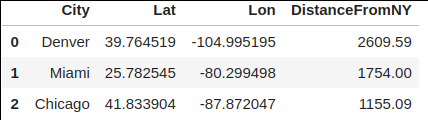
Which means that now you have a dedicated column for distance in kilometers. Nice work!
Before you go
Just imagine how useful this formula is. For example, you could use it to find objects of interest that are located in some radius from your current location. You could also use it to locate the nearest point of interest. There are many possibilities, depending mostly on your ability to correctly frame the problem.
You can also use a site like this one to check how correct our calculated distances are. Last time I’ve checked (for Denver) we had a difference of 7 or 8 kilometers, which is not significant for most use cases.
Thanks for reading, I hope you’ve liked it.
Loved the article? Become a Medium member to continue learning without limits. I’ll receive a portion of your membership fee if you use the following link, with no extra cost to you.


