
HELP —A Quick and Easy Guide to Designing Senior-Friendly Technology
It’s time for senior-friendly technology websites

If you follow my writing in Crow’s Feet, you know that most of it deals with serious subjects in a humorous, whimsical, or satirical manner.
But when a young, tech-savvy customer agent from an AI Picture Generator website makes this old lady so frustrated that she cries, it’s time to put aside the satirical pen and get serious.
It is not my intention to bash any company. I’m here to focus on a genuine problem with all tech companies and offer a viable solution.
THE PROBLEM — Someone needs to design a technical website that is Senior-Friendly.
Remember the 1980s when computers were first introduced for home use? Remember the phrase “user-friendly”? The language and usability of the original operating systems were limited and complicated for the ordinary user who was not yet tech-savvy. Everyone begged for programs that were more “user friendly” and the computer engineers delivered operating systems like Windows 95.
From the moment Windows 95 was introduced in 1995, my life with computers became, if not a breeze, at least an easy wind.
Why can’t a computer engineer design 21st-century technical sites that are “senior-friendly?” In this case, I am talking specifically about the AI (Artificial Intelligence) Picture Generator sites that I have been using.
My desire for knowledge about and working in the writing field has not waned over time. If anything, it has increased, but my ability to keep up with technical terminology and workability has decreased exponentially.
I do not understand the terminology and acronyms that website designers and writers take for granted.
Please, someone, write a new AI technology website in a language a senior can understand. Spread the word to your children and grandchildren in the technology field.
I’m not proud of it, but recently I lost my temper with a young tech advisor from an AI picture generator website. It was a site I had been using with ease because I had figured out how to navigate the 1% of it that I needed.
I had “generated” about 75 pictures and stored them somewhere on the site in what I thought I recalled said “creations”. Up until this particular day about which I am writing, I could easily access them in three simple steps.
This day, when I logged on, the entire front page of the website had changed. Nothing I clicked worked. No matter what I clicked — “images” “assets”, “projects”, “creations”, “folders” - I was taken through an endless loop that circled back to each of them, none of which had any of my pictures.
More clicks. There were options to create 10 different types of images that would have taken me hours to go through to figure out what each meant. There were hundreds of options of terms I did not understand.
They did not have a “real-time” chatbot or chat human to answer my questions. I had to leave my question and wait for an email informing me that someone had answered me.
I was frustrated and upset. This is the message I left:
“You changed everything. I can’t find my pictures. I can’t find anything I made. Where is my stuff?” Joan Gershman
This is the message I received:
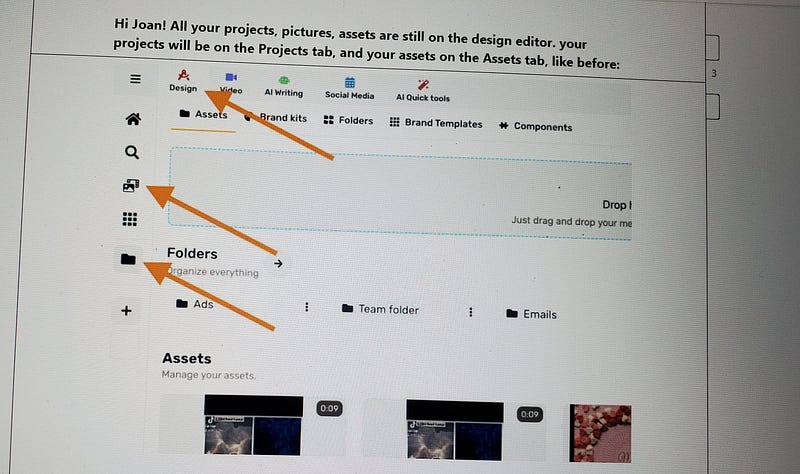
Hi Joan! All your projects, pictures, and assets are still in the design editor. your projects will be on the Projects tab, and your assets on the Assets tab, like before:
THAT DID NOT HELP ME.
After one-half hour of following her suggestions into an endless corn row maze of clicking assets, projects, designs, and folders, I could not find my pictures. I put my head down on my desk and cried. The Generation Youngster techie woman made this overwhelmed old lady cry.
That’s when I lost all sense of decorum, pulled the “old lady card”, and sent the following message. I’m not defending it but I was so disheartened, I couldn’t help myself.
“I’m sorry, but you’re talking to a senior citizen. This is way too complicated and confusing for me. All I want is to find the PICTURES I generated. I click on the design feature. Then I click on the “assets” and all I get is 8 of my pictures. When I type in a description of one of the pictures I generated, I get nothing. I generated at least 75. Where are they? I get nothing when I click on projects except a choice to create a project. I want to find ALL of the PICTURES I generated. That’s all I want to do. Simple. I know all of my pictures are in there somewhere because I accidentally came upon them last night, but I have no idea how, and I have no idea how to get back to them.”
The message I received began –
“I see. I thought you were looking for your images, not your AI-generated images. Here’s how to find them:”
Never mind that I had no idea I had images that weren’t AI-generated. She proceeded to give me twelve screenshots of images of explanations of how to retrieve my pictures. (It’s too long to post here). Six of the twelve were related to my question. Six different images with arrows pointing to words such as design, tools, image generator, assets, folders, and projects. Not one of them said, “saved pictures”.
The first three screenshots finally took me to my pictures. Is there something wrong with me? In my simple mind, the title of “My Saved Pictures” should be all that’s needed to find my pictures. Instead, I was instructed to:
Click “Quick Tools”
Click “Image Generator” (I didn’t want to generate pictures. I wanted to find them, but I did as I was instructed.)
Click “my creations”.
Voila! There were my pictures.
MY SOLUTION:
I again implore computer technicians to develop some technical websites that are senior-friendly, meaning they use short, simple steps written in basic English.
Example:
To Generate a picture:
1. Click “generate a picture”.
2. Write an explanation of the picture you want, being as specific as possible using adjectives and descriptions.
3. Click “Enter”.
4. Evaluate the picture that AI has generated.
5. Click either SAVE TO “MY SAVED PICTURES” or “Delete”.
6. To use the picture, click “Download”.
The picture will download to where downloads are stored on your computer. You can access them as you do any of your pictures that you use in your Internet platform stories.
Why is that so difficult for someone to put into an AI picture generation program? Would you, as a senior, find this easier to use than the programs that are available now? Or have I turned into an idiot incapable of learning anything?
I am TIRED, folks. I no longer have the stamina to work at something 10 hours straight until I figure it out. I want someone to write simple steps in plain English. Is that too much to ask?
©Joan Gershman 2023
Want unlimited access to all my stories — Click this link:
I get a small portion of your membership fee at no extra cost to you.