
Haw to setup a complete CI/CD pipeline for an android application using Gitlab.
In this story i will show you my way to setup a complete CI/CD pipeline for and android application from scrash.
In this short tutorial we will use a tool called fastlane to build and deploy an android application to google play store.
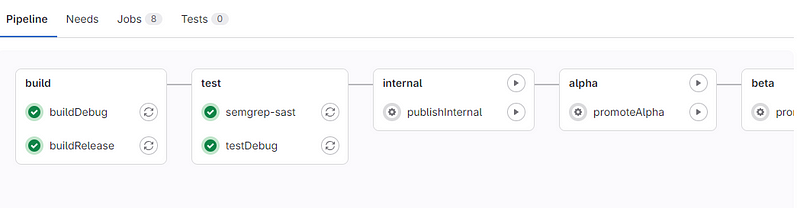
The final result is a gitlab pipeline that build debug and release versions of an android application, test the debug apk, publish the release as an internal draft then promote it to alpha, beta and finally publish to production in google play. All this is done automatically.
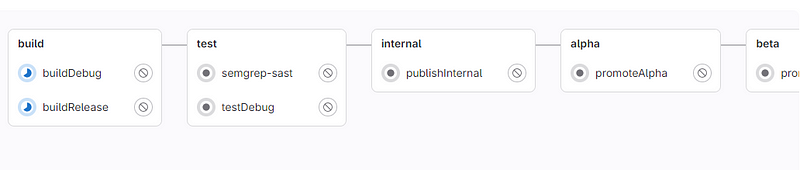
So, let’s first create a sample android application using android studio. We will add later some modifications to this application.
But now let’s create required config files and keys.
1 . Create android signing key file (release-keystore.jks) using keytool command.
keytool -genkey -v -keystore release-keystore.jks -alias alias -keyalg RSA -keysize 2048 -validity 100002. Create a file release-keystore.properties that contain informations about the signing key like below:
storePassword=key_password
keyPassword=key_password
keyAlias=alias
storeFile=./release-keystore.jks
3. get google_paly_api_key.json file that will be used to authenticate with google play API. This tutorial may help you .
When theses 3 files are ready, we should upload them to a secure place and in the same time they should be availables in the gitlab pipeline. I decided to add them to Gitlab Secure Files.
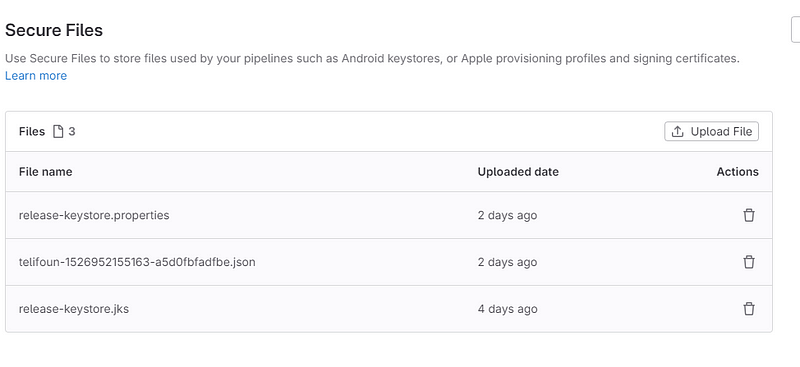
Go back to the android application whe should update app build.grale file to add this code bloc before android section.
def keystoreProperties = new Properties()
def keystorePropertiesFile = rootProject.file('release-keystore.properties')
if (keystorePropertiesFile.exists()) {
    keystoreProperties.load(new FileInputStream(keystorePropertiesFile))
}
android {
then in android section in defaultConfig: versionCode and versionName should be modified by pipeline before each deployment. we used environment varibales like below:
versionCode=Integer.valueOf(System.env.VERSION_CODE ?: 2)
 // Manually bump the semver version part of the string as necessary
versionName="1.0-${System.env.VERSION_SHA}"
After defaultConfig, add signing bloc using the signing key build earlier.
if (keystorePropertiesFile.exists()) {
        signingConfigs {
            release {
                keyAlias keystoreProperties['keyAlias']
                keyPassword keystoreProperties['keyPassword']
                storeFile keystoreProperties['storeFile'] ? file(keystoreProperties['storeFile']) : null
                storePassword keystoreProperties['storePassword']
            }
        }
    }
Finally in buildTypes > release section add the following cde
 if (keystorePropertiesFile.exists()) {
   signingConfig signingConfigs.release
 }
That is all for build.gradle file config.
Now we should add fastlane config to the application, for this we should create fastlane folder in the racine of application. Folder will contain two files:
- Appfile
- Fastfile
the appfile contain general config:
json_key_file("telifoun-1526952155163-a5d0fbfadfbe.json")  # Path to the json secret file - Follow https://docs.fastlane.tools/actions/supply/#setup to get one
package_name("com.app.exemple")  # e.g. com.krausefx.app
the Fasfile contain the most importants commands to build, test and deploy our android application.
# This file contains the fastlane.tools configuration
# You can find the documentation at https://docs.fastlane.tools
#
# For a list of all available actions, check out
#
#     https://docs.fastlane.tools/actions
#
# For a list of all available plugins, check out
#
#     https://docs.fastlane.tools/plugins/available-plugins
#

# Uncomment the line if you want fastlane to automatically update itself
# update_fastlane

default_platform(:android)

platform :android do

   desc "Builds the debug code"
   lane :buildDebug do
     gradle(task: "assembleDebug")
   end

   desc "Builds the release code"
   lane :buildRelease do
     gradle(task: "bundleRelease")
   end

  desc "Runs all the tests"
  lane :test do
    gradle(task: "test")
  end

  desc "Submit a new Internal Build to Play Store"
  lane :internal do
     upload_to_play_store(track: 'internal',  release_status: 'draft', aab: 'app/build/outputs/bundle/release/app-release.aab')
  end

  desc "Promote Internal to Alpha"
  lane :promote_internal_to_alpha do
    upload_to_play_store(track: 'internal', track_promote_to: 'alpha')
  end

  desc "Promote Alpha to Beta"
  lane :promote_alpha_to_beta do
      upload_to_play_store(track: 'alpha', track_promote_to: 'beta')
  end

  desc "Promote Beta to Production"
  lane :promote_beta_to_production do
      upload_to_play_store(track: 'beta', track_promote_to: 'production')
  end

end
Finally, in the android application d’ont fotget the Gitlab pipeline file gitlab-ci.yml.
include:
  - template: Security/SAST.gitlab-ci.yml

image: android-compile:1

.sast:
  stage: test


.build-job:
  stage: build
  variables:
    SECURE_FILES_DOWNLOAD_PATH: "./"
  before_script:
    - export VERSION_CODE=$((100 + $CI_PIPELINE_IID)) && echo $VERSION_CODE
    - export VERSION_SHA=`echo ${CI_COMMIT_SHORT_SHA}` && echo $VERSION_SHA
    - curl -s https://gitlab.com/gitlab-org/incubation-engineering/mobile-devops/download-secure-files/-/raw/main/installer | bash
    - chmod a+x gradlew
  artifacts:
    paths:
      - app/build/outputs


buildDebug:
    extends:
       - .build-job
    script:
      - bundle exec fastlane buildDebug


testDebug:
  stage: test
  dependencies:
    - buildDebug
  before_script:
    - chmod a+x gradlew
  script:
    - bundle exec fastlane test


buildRelease:
    extends:
      - .build-job
    script:
      - bundle exec fastlane buildRelease
    environment:
      name: production


publishInternal:
  stage: internal
  variables:
    SECURE_FILES_DOWNLOAD_PATH: "./"
  dependencies:
    - buildRelease
  when: manual
  before_script:
    - curl -s https://gitlab.com/gitlab-org/incubation-engineering/mobile-devops/download-secure-files/-/raw/main/installer | bash
    - echo $google_play_service_account_api_key_json > ~/telifoun-1526952155163-a5d0fbfadfbe.json
  after_script:
    - rm ~/telifoun-1526952155163-a5d0fbfadfbe.json
  script:
    - bundle exec fastlane internal


.promote_job:
  when: manual
  variables:
    SECURE_FILES_DOWNLOAD_PATH: "./"
  dependencies: []
  #only:
  #  - master
  before_script:
    - curl -s https://gitlab.com/gitlab-org/incubation-engineering/mobile-devops/download-secure-files/-/raw/main/installer | bash
    - echo $google_play_service_account_api_key_json > ~/telifoun-1526952155163-a5d0fbfadfbe.json
  after_script:
    - rm ~/telifoun-1526952155163-a5d0fbfadfbe.json


promoteAlpha:
  extends: .promote_job
  stage: alpha
  script:
    - bundle exec fastlane promote_internal_to_alpha


promoteBeta:
  extends: .promote_job
  stage: beta
  script:
    - bundle exec fastlane promote_alpha_to_beta


promoteProduction:
  extends: .promote_job
  stage: production
  script:
    - bundle exec fastlane promote_beta_to_production


stages:
  - environment
  - build
  - test
  - internal
  - alpha
  - beta
  - production
there are some points that we should be explained in this pipeline:
First it require an image(android-compile:1) that can compile and build the android application. This image also should have bundle and fastlane installed. see more informations about fastlane.
I used docker to build this image and publish it to docker hub and below is the used Dockerfile.
FROM  --platform=linux/amd64 openjdk:17-slim
ENV ANDROID_SDK_TOOLS 9477386
ENV ANDROID_SDK_URL https://dl.google.com/android/repository/commandlinetools-linux-${ANDROID_SDK_TOOLS}_latest.zip
ENV ANDROID_BUILD_TOOLS_VERSION 33.0.0
ENV ANDROID_HOME /usr/local/android-sdk-linux
ENV ANDROID_VERSION 34
# Just matched `app/build.gradle`
ENV ANDROID_BUILD_TOOLS "28.0.3"
ENV PATH $PATH:$ANDROID_HOME/tools:$ANDROID_HOME/tools/bin:$ANDROID_HOME/platform-tools:$ANDROID_HOME/cmdline-tools/bin
# Set user to root for necessary permissions
USER root
# Install required packages
RUN apt-get update && \
    apt-get install -y --no-install-recommends unzip curl && \
    mkdir "$ANDROID_HOME" .android && \
    cd "$ANDROID_HOME" && \
    curl -o sdk.zip $ANDROID_SDK_URL && \
    unzip sdk.zip && \
    rm sdk.zip && \
# Download Android SDK
    yes | sdkmanager --licenses --sdk_root=$ANDROID_HOME && \
    sdkmanager --update --sdk_root=$ANDROID_HOME && \
    sdkmanager --sdk_root=$ANDROID_HOME "build-tools;${ANDROID_BUILD_TOOLS_VERSION}" \
    "platforms;android-${ANDROID_VERSION}" \
    "platform-tools" \
    "extras;android;m2repository" \
    "extras;google;google_play_services" \
    "extras;google;m2repository" && \
# Install Fastlane
    apt-get install --no-install-recommends -y --allow-unauthenticated build-essential git ruby-full && \
    gem install rake && \
    gem install fastlane && \
    gem install bundler && \
    gem install screengrab
# install Fastlane
COPY Gemfile.lock .
COPY Gemfile .
RUN gem install bundle
RUN bundle install
# Clean up
RUN rm -rf /var/lib/apt/lists/* /tmp/* /var/tmp/* && \
    apt-get autoremove -y && \
    apt-get clean
Please see also the same tutorial to kow haw to create Gemfile and Gemfile.lock used in Dockerfile;
Second, the pipeline use this script to get require key file and api key file from Gitlab secret files. Please read Gitlab documentation about this.
- curl -s https://gitlab.com/gitlab-org/incubation-engineering/mobile-devops/download-secure-files/-/raw/main/installer | bashSo Now we have our Gitlab pipeline ready and working. For each new commit of application code pipeline will:
- build debug APK and App Release bundle
- test the debug APK
- publid application to google play store internal ( manuall job) can be skipped.
- promote application to alpha (manual job) can be skipped.
- promote application to beta (manual job) can be skipped.
- publish application to production (manual job) can be skipped.
That is all thanks for reading and welcome to questions and comments.


