avatarOliver Lövström

Free AI web copilot to create summaries, insights and extended knowledge, download it at here

2067

Abstract

he Code</h2><p id="f0f6">First, begin with the imports:</p><div id="f836"><pre><span class="hljs-keyword">from</span> diffusers <span class="hljs-keyword">import</span> DiffusionPipeline <span class="hljs-keyword">import</span> torch</pre></div><p id="daaa">Continue by downloading and initializing the model:</p><p id="56a8"><b>For Apple Silicon:</b></p><div id="71c9"><pre>pipe = DiffusionPipeline.<span class="hljs-built_in">from_pretrained</span>( <span class="hljs-string">"stabilityai/stable-diffusion-xl-base-1.0"</span>, torch_dtype=torch.float16, use_safetensors=True, variant=<span class="hljs-string">"fp16"</span> ).<span class="hljs-built_in">to</span>(<span class="hljs-string">"mps"</span>)</pre></div><p id="ad02"><b>For CUDA (Nvidia):</b></p><div id="a624"><pre>pipe = DiffusionPipeline.from_pretrained( <span class="hljs-string">"stabilityai/stable-diffusion-xl-base-1.0"</span>, torch_dtype=torch.float16, use_safetensors=<span class="hljs-literal">True</span>, variant=<span class="hljs-string">"fp16"</span> ).to(<span class="hljs-string">"cuda"</span>)</pre></div><p id="dc86">If you want to run it on the CPU instead, remove <code>.to("...")</code> at the end there!</p><p id="f23b">Finally, let’s generate the image and display it:</p><div id="638a"><pre>prompt = <span class="hljs-string">"Mater from the movie Cars in human form"</span> images = pipe(prompt=prompt).images[<span class="hljs-number">0</span>] display(images)</pre></div><p id="21c4"><b>Note:</b> <i>The images used in this story are by the Pixlr AI image generator. The results from the stable diffusion model were too similar to the actual movie! </i>😅</p><h2 id="a881">Thank You</h2><p id="f854">That’s all for today!</p><blockquote id="a7dd"><p>Please do let me know if there is any Python, AI, or machine learning content you would like to see more of!</p></blockquote><p id="cf32">Until next time!</p><blockquote id="8038"><p><b>Day 27 out of 30:</b> Here’s yesterday’s story:</p></blockquote><div id="03cf" class="link-block"> <a href="https:

Options

//readmedium.com/language-analysis-of-a-medium-story-bb861a8f70f3"> <div> <div> <h2>Language Analysis of a Medium Story</h2> <div><h3>How can you perform language analysis on a Medium story — and why should you care?</h3></div> <div><p>medium.com</p></div> </div> <div> <div style="background-image: url(https://miro.readmedium.com/v2/resize:fit:320/1*mtltzxPlang4CM4aqurPcg.jpeg)"></div> </div> </div> </a> </div><blockquote id="7b5b"><p><b><i>My Machine Learning PC:</i></b></p></blockquote><div id="8778" class="link-block"> <a href="https://medium.com/@oliver.lovstrom/machine-learning-workstation-322b5ae78c38"> <div> <div> <h2>Machine Learning Workstation</h2> <div><h3>undefined</h3></div> <div><p>undefined</p></div> </div> <div> <div style="background-image: url(https://miro.readmedium.com/v2/resize:fit:320/1*lU_hEMpMLkhPrJKNI9e4nw.jpeg)"></div> </div> </div> </a> </div><p id="c35b"><b>Check out the model here:</b> <a href="https://huggingface.co/stabilityai/stable-diffusion-xl-base-1.0">Stable Diffusion</a></p><p id="cd6f">The obligatory extra thank you for reaching the end! 🙏</p><div id="2c37" class="link-block"> <a href="https://readmedium.com/this-is-what-my-best-story-taught-me-190-from-one-post-f97bb10b6e59"> <div> <div> <h2>This is What My Best Story Taught Me ($190+ From One Post)</h2> <div><h3>Photo by Thomas Franke on Unsplash</h3></div> <div><p>medium.com</p></div> </div> <div> <div style="background-image: url(https://miro.readmedium.com/v2/resize:fit:320/0*YMt9k-UaaTAzoiZv)"></div> </div> </div> </a> </div></article></body>

Have you ever wondered what Lightning McQueen would look like as a human?

Me neither! — But here it is…

Not a member yet? Read for free here!

Have you ever wondered what Lightning McQueen would look like as a human?

If so, that’s pretty strange — but hey, I came up with the idea, so don’t worry!

Photo by Kin Li on Unsplash

But I can’t give you the answer straight away!

Then what’s the incentive for you to read the story?

Let’s begin by generating the other cast members:

  • Sally Carrera
  • And, of course, Mater
Sally Carrera and Mater in human form. AI-generated images by Pixlr.

What we all have been waiting for…

🥁 Drumroll…

Lightning McQueen
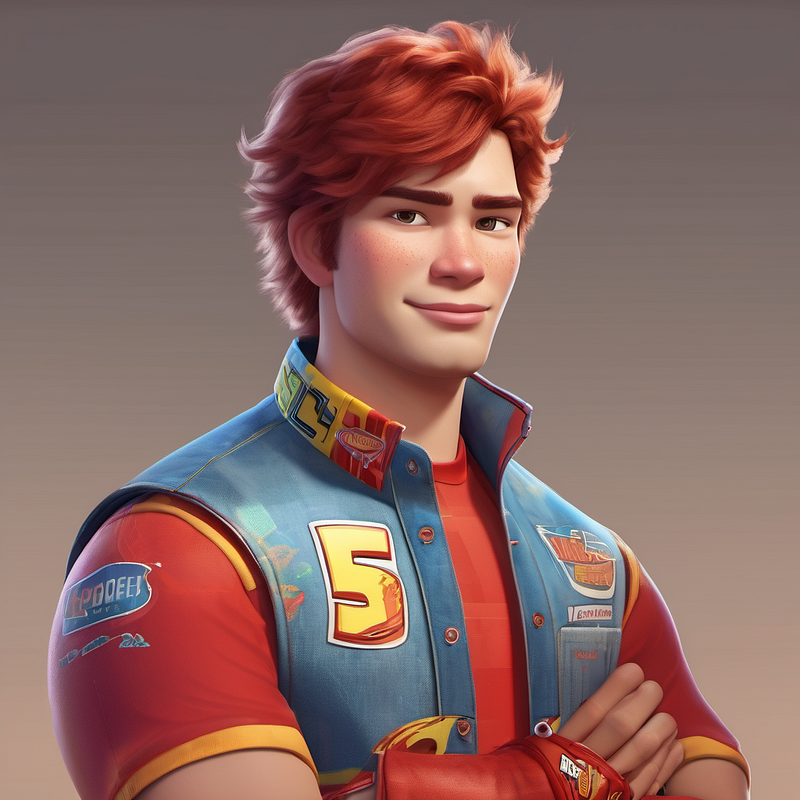
Lightning McQueen in human form. AI-generated image by Pixlr

How did we draw the cast as humans?

Simple answer: Generative AI

Here’s the Code

First, begin with the imports:

from diffusers import DiffusionPipeline
import torch

Continue by downloading and initializing the model:

For Apple Silicon:

pipe = DiffusionPipeline.from_pretrained(
  "stabilityai/stable-diffusion-xl-base-1.0",
  torch_dtype=torch.float16,
  use_safetensors=True,
  variant="fp16"
).to("mps")

For CUDA (Nvidia):

pipe = DiffusionPipeline.from_pretrained(
  "stabilityai/stable-diffusion-xl-base-1.0",
  torch_dtype=torch.float16,
  use_safetensors=True,
  variant="fp16"
).to("cuda")

If you want to run it on the CPU instead, remove .to("...") at the end there!

Finally, let’s generate the image and display it:

prompt = "Mater from the movie Cars in human form"
images = pipe(prompt=prompt).images[0]
display(images)

Note: The images used in this story are by the Pixlr AI image generator. The results from the stable diffusion model were too similar to the actual movie! 😅

Thank You

That’s all for today!

Please do let me know if there is any Python, AI, or machine learning content you would like to see more of!

Until next time!

Day 27 out of 30: Here’s yesterday’s story:

My Machine Learning PC:

Check out the model here: Stable Diffusion

The obligatory extra thank you for reaching the end! 🙏

Generative Ai Tools
Artificial Intelligence
Word Wave
Medium Partner Program
Ideas
Recommended from ReadMedium