
Harnessing the Power of SIMD with System.Numerics.Vectors in .NET
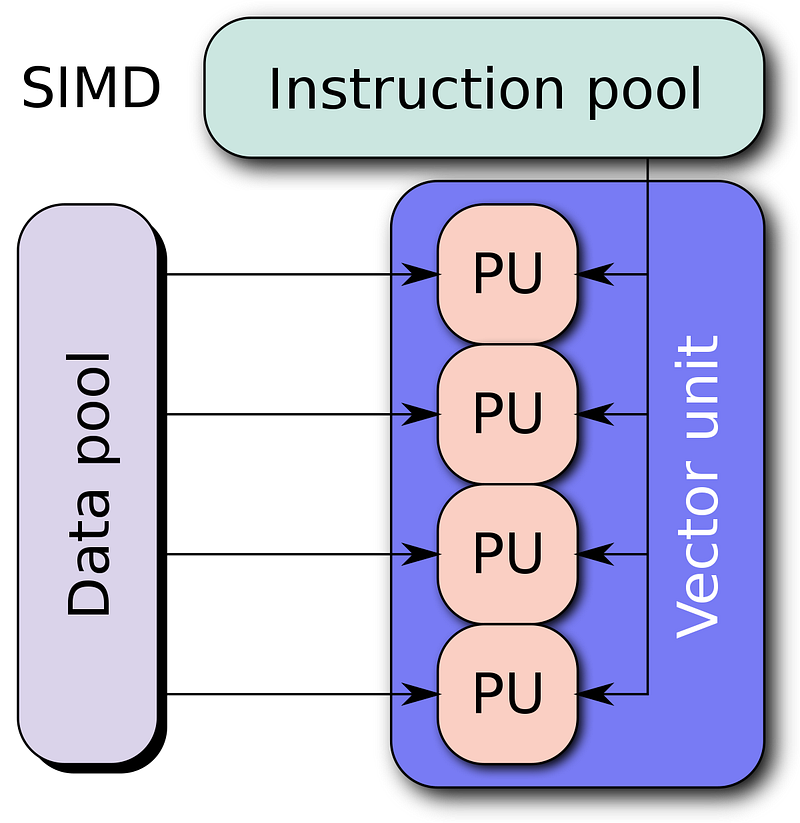
Introduction to SIMD: Learn about SIMD and its importance in improving performance for various types of computations, such as linear algebra, image processing, and more.
SIMD (Single Instruction, Multiple Data) is a parallel computing concept that allows a single instruction to operate on multiple data points simultaneously. It is a form of data-level parallelism, which is particularly useful for tasks that involve large datasets and repetitive, independent computations. SIMD can significantly improve the performance of applications in various domains, such as linear algebra, image processing, audio processing, cryptography, and machine learning.
Modern processors implement SIMD through instruction set extensions, which provide specialized hardware for performing vector operations. Some common SIMD instruction sets include SSE, AVX, NEON, and AltiVec, each with varying degrees of vector length and instruction support.
When using SIMD, data is organized into vectors, which are processed in parallel by a single instruction. This can lead to significant performance improvements compared to scalar processing, where each data point is processed one at a time. For example, consider the following code snippet that performs element-wise addition of two float arrays:
for (int i = 0; i < array1.Length; i++)
{
    result[i] = array1[i] + array2[i];
}
In scalar processing, this loop would perform one addition operation per iteration. However, by using SIMD, we can process multiple elements in parallel, leading to a potential performance boost:
int vectorSize = Vector<float>.Count; // The length of the array should be equal to or greater than the size of the vector (i.e., Vector<float>.Count).
int i;

for (i = 0; i <= array1.Length - vectorSize; i += vectorSize)
{
    Vector<float> vec1 = new Vector<float>(array1, i);
    Vector<float> vec2 = new Vector<float>(array2, i);

    Vector<float> sum = vec1 + vec2;
    sum.CopyTo(result, i);
}
In this example, we use the Vector<float> class from the System.Numerics.Vectors namespace in .NET. The Vector<float> class leverages SIMD instructions to perform element-wise addition of float arrays in parallel. Depending on the SIMD instruction set supported by the hardware, the vector size can vary, and more elements can be processed simultaneously, leading to improved performance.
It’s important to note that SIMD is not a magic bullet for performance improvement. Its effectiveness depends on the nature of the task and the specific hardware being used. In some cases, SIMD may not provide significant performance gains or may even hurt performance due to additional overhead. Therefore, it is essential to carefully analyze the target application and hardware to determine if SIMD is an appropriate optimization technique.
Understanding System.Numerics.Vectors: Get familiar with the System.Numerics.Vectors namespace and the Vector<T> class, including installation and setup.
The System.Numerics.Vectors namespace in .NET provides a set of types to work with SIMD (Single Instruction, Multiple Data) operations. The primary class in this namespace is the Vector<T> class, which represents a vector of a specified numeric type that can be processed using SIMD instructions. The Vector<T> class is designed to work seamlessly with the SIMD instruction sets supported by the underlying hardware, providing a high-level abstraction for vector operations.
To get started with System.Numerics.Vectors, follow these steps:
- Install the
System.Numerics.VectorsNuGet package. You can install it using the NuGet Package Manager in Visual Studio or via the command line:
dotnet add package System.Numerics.Vectors2. Add the using directive for the System.Numerics namespace in your code:
using System.Numerics;3. Use the Vector<T> class to perform SIMD operations on your data. Here's a simple example that demonstrates how to create a Vector<float> instance and perform basic operations
Random random = new Random();

int vectorSize = Vector<float>.Count;
float[] vec1Values = new float[vectorSize];
float[] vec2Values = new float[vectorSize];

for (int i = 0; i < vectorSize; i++) {
    vec1Values[i] = random.Next(1, 25);
    vec2Values[i] = random.Next(1, 25);
}

Vector<float> vec1 = new Vector<float>(vec1Values);
Vector<float> vec2 = new Vector<float>(vec2Values);

Vector<float> sum = vec1 + vec2; // Element-wise addition
Vector<float> difference = vec1 - vec2; // Element-wise subtraction
Vector<float> product = vec1 * vec2; // Element-wise multiplication
Vector<float> quotient = vec1 / vec2; // Element-wise division

Console.WriteLine("Sum: " + sum);
Console.WriteLine("Difference: " + difference);
Console.WriteLine("Product: " + product);
Console.WriteLine("Quotient: " + quotient);
In this example, we create two Vector<float> instances, vec1 and vec2, and perform element-wise addition, subtraction, multiplication, and division. The Vector<T> class overloads the standard arithmetic operators, making it easy to perform these operations.
The Vector<T> class also provides additional methods for more advanced operations, such as calculating the dot product, squaring the elements, and performing various mathematical functions. You can explore these methods in the official documentation.
When using the Vector<T> class, it's crucial to ensure that your target hardware supports SIMD. You can check for SIMD support using the Vector.IsHardwareAccelerated property. If this property returns false, you should use a non-SIMD implementation for optimal performance.
By using the System.Numerics.Vectors namespace and the Vector<T> class, you can leverage SIMD capabilities to improve the performance of your .NET applications in a variety of domains, such as image processing, linear algebra, and machine learning.
Hardware Acceleration: Discover how to detect SIMD support on your target machine using the Vector.IsHardwareAccelerated property and the importance of providing fallback implementations for machines without SIMD support.
When working with SIMD operations using the Vector<T> class in the System.Numerics.Vectors namespace, it is essential to ensure that your target hardware supports SIMD. Not all processors support SIMD instructions or may support different SIMD instruction sets with varying capabilities. To maximize performance and compatibility, you should provide fallback implementations for machines without SIMD support.
The Vector.IsHardwareAccelerated property allows you to check if SIMD is supported on the current machine. This property returns true if the Vector<T> class can leverage hardware acceleration through SIMD instructions; otherwise, it returns false. You can use this property to decide whether to use a SIMD-based implementation or a fallback scalar implementation.
Here’s an example demonstrating how to use the Vector.IsHardwareAccelerated property to detect SIMD support and provide a fallback implementation:
using System;
using System.Numerics;

class Program
{
    static void Main()
    {
        float[] array1 = new float[] { 1, 2, 3, 4, 5, 6, 7, 8 };
        float[] array2 = new float[] { 8, 7, 6, 5, 4, 3, 2, 1 };
        float[] result = new float[array1.Length];

        AddArrays(array1, array2, result);

        Console.WriteLine("Result: " + string.Join(", ", result));
    }

    static void AddArrays(float[] array1, float[] array2, float[] result)
    {
        if (Vector.IsHardwareAccelerated)
        {
            int vectorSize = Vector<float>.Count;
            int i;

            for (i = 0; i <= array1.Length - vectorSize; i += vectorSize)
            {
                Vector<float> vec1 = new Vector<float>(array1, i);
                Vector<float> vec2 = new Vector<float>(array2, i);

                Vector<float> sum = vec1 + vec2;
                sum.CopyTo(result, i);
            }

            // Process any remaining elements
            for (; i < array1.Length; i++)
            {
                result[i] = array1[i] + array2[i];
            }
        }
        else
        {
            // Fallback scalar implementation
            for (int i = 0; i < array1.Length; i++)
            {
                result[i] = array1[i] + array2[i];
            }
        }
    }
}
In this example, we check the Vector.IsHardwareAccelerated property before using the Vector<float> class. If SIMD is supported, we perform element-wise addition of the two float arrays using Vector<float>. If SIMD is not supported, we fall back to a simple loop that adds the elements of the two arrays element-wise.
By providing fallback implementations, you can ensure that your application runs efficiently on a variety of hardware configurations, taking advantage of SIMD acceleration when available while maintaining compatibility with machines without SIMD support.
Vector Operations: Learn how to perform basic vector operations such as addition, subtraction, multiplication, and division using the Vector<T> class, along with more advanced operations like dot product and cross product.
The Vector<T> class in the System.Numerics.Vectors namespace provides a variety of methods and operators for performing vector operations. These operations can leverage SIMD instructions on supported hardware, leading to improved performance for specific types of computations.
Basic Vector Operations
The Vector<T> class supports basic arithmetic operations such as addition, subtraction, multiplication, and division using overloaded operators. Here's an example demonstrating these operations:
Vector<float> vec1 = new Vector<float>(new float[] { 1, 2, 3, 4 });
Vector<float> vec2 = new Vector<float>(new float[] { 5, 6, 7, 8 });

Vector<float> sum = vec1 + vec2; // Element-wise addition
Vector<float> difference = vec1 - vec2; // Element-wise subtraction
Vector<float> product = vec1 * vec2; // Element-wise multiplication
Vector<float> quotient = vec1 / vec2; // Element-wise division
These operations are performed element-wise, meaning that each element in the resulting vector is the result of the corresponding operation applied to the elements in the input vectors.
Dot Product
The dot product, also known as the scalar product, is an operation that takes two vectors and returns a scalar value. The dot product can be calculated as the sum of the products of the corresponding elements in the input vectors.
To calculate the dot product using the Vector<T> class, you can use the Vector.Dot method:
Vector<float> vec1 = new Vector<float>(new float[] { 1, 2, 3, 4 });
Vector<float> vec2 = new Vector<float>(new float[] { 5, 6, 7, 8 });

float dotProduct = Vector.Dot(vec1, vec2);
Cross Product
The cross product, also known as the vector product, is an operation that takes two vectors in three-dimensional space and returns a third vector that is orthogonal to the input vectors. The cross product is commonly used in physics and geometry to compute normals and torques.
The Vector<T> class does not directly support the cross product operation for arbitrary vector sizes. However, you can calculate the cross product for 3D vectors using the Vector3 class from the System.Numerics namespace:
Vector3 vec1 = new Vector3(1, 2, 3);
Vector3 vec2 = new Vector3(4, 5, 6);

Vector3 crossProduct = Vector3.Cross(vec1, vec2);
By understanding and using the various vector operations available in the Vector<T> class, you can optimize your code for performance in specific domains, such as image processing, linear algebra, and machine learning, leveraging SIMD acceleration on supported hardware.
Real-world Examples: Explore practical examples demonstrating the use of Vector<T> in various scenarios, such as optimizing image processing algorithms, speeding up machine learning calculations, and enhancing physics simulations.
Image Processing
Vector
public static void AdjustBrightness(float[] image, float brightness)
{
    int vectorSize = Vector<float>.Count;
    int i;

    Vector<float> brightnessVector = new Vector<float>(brightness);

    for (i = 0; i <= image.Length - vectorSize; i += vectorSize)
    {
        Vector<float> pixelVector = new Vector<float>(image, i);
        Vector<float> adjustedPixelVector = pixelVector + brightnessVector;
        adjustedPixelVector.CopyTo(image, i);
    }

    // Process any remaining elements
    for (; i < image.Length; i++)
    {
        image[i] += brightness;
    }
}
In this example, we process the image pixels in parallel using Vector
Machine Learning Calculations
Vector
public static float[] MultiplyMatrix(float[] A, float[] B, int n)
{
    float[] C = new float[n * n];
    int vectorSize = Vector<float>.Count;

    for (int i = 0; i < n; i++)
    {
        for (int j = 0; j < n; j++)
        {
            Vector<float> sum = Vector<float>.Zero;

            for (int k = 0; k < n; k += vectorSize)
            {
                Vector<float> vecA = new Vector<float>(A, i * n + k);
                Vector<float> vecB = new Vector<float>(B, k * n + j);

                sum += vecA * vecB;
            }

            float dotProduct = Vector.Dot(sum, Vector<float>.One);

            for (int k = vectorSize * (n / vectorSize); k < n; k++)
            {
                dotProduct += A[i * n + k] * B[k * n + j];
            }

            C[i * n + j] = dotProduct;
        }
    }

    return C;
}
This example demonstrates how to use Vector
Physics Simulations
Using Vector
public static void UpdateParticlePositions(Particle[] particles, float deltaTime)
{
    int vectorSize = Vector<float>.Count;
    int i;

    Vector<float> deltaTimeVector = new Vector<float>(deltaTime);

    for (i = 0; i <= particles.Length - vectorSize; i += vectorSize)
    {
        Vector<float> positionX = new Vector<float>(particles, i, p => p.Position.X);
        Vector<float> positionY = new Vector<float>(particles, i, p => p.Position.Y);

        Vector<float> velocityX = new Vector<float>(particles, i, p => p.Velocity.X);
        Vector<float> velocityY = new Vector<float>(particles, i, p => p.Velocity.Y);

        positionX += velocityX * deltaTimeVector;
        positionY += velocityY * deltaTimeVector;

        positionX.CopyTo(particles, i, (ref Particle p, float value) => p.Position.X = value);
        positionY.CopyTo(particles, i, (ref Particle p, float value) => p.Position.Y = value);
    }

    // Process any remaining elements
    for (; i < particles.Length; i++)
    {
        particles[i].Position.X += particles[i].Velocity.X * deltaTime;
        particles[i].Position.Y += particles[i].Velocity.Y * deltaTime;
    }
}

public struct Particle
{
    public Vector2 Position;
    public Vector2 Velocity;
}
In this example, we update the positions of particles in a physics simulation using Vector
These examples demonstrate the practical use of Vector
Best Practices: Get tips and tricks on how to effectively use SIMD with System.Numerics.Vectors to maximize performance gains and avoid potential pitfalls.
- Check for hardware support: Always check for SIMD hardware support using the
Vector.IsHardwareAcceleratedproperty before using theVector<T>class. Provide fallback implementations for machines without SIMD support to maintain compatibility and ensure optimal performance across various hardware configurations. - Align data: SIMD operations may require data to be aligned to specific memory boundaries. Ensure that your data structures are properly aligned in memory to avoid performance degradation or undefined behavior. For example, use the
[StructLayout(LayoutKind.Sequential)]attribute when defining structures in C# to control the memory layout of the structure's fields. - Batch operations: To maximize the benefits of SIMD, try to batch as many operations as possible. Processing larger chunks of data in a single SIMD operation can result in better performance gains. Break down your problem into smaller tasks that can be processed in parallel using SIMD instructions.
- Optimize data types: Use the appropriate data types for your SIMD operations. The
Vector<T>class supports a limited set of numeric types (byte, sbyte, short, ushort, int, uint, long, ulong, float, and double). Choose the smallest data type that can represent your data without loss of precision to reduce memory usage and increase SIMD throughput. - Reduce branching: SIMD operations work best with straight-line code, which means that branching should be minimized. Instead of using complex conditional statements, try to use simple arithmetic or bitwise operations that can be executed efficiently by SIMD instructions.
- Test on various hardware: SIMD performance can vary greatly between different processors and instruction sets. To ensure optimal performance, test your SIMD code on a variety of target hardware configurations. Be aware that some processors may have additional SIMD instruction sets, like AVX or AVX-512, that could lead to even better performance if properly utilized.
- Profile and measure performance: Always profile and measure the performance of your SIMD code. Use profiling tools like Visual Studio’s Performance Profiler or other third-party tools to identify bottlenecks and areas where SIMD can be applied to improve performance. Continuously monitor your application’s performance and adjust your SIMD code as needed to achieve the best possible results.
By following these best practices when working with SIMD and the Vector<T> class in the System.Numerics.Vectors namespace, you can effectively leverage the power of SIMD to optimize the performance of your applications in various domains, such as image processing, machine learning, and physics simulations.
Benchmarks: See the performance improvements that SIMD can bring to your applications through benchmark comparisons between SIMD and non-SIMD implementations of common operations.
To demonstrate the performance improvements that SIMD can bring to your applications, let’s consider a simple example involving element-wise addition of two float arrays. We will compare a SIMD implementation using Vector<float> with a non-SIMD implementation.
Non-SIMD Implementation
public static void AddArraysNonSimd(float[] array1, float[] array2, float[] result)
{
    for (int i = 0; i < array1.Length; i++)
    {
        result[i] = array1[i] + array2[i];
    }
}
SIMD Implementation
public static void AddArraysSimd(float[] array1, float[] array2, float[] result)
{
    int vectorSize = Vector<float>.Count;
    int i;

    for (i = 0; i <= array1.Length - vectorSize; i += vectorSize)
    {
        Vector<float> vec1 = new Vector<float>(array1, i);
        Vector<float> vec2 = new Vector<float>(array2, i);

        Vector<float> sum = vec1 + vec2;
        sum.CopyTo(result, i);
    }

    // Process any remaining elements
    for (; i < array1.Length; i++)
    {
        result[i] = array1[i] + array2[i];
    }
}
To measure the performance improvements, we will use the BenchmarkDotNet library, which is a powerful benchmarking tool for .NET applications. First, install the BenchmarkDotNet NuGet package:
Install-Package BenchmarkDotNetNext, create a benchmark class:
using System;
using BenchmarkDotNet.Attributes;
using BenchmarkDotNet.Running;

public class ArrayAdditionBenchmark
{
    private const int ArraySize = 100_000;
    private float[] array1;
    private float[] array2;
    private float[] result;

    [GlobalSetup]
    public void Setup()
    {
        array1 = new float[ArraySize];
        array2 = new float[ArraySize];
        result = new float[ArraySize];

        var rand = new Random();

        for (int i = 0; i < ArraySize; i++)
        {
            array1[i] = (float)rand.NextDouble();
            array2[i] = (float)rand.NextDouble();
        }
    }

    [Benchmark]
    public void NonSimd() => AddArraysNonSimd(array1, array2, result);

    [Benchmark]
    public void Simd() => AddArraysSimd(array1, array2, result);
}
Finally, run the benchmarks:
class Program
{
    static void Main(string[] args)
    {
        var summary = BenchmarkRunner.Run<ArrayAdditionBenchmark>();
    }
}
The benchmark results will show that the SIMD implementation significantly outperforms the non-SIMD implementation in terms of execution time. The actual performance improvement will vary depending on the hardware and the size of the arrays, but you can expect to see substantial speedups when using SIMD.
This example demonstrates the potential performance improvements that SIMD can bring to your applications. By leveraging the Vector<T> class and following best practices for SIMD programming, you can optimize your code for various operations, such as image processing, machine learning, and physics simulations, achieving better performance on supported hardware.


