
Handy Python Decorators
Implementing and Using Advanced Decorators
After introducing the basics of decorators, in this post I’d like to showcase some useful and advanced decorators, stemming from existing libraries or custom implementation.
In particular, we will discuss decorators from the Standard Library (staticmethod, classmethod, dataclass, property), functools (lru_cache) and implement our own singleton decorator.

Standard Library Decorators
The Python Standard Library contains four incredibly useful decorators: staticmethod, classmethod, dataclas and property. I covered the last two in detail in a previous post, thus here we will just briefly cover the former.
staticmethod and classmethod
Both are very similar: using the respective decorators gives us functions not bound to a specific object / instance of a class. Usually methods are bound to an instance and are called instance methods.
The difference is, that classmethod takes the class itself as first argument, whereas staticmethod does not. Due to this, static methods are usually used for simple helper / utility functions, whereas class methods in situations where one wants to access static class variables, or (very commonly) for creating factory methods.
The following example should demonstrate this:
class MyClass:
    counter = 0

    @staticmethod
    def my_static_method():
        print("Static method called.")

    @classmethod
    def my_class_method(cls):
        print(f"Value of x: {cls.counter}.")
        cls.counter += 1

    @classmethod
    def my_class_factory(cls):
        return cls()

    def my_instance_method(self):
        print("Instance method called.")

MyClass.my_static_method()

MyClass.my_class_method()
MyClass.my_class_method()

my_class_instance = MyClass.my_class_factory()
my_class_instance.my_instance_method()
my_class_method() increments the static variable counter of class, s.t. the second execution prints 1 instead of 0. my_class_factory() is a factory method — this pattern is commonly used to instantiate classes: one passes all needed arguments and data to the factory method, and this is responsible for creating a class instance.
Functools Decorators
functools is a very interesting Python package, probably worth another post. Here we’ll discuss one decorator, namely lru_cache.
This decorators follows the principle of memoization: memoization means caching the results of previous function calls. Let’s have a look at the Fibonacci sequence for demonstration. In this, sequence number n is defined by the sum of the numbers n-1 and n-2, the first and second number are 1 and 2 by definition — yielding the sequence 1, 2, 3, 5, 8, 13, 21, … We could now compute this recursively, i.e. calculate the n-th number as fibonacci(n) = fibonacci(n-1) + fibonacci(n-2). The call graph for fibonacci(5) is shown in the picture below: the first number of each node describes n, the second the corresponding n-th Fibonacci number.
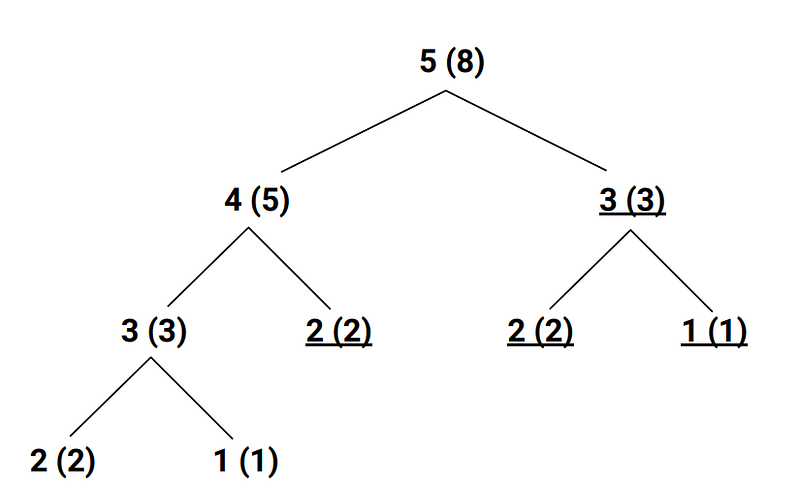
As we can see from this graph, several nodes have the same n value — i.e. correspond to the same function call fibonacci(n) (and with higher n this number just grows). With memoization, after calculating fibonacci(n) once, the output is stored in a cache for previous calls. When implementing above recursive formula as is, i.e. DFS-style, the underscored calls will be read from cache instead.
lru_cache
Let’s convert this to Python:
import time

def get_fibonacci_number(n):
    if n <= 0:
        raise ValueError("n must be non-negative!")
    elif n == 1:
        return 0
    elif n == 2:
        return 1
    else:
        return get_fibonacci_number(n - 1) + get_fibonacci_number(n - 2)


start_time = time.time()
print(f"40th Fibonacci number is: {get_fibonacci_number(40)}, time needd [s]: {time.time() - start_time}")
This code takes around 15s to run.
With a simple change, we employ the lru_cache decorator, cutting down runtime to under 1ms:
from functools import lru_cache
import time

@lru_cache
def get_fibonacci_number(n):
    if n <= 0:
        raise ValueError("n must be non-negative!")
    elif n == 1:
        return 0
    elif n == 2:
        return 1
    else:
        return get_fibonacci_number(n - 1) + get_fibonacci_number(n - 2)
“lru cache” stands for least-recently used cache, and by default keeps the last 128 return values in cache. But it can be customized via the maxsize parameter, with a value of None denoting no cache limit (e.g. @lru_cache(maxsize=None)).
Custom Decorators
In this section we will implement one custom decorator — a class decorator describing Singletons. This pattern is used to enforce an object can only be instantiated once, which can for example be used for factories.
Our implementation is based on a dict which manages all available classes, and returns available instances in case these were already constructed:
def singleton(cls):
    instances = {}
    def wrapper(*args, **kwargs):
        if cls not in instances:
          instances[cls] = cls(*args, **kwargs)
        return instances[cls]
    return wrapper

@singleton
class MyClass:
    def __init__(self):
        self.call_count = 0

    def call(self):
        print(f"# calls so far: {self.call_count}")
        self.call_count += 1

singleton_instance_one = MyClass()
singleton_instance_one.call()
singleton_instance_two = MyClass()
singleton_instance_two.call()
We see, that trying to create another class instance returns the already available one. Note that decorators are not the only way for creating singletons in Python, and maybe not even the best ones, depending on your use-case. I’d like to refer to this interesting thread on Stackoverflow.
This concludes this post about advanced Python decorators. I hope, these come in handy one day for you. If you liked this post, I would be happy about a subscription and about seeing you again another time. Thanks!
More content at PlainEnglish.io.
Sign up for our free weekly newsletter. Follow us on Twitter, LinkedIn, YouTube, and Discord.
Interested in scaling your software startup? Check out Circuit.
We offer free expert advice and bespoke solutions to help you build awareness and adoption for your tech product or service.