Hands-On LangChain for LLMs App: Chat with Your Files
In previous articles, we have explored the journey from loading documents to creating a vector store, discussing the limitations of existing models in handling follow-up questions and engaging in real conversations.
The good news is that we’re addressing these issues by introducing chat history into LangChain. This addition enables the language model to consider previous interactions, allowing it to provide context-aware responses.
The article guides users through setting up their environment, adding memory to the chain, and building an end-to-end chatbot that empowers users to have interactive and context-sensitive conversations with their document-based language models.
Table of Contents:
- Setting Up Working Environment & Getting Started
- Adding Memory to Your Chain
- Building an End-to-End Chatbot
Most insights I share in Medium have previously been shared in my weekly newsletter, To Data & Beyond.
If you want to be up-to-date with the frenetic world of AI while also feeling inspired to take action or, at the very least, to be well-prepared for the future ahead of us, this is for you.
🏝Subscribe below🏝 to become an AI leader among your peers and receive content not present in any other platform, including Medium:
1. Setting Up Working Environment & Getting Started
First, as always, we’re going to load our environment variables and set up the API keys that we will use.
import os
import openai
import sys
sys.path.append('../..')

import panel as pn  # GUI
pn.extension()

from dotenv import load_dotenv, find_dotenv
_ = load_dotenv(find_dotenv()) # read local .env file

openai.api_key  = os.environ['OPENAI_API_KEY']
Next, we will initialize the language model that we’re going to use as our chatbot.
from langchain.chat_models import ChatOpenAI
llm = ChatOpenAI(model_name=llm_name, temperature=0)
We’re going to load our vector store that has all the embeddings for all the class materials.
from langchain.vectorstores import Chroma
from langchain.embeddings.openai import OpenAIEmbeddings
persist_directory = 'docs/chroma/'
embedding = OpenAIEmbeddings()
vectordb = Chroma(persist_directory=persist_directory, embedding_function=embedding)
We can run through a basic similarity search on the vector store.
question = "What are major topics for this class?"
docs = vectordb.similarity_search(question,k=3)
docs[0]
Document(page_content=”statistics for a while or maybe algebra, we’ll go over those in the discussion sections as a \nrefresher for those of you that want one. \nLater in this quarter, we’ll also use the disc ussion sections to go over extensions for the \nmaterial that I’m teaching in the main lectur es. So machine learning is a huge field, and \nthere are a few extensions that we really want to teach but didn’t have time in the main \nlectures for.”, metadata={‘source’: ‘docs/cs229_lectures/MachineLearning-Lecture01.pdf’, ‘page’: 8})
We can initialize a prompt template, create a retrieval QA chain, and then pass in a question and get back a result.
# Build prompt
from langchain.prompts import PromptTemplate
template = """Use the following pieces of context to answer the question at the end. If you don't know the answer, just say that you don't know, don't try to make up an answer. Use three sentences maximum. Keep the answer as concise as possible. Always say "thanks for asking!" at the end of the answer.
{context}
Question: {question}
Helpful Answer:"""
QA_CHAIN_PROMPT = PromptTemplate(input_variables=["context", "question"],template=template,)

# Run chain
from langchain.chains import RetrievalQA
question = "Is probability a class topic?"
qa_chain = RetrievalQA.from_chain_type(llm,
                                       retriever=vectordb.as_retriever(),
                                       return_source_documents=True,
                                       chain_type_kwargs={"prompt": QA_CHAIN_PROMPT})


result = qa_chain({"query": question})
result["result"]
‘Yes, probability is a topic that will be covered in the class. Thanks for asking!’
2. Adding Memory to Your Chain
We are going to be working with conversation buffer memory. This is going to simply keep a list, a buffer of chat messages in history, and it’s going to pass those along with the question to the chatbot every time.
We are going to specify the memory key and chat history. This will line it up with an input variable on the prompt. Then we’re going to specify return messages equal true. This is going to return the chat history as a list of messages as opposed to a single string. This is the simplest type of memory.
from langchain.memory import ConversationBufferMemory

memory = ConversationBufferMemory(
    memory_key="chat_history",
    return_messages=True
)
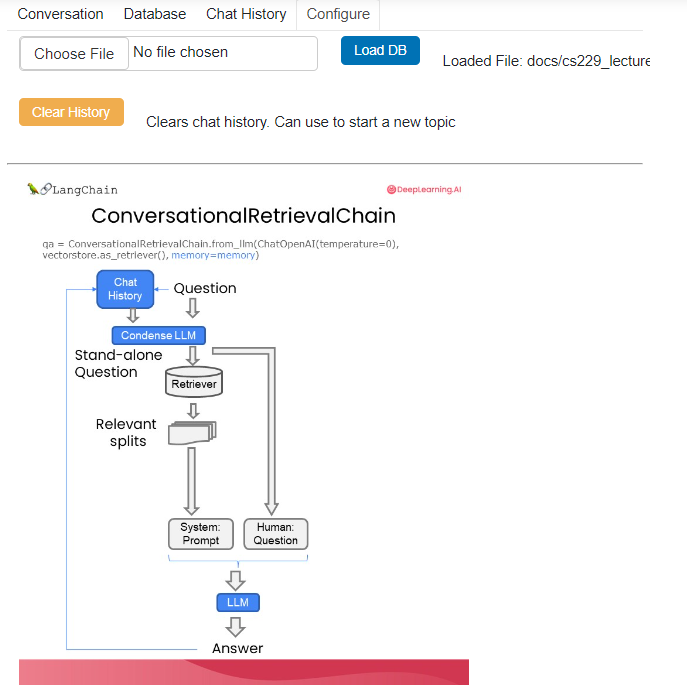
Let’s now create a new type of chain, the conversational retrieval chain. We pass in the language model, we pass in the retriever, and we pass in memory. The conversational retrieval chain adds a new bit on top of the retrieval QA chain, not just memory.
Specifically, it adds a step that takes the history and the new question and condenses it into a stand-alone question to pass to the vector store to look up relevant documents.
from langchain.chains import ConversationalRetrievalChain
retriever=vectordb.as_retriever()
qa = ConversationalRetrievalChain.from_llm(
    llm,
    retriever=retriever,
    memory=memory
)
To see how it works, we first ask a question. This is without any history, and see the result we get back. And then we can ask a follow-up question to that answer. This is the same as before. So we’re asking, is probability a class topic?
question = "Is probability a class topic?"
result = qa({"question": question})
result['answer']
‘Yes, probability is a topic that will be covered in this class. The instructor assumes familiarity with basic probability and statistics, so it is expected that students have prior knowledge in this area.’
The instructor assumes that students have a basic understanding of probability and statistics. And then we ask, why are those prerequisites needed? We get back a result, and let’s look at it.
question = "why are those prerequesites needed?"
result = qa({"question": question})
Prior knowledge in basic probability and statistics is needed for this class because machine learning heavily relies on probabilistic and statistical concepts. Understanding concepts such as random variables, expectation, variance, and probability distributions is crucial for understanding and implementing machine learning algorithms. Additionally, statistical inference and hypothesis testing are important for evaluating the performance and significance of machine learning models. Without a solid foundation in probability and statistics, it would be challenging to grasp the underlying principles and techniques of machine learning.
We get back an answer, and now we can see that the answer is referring to basic probability and statistics as prerequisites and expanding upon that, not getting confused with computer science as it had before.
3. Create a Chatbot that Works on Your Documents
We will put everything together from all the lessons and create a chatbot to chat with your documents. First, we’re going to pass in a file. Then We’re going to load it with the PDF loader. We’re then going to load it into documents. Then we are going to split those documents. Next, we will create embeddings and store them in a vector store. We’re then going to turn that vector store into a retriever. We will use similarity here with “search_kwargs=k”, which we will set equal to a parameter that we can pass in. And then we’re going to create the conversational retrieval chain.
One important thing to note here is that we’re not passing in memory. We will manage memory externally for the convenience of the GUI below. That means that chat history will have to be managed outside the chain.
from langchain.embeddings.openai import OpenAIEmbeddings
from langchain.text_splitter import CharacterTextSplitter, RecursiveCharacterTextSplitter
from langchain.vectorstores import DocArrayInMemorySearch
from langchain.document_loaders import TextLoader
from langchain.chains import RetrievalQA,  ConversationalRetrievalChain
from langchain.memory import ConversationBufferMemory
from langchain.chat_models import ChatOpenAI
from langchain.document_loaders import TextLoader
from langchain.document_loaders import PyPDFLoader

def load_db(file, chain_type, k):
    # load documents
    loader = PyPDFLoader(file)
    documents = loader.load()
    # split documents
    text_splitter = RecursiveCharacterTextSplitter(chunk_size=1000, chunk_overlap=150)
    docs = text_splitter.split_documents(documents)
    # define embedding
    embeddings = OpenAIEmbeddings()
    # create vector database from data
    db = DocArrayInMemorySearch.from_documents(docs, embeddings)
    # define retriever
    retriever = db.as_retriever(search_type="similarity", search_kwargs={"k": k})
    # create a chatbot chain. Memory is managed externally.
    qa = ConversationalRetrievalChain.from_llm(
        llm=ChatOpenAI(model_name=llm_name, temperature=0),
        chain_type=chain_type,
        retriever=retriever,
        return_source_documents=True,
        return_generated_question=True,
    )
    return qa
We then have a lot more code here. We’re not going to spend too much time on it, but pointing out that here we’re passing in chat history into the chain. And again, that’s because we don’t have memory attached to it. And then here we’re extending chat history with the result. We can then put it all together and run this to get a nice UI through which we can interact with our chatbot.
import panel as pn
import param

class cbfs(param.Parameterized):
    chat_history = param.List([])
    answer = param.String("")
    db_query  = param.String("")
    db_response = param.List([])

    def __init__(self,  **params):
        super(cbfs, self).__init__( **params)
        self.panels = []
        self.loaded_file = "docs/cs229_lectures/MachineLearning-Lecture01.pdf"
        self.qa = load_db(self.loaded_file,"stuff", 4)

    def call_load_db(self, count):
        if count == 0 or file_input.value is None:  # init or no file specified :
            return pn.pane.Markdown(f"Loaded File: {self.loaded_file}")
        else:
            file_input.save("temp.pdf")  # local copy
            self.loaded_file = file_input.filename
            button_load.button_style="outline"
            self.qa = load_db("temp.pdf", "stuff", 4)
            button_load.button_style="solid"
        self.clr_history()
        return pn.pane.Markdown(f"Loaded File: {self.loaded_file}")

    def convchain(self, query):
        if not query:
            return pn.WidgetBox(pn.Row('User:', pn.pane.Markdown("", width=600)), scroll=True)
        result = self.qa({"question": query, "chat_history": self.chat_history})
        self.chat_history.extend([(query, result["answer"])])
        self.db_query = result["generated_question"]
        self.db_response = result["source_documents"]
        self.answer = result['answer']
        self.panels.extend([
            pn.Row('User:', pn.pane.Markdown(query, width=600)),
            pn.Row('ChatBot:', pn.pane.Markdown(self.answer, width=600, style={'background-color': '#F6F6F6'}))
        ])
        inp.value = ''  #clears loading indicator when cleared
        return pn.WidgetBox(*self.panels,scroll=True)

    @param.depends('db_query ', )
    def get_lquest(self):
        if not self.db_query :
            return pn.Column(
                pn.Row(pn.pane.Markdown(f"Last question to DB:", styles={'background-color': '#F6F6F6'})),
                pn.Row(pn.pane.Str("no DB accesses so far"))
            )
        return pn.Column(
            pn.Row(pn.pane.Markdown(f"DB query:", styles={'background-color': '#F6F6F6'})),
            pn.pane.Str(self.db_query )
        )

    @param.depends('db_response', )
    def get_sources(self):
        if not self.db_response:
            return
        rlist=[pn.Row(pn.pane.Markdown(f"Result of DB lookup:", styles={'background-color': '#F6F6F6'}))]
        for doc in self.db_response:
            rlist.append(pn.Row(pn.pane.Str(doc)))
        return pn.WidgetBox(*rlist, width=600, scroll=True)

    @param.depends('convchain', 'clr_history')
    def get_chats(self):
        if not self.chat_history:
            return pn.WidgetBox(pn.Row(pn.pane.Str("No History Yet")), width=600, scroll=True)
        rlist=[pn.Row(pn.pane.Markdown(f"Current Chat History variable", styles={'background-color': '#F6F6F6'}))]
        for exchange in self.chat_history:
            rlist.append(pn.Row(pn.pane.Str(exchange)))
        return pn.WidgetBox(*rlist, width=600, scroll=True)

    def clr_history(self,count=0):
        self.chat_history = []
        return


cb = cbfs()

file_input = pn.widgets.FileInput(accept='.pdf')
button_load = pn.widgets.Button(name="Load DB", button_type='primary')
button_clearhistory = pn.widgets.Button(name="Clear History", button_type='warning')
button_clearhistory.on_click(cb.clr_history)
inp = pn.widgets.TextInput( placeholder='Enter text here…')

bound_button_load = pn.bind(cb.call_load_db, button_load.param.clicks)
conversation = pn.bind(cb.convchain, inp)

jpg_pane = pn.pane.Image( './img/convchain.jpg')

tab1 = pn.Column(
    pn.Row(inp),
    pn.layout.Divider(),
    pn.panel(conversation,  loading_indicator=True, height=300),
    pn.layout.Divider(),
)
tab2= pn.Column(
    pn.panel(cb.get_lquest),
    pn.layout.Divider(),
    pn.panel(cb.get_sources ),
)
tab3= pn.Column(
    pn.panel(cb.get_chats),
    pn.layout.Divider(),
)
tab4=pn.Column(
    pn.Row( file_input, button_load, bound_button_load),
    pn.Row( button_clearhistory, pn.pane.Markdown("Clears chat history. Can use to start a new topic" )),
    pn.layout.Divider(),
    pn.Row(jpg_pane.clone(width=400))
)
dashboard = pn.Column(
    pn.Row(pn.pane.Markdown('# ChatWithYourData_Bot')),
    pn.Tabs(('Conversation', tab1), ('Database', tab2), ('Chat History', tab3),('Configure', tab4))
)
dashboard
Here is what this chatbot looks like:
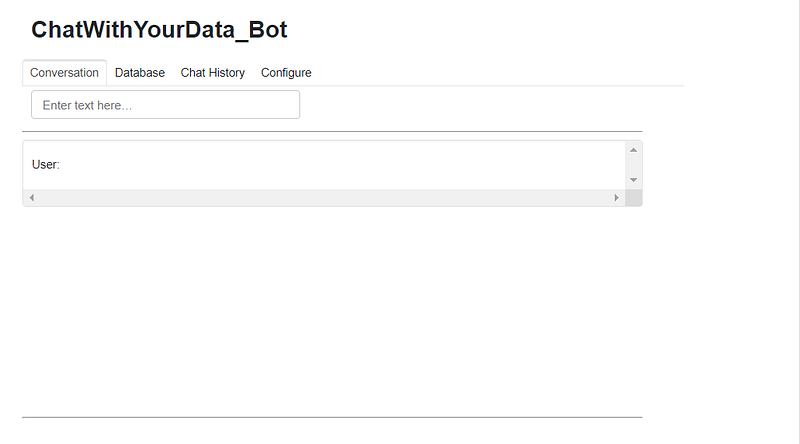
Let’s ask it the following question: Who are the course TAs?
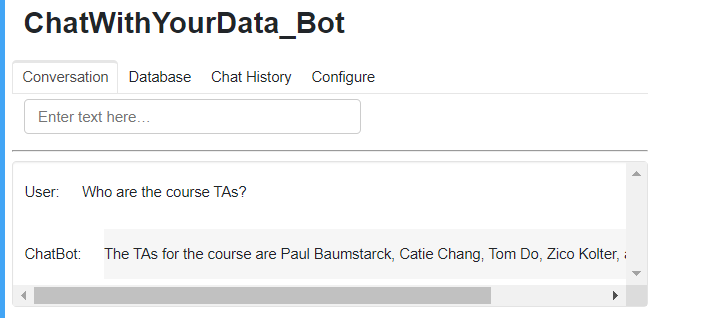
The TAs are Paul Baumstarck, Catie Chang, Tom Do, Zico Kolter
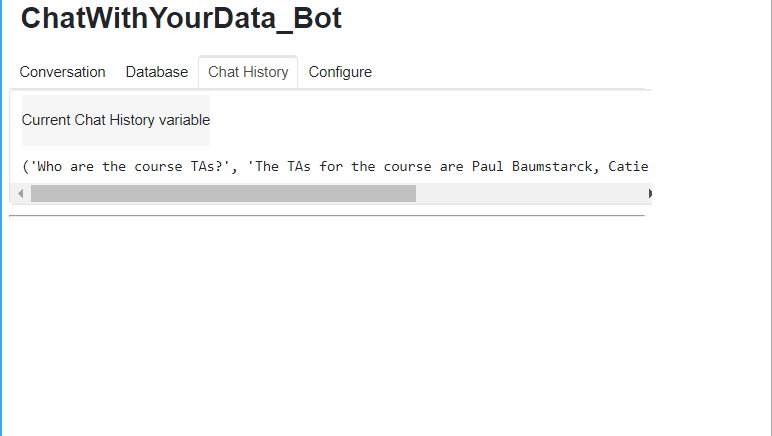
You can notice that there are a few tabs that we can also click on to see other things. So if we click on the database, we can see the last question we asked of the database, as well as the sources we got back from the lookup there.
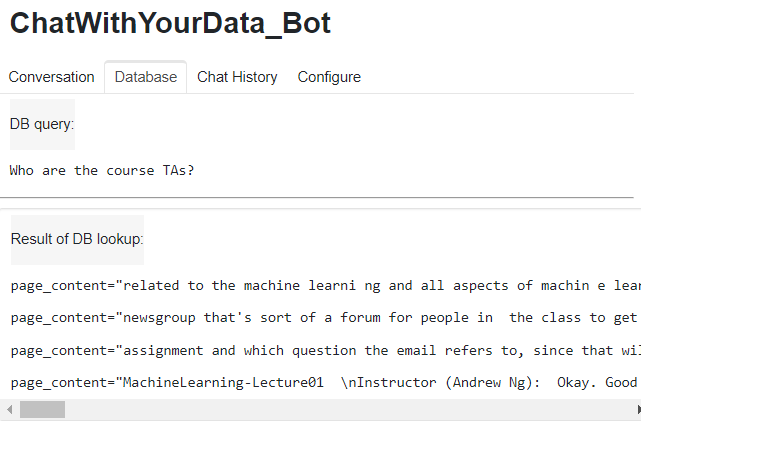
So these are the documents. These are after the splittings happened. These are each chunk that we’ve retrieved. We can see the chat history with the input and the output. And then there’s also a place to configure it where you can upload files.
We can also ask for follow-ups. So let’s ask, what are their majors? We will get back an answer about the previously mentioned TAs.
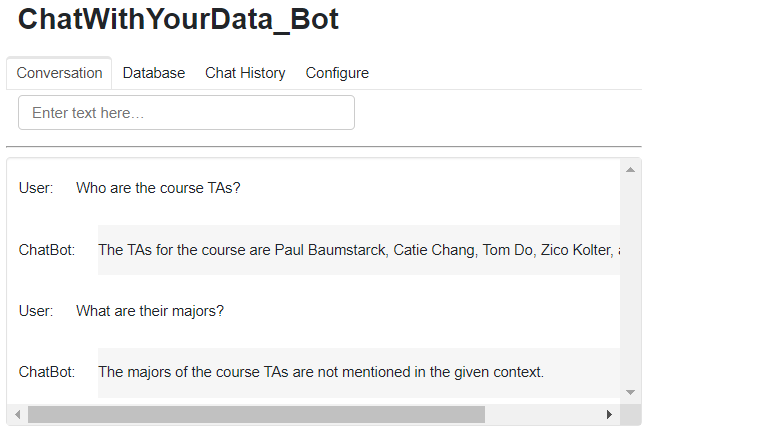
So we can see it says that the majors are not mentioned in the given context.
You can also go to the configure tab and then upload your documents there, and enjoy this end-to-end question-answering bot.
If you like the article and would like to support me, make sure to:
- 👏 Clap for the story (50 claps) to help this article be featured
- Subscribe to To Data & Beyond Newsletter
- Follow me on Medium
- 📰 View more content on my medium profile
- 🔔 Follow Me: LinkedIn |Youtube | GitHub | Twitter
Subscribe to my newsletter To Data & Beyond to get full and early access to my articles:
Are you looking to start a career in data science and AI and do not know how? I offer data science mentoring sessions and long-term career mentoring:
- Mentoring sessions: https://lnkd.in/dXeg3KPW
- Long-term mentoring: https://lnkd.in/dtdUYBrM