
gRPC: How to Make Server Streaming Calls
In this article, I’ll cover a gRPC call using Server Streaming response— implementing a client and server Go applications.
This is the third article of the series:
- How to Make Effective Unary Calls
- How to Make Client Streaming Calls
- How to Make Server Streaming Calls
- How to Make Bi-directional Streaming Calls
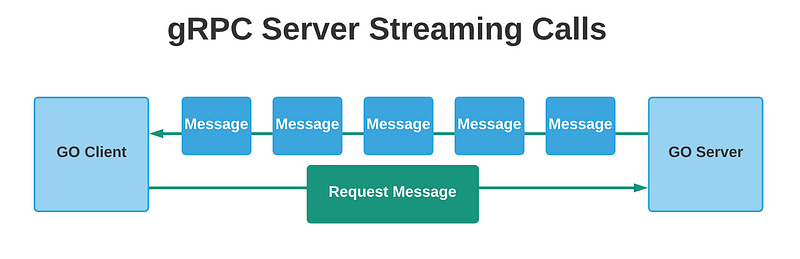
In a server streaming rpc call, the client sends a single request, and the server responds with a stream of messages. This is useful when the server needs to do bulks operations, and instead of waiting until the server finishes processing the data, the server can send objects one by one using streaming.
Project Description
For this project, we will create a Documents service with one gRPC endpoint that will allow the client to send a request to fetch documents.
The endpoint will not require any request message, so we will send an empty hash.
The server then will process some documents and start sending streaming responses to the client.
The client can also stop accepting messages from the server at any point in time, either because it already got what it wanted, or because the server is taking too long to send messages.
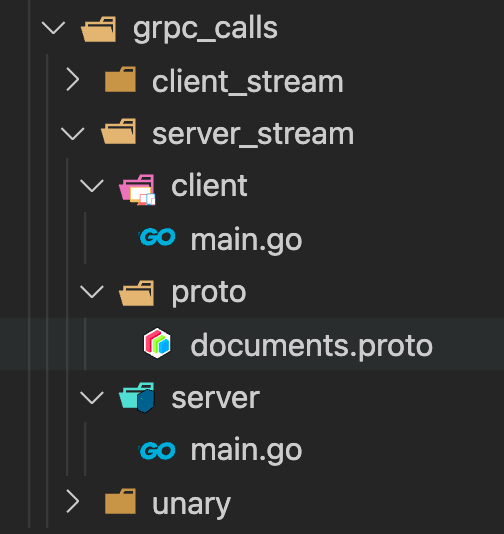
Let’s create another folder inside the grpc_calls, and call it server_stream.
Inside this folder create the following structure.
The definition of the documents.proto file is the following:
In this proto file I defined the service documents, the endpoint, and the corresponding messages for this request.
For this endpoint, the client will not need to send any data in the request message, so we are declaring it as an empty request.
For the response, the server will send a message of type Document.
Proto file definitions:
- GetDocuments: This is the rpc endpoint definition, it accepts and empty message in the request, and returns a stream of GetDocumentsRes.
- EmptyReq: This is the request message.
- GetDocumentsRes: This is the response message, and it has one field called document, of type Document.
- Document: This message represents a document object, with name, document type, and size fields.
Let’s now generate the go code for this proto file.
Inside the proto folder run the following command:
protoc --go_out=. --go_opt=paths=source_relative --go-grpc_out=. --go-grpc_opt=paths=source_relative documents.protoNow we can move on and implement the server. This is the code for the server go application.
Again, for this file, we first create a new grpc server that will listen on port 3000, then we register the documents service and start listening for connections.
Now, as you can see, I am importing proto_server_stream package. Because Go will complain if you have local imports.
To solve this issue you can do the following:
- Push the content of the proto folder to Github and then import it from there.
- Put the content of the proto folder inside the packages/src folder for your go version path. In my case this is the path:
golang/1.15.5/packages/srcInside this folder, I created a proto_server_stream folder and pasted the files from the proto folder that contains the generated code, and the documents.proto file.
That way I can import the package without pushing it to Github. Take the approach you consider more convenient.
For the GetDocuments function, we first initialize some dummy data, then we iterate through the documents, perform some validations, and use the stream object to start sending streaming responses to the client.
We also use the sleep function to simulate some latency in the server.
Let’s implement the client code.
For the client code, we create a new client-server on port 3000, using the NewDocumentsClient method provided by the documents package.
For the fetchDocuments function, we first initialize the request message, in this case, is an empty one. Then it gets the stream object and starts receiving streaming messages from the server.
As I said before, the client can also decide when to stop receiving messages from the server, in this case, the client waits until the server finishes streaming messages.
That is the necessary code for the client and server go applications, if you read the last article about client streaming requests, you can see that the difference in the definition of the proto file is really small. As well as the implementation for the client and server.
We can now try it out. Go to the console, inside the server folder, start the server with the following command.
go run .
Then start the client as well with the same command, but under the client folder.

Awesome, we’ve implemented a server streaming rpc response.
I hope you find it useful. In the next article of the series, we’ll tackle Bi-Directional streaming.
Thank you for taking the time to read the series!


