avatarVictoria Kurichenko

Free AI web copilot to create summaries, insights and extended knowledge, download it at here

4366

Abstract

m/trends/">Google trends</a> is an online tool that helps to explore user needs and search queries across different world regions and languages. It is a great tool to see what’s popular in different regions nowadays as well as analyze the historical data for specific periods such as Christmas, Halloween, etc. Let’s see what you can discover with Google trends for our fictional online flower store in New York.</p><p id="586b">First, Google trends show you a historical chart of the keyword popularity. You can see that the flower delivery becomes highly popular during Valentine’s day in February and Mother’s day in May. Your business could use the trends to prepare content, advertisement, and special offers for the high-pick periods to generate as many sales as possible and outperform competitors.</p><figure id="5e34"><img src="https://cdn-images-1.readmedium.com/v2/resize:fit:800/1*_GSy3kvQeCYPE6mhXLy6Mg.png"><figcaption>Google trends historical data for “flower delivery” keyword</figcaption></figure><p id="e845">Second, Google trends shows related inquiries and similar topics relevant to your primary inquiry. It could be used as one of the inspirational sources to find new keywords associated with your business.</p><figure id="5cf5"><img src="https://cdn-images-1.readmedium.com/v2/resize:fit:800/1*5-t4uJVgXCnJDUhSPrqgVg.png"><figcaption>Related topics and inquiries discovered via Google Trends.</figcaption></figure><h1 id="8032">3. Google Analytics Search Terms Report</h1><p id="104f">If your website has a search functionality, users will most likely try to find some content on your website. If you track search queries with the help of Google Analytics, you will see search queries report with all topics that users tried to search on your website. You can find it under the Behavior report in Google Analytics:</p><figure id="b5c7"><img src="https://cdn-images-1.readmedium.com/v2/resize:fit:800/1*5W7bkNfKGxFhmWtKT_AT8g.png"><figcaption>Website search terms report in GA</figcaption></figure><p id="73b6">It is pretty helpful to check this report from time to time to discover what users did not manage to find on your website. You might want to create this content later, to keep users onsite longer.</p><p id="6ed1">What if you do not have search terms set up on your website? Here is how you can do it:</p><ol><li><i>Sign in to your Google Analytics account</i></li><li><i>Click Admin and navigate to the property view, where you want to set up a search.</i></li><li><i>In the View column, click View Settings.</i></li><li><i>Turn on Site Search Tracking and add query parameters to the field.</i></li></ol><figure id="8aa2"><img src="https://cdn-images-1.readmedium.com/v2/resize:fit:800/1*PXUZhBX2GnmKLsnpPZO-wg.png"><figcaption>How to enable search terms collection on your website via GA</figcaption></figure><p id="8e34">Query parameters can be found when you try to search for something on your website. It is usually designated by a letter, such as s or q.</p><figure id="bb8c"><img src="https://cdn-images-1.readmedium.com/v2/resize:fit:800/1*mlrefIKbJni7MhuyOFcVaA.png"><figcaption>s is a query parameter in this example</figcaption></figure><p id="fafd">Read more information about how to set up a site search <a href="https://support.google.com/analytics/answer/1012264?hl=en">here</a>.</p><h1 id="18b7">4. Google Keyword Planner</h1><p id="eebb"><a href="https://ads.google.com/intl/en_cy/home/tools/keyword-planner/">Google keyword planner</a> is a free tool designed by Google to discover new keywords relevant to your website and check their potential, like monthly volume, competition, keyword CPC, etc.</p><p id="be7e">Here is what Google Planner suggested after checking the keyword “flower delivery” with the location of New York. You can see multiple new keyword ideas such as local florist, designer florist, gift delivery, sunflower bouquet, etc. It is already enough to craft a few exciting blog posts related to this topic.</p><figure id="6197"><img src="https://cdn-images-1.readmedium.com/v2/resize:fit:800/1*8RF756iSeonNnUFNLkiYPQ.png"><figcaption>Google Keyword Planner</figcaption></figure><h1 id="4d7c">5. Try AnswerThePublic</h1><p id="86fe"><a href="https://answerthepublic.com/">AnswerThePublic</a> is a free online tool that utilizes Google and Bing’s auto-suggested keywords to visualize topic ideas

Options

in a search cloud.</p><p id="4b15">The tool has suggested 42 questions that include “flower delivery” keyword, 47 prepositions, 22 comparisons, 208 alphabetical, and 8 related topics. It seems a lot of suggestions for one keyword. Feel free to try this tool and see if it fits your needs. Here is how the search cloud for 42 questions look like.</p><figure id="ea07"><img src="https://cdn-images-1.readmedium.com/v2/resize:fit:800/1*EtquuCB8yu5GkzLrocpL1w.png"><figcaption>Search cloud from AnswertheRepublic for “flower delivery” keyword</figcaption></figure><h1 id="1d09">6. User-Generated Content From Online Communities</h1><p id="614e">Quora, Reddit, Facebook, Instagram, Linkedin are good examples of where to look for questions/suggestions from users. Here is what Quora shows under our example keyword. The first 2 questions look promising for a blog.</p><figure id="2073"><img src="https://cdn-images-1.readmedium.com/v2/resize:fit:800/1*cp312gNffUw-0sNJT33y6g.png"><figcaption>Quora keywords search</figcaption></figure><p id="090c">It is a widely known method to search for keywords. However, if you see that it takes a lot of time to check thoroughly online communities, maybe it worths investing more time into the 5 above-mentioned methods. I use Quora, Linkedin, and Facebook to check design-related topics users discuss online.</p><h1 id="12ea">How to Analyze and Select the Right Keywords</h1><p id="0801">Once you’ve collected enough keyword ideas for your blog it is the right time to decide what keywords would provide the best outcome. Here is how I check the keyword potential via Ahrefs. Similar steps could be performed if you utilize other tools, such as Semrush, Moz.</p><h2 id="2786">1. Check the keyword monthly volume and the keyword difficulty</h2><p id="ab5e">Here is an example with the keyword we have discovered earlier “build your own bouquet”. You can see that the monthly volume for the USA is 200 searchers, while the keyword difficulty is very low 1/100. This information already gives an estimate that this is a keyword with a low competition that your business could potentially target and rank for easily.</p><p id="4cd2">The smaller the keyword difficulty, the lower the competition level is for your keyword. Ahrefs estimates are not 100% reliable. However, I managed to bring some blog pages with long-tail keywords to the Google top 10 results following the logic explained here.</p><figure id="c56f"><img src="https://cdn-images-1.readmedium.com/v2/resize:fit:800/1*CG61AteUPG2tGg9kEfHllw.png"><figcaption></figcaption></figure><h2 id="8709">2. Check how competitive your keyword is</h2><p id="518b">In particular, check the DR (Domain authority), the number of referring domains, backlinks, as well as the number of keywords the website or a page ranks for. It is needed to estimate what is already in Google’s top results and how difficult it would be for your site to get there. Here is how it looks for our keyword:</p><figure id="c026"><img src="https://cdn-images-1.readmedium.com/v2/resize:fit:800/1*wenGu7knIVVPkfUaU7r1gQ.png"><figcaption></figcaption></figure><p id="951e">The websites on the 3rd and 4th positions have a very low domain authority, 1/100, 8/100, which gives an assumption that a well-optimized page with a few backlinks would work here.</p><p id="60fe">I would also suggest to check the titles for websites in SERP top 10. Your title needs to be different and much more clickbait than what is already available in Google, otherwise, you risk having a poor CTR and, as a result, poor traffic flow to your website.</p><p id="439c">Follow these 2 essential steps to discover the best keyword ideas for your site. If you have multiple keywords to check, write them in bulk and let Ahrefs check all of them at once.</p><p id="fbb6">Most of the online market niches are already saturated and it is incredibly difficult to rank for transactional keywords. However, there is always a way to search for less competitive, long-tail keywords, which is a perfect solution to kick-off your online business.</p><p id="13a1">Dedicate some time for keyword research, analyze the obtained keyword ideas, create relevant content, and start conquering Google top 10 results. It takes 2–6 months to see the first results of your work, so be patient and keep working on your project. Good luck!</p></article></body>

How to Grow Your Blog With These 6 Keyword Research Techniques

Find untapped content ideas with great potential

Image credit: Carlos Muza on Unsplash

Content managers often struggle with finding the right keywords for the new blog posts. It seems easy if you have just started, but imagine you’ve been running your blog for years. How do you still generate new topic ideas to write about?

Do you brainstorm with your team and then decide what to write? Or do you endlessly scroll competitor blogs to get some inspiration?

No more questions about where to find good keywords for a blog! I am sharing 6 proven techniques on how to never run out of keyword ideas for your blog.

1. A New Way to Spy on Competitor Blog Post Keywords

The idea seems simple and I am sure many of you have been doing it for a while. However, I have a slightly different approach to checking competitor pages. Let’s imagine you are a flower online shop in New York. Here is how you can save your time and find new keyword ideas via Ahrefs.

Go to the Keyword Explorer tab in Ahrefs and type “flower delivery nyc”, since this is most probably one of your service types. Here is what Ahrefs show you in the SERP overview section:
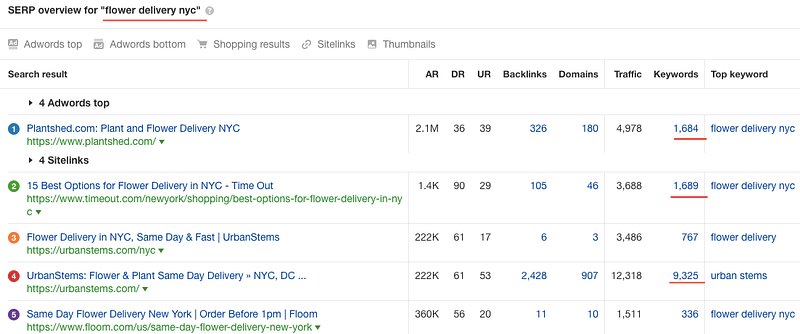
Search Engine Result Page overview under the keyword “flower delivery nyc”

What can you see here? Ahrefs shows you the top 5 Google results occupied by your competitors (if your website is not there yet). Besides, you can see that most of them rank under a huge amount of keywords 1,600 and more.

These websites are good candidates to explore their keywords and find new opportunities for your business. Let’s explore Plantshed with the keyword number 1,684.

Navigate to the site overview and open the top website pages report to see what brings the most traffic to the website:
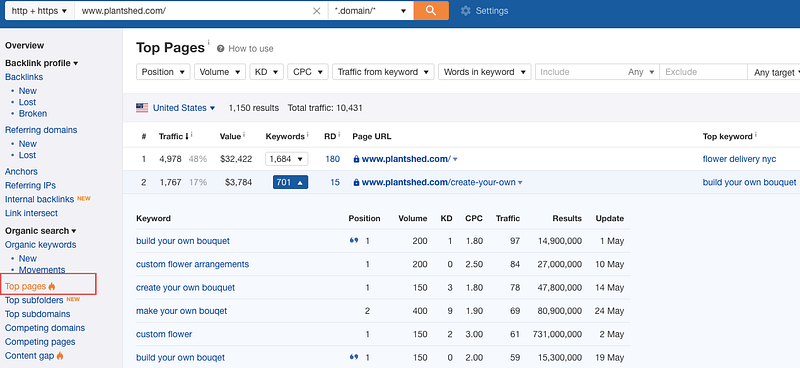
Top pages report in Ahrefs

17% of traffic is generated by a keyword “build your own bouquet” with 200 monthly searches from Google. The top pages report is a quick way to see what pages and keywords contribute the highest percentage of traffic to the website. If your business does not have content for it — it is an excellent idea for your blog post. Write this keyword down and we will further analyze how difficult it would be to reach Google top 10 results with this keyword.

You could also open the “Organic keywords” report and filter all available keywords by position (select maximum 10 positions), volume (minimum 500 searchers per month), keyword difficulty (maximum 10) and see what Ahrefs filters for you. In our example, there are 28 low competitive keywords that your business could potentially target to rank pretty fast in top 10 Google results.
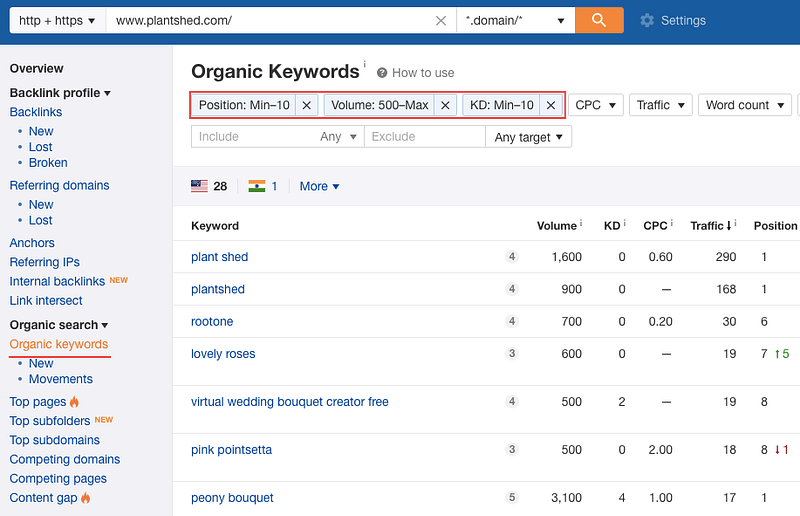
Filter organic keywords in Ahrefs to find the ideas with the lowest competition and high monthly volume

It is a great report to filter all the keywords by volume, keyword difficulty, etc and find the low-hanging fruits for your site. However, this report shows you all keywords the website ranks for, while the “top pages” report could be used to check the blog subdomain or a directory.

These 2 methods are my favorite when it comes to new content ideas generation. Different marketing tools could be used to conduct similar research, such as Ubersuggest, Semrush, Moz, etc. However, there are many more ways to come up with new topic ideas. The sky is the limit here. Read on to see what else you could do to get new keywords for your blog.

2. Analyze Google Trends

Google trends is an online tool that helps to explore user needs and search queries across different world regions and languages. It is a great tool to see what’s popular in different regions nowadays as well as analyze the historical data for specific periods such as Christmas, Halloween, etc. Let’s see what you can discover with Google trends for our fictional online flower store in New York.

First, Google trends show you a historical chart of the keyword popularity. You can see that the flower delivery becomes highly popular during Valentine’s day in February and Mother’s day in May. Your business could use the trends to prepare content, advertisement, and special offers for the high-pick periods to generate as many sales as possible and outperform competitors.
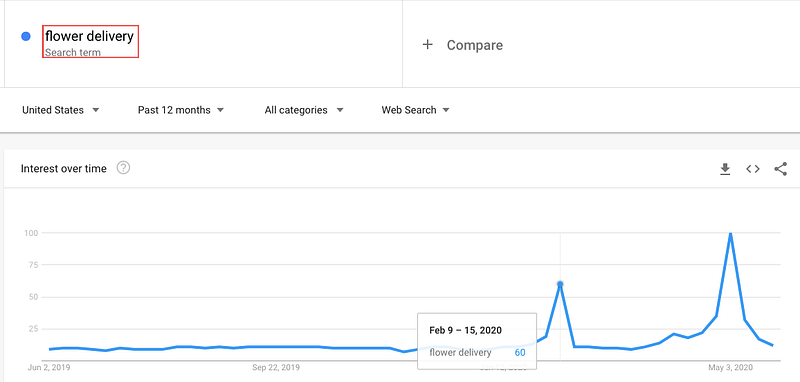
Google trends historical data for “flower delivery” keyword

Second, Google trends shows related inquiries and similar topics relevant to your primary inquiry. It could be used as one of the inspirational sources to find new keywords associated with your business.
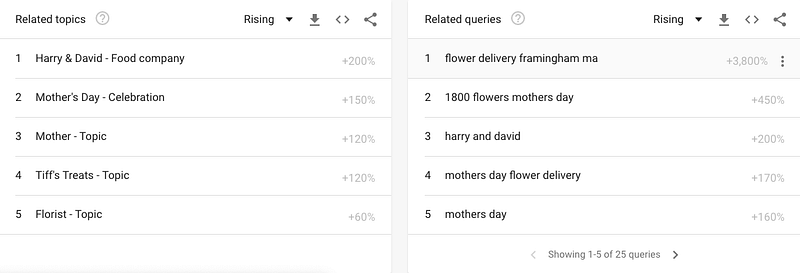
Related topics and inquiries discovered via Google Trends.

3. Google Analytics Search Terms Report

If your website has a search functionality, users will most likely try to find some content on your website. If you track search queries with the help of Google Analytics, you will see search queries report with all topics that users tried to search on your website. You can find it under the Behavior report in Google Analytics:
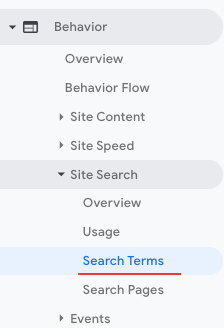
Website search terms report in GA

It is pretty helpful to check this report from time to time to discover what users did not manage to find on your website. You might want to create this content later, to keep users onsite longer.

What if you do not have search terms set up on your website? Here is how you can do it:

  1. Sign in to your Google Analytics account
  2. Click Admin and navigate to the property view, where you want to set up a search.
  3. In the View column, click View Settings.
  4. Turn on Site Search Tracking and add query parameters to the field.
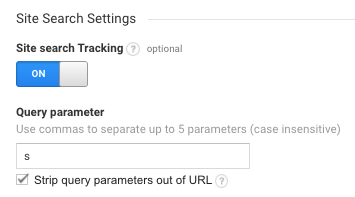
How to enable search terms collection on your website via GA

Query parameters can be found when you try to search for something on your website. It is usually designated by a letter, such as s or q.

s is a query parameter in this example

Read more information about how to set up a site search here.

4. Google Keyword Planner

Google keyword planner is a free tool designed by Google to discover new keywords relevant to your website and check their potential, like monthly volume, competition, keyword CPC, etc.

Here is what Google Planner suggested after checking the keyword “flower delivery” with the location of New York. You can see multiple new keyword ideas such as local florist, designer florist, gift delivery, sunflower bouquet, etc. It is already enough to craft a few exciting blog posts related to this topic.
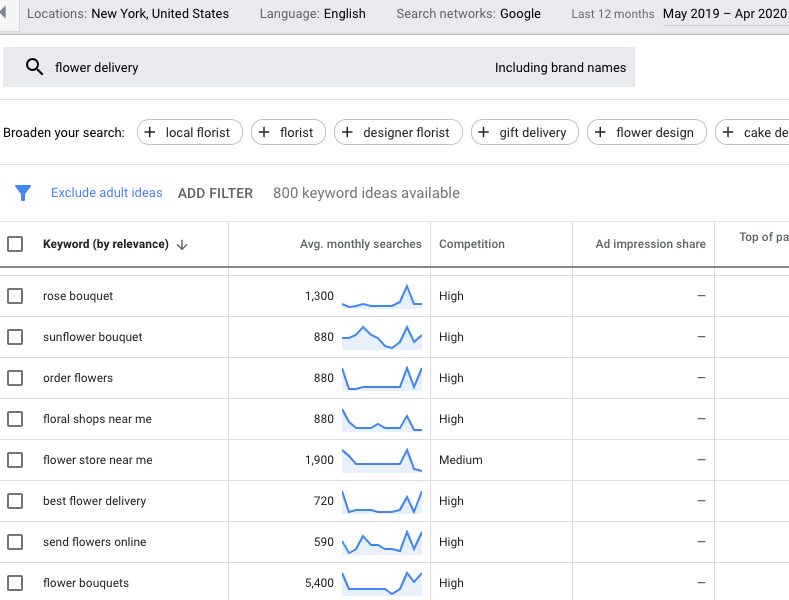
Google Keyword Planner

5. Try AnswerThePublic

AnswerThePublic is a free online tool that utilizes Google and Bing’s auto-suggested keywords to visualize topic ideas in a search cloud.

The tool has suggested 42 questions that include “flower delivery” keyword, 47 prepositions, 22 comparisons, 208 alphabetical, and 8 related topics. It seems a lot of suggestions for one keyword. Feel free to try this tool and see if it fits your needs. Here is how the search cloud for 42 questions look like.
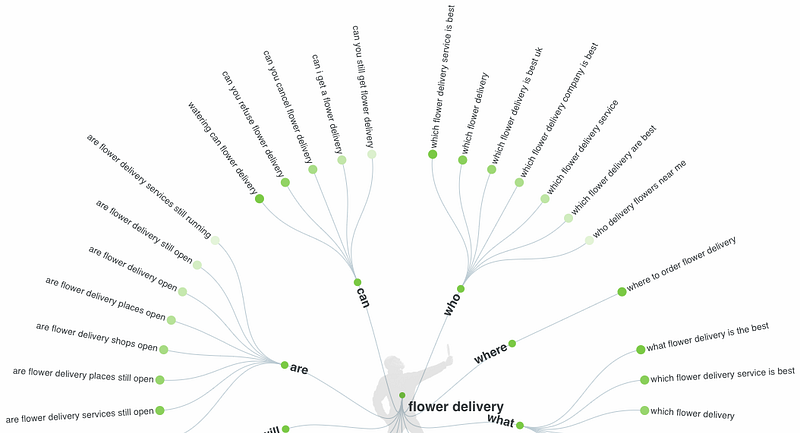
Search cloud from AnswertheRepublic for “flower delivery” keyword

6. User-Generated Content From Online Communities

Quora, Reddit, Facebook, Instagram, Linkedin are good examples of where to look for questions/suggestions from users. Here is what Quora shows under our example keyword. The first 2 questions look promising for a blog.
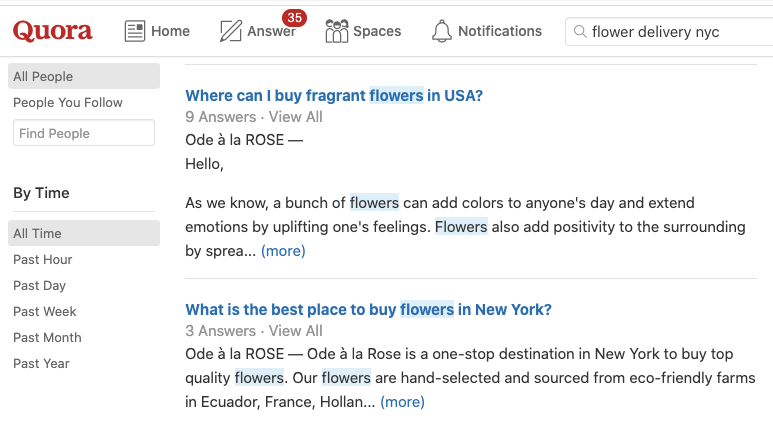
Quora keywords search

It is a widely known method to search for keywords. However, if you see that it takes a lot of time to check thoroughly online communities, maybe it worths investing more time into the 5 above-mentioned methods. I use Quora, Linkedin, and Facebook to check design-related topics users discuss online.

How to Analyze and Select the Right Keywords

Once you’ve collected enough keyword ideas for your blog it is the right time to decide what keywords would provide the best outcome. Here is how I check the keyword potential via Ahrefs. Similar steps could be performed if you utilize other tools, such as Semrush, Moz.

1. Check the keyword monthly volume and the keyword difficulty

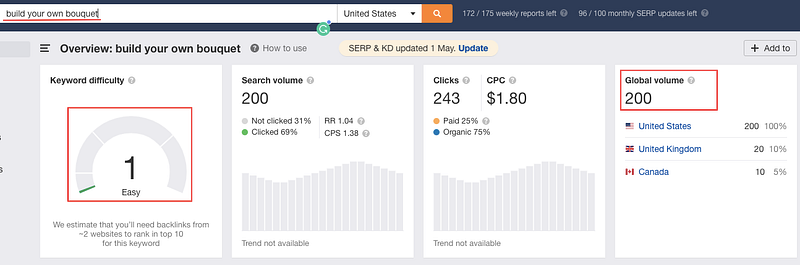
Here is an example with the keyword we have discovered earlier “build your own bouquet”. You can see that the monthly volume for the USA is 200 searchers, while the keyword difficulty is very low 1/100. This information already gives an estimate that this is a keyword with a low competition that your business could potentially target and rank for easily.

The smaller the keyword difficulty, the lower the competition level is for your keyword. Ahrefs estimates are not 100% reliable. However, I managed to bring some blog pages with long-tail keywords to the Google top 10 results following the logic explained here.
2. Check how competitive your keyword is

In particular, check the DR (Domain authority), the number of referring domains, backlinks, as well as the number of keywords the website or a page ranks for. It is needed to estimate what is already in Google’s top results and how difficult it would be for your site to get there. Here is how it looks for our keyword:
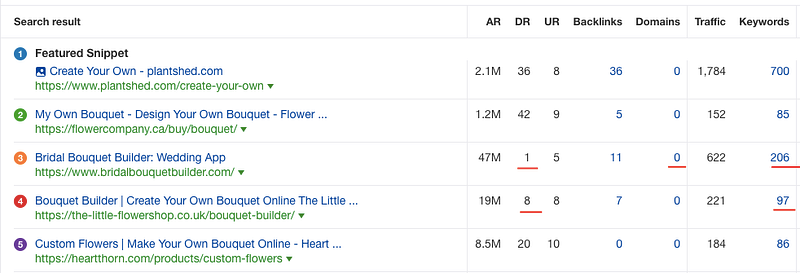
The websites on the 3rd and 4th positions have a very low domain authority, 1/100, 8/100, which gives an assumption that a well-optimized page with a few backlinks would work here.

I would also suggest to check the titles for websites in SERP top 10. Your title needs to be different and much more clickbait than what is already available in Google, otherwise, you risk having a poor CTR and, as a result, poor traffic flow to your website.

Follow these 2 essential steps to discover the best keyword ideas for your site. If you have multiple keywords to check, write them in bulk and let Ahrefs check all of them at once.

Most of the online market niches are already saturated and it is incredibly difficult to rank for transactional keywords. However, there is always a way to search for less competitive, long-tail keywords, which is a perfect solution to kick-off your online business.

Dedicate some time for keyword research, analyze the obtained keyword ideas, create relevant content, and start conquering Google top 10 results. It takes 2–6 months to see the first results of your work, so be patient and keep working on your project. Good luck!

Blogging
Marketing
Keyword Research
Business
Startup
Recommended from ReadMedium