avatarAniket Hingane | Day Manager, Night Coder

Free AI web copilot to create summaries, insights and extended knowledge, download it at here

7833

Abstract

an>: [<span class="hljs-string">"Calculus"</span>, <span class="hljs-string">"Linear Algebra"</span>], <span class="hljs-string">"Differential Equations"</span>: [<span class="hljs-string">"Calculus"</span>, <span class="hljs-string">"Linear Algebra"</span>], <span class="hljs-string">"History"</span>: [], <span class="hljs-string">"Geography"</span>: [], <span class="hljs-string">"World Cultures"</span>: [<span class="hljs-string">"History"</span>, <span class="hljs-string">"Geography"</span>], .........................</pre></div><h2 id="390b">Data Loading and Preparation</h2><div id="4ed6"><pre>def load_courses_from_json(file_path): with <span class="hljs-keyword">open</span>(file_path, <span class="hljs-string">'r'</span>) <span class="hljs-keyword">as</span> file: <span class="hljs-keyword">data</span> = json.load(file) <span class="hljs-keyword">return</span> <span class="hljs-keyword">data</span>.<span class="hljs-keyword">get</span>(<span class="hljs-string">'courses'</span>, {})</pre></div><p id="c3a0">Reads course data from a structured JSON file. This data includes course names and their respective prerequisites. (as seen from Data Structure above)</p><h2 id="9283">Creating a Graph Structure Using NetworkX</h2><div id="0026"><pre> <span class="hljs-comment"># Create dummy course data using NetworkX</span> <span class="hljs-string">G</span> <span class="hljs-string">=</span> <span class="hljs-string">nx.DiGraph()</span> <span class="hljs-string">for</span> <span class="hljs-string">course,</span> <span class="hljs-string">prereqs</span> <span class="hljs-string">in</span> <span class="hljs-string">courses.items():</span> <span class="hljs-attr">for prereq in prereqs:</span> <span class="hljs-string">G.add_edge(prereq,</span> <span class="hljs-string">course)</span></pre></div><p id="92c1"><code>G = nx.DiGraph()</code></p><ul><li>This line lays the foundation for representing our course data. It initializes an object <code>G</code> as a directed graph (<code>DiGraph</code>) from the NetworkX library. Directed graphs are perfect here because course prerequisites have a clear direction (course A must be taken before course B).</li></ul><p id="de9c"><code>for course, prereqs in courses.items(): ...</code></p><ul><li>This line starts a loop to iterate through the course data that was loaded from the JSON file. The <code>courses</code> structure looks like a dictionary where:</li><li><b>Keys:</b> Individual course names</li><li><b>Values:</b> A list of prerequisite course names for that courses</li></ul><p id="3420"><code>for prereq in prereqs: ...</code></p><ul><li>This nested loop focuses on each prerequisite (<code>prereq</code>) listed for a specific <code>course</code>.</li></ul><p id="7b47"><code>G.add_edge(prereq, course)</code></p><ul><li>Here’s where the graph structure takes shape. For each prerequisite-course relationship found in the data, an edge is added to the graph <code>G</code>. The edge direction is crucial – it points from the prerequisite (<code>prereq</code>) to the dependent course (<code>course</code>).</li></ul><h2 id="0fc4">Interacting with Neo4j Graph Database</h2><div id="d2ef"><pre><span class="hljs-comment"># Function to convert NetworkX graph to Neo4j</span> <span class="hljs-keyword">def</span> <span class="hljs-title function_">networkx_to_neo4j</span>(<span class="hljs-params">graph, driver</span>): <span class="hljs-keyword">with</span> driver.session() <span class="hljs-keyword">as</span> session: session.run(<span class="hljs-string">"MATCH (n) DETACH DELETE n"</span>) <span class="hljs-keyword">for</span> node <span class="hljs-keyword">in</span> graph.nodes: session.run(<span class="hljs-string">"CREATE (:Course {name: name})"</span>, name=node) <span class="hljs-keyword">for</span> edge <span class="hljs-keyword">in</span> graph.edges: session.run(<span class="hljs-string">""" MATCH (c1:Course {name: course1}), (c2:Course {name: $course2}) CREATE (c1)-[:PREREQUISITE]->(c2) """</span>, course1=edge[<span class="hljs-number">0</span>], course2=edge[<span class="hljs-number">1</span>])</pre></div><p id="0c8f">Takes a graph structure (from NetworkX) and converts it into a format that the Neo4j database can understand. This is how we represent the courses and their dependencies within Neo4j.</p><h2 id="5bbd">Core Logic: Topological Sorting with Neo4j</h2><div id="a8fb"><pre><span class="hljs-comment"># Function to run topological sort algorithm using GDS</span> <span class="hljs-keyword">def</span> <span class="hljs-title function_">run_topological_sort</span>(): <span class="hljs-comment"># Connect to Neo4j</span> driver = GraphDatabase.driver(uri, auth=(user, password))

<span class="hljs-comment"># Cypher query to project the graph for topological sorting</span>
query_project_graph = <span class="hljs-string">"""
CALL gds.graph.project(
  'courseGraph', 
  'Course',
  {
    PREREQUISITE: {
      type: 'PREREQUISITE',
      orientation: 'NATURAL'
    }
  }
)
"""</span>

<span class="hljs-comment"># Cypher query to run topological sort algorithm and calculate distance from source</span>
query_topological_sort = <span class="hljs-string">"""
CALL gds.dag.topologicalSort.stream(
  'courseGraph',
  {
    relationshipTypes: ['PREREQUISITE'], 
    computeMaxDistanceFromSource: true
  }
)
YIELD nodeId, maxDistanceFromSource
WITH nodeId, maxDistanceFromSource
MATCH (course:Course) WHERE id(course) = nodeId
RETURN course.name AS course, maxDistanceFromSource
"""</span>

<span class="hljs-keyword">with</span> driver.session() <span class="hljs-keyword">as</span> session:
    <span class="hljs-comment"># Delete any existing projected graph</span>
    session.run(<span class="hljs-string">"CALL gds.graph.drop('courseGraph', false)"</span>)

    <span class="hljs-comment"># Create the graph for topological sorting</span>
    session.run(query_project_graph)

    <span class="hljs-comment"># Execute topological sort algorithm and calculate distance from source</span>
    result = session.run(query_topological_sort)

    <span class="hljs-comment"># Store the results in a list</span>
    result_list = <span class="hljs-built_in">list</span>(result)

    <span class="hljs-comment"># Print sorted sequence of courses with maxDistanceFromSource</span>
    <span class="hljs-built_in">print</span>(<span class="hljs-string">"Topological Sort Order:"</span>)
    <span class="hljs-keyword">for</span> record <span class="hljs-keyword">in</span> result_list:
        course = record[<span class="hljs-string">'course'</span>]
        <span class="hljs-built_in">print</span>(<span class="hljs-string">f"Course: <span class="hljs-subst">{course}</span>, Max Distance from Source: <span class="hljs-subst">{record[<span class="hljs-string">'maxDistanceFromSource'</span>]}</span>"</span>)

    <span class="hljs-comment"># Create a Network object</span>
    network = Network(notebook=<span class="hljs-literal">False</span>)

    <span class="hljs-comment"># Add nodes and keep track of added nodes</span>
    added_nodes = <span class="hljs-built_in">set</span>()
    <span class="hljs-keyword">for</span> record <span class="hljs-keyword">in</span> result_list:
        <span class="hljs-built_in">print</span>(<span class="hljs-string">"in result for loop"</span>)
        course = record[<span class="hljs-string">'course'</span>]
        <span class="hljs-keyword">if</span> <span class="hljs-keyword">not</span> co

Options

urse: <span class="hljs-built_in">print</span>(<span class="hljs-string">"Empty course name found in record:"</span>, record) <span class="hljs-keyword">else</span>: course_lower = course.lower() <span class="hljs-comment"># Convert to lowercase</span> <span class="hljs-keyword">if</span> course <span class="hljs-keyword">not</span> <span class="hljs-keyword">in</span> added_nodes: <span class="hljs-comment"># Check if node already added</span> network.add_node(course_lower) <span class="hljs-comment"># Add node to the graph</span> added_nodes.add(course_lower) <span class="hljs-comment"># Update set of added nodes</span> <span class="hljs-built_in">print</span>(<span class="hljs-string">"Added node:"</span>, course_lower) <span class="hljs-comment"># Debug print</span> <span class="hljs-keyword">else</span>: <span class="hljs-built_in">print</span>(<span class="hljs-string">"Course already added:"</span>, course_lower) <span class="hljs-built_in">print</span>(<span class="hljs-string">"Current added nodes:"</span>, added_nodes) <span class="hljs-comment"># Print current set of added nodes</span>

    <span class="hljs-comment"># Add edges based on relationships in the graph</span>
    query_get_edges = <span class="hljs-string">"""
    MATCH (source)-[:PREREQUISITE]-&gt;(target)
    RETURN source.name AS source, target.name AS target
    """</span>
    edges = session.run(query_get_edges)
    <span class="hljs-keyword">for</span> edge <span class="hljs-keyword">in</span> edges:
        source = edge[<span class="hljs-string">'source'</span>].lower()  <span class="hljs-comment"># Convert to lowercase</span>
        target = edge[<span class="hljs-string">'target'</span>].lower()  <span class="hljs-comment"># Convert to lowercase</span>

        <span class="hljs-keyword">if</span> source <span class="hljs-keyword">in</span> added_nodes <span class="hljs-keyword">and</span> target <span class="hljs-keyword">in</span> added_nodes:  <span class="hljs-comment"># Check if both nodes exist</span>
            network.add_edge(source, target)  <span class="hljs-comment"># Add edge to the graph</span>
            <span class="hljs-built_in">print</span>(<span class="hljs-string">f"Adding edge: <span class="hljs-subst">{source}</span> -&gt; <span class="hljs-subst">{target}</span>"</span>)  <span class="hljs-comment"># Debug print</span>
        <span class="hljs-keyword">else</span>:
            <span class="hljs-built_in">print</span>(<span class="hljs-string">f"Ignoring edge: <span class="hljs-subst">{source}</span> -&gt; <span class="hljs-subst">{target}</span>"</span>)  <span class="hljs-comment"># Debug print</span>

    <span class="hljs-comment"># Print out nodes and edges data for debugging</span>
    <span class="hljs-built_in">print</span>(<span class="hljs-string">"Nodes:"</span>, network.get_nodes())
    <span class="hljs-built_in">print</span>(<span class="hljs-string">"Edges:"</span>, network.get_edges())

    <span class="hljs-comment"># Save the graph to an HTML file</span>
    graph_html_file = <span class="hljs-string">'sorted_courses_graph.html'</span>
    network.save_graph(graph_html_file)
    <span class="hljs-built_in">print</span>(<span class="hljs-string">f"Sorted courses graph exported to '<span class="hljs-subst">{graph_html_file}</span>'"</span>)

    <span class="hljs-built_in">print</span>(<span class="hljs-string">f"Graph exported to '<span class="hljs-subst">{graph_html_file}</span>'"</span>)

    <span class="hljs-comment"># Open the HTML file in a web browser</span>
    webbrowser.open_new_tab(graph_html_file)</pre></div><h2 id="afb1">This is where the magic happens! Key steps include:</h2><ul><li><b>Connecting to Neo4j:</b> Establishes a connection to the graph database.</li><li><b>Preparing the Graph:</b> Cypher queries are used to create a special view of the data tailored for topological sorting.</li><li><b>Topological Sorting:</b> Neo4j’s Graph Data Science (GDS) library executes the topological sort algorithm, determining the ideal order of courses.</li><li><b>Calculating Distance:</b> The algorithm calculates how far (in terms of prerequisites) each course is from a starting point.</li><li><b>Sorting and Printing:</b> The function neatly presents the sorted course list and their distances.</li></ul><h1 id="56e7">How to run it</h1><p id="cc88"><a href="https://github.com/aniket-work/Topological_Sort_In_Graph/blob/main/README.md">Copy from</a></p><figure id="b43d"><img src="https://cdn-images-1.readmedium.com/v2/resize:fit:800/1*RvvYCh9edRim6hNth3dvQg.png"><figcaption></figcaption></figure><h2 id="e36b">Execution Result</h2><figure id="1ee5"><img src="https://cdn-images-1.readmedium.com/v2/resize:fit:800/1*lu60xxmN0STUy_i3OHwQfw.gif"><figcaption></figcaption></figure><h2 id="47de">Visualizing the Results</h2><figure id="52bc"><img src="https://cdn-images-1.readmedium.com/v2/resize:fit:800/1*T-ieNzhyV2EtfHLeMEOpLg.png"><figcaption></figcaption></figure><p id="7584">I like and used, PyVis library to create a visual representation of the course dependencies. Key steps include:</p><ul><li><b>Building the Graph:</b> The sorted course data and prerequisite relationships are added to a Network object.</li><li><b>Handling Duplicates:</b> The code ensures only unique courses are added to the visualization, making it cleaner.</li><li><b>Exporting the Graph:</b> Saves the graph as an HTML file, so it can be easily viewed in a web browser.</li></ul><h1 id="9bdd">So what we achieved</h1><p id="b930">we have successfully implemented a topological sort algorithm to order university courses in a sequence that satisfies all prerequisites. The key achievements are:</p><ol><li>Foundation Courses Identified: Courses with a distance of 0.0 from the source represent foundational or introductory courses that do not have any prerequisites. <b>Examples </b>include Business Ethics, Political Science, Anatomy and Physiology, and Intro to Programming. These courses can be taken first, as they do not require any prior knowledge.</li><li>Course Dependencies Revealed: Courses with a higher distance from the source are those that have prerequisites. <b>For instance</b>, Corporate Finance has a distance of 2.0, indicating that it has at least one prerequisite course that itself may have another prerequisite.</li><li>Optimal Sequence Determined: By sorting the courses based on their maximum distance from the source, we have obtained an optimal sequence in which courses should be taken to ensure that all prerequisites are satisfied. Students can follow this sequence to plan their academic journey efficiently, avoiding potential conflicts or delays caused by missing prerequisites.</li><li>Visual Representation: In addition to the sorted list, we have created a visual graph representation of the course dependencies, making it easier to understand the relationships between courses and identify prerequisite chains.</li></ol><h1 id="31da">Closing Thoughts</h1><p id="7b9d">As we wrap up our exploration of college class sorting, remember that technology is here to make our lives easier. With a little math and some clever coding, we can turn a daunting task into a breeze. So next time you’re planning your class schedule, don’t stress — let technology do the hard work for you.</p><p id="9dba"><b><i>I hope you enjoyed this article! stay informed and inspired, consider follow me and subscribing to email notification. Stay updated with the latest articles, tips, and insights delivered straight to your inbox.</i></b></p></article></body>

Graph + AI : How I build Graph-Powered Journey Thr’ University’s Academic Universe

Topological Sort Algorithm | The AI That Knows Your Major
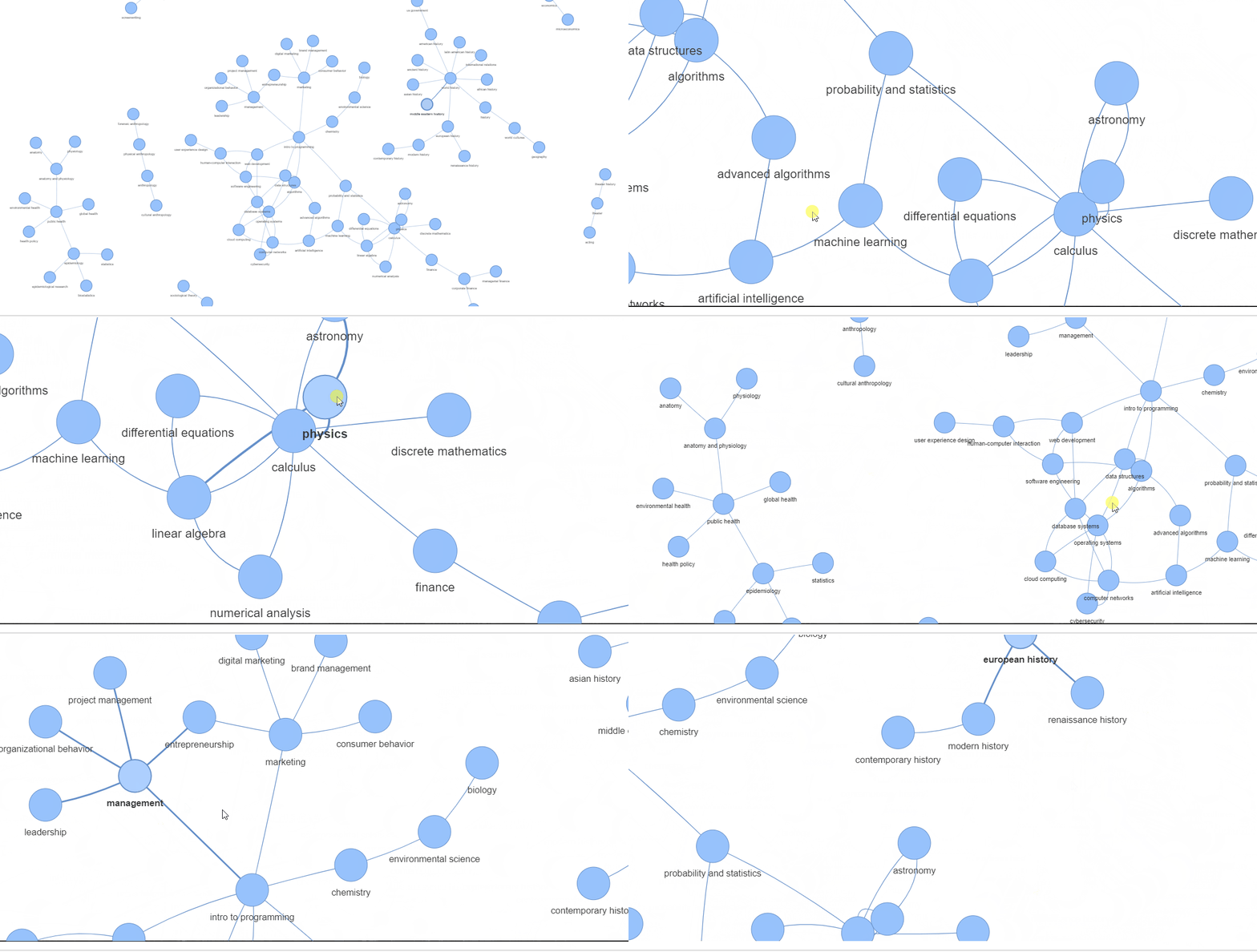
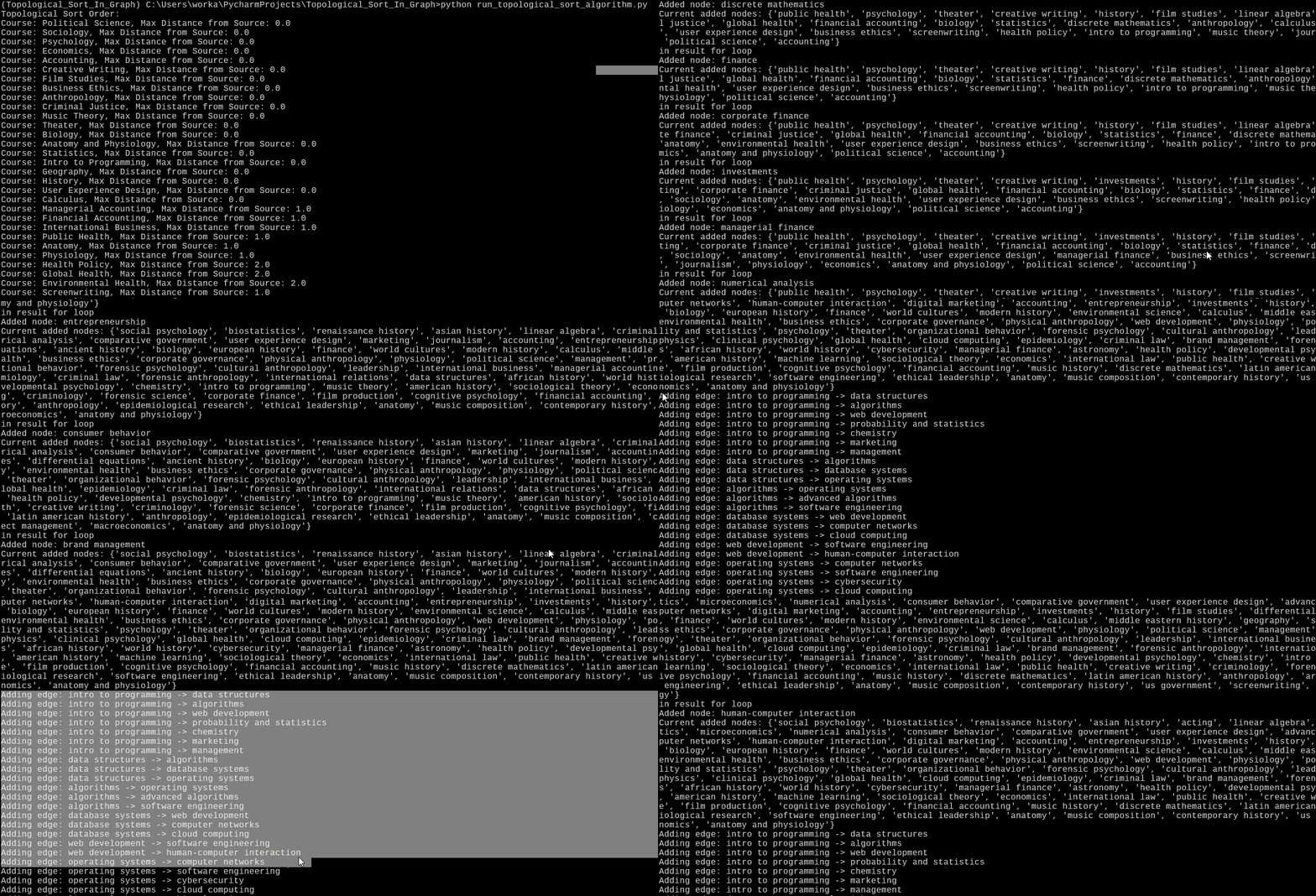
By code in this project, to showcase Topological Sort Algorithm

What is this Article about

This article delves into a cool project using the power of graphs and AI to navigate the maze of course dependencies. But it’s not just about school/college! The same concepts we’re exploring apply to many crucial real-world situations, like network routing, supply-chain management, retails/manufacturing, software compilations etc.

It’s about a little tech magic called “topological sorting” Algorithm. It’s basically a smart way for a computer to figure out the best order to tackle things that depend on each other (like some university courses we chose Today).

Why Read It

  • Tech enthusiasts: Get a peek at how graphs (think networks of connections) and AI collaborate to solve real-world problems.
  • Curious minds: Explore a creative application of tech concepts outside of mainstream examples.
  • Learner: Discover how to visualize and streamline your academic progression! This could change how you plan out your degree.

The Problem

University course catalogs can be vast and confusing. Understanding the prerequisites and dependencies between courses can turn into a giant headache, especially when planning your degree path across multiple semesters.

The Solution

Imagine having a visual representation of the entire academic universe, where every course is a node, and the prerequisites are the edges connecting them. This is precisely what I’ve achieved by combining the might of graphs and AI. With a few lines of Python code, I can load course data, construct a NetworkX graph, and seamlessly transfer it to a Neo4j graph database.

But that’s just the beginning. The true magic happens when I unleash the power of the GDS library’s topological sort algorithm. This ingenious approach analyzes the graph, identifying the optimal sequence of courses while calculating the distance from the source (i.e., the foundational courses). The result? A beautifully sorted list of courses, each accompanied by its maximum distance from the starting point, providing you with an instant roadmap through the academic labyrinth.

Why You Can’t Miss This

This article isn’t just about math and computer tricks; it’s your gateway to unlocking the secrets of solving real-world problems with cutting-edge technology — and we’re making it fun and easy! While sorting university courses might seem straightforward, the true power of these techniques shines when we apply them to complex, real-world business challenges. So buckle up and get ready to witness the transformative potential of smart math and computer wizardry in action.

Let’s Go !

Alright, time to dive into the fun part! We’re going to use our fancy algorithm to sort through all the college classes and make sense of their relationships. Get ready for a journey through the world of college courses, simplified just for you.

High level Execution

  • Data Loading: Loads the JSON course data.
  • Graph Creation: Creates an initial graph representation (using NetworkX) for later conversion to Neo4j.
  • Neo4j Interaction: Calls the functions to load data into Neo4j.
  • Topological Sort: Executes the core sorting logic using Neo4J “Graph Data Science” lib
  • Visualization : Uses PyVis library to create a visual representation of the course dependencies

Let’s get Cooking !

Our Data Structure

{
    "courses": {
        "Intro to Programming": [],
        "Data Structures": ["Intro to Programming"],
        "Algorithms": ["Data Structures", "Intro to Programming"],
        "Database Systems": ["Data Structures"],
        "Web Development": ["Database Systems", "Intro to Programming"],
        "Operating Systems": ["Data Structures", "Algorithms"],
        "Machine Learning": ["Linear Algebra", "Probability and Statistics"],
        "Advanced Algorithms": ["Algorithms"],
        "Computer Networks": ["Operating Systems", "Database Systems"],
        "Software Engineering": ["Algorithms", "Web Development", "Operating Systems"],
        "Cybersecurity": ["Computer Networks", "Operating Systems"],
        "Artificial Intelligence": ["Machine Learning", "Advanced Algorithms", "Computer Networks"],
        "Cloud Computing": ["Database Systems", "Operating Systems", "Computer Networks"],
        "Human-Computer Interaction": ["Web Development", "User Experience Design", "Software Engineering"],
        "Calculus": [],
        "Linear Algebra": ["Calculus"],
        "Probability and Statistics": ["Calculus", "Intro to Programming"],
        "Discrete Mathematics": ["Calculus"],
        "Numerical Analysis": ["Calculus", "Linear Algebra"],
        "Differential Equations": ["Calculus", "Linear Algebra"],
        "History": [],
        "Geography": [],
        "World Cultures": ["History", "Geography"],
.........................

Data Loading and Preparation

def load_courses_from_json(file_path):
    with open(file_path, 'r') as file:
        data = json.load(file)
        return data.get('courses', {})

Reads course data from a structured JSON file. This data includes course names and their respective prerequisites. (as seen from Data Structure above)

Creating a Graph Structure Using NetworkX

 # Create dummy course data using NetworkX
    G = nx.DiGraph()
    for course, prereqs in courses.items():
        for prereq in prereqs:
            G.add_edge(prereq, course)

G = nx.DiGraph()

  • This line lays the foundation for representing our course data. It initializes an object G as a directed graph (DiGraph) from the NetworkX library. Directed graphs are perfect here because course prerequisites have a clear direction (course A must be taken before course B).

for course, prereqs in courses.items(): ...

  • This line starts a loop to iterate through the course data that was loaded from the JSON file. The courses structure looks like a dictionary where:
  • Keys: Individual course names
  • Values: A list of prerequisite course names for that courses

for prereq in prereqs: ...

  • This nested loop focuses on each prerequisite (prereq) listed for a specific course.

G.add_edge(prereq, course)

  • Here’s where the graph structure takes shape. For each prerequisite-course relationship found in the data, an edge is added to the graph G. The edge direction is crucial – it points from the prerequisite (prereq) to the dependent course (course).

Interacting with Neo4j Graph Database

# Function to convert NetworkX graph to Neo4j
def networkx_to_neo4j(graph, driver):
    with driver.session() as session:
        session.run("MATCH (n) DETACH DELETE n")
        for node in graph.nodes:
            session.run("CREATE (:Course {name: $name})", name=node)
        for edge in graph.edges:
            session.run("""
            MATCH (c1:Course {name: $course1}), (c2:Course {name: $course2})
            CREATE (c1)-[:PREREQUISITE]->(c2)
            """, course1=edge[0], course2=edge[1])

Takes a graph structure (from NetworkX) and converts it into a format that the Neo4j database can understand. This is how we represent the courses and their dependencies within Neo4j.

Core Logic: Topological Sorting with Neo4j

# Function to run topological sort algorithm using GDS
def run_topological_sort():
    # Connect to Neo4j
    driver = GraphDatabase.driver(uri, auth=(user, password))

    # Cypher query to project the graph for topological sorting
    query_project_graph = """
    CALL gds.graph.project(
      'courseGraph', 
      'Course',
      {
        PREREQUISITE: {
          type: 'PREREQUISITE',
          orientation: 'NATURAL'
        }
      }
    )
    """

    # Cypher query to run topological sort algorithm and calculate distance from source
    query_topological_sort = """
    CALL gds.dag.topologicalSort.stream(
      'courseGraph',
      {
        relationshipTypes: ['PREREQUISITE'], 
        computeMaxDistanceFromSource: true
      }
    )
    YIELD nodeId, maxDistanceFromSource
    WITH nodeId, maxDistanceFromSource
    MATCH (course:Course) WHERE id(course) = nodeId
    RETURN course.name AS course, maxDistanceFromSource
    """

    with driver.session() as session:
        # Delete any existing projected graph
        session.run("CALL gds.graph.drop('courseGraph', false)")

        # Create the graph for topological sorting
        session.run(query_project_graph)

        # Execute topological sort algorithm and calculate distance from source
        result = session.run(query_topological_sort)

        # Store the results in a list
        result_list = list(result)

        # Print sorted sequence of courses with maxDistanceFromSource
        print("Topological Sort Order:")
        for record in result_list:
            course = record['course']
            print(f"Course: {course}, Max Distance from Source: {record['maxDistanceFromSource']}")

        # Create a Network object
        network = Network(notebook=False)

        # Add nodes and keep track of added nodes
        added_nodes = set()
        for record in result_list:
            print("in result for loop")
            course = record['course']
            if not course:
                print("Empty course name found in record:", record)
            else:
                course_lower = course.lower()  # Convert to lowercase
                if course not in added_nodes:  # Check if node already added
                    network.add_node(course_lower)  # Add node to the graph
                    added_nodes.add(course_lower)  # Update set of added nodes
                    print("Added node:", course_lower)  # Debug print
                else:
                    print("Course already added:", course_lower)
            print("Current added nodes:", added_nodes)  # Print current set of added nodes

        # Add edges based on relationships in the graph
        query_get_edges = """
        MATCH (source)-[:PREREQUISITE]->(target)
        RETURN source.name AS source, target.name AS target
        """
        edges = session.run(query_get_edges)
        for edge in edges:
            source = edge['source'].lower()  # Convert to lowercase
            target = edge['target'].lower()  # Convert to lowercase

            if source in added_nodes and target in added_nodes:  # Check if both nodes exist
                network.add_edge(source, target)  # Add edge to the graph
                print(f"Adding edge: {source} -> {target}")  # Debug print
            else:
                print(f"Ignoring edge: {source} -> {target}")  # Debug print

        # Print out nodes and edges data for debugging
        print("Nodes:", network.get_nodes())
        print("Edges:", network.get_edges())

        # Save the graph to an HTML file
        graph_html_file = 'sorted_courses_graph.html'
        network.save_graph(graph_html_file)
        print(f"Sorted courses graph exported to '{graph_html_file}'")

        print(f"Graph exported to '{graph_html_file}'")

        # Open the HTML file in a web browser
        webbrowser.open_new_tab(graph_html_file)

This is where the magic happens! Key steps include:

  • Connecting to Neo4j: Establishes a connection to the graph database.
  • Preparing the Graph: Cypher queries are used to create a special view of the data tailored for topological sorting.
  • Topological Sorting: Neo4j’s Graph Data Science (GDS) library executes the topological sort algorithm, determining the ideal order of courses.
  • Calculating Distance: The algorithm calculates how far (in terms of prerequisites) each course is from a starting point.
  • Sorting and Printing: The function neatly presents the sorted course list and their distances.

How to run it
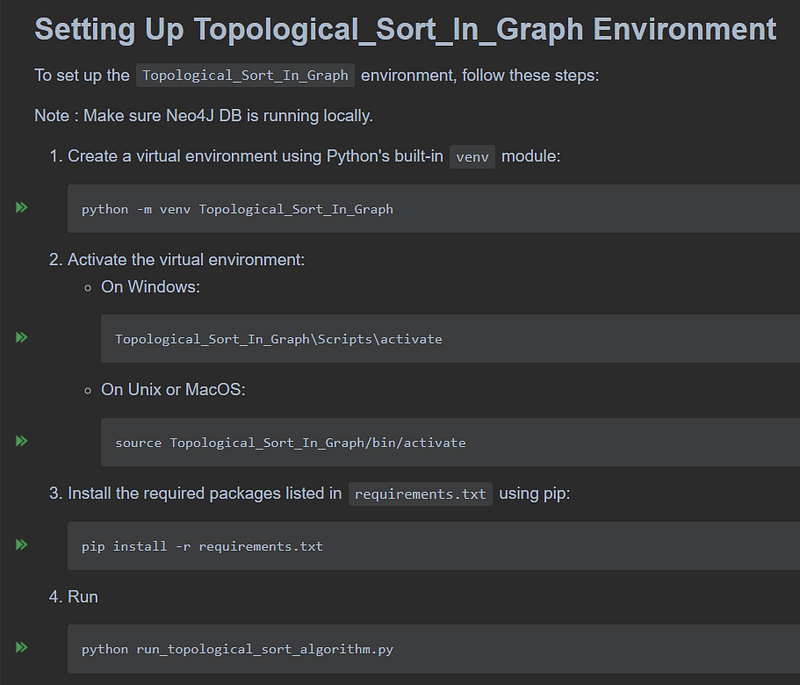
Copy from

Execution Result

Visualizing the Results
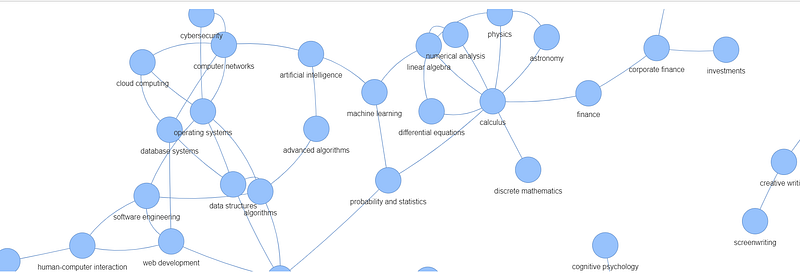
I like and used, PyVis library to create a visual representation of the course dependencies. Key steps include:

  • Building the Graph: The sorted course data and prerequisite relationships are added to a Network object.
  • Handling Duplicates: The code ensures only unique courses are added to the visualization, making it cleaner.
  • Exporting the Graph: Saves the graph as an HTML file, so it can be easily viewed in a web browser.

So what we achieved

we have successfully implemented a topological sort algorithm to order university courses in a sequence that satisfies all prerequisites. The key achievements are:

  1. Foundation Courses Identified: Courses with a distance of 0.0 from the source represent foundational or introductory courses that do not have any prerequisites. Examples include Business Ethics, Political Science, Anatomy and Physiology, and Intro to Programming. These courses can be taken first, as they do not require any prior knowledge.
  2. Course Dependencies Revealed: Courses with a higher distance from the source are those that have prerequisites. For instance, Corporate Finance has a distance of 2.0, indicating that it has at least one prerequisite course that itself may have another prerequisite.
  3. Optimal Sequence Determined: By sorting the courses based on their maximum distance from the source, we have obtained an optimal sequence in which courses should be taken to ensure that all prerequisites are satisfied. Students can follow this sequence to plan their academic journey efficiently, avoiding potential conflicts or delays caused by missing prerequisites.
  4. Visual Representation: In addition to the sorted list, we have created a visual graph representation of the course dependencies, making it easier to understand the relationships between courses and identify prerequisite chains.

Closing Thoughts

As we wrap up our exploration of college class sorting, remember that technology is here to make our lives easier. With a little math and some clever coding, we can turn a daunting task into a breeze. So next time you’re planning your class schedule, don’t stress — let technology do the hard work for you.

I hope you enjoyed this article! stay informed and inspired, consider follow me and subscribing to email notification. Stay updated with the latest articles, tips, and insights delivered straight to your inbox.

Graph
Artificial Intelligence
Algorithms
Graphdb
System Design Interview
Recommended from ReadMedium