
Google’s Gemma vs Microsoft’s Phi-2 vs Mistral on Summarisation

TL;DR: I’m investigating whether smaller open-source models can provide effective dialogue summarization, a key feature in my medical AI project, Omi. While they don’t have the vast resources of models like GPT-4, these small alternatives could offer specialized, cost-effective solutions for specific tasks like summarising dialogues, which in a clinical setting could potentially save clinicians hours each day.
AI advancements are outpacing Shinkansen bullet-trains. I closely track these developments, especially how open-source models are catching up to giants like OpenAI’s GPT-4. Yet, I remain skeptical that open-source can match the scale of trillion-parameter giants requiring billion-dollar business models. Despite this, open-source models excel in niche areas, using far fewer parameters to reduce energy use and environmental impact. They’ve outperformed GPT-3.5 and sometimes approached GPT-4 levels in specific tasks. This leads me to wonder: How well do these smaller open-source models perform in dialogue summarization?
Why Summarization?
I’m pursuing the question of summarization because I recently launched Omi: Open Medical Intelligence. My aim with Omi is to develop smaller, highly tailored language models for specific medical use cases. Clinicians face a tedious administrative burden, spending more time behind a computer than with patients. The first use-case I want to tackle with Omi is summarizing medical dialogues between clinicians and patients into simple, standardized summaries, which can potentially save clinicians hours each day. While there are many proprietary solutions backed by substantial investments, I was curious whether it is feasible to develop a comparable open-source model. Challenge accepted.
I’ll center my exploration on general dialogue summarization, delving into the models selected, datasets utilized, evaluation metrics, training parameters, and, ultimately, the results. Detailed code will be made accessible via a Colab link, with discussions on medical dialogues reserved for future discussion.
LLM Models
For this exploration, I selected a range of popular open-source models with fewer than 7 billion parameters, focusing on versatility and efficiency. The lineup includes:
- Google’s Gemma 2B and Gemma 7B, in both pretrained and instruction-finetuned variants
- Microsoft’s Phi-2
- Mistral’s 7B instruct
- Flan-T5 in both Large and XL sizes
Additionally, for a comparative perspective, I evaluated three models with medical pre-training:
- Microsoft’s BioGPT
- Stanford’s BioMedLM
- Meditron 7B
Dataset
I utilized the Samsung SamSum dataset, featuring 16,369 “messenger-like” conversations, each accompanied by summaries crafted by linguists. This dataset is publicly available on Huggingface. Here’s a sample entry:
Dialogue:
Lucia: I need my hair cut.
Lucia: When can I come? I've got some time on Thursday and Friday.
Eric: Lucia! My dear!
Eric: Are you sure? After all, you had your hairstyle done a week ago.
Eric: What's the matter? Don't you like it?
Lucia: I like it very much and I regret to lose it.
Lucia: But I'm changing the job and my hair must be shorter…
Eric: I see. You'll tell me everything in detail once you're here, in my beauty salon.
Eric: I suggest Friday at 3 p.m. Is it fine for you?
Lucia: Sure, perfect.
Eric: Fantastic, have a nice day then.
Lucia: Thanks, bye.

Summary:
Lucia needs a new hairstyle due to a change of work and she makes an appointment with Eric for Friday 3 p.m.
Evaluation
Evaluating summarization performance is challenging. To measure performance, I utilize the ROUGE metric, a standard tool in summarization assessment. ROUGE measures the overlap between the words or sequences of words in the generated summary and a reference summary, serving as a proxy for the quality of the generated text. This metric quantifies how much the key information and phrasing of the output align with the expected summary, making it a useful, although imperfect, measure of summarisation effectiveness.
For instance, in the example earlier shared, if a model generates the exact reference summary, the ROUGE score would be 100%, indicating a perfect match. However, if the model produces a variant like, “Lucia needs a new haircut due to a change of occupation and she makes an arrangement with Eric for Friday 3 p.m.,” the essence remains unchanged, but the ROUGE score drops due to variations in wording. This illustrates the metric’s limitation in capturing semantic equivalence beyond exact word matches. Consequently, while useful, ROUGE scores are complemented by qualitative assessments for a fuller evaluation (both by humans as models). Nonetheless, for our analysis, we’ll concentrate on ROUGE scores, comparing them on the SamSum Test dataset (812 examples) before and after model fine-tuning.
Training
I commenced by establishing a baseline ROUGE score for each model using the SamSum Test dataset (812 examples) and fine-tuning further on the Train dataset, consisting of 14.7k examples. Our fine-tuning approach employs QLORA, a parameter-efficient optimization strategy that modifies only a fraction of the model’s parameters through the creation of an adapter layer. This technique is designed to yield results nearly on par with fine-tuning, although with some trade-offs in performance. Only, Flan-T5-Large, with its modest 0.8 billion parameters, was fine-tuned across its entire parameter set.
For computational resources, I alternated between using a Colab instance equipped with a GPU and a dedicated instance on Jarvislabs. QLORA’s 4-bit configuration typically allows for fine-tuning models up to 3 billion parameters on Colab’s T4 or V100 GPUs, which have 16GB of RAM. For larger models or when the need for faster processing and Flash Attention 2 (compatible only with Ampere GPUs) arose, I upgraded to more powerful A5000/A6000 or A100 GPUs on Jarvislabs. Despite encountering some technical challenges, the overall expenditure on computational resources amounted to approximately €50, a figure that, in retrospect, could likely have been reduced by half.
Code
Since I followed code examples shared earlier by others, including from the excellent blogs of PhilSchmid, some code in retrospect might not always make sense and might need some adjustment.
Let’s go through the code step by step
Step 1: Installing necessary libraries
# Install necessary libraries with specific versions to ensure compatibility
!pip install torch==2.1.2 tensorboard rouge_score
!pip install --upgrade datasets==2.16.1 accelerate==0.26.1 evaluate==0.4.1 bitsandbytes==0.42.0
!pip install --upgrade git+https://github.com/huggingface/trl@a3c5b7178ac4f65569975efadc97db2f3749c65e
!pip install --upgrade git+https://github.com/huggingface/peft@4a1559582281fc3c9283892caea8ccef1d6f5a4f
!pip uninstall -y transformers && pip install git+https://github.com/huggingface/transformers
!pip install ninja packaging
!MAX_JOBS=4 pip install flash-attn --no-build-isolation
This block ensures all necessary libraries are installed, with particular attention to version compatibility which is crucial for specific models like Phi-2.
Step 2: Loading the dataset and model
from datasets import load_dataset

# Load the SamSum dataset for training, validation, and testing
dataset = load_dataset("samsum")
train_dataset, validation_dataset, test_dataset = dataset['train'], dataset['validation'], dataset['test']

# Loading the model
import torch
from transformers import AutoModelForCausalLM, BitsAndBytesConfig, AutoTokenizer
from peft import prepare_model_for_kbit_training

model_id = "google/gemma-7b"

# Configure model for 4-bit quantization
bnb_config = BitsAndBytesConfig(
    load_in_4bit=True,
    bnb_4bit_quant_type="nf4",
    bnb_4bit_use_double_quant=True,
    bnb_4bit_compute_dtype=torch.bfloat16
)

# Load the model with the specified quantization configuration
model = AutoModelForCausalLM.from_pretrained(
    model_id,
    quantization_config=bnb_config,
    use_cache=False,
    device_map="auto",
    trust_remote_code=True,
    attn_implementation="flash_attention_2"
)

# Prepare the model for k-bit training and load tokenizer
model = prepare_model_for_kbit_training(model)
tokenizer = AutoTokenizer.from_pretrained(model_id)
tokenizer.pad_token = tokenizer.eos_token  # Ensure padding token is correctly set
tokenizer.padding_side = "right"  # Set padding side to right for consistency
This code first loads the SamSum dataset, separating it into training, validation, and testing sets for the models’ evaluation and fine-tuning processes. And then focuses on loading the Gemma-7b model, configuring it for 4-bit quantization to enhance efficiency, and preparing it for k-bit training. The tokenizer is also configured, setting the padding token and side for consistent text processing.
Step 3: Formatting the Prompt
# Prompt formatter
def prompt_formatter(sample):
return f"""<s>### Instruction:
You are a helpful, respectful and honest assistant. \
Your task is to summarize the following dialogue in a concise way. \
Your answer should be based on the provided dialogue only.
### Dialogue:
{sample['dialogue']}
### Summary:
{sample['summary']} </s>"""
n = 0
print(prompt_formatter(train_dataset[n]))
This function formats the input for the model, providing clear instructions, the dialogue to summarize, and the expected summary format. It’s a crucial step for preparing the data for model training. And will be used during training as a SFTTrainer variable.
Step 4: Configuring and Training the Model
Before setting the training variables for PEFT, have look at the Linear layers that should be defined as the target_modules by running:
print(model)Then load the PEFT model
from peft import LoraConfig, get_peft_model

# the QLoRA paper recommends LoRA dropout = 0.05 for small models (less than 13B)

peft_config = LoraConfig(
target_modules=[
"q_proj",
"k_proj",
"v_proj",
"o_proj",
"gate_proj",
"up_proj",
"down_proj",
"lm_head",
],
lora_alpha=16,
lora_dropout=0.05,
r=8,
bias="none",
task_type="CAUSAL_LM",
)
model = get_peft_model(model, peft_config)
Finally, we’ll set the training and trainer variables:
from transformers import TrainingArguments
from trl import SFTTrainer

# set up the trainer
args = TrainingArguments(
output_dir="gemma7b-samsum",
num_train_epochs=1,
per_device_train_batch_size=4,
gradient_accumulation_steps=2,
logging_steps=4,
save_strategy="epoch",
learning_rate=2e-4,
optim="paged_adamw_32bit",
bf16=True, # make sure this works with your GPU, otherwise set to False and choose fp16 = True
fp16=False,
tf32=True, # make sure this works with your GPU, otherwise set to False and choose fp16 = True
max_grad_norm=0.3,
warmup_ratio=0.03,
lr_scheduler_type="constant",
disable_tqdm=False,
)

trainer = SFTTrainer(
model=model,
train_dataset=train_dataset,
peft_config=peft_config,
max_seq_length=1024,
tokenizer=tokenizer,
packing=True,
formatting_func=prompt_formatter,
args=args,
)
Finally, let’s start the magic
trainer.train()
For further details on measuring Rouge scores and additional steps, please refer to the provided Colab link for a comprehensive guide.
You can find the full code in this Colab Notebook link, for the for the Causal models (Gemma, Phi-2, Mistral, etc).
For the Flan-T5 models I would suggest to have a look at this excellent blog from Phil Schmid, where he explains his steps in finetuning Flan-T5 with SamSum.
Results
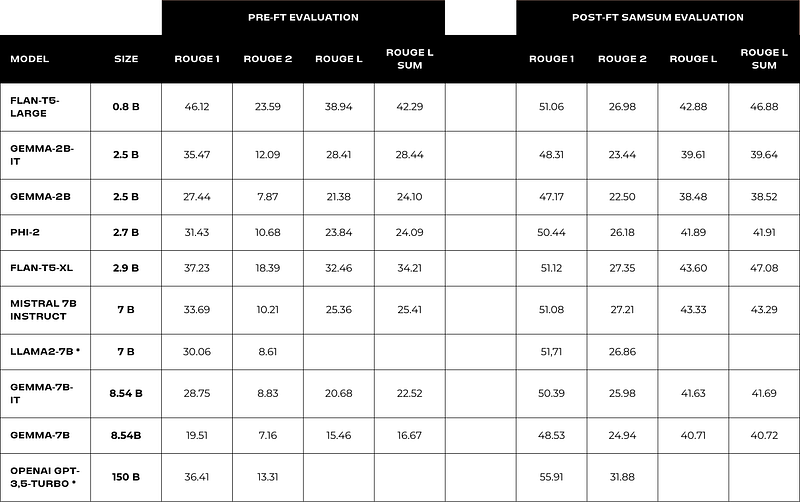
In examining the comparative performance of the Gemma, Phi-2, and Mistral models as illustrated in the attached table, it becomes evident that Phi-2 consistently delivers great outcomes relative to its parameter size. Notably, Flan-T5-Large, which undergoes training with full parameters — as opposed to the QLORA-trained counterparts — exhibits great proficiency for its size. This proficiency may be partly attributed to its inherent seq-to-seq model structure, which is typically more adept at summarization tasks. Additionally, the impressive pre-finetuning results may stem from Google’s intensive instruct-based fine-tuning of the model.
It is important to note that, in the interest of rapid prototyping, these models were subjected to training for only a single epoch. It is plausible that extended training durations could further enhance performance. However, amidst all models evaluated, Phi-2 stands out as particularly promising due to its good performance, compact size, and favorable licensing terms.
Results of medically trained models
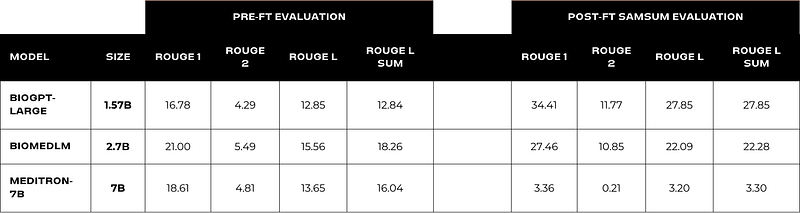
The data presented here indicates a generally underwhelming performance from the medically trained models, even after the fine-tuning process. Particularly striking is the case of Meditron 7B, which, after fine-tuning, appears to suffer from catastrophic forgetting. This is especially evident considering that its foundational model, Llama2 7B, demonstrated considerably better performance, as you can see in Table 1. Contrary to expectations, BioGPT-Large, despite being the smallest model, emerges as the top performer.
I had reservations about including these results due to their limited implications for medical dialogue understanding. However, the full significance of these findings will be more thoroughly discussed in an upcoming article. It’s also worth mentioning that there have been recent additions to the field of medically oriented models, such as BioMistral and Medinote. These models present an exciting opportunity for future evaluations.
Next steps
Diving into large language modeling has been quite the learning curve for me, starting from scratch just a year back. I’ve gone through numerous errors that even GPT4 couldn’t help me with, needing me to dive deep into deep-theoretical areas of language modeling. Overall, after having read tons of scientific articles, I still feel development goes a lot faster than I can catch up. But I am super excited about stepping into this new field, and I can’t wait to share with you the next steps I am working on. Soon, I will launch Omi Sum, an open-source medical dialogue summarization model, which, as it seems, now comes close to the performance of far larger closed-source models.
One more thing, I will make sure to share both the model and the datasets openly. So do follow me on LinkedIn to not miss anything.
If you’ve liked this article, a quick 👏 clap would be much appreciated — helping it to reach other curious minds. And if you’ve got thoughts or questions, feel free to drop them in the comments.