

Google’s Gemini Is Better Than GPT
I recently put GPT 4 into my app and it was pretty good at first. But then it was not so good. GPT 4, for whatever reason, decided to take ages to answer my prompts. And also it cost me a fortune to run so I decided to switch from GPT 4 to Google’s Gemini Pro. Just in time for OpenAI to announce they’re dropping their GPT 3.5 prices by 25–50%.
Still, now that I think about it GPT 3.5 is not that great of a model. Yeah, it gets the job done but it’s just not that good at explaining things. GPT 4 is better at explaining things but that’s just because its answers are longer. It just doesn’t feel human.
Which brings us to Gemini. You know what I love about Google’s Gemini? It actually has a personality. If you’ve chatted with ChatGPT a lot you probably have realized that its answers are incredibly dry. It will very rarely give you an opinion. Gemini, on the other hand, won’t be afraid to tell you what it thinks. Just look at these conversations I had with it in my language learning app:
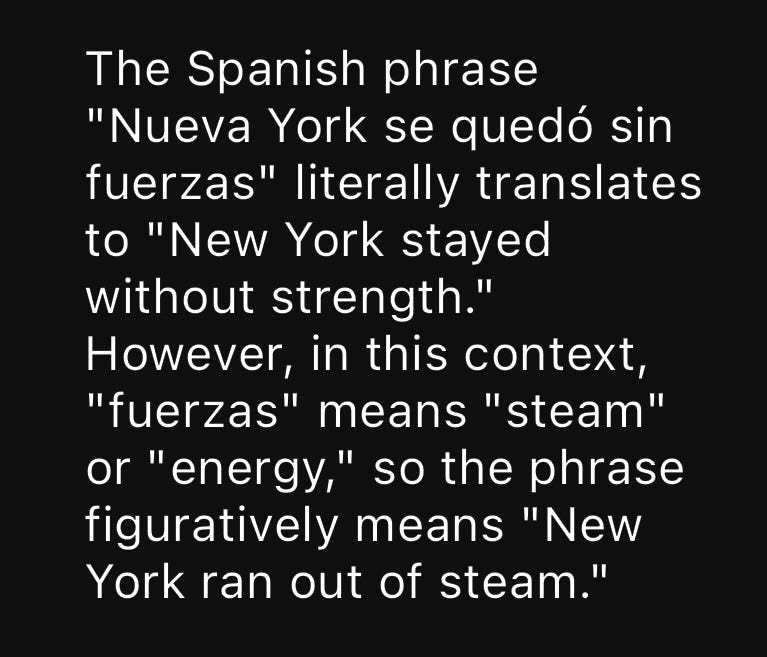
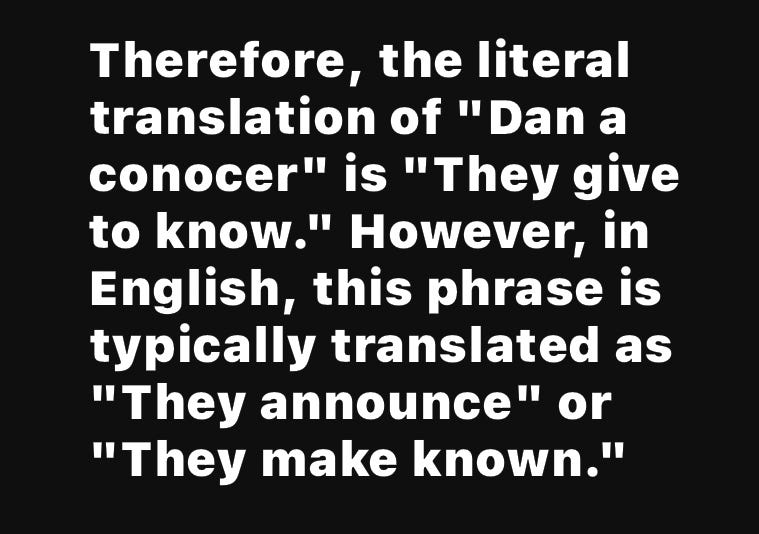
Not so shabby. It’s not perfect though. Once I asked it if it was OK that my app looked bad if you set the font size too high. And it said it was not OK. I don’t know about that, if you max out the font scale in iOS pretty much every app will look like trash. (Except the apps that don’t support variable font scale)
But I prefer a wrong answer to the overly generic ChatGPT answers that just lack any personality.
However it’s not perfect. I ran into some problems when I used Gemini. So in this post I’d like to list them out.
1. Bad At JSON
ChatGPT is really really really good at JSON. If you ask for the result in JSON it will pretty much always give you JSON. The only problem with it is sometimes it would append some text at the end that wasn’t JSON but newer versions of GPT solve this by using a JSON mode.
Google’s Gemini on the other hand… it’s not that great at JSON. I mean, if you ask it to format the result in JSON it will do that but you have to be very careful not to mislead it.
For example this is one of the prompts I used:
Provide information on all the definitions for the ${widget.foreignLanguage.getHumanName(Language.ENGLISH)} word ‘${widget.word}’. Format your response as a list of JSON objects with the following fields:

- translation (string): ${widget.nativeLanguage.getHumanName(Language.ENGLISH)} translation
- definition (string): ${widget.nativeLanguage.getHumanName(Language.ENGLISH)} definition
…
And it would give me JSON that looked like this
{
 — translation,
 — definition,
 …
}
Yeah, not what I had in mind. So now I changed the prompt to this:
Provide information on all the definitions for the ${widget.foreignLanguage.getHumanName(Language.ENGLISH)} word ‘${widget.word}’. Format your response as a list of JSON objects in the following format:
{
 "translation" (string): ${widget.nativeLanguage.getHumanName(Language.ENGLISH)} translation,
 "definition" (string): ${widget.nativeLanguage.getHumanName(Language.ENGLISH)} definition,
 …
}
And it works.
2. More Filtering Than GPT
I was having a problem with a prompt to define the Spanish word ‘agresores’ and I didn’t know what was happening. So I looked into it:
Yeah, the request was denied due to ‘descriptions of violence, sexual themes, or otherwise derogatory content’. I think Google’s filters are a little too extreme. So I just disabled all of them.
3. Needs More Prompting
Also Gemini needs more prompting to give you the correct result. Not that much more but I have noticed unless you’re explicit about what you want it could give you the wrong answer.
In one of my prompts I specified that it should give me Spanish synonyms. And it sometimes gave me English synonyms. Not what I want so I had to tweak my prompt a little.
4. Likes Markdown
And lastly Gemini really really loves Markdown. So it will commonly use the **bolded text** method of bolding text. GPT would never do that, it would just put the text in quotes like a normal person. Well, anyways, I just wrote a script to fix it.
So all in all I really like Google’s Gemini. It is a little bit more work than GPT to get setup but it works really well and the responses are a little more natural.
I think I’m going to continue using Gemini in all my apps replacing GPT. Well, Gemini is currently restricted to 60 requests per minute and is not available in Canada (despite being available in countries such as Japan, Mexico, and Antarctica, I bet the penguins are really enjoying using Gemini) which means I’ll have to use GPT as a fallback. But soon Google will remove that restriction and I’ll be using Gemini everywhere.
If you liked this post and would like to stay updated with my future articles consider using my RSS app Stratum on iOS and Android. Also check out my language learning app Litany (iOS, Android).


