
Google People Card: “Add Me to Google” And Its Importance In 2024
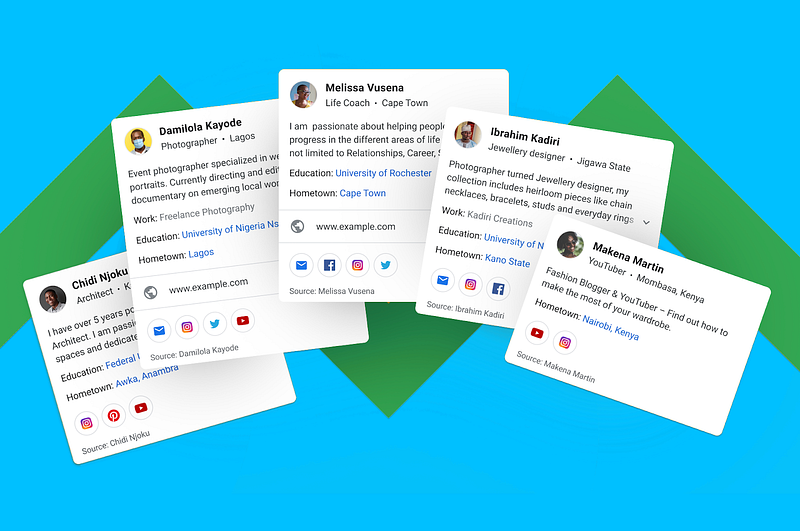
Due to the increased volume of users and information on the internet, it is becoming increasingly challenging every day to find information on specific people, especially if they are not famous, small business owners, freelancers, or self-employed. To address these challenges, Google introduced People Cards, which enable individuals to have their profile on Google search with certain information that searchers will be looking for.
In 2024, the symbiotic relationship between digital marketing and search engine optimization has become crucial, serving as the cornerstone for businesses to enhance their online visibility, engage target audiences, and stay competitive in the rapidly evolving digital landscape. Hence, seizing the Google People Card opportunity is a savvy strategy to maintain prominent visibility for your contact details in searches, requiring minimal optimization efforts.
In this article, we will go through the importance of the Google People Card, how to create a Google People Card using “Add me to Google”, who can create this virtual card, and frequently asked questions.
What is a Google People Card?
In 2020, Google introduced a virtual business card for every Google user, allowing them to establish their online presence by adding their own personal information to Google. It displays information about a person including a summary, profession, education, and contact details. This feature enables Google searchers to find specific people even if they are small business owners or simply they don’t have a strong online presence.
Why Google People Card or “Add Me to Google” is important?
First of all, creating a Google People Card allows individuals to create a public profile that appears at the top of Google search results. This feature is beneficial for small and mid-level influencers, entrepreneurs, and freelancers who want to be discovered on Google Search.
Some of the key benefits and importance of the Google People Card include:
- Increased Online Visibility: By creating a Google People Card, individuals can increase their visibility on search engines and social platforms, making it easier for others to learn about them and their services in the digital world.
- Control Over Information: Users have complete control over the information that appears in search results, ensuring that they present a reliable and consistent web presence.
- Digital Business Card: The Google People Card serves as a digital business card, providing a centralized location for all high-level information about an individual, making it convenient for others to find their online vitals quickly.
- Professional Networking: It helps individuals connect with potential clients, customers, employment prospects, and collaborators, professionally showcasing their skills and experience.
- Unique Information Needs: Google launched this feature in India, Kenya, Nigeria, and South Africa first to address unique information needs in these countries and make search more useful for people.
Guide on how to create a Google People Card using “Add Me to Google” Search:
To add yourself to Google Search, you can create a People Card. Here are the steps to create your Google People Card:
Eligibility for Creating Google People Card:
- A mobile browser or the Google Search app
- A personal Google Account
- Make sure the Web & App Activity turned on. You can check this on your account settings page.
- Google People Card feature is currently available to all Google Search users from India, Kenya, Nigeria, and South Africa, and for users who have their set language to English or Hindi.
Steps to Create Your Google People Card:
- Go to google.com on your mobile browser or open the Google Search app on your mobile.
- Type in and search yourself “add me to Google” or “edit my people card.”
- At the top of the search results page, you’ll find the option to add yourself to Google Search. Click “Get started” button.
- Fill out the information that you want to share publicly on your card, including a summary, profession, and other optional details.
- Preview your card and, if satisfied, submit it. It may take a few hours for your card to show up in Google Search results.
Managing Your People Card:
- You can edit and change the information on your people card at any time by searching for “edit my people card” and tapping “Edit” at the top right of your card.
By following these steps, you can create and manage your people card to establish a notable online presence on Google Search.
FAQs
Who can use Google People Card? All Google users from India, Kenya, Nigeria, and South Africa, and for users who have their set language to English or Hindi can use the Google People Card feature.
Will Google People Card be available in more countries soon? Currently, Google has not disclosed any information on when the People Card will be available in more countries.
How to share a Google People Card with others? Once your card is created, you can share the link to your People Card with others. The link to your card will be in the format of “g.page/yourname” or “g.page/yourcustomURL”
How to delete your Google People Card? Go to “Edit” page of your Google People Card and Tap “Remove my search card from Google” to delete your card and its content from search results. Please note that once you remove your people card, it may take some time for the changes to reflect in Google Search results.
Can you recover a deleted Google People Card? You cannot recover a deleted Google People Card. Once you remove your People Card, the content is permanently deleted from Google Search results. Therefore, it’s important to consider this decision carefully, as there is no option to recover the card or its content after deletion.