
Google launches Pattern Analyzer for BigQuery
How to extract and analyze Terms from unstructured Text

Lately, Google has added a lot of new functions for BigQuery and BigQuery ML for analyzing and using prominent Data Science tools like Tokenization and Bag of Words. Another important new function that comes with these other updates is the PATTERN_ANALYZER function[1].
First thing, you should start getting into the topic of Tokenization — like previously mentioned, Google has also added that function so that you can extract terms (tokens) from text and convert them into a tokenized document. Read more about that down below:
Corresponding to the other new text functions, the PATTERN_ANALYZER function extracts tokens from unstructured text, using a re2 regular expression[2].
The way that this works is that the analyzer finds the first term from the left side of the input text that matches the regular expression and adds this term to the output. Afterwards, it removes the prefix in the input text up to the newly found term. This process is operated until the input text is empty. Here by default, the regular expression \b\w{2,}\b is used. This regular expression matches non-Unicode words that feature at least two characters. If you would like to use another regular expression, see patterns option.[1][2].
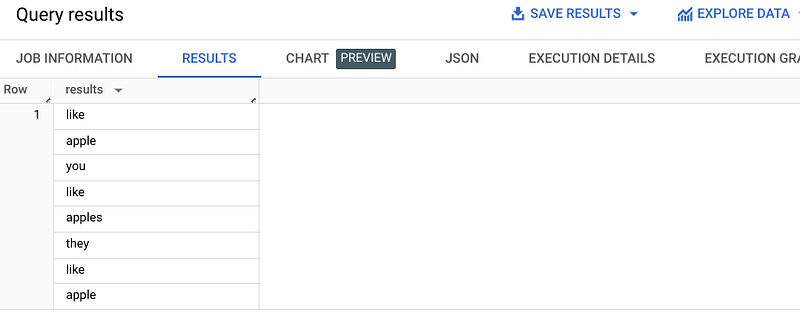
Here is a small example:
SELECT TEXT_ANALYZE(
 ‘I like apple, you like-apples, they like 2 apple.’,
 analyzer=>’PATTERN_ANALYZER’
) AS results
The result would look like that:
You can also pass options via JSON-formatted STRING value when using this function — like:[2]
delimiters: Breaks the input into terms when these delimiters are encountered.
patterns: Breaks the input into terms that match a regular expression.
token_filters: After the input text has been tokenized into terms, apply filters on the terms.
Feel free to use the upper blue print and the official documentary from Google, which I have linked down below, for getting started with this new function and also to dive deeper, if needed.
Sources and Further Readings
[1] Google, BigQuery release notes (2023)
[2] Google, PATTERN_ANALYZER analyzer (2023)


