
Google launched Vector Search & Indexes for BigQuery
How BigQuery becomes more suitable for AI and ML

BigQuery now supports vector search and vector indexes, which makes it more attractive for Data Engineers and Scientists who want to do AI and ML tasks[1].
Vector databases like LanceDB or databases which supports vector search like PostreSQL or Cassandra are better suited than traditional databases for certain applications such as similarity search, artificial intelligence and machine learning as they support high dimensional search functions and customized indexing and are scalable, flexible and efficient.
Now, BigQuery also supports vector indexes and search — well, at least in preview for now. Here, you can use the VECTOR_SEARCH function to search embeddings in order to identify semantically similar entities and use vector indexes to make VECTOR_SEARCH more efficient with the trade-off of returning more approximate results[2].
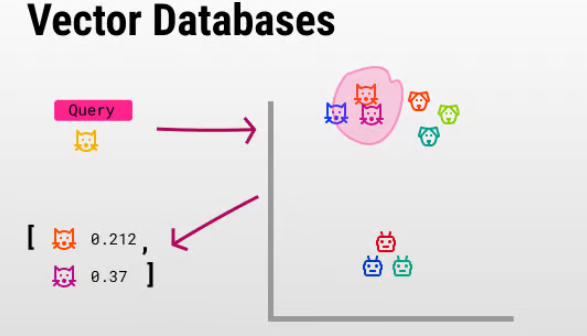
The most prominent benefit of a vector database is its ability to swiftly and precisely locate and retrieve data according to their vector proximity or resemblance. This allows for searches that are rooted in semantic or contextual relevance rather than relying solely on exact matches or set criteria as with conventional databases. Prominent use cases are for example[3][4]:
- Image and Video Recognition
- Natural Language Processing
- Recommendation Systems
- Biometrics and Anomaly Detection
Google is also offering a very good tutorial to start with, which I will now briefly introduce you here. However, for a deeper dive, you should really use the official documentary. Here the open dataset of patents data is gonna be used:
Step 1: Create a Table that will be indexed later and used for the search.
CREATE TABLE YourProject.YourDataSet.patents AS
 SELECT * FROM `patents-public-data.google_patents_research.publications`
 WHERE ARRAY_LENGTH(embedding_v1) > 0
 AND publication_number NOT IN (‘KR-20180122872-A’)
 LIMIT 500000;
Step 2: Create a second table that contains one patent embedding to find nearest neighbors.
CREATE TABLE YourProject.YourDataSet.patents2 AS
SELECT * FROM `patents-public-data.google_patents_research.publications`
WHERE publication_number = 'KR-20180122872-A';
Step 3: Create a Vector Index on the first table.
CREATE VECTOR INDEX my_index ON YourDataSet.patents(embedding_v1)
OPTIONS(distance_type=’COSINE’, index_type=’IVF’, ivf_options=’{“num_lists”: 1000}’);
This can take a few minutes to be finished. To learn more about the options you can add in the function, please also use the linked documentary. To check if the index is already active, you can use:
SELECT * FROM YourDataSet.INFORMATION_SCHEMA.VECTOR_INDEXES;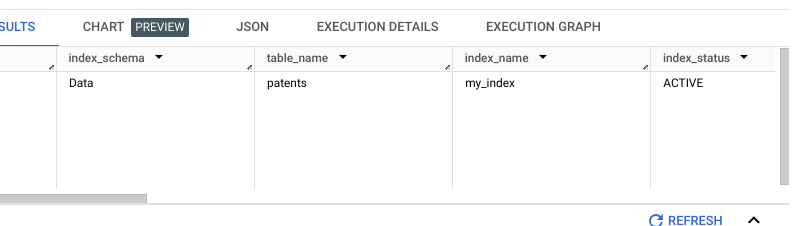
Step 4: Use the Vector Search Function.
Now, you can use the VECTOR_SEARCH function to find the nearest neighbor for the embedding in the embedding_v1 column in the patents2 table. This query uses the vector index in the search, so VECTOR_SEARCH uses an Approximate Nearest Neighbor method to find the embedding's nearest neighbor[4]:
SELECT query.publication_number AS query_publication_number,
 query.title AS query_title,base.publication_number
 AS base_publication_number, base.title AS base_title, distance
FROM
 VECTOR_SEARCH( TABLE Data.patents,‘embedding_v1’, TABLE Data.patents2,
 top_k => 5,
 distance_type => ‘COSINE’,
 options => ‘{“fraction_lists_to_search”: 0.005}’);
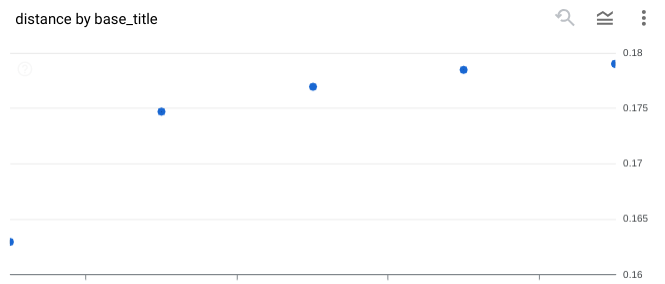
While using top_k => 5, the query will put out the five nearest neighbors. You can see the results below. Here, I used the very new Chart functionality to visualize the data which is also in preview in BigQuery:
So for me and probably for many others, this is big news when you are using BigQuery as a Data Scientist but have tasks which are more suitable for vector databases. While Google BigQuery was always a mix between an traditional SQL and modern NoSQL databases, it has now added more features from the NoSQL world.
Sources and Further Readings
[1] Google, BigQuery release notes (2024)
[2] Google, VECTOR_SEARCH (2024)
[3] AIMultiple, Top 10 Vector Database Use Cases in 2024 — AIMultiple (2024)
[4] Google, Search embeddings with vector search (2024)


