avatarChristianlauer

Free AI web copilot to create summaries, insights and extended knowledge, download it at here

1058

Abstract

sources based on “fixed schemas”, such as Ads and Google Analytics, you can have 10 dimensions and 20 metrics.) — Google [1]</p></blockquote><p id="705b">Even though I’m more fan of presenting dashboards clearly and not overwhelming the user with too much data, but rather aggregating data, there may still be use cases where you need to present large amounts of data in tables. For example, for reports in the area of finance, controlling or internal audit. Here, for example, financial documents with hundreds of columns have to be controlled.</p><figure id="eee1"><img src="https://cdn-images-1.readmedium.com/v2/resize:fit:800/1*aTwZq7ceSHClNuAconBNig.jpeg"><figcaption>Photo by <a href="https://unsplash.com/@mbaumi?utm_source=unsplash&amp;utm_medium=referral&amp;utm_content=creditCopyText">Mika Baumeister</a> on <a href="https://unsplash.com/s/photos/spreadsheet?utm_source=unsplash&amp;utm_medium=referral&amp;utm_content=creditCopyText">Unsplash</a></figcaption></figure><p id="6e8f">And this is exactly where Data Studio improved itself by allowin

Options

g more data to be displayed in tables and, conveniently, horizontal scrolling. Thus, even large data sets can now be displayed in Data Studio. This could ensure that companies can map even more legacy reporting tools in Data Studio.</p><figure id="5ad9"><img src="https://cdn-images-1.readmedium.com/v2/resize:fit:800/1*bUAh0Qyz8btZWj3Z8B7OxA.png"><figcaption>Scrolling Feature in Data Studio — Image by Author</figcaption></figure><p id="7582">Of course, there is the danger of users who use Data Studio as a service tool are now able to query much larger amounts of data. Especially when using data sources like BigQuery, the cost per queried column becomes significantly higher. Here, the IT department should keep an eye on the usage. However, if this is taken into account and the user is trained accordingly, this feature can cover many new use cases.</p><h2 id="49cf">Sources and Further Readings</h2><p id="09f6">[1] Google, <a href="https://support.google.com/datastudio/answer/10331528?hl=en#dec-9-2021">Release notes (2021)</a></p></article></body>

Google just made Data Studio ready for Big Data

Now you can build Reports with more Dimensions and Metrics

Photo by Vladimir Kudinov on Unsplash

After Data Studio was able to upgrade its product in the last weeks, especially with new connectors, there is now another great news: Data Studio can now display up to 100 dimensions and metrics — before it was significantly less. This makes Data Studio much more powerful for me.

You can now visualize up to 100 dimensions and 100 metrics for tables based on “flexible schema” data sources, such as Sheets or BigQuery. (For Data sources based on “fixed schemas”, such as Ads and Google Analytics, you can have 10 dimensions and 20 metrics.) — Google [1]

Even though I’m more fan of presenting dashboards clearly and not overwhelming the user with too much data, but rather aggregating data, there may still be use cases where you need to present large amounts of data in tables. For example, for reports in the area of finance, controlling or internal audit. Here, for example, financial documents with hundreds of columns have to be controlled.

Photo by Mika Baumeister on Unsplash

And this is exactly where Data Studio improved itself by allowing more data to be displayed in tables and, conveniently, horizontal scrolling. Thus, even large data sets can now be displayed in Data Studio. This could ensure that companies can map even more legacy reporting tools in Data Studio.
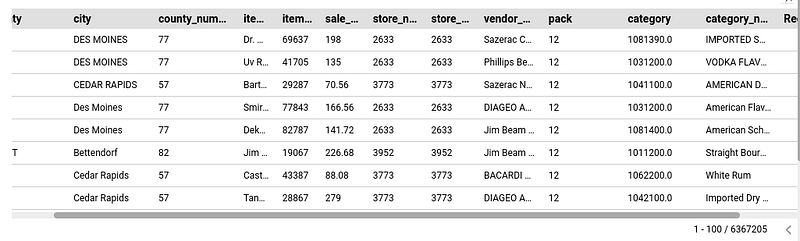
Scrolling Feature in Data Studio — Image by Author

Of course, there is the danger of users who use Data Studio as a service tool are now able to query much larger amounts of data. Especially when using data sources like BigQuery, the cost per queried column becomes significantly higher. Here, the IT department should keep an eye on the usage. However, if this is taken into account and the user is trained accordingly, this feature can cover many new use cases.

Sources and Further Readings

[1] Google, Release notes (2021)

Google Data Studio
Google
Data Science
Business Intelligence
Technology
Recommended from ReadMedium