
Google Dork — The best one and how do you find Bugs with it
I am Proviesec and I am starting my new series of Google Dorks in which I’ll mention some useful dorks.

Here are the topics of this post:
- What is Google Dorking
- How to use Google Dorks
- Search Operators
- Examples of Bug Bounty Google Dorks
- Reports / Infos / Google Dork List
- Summary
What is Google Dorking?
Google Dorking, also known as Google hacking, is the practice of using advanced search operators and techniques to find sensitive information that is publicly available on the internet. This information may include personal data, such as email addresses and phone numbers, as well as sensitive information about a company, such as financial records or internal documents.
Google Dorking is often used by security researchers and ethical hackers to find potential vulnerabilities in a company’s online presence. It can also be used by malicious actors to find sensitive information that can be used for fraud or other illegal activities.
To perform Google Dorking, you can use advanced search operators and keywords to search for specific types of information on the internet. For example, they may search for specific file types, such as PDF or Excel documents, or search for specific keywords, such as “password” or “confidential.” By combining these search operators and keywords, a Google Dorker can quickly find a large amount of information that may not be easily accessible through normal search methods.
In summary, Google Dorking is a practice that involves using advanced search techniques to find sensitive information that is publicly available on the internet. It can be used for both legitimate and malicious purposes, and is a useful technique for security researchers and ethical hackers.
How to Use Google Dorks?
Google Dorks is a powerful technique that leverages advanced search operators and specific keywords to uncover hard-to-find information on the internet. Here’s a brief guide on how to effectively use Google Dorks:
- Define Your Objective: Identify the specific type of information you’re seeking. This could range from a particular file type (e.g., PDF or Excel documents) to sensitive data (e.g., “password” or “confidential”).
- Apply Search Operators: Utilize the appropriate search operators based on your objective. Remember, these operators are vital in refining your search and making your results more precise.
- Craft Your Query: Combine your search operators and keywords to form a query. Be sure to use quotes around phrases to search for exact matches, and the “-” sign to exclude specific keywords. Using “OR” can help broaden your search, while “*” serves as a wildcard for more flexible searches.
- Analyze Your Results: Sift through your results to find relevant information. Keep refining your query as needed based on what you find.
- Ensure Ethical Use: While Google Dorks can uncover a wealth of information, it’s essential to use this tool responsibly and ethically. Never use it for malicious purposes or to invade personal privacy.
In essence, Google Dorks offers a highly efficient way of pinpointing specific information on the internet that may not be readily accessible through regular search methods. By understanding and using advanced search operators, you can harness its full potential and improve the quality of your research.
Search Operators
Search operators, also known as search parameters, are symbols or strings of text used in a search engine query to narrow down the results. Below are some of the most commonly used search operators in Google Dorking:
- Search Term: This operator is used to search for an exact phrase or term. By putting your search term in quotes, you are instructing Google to look for pages containing those exact words in that exact order. For instance, “Admin Loginpage” would yield results with this exact phrase.
- OR: The OR operator is used to search for pages that might use one of several words. For example, using the query ‘site:instagram.com OR site:github.com’ will return results from either of these sites.
- AND: The AND operator is used to combine search terms, ensuring that results contain all the specified terms. A query such as ‘site:github.com AND site:twitter.com’ would yield results from both sites.
- Operators Combination: This involves the use of multiple operators in one search query to refine results. For example, ‘(site:instagram.com OR site:twitter.com) AND intext:”admin”’ will return pages from either Instagram or Twitter that also contain the word “admin”.
- Include Results: This operator is used to enhance search results based on the occurrence of the keyword. For instance, ‘site:twitter.com +site:twitter.*’ will return results from Twitter and all its subdomains.
- Exclude Results: This operator is used to exclude certain results from your search. For example, ‘site:twitter.* -site:twitter.com’ will return results from all Twitter subdomains, excluding twitter.com itself.
- Better Results (Subdomains): This technique is used to retrieve results from multiple levels of subdomains. Here are some examples: - site:*.site.com (results from one level of subdomains) - site:..site.com (results from two levels of subdomains) - site:..*.site.com (results from three levels of subdomains)
- Synonyms: The tilde (~) operator can be used in front of a word to search for its synonyms. For example, ‘~set’ will return results for ‘set’, but also for ‘collection’, ‘group’, ‘batch’, and so on.
- Glob Pattern (*): The asterisk (*) can be used as a wildcard symbol and can take on the value of any word. For instance, ‘site:*.com’ would yield results from any .com website.
Remember, a combination of these operators can be used to create complex queries that are specific to your needs, enabling you to find the most relevant information from the vast troves of data on the internet.
Examples of Bug Bounty Google Dorks
Google Dorks can be extremely powerful when it comes to uncovering hidden information and potential security vulnerabilities. While it’s important to use them responsibly and ethically, they can be crucial in identifying potential risks in cybersecurity and bug bounty hunts. Below are some potent Google Dork examples that can help enhance your cybersecurity investigations:
inurl:config pass: This search would reveal pages containing 'config' in the URL and 'pass' in the text, potentially exposing configuration files with passwords.inurl:config.php dbpasswd: This Dork can unveil configuration files with database passwords.inurl:config.php password: This is used to detect configuration files containing user passwords.inurl:env filetype:txt: It helps find environment variables which could disclose sensitive information.filetype:log: This Dork is used to discover log files that might contain valuable data.intext:"Index of /" +.htaccess: This Dork can reveal directories listing along with .htaccess files which could potentially expose sensitive information.
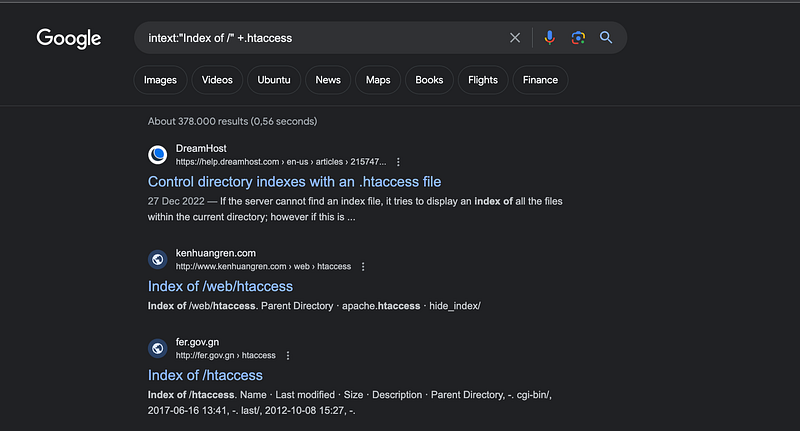
intitle:"index of": This Dork can lead to directory listings.inurl:& intext:admin intext:login: This Dork is used to find admin login pages.inurl:config secret: Finds pages with 'config' in the URL and 'secret' in the text, possibly uncovering configuration files with secret keys.inurl:backup.zip: Finds backup files that could potentially expose sensitive data.inurl:quiz inurl:&: This Dork can find quiz pages that might have vulnerabilities, especially if they use URL parameters.inurl:Makefile.toml: Discloses potential 'Makefile.toml' files which can expose critical information about the building and deployment process of a project.
These examples showcase how Google Dorks can be used for security research and bug bounty hunting, providing a starting point for those interested in this field. For more such Google Dorks, feel free to check out this GitHub repository.
Find CMS Systems
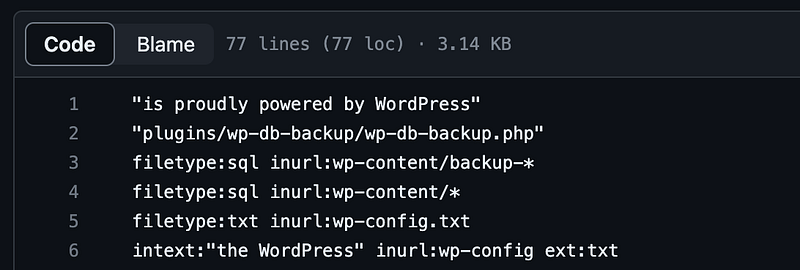
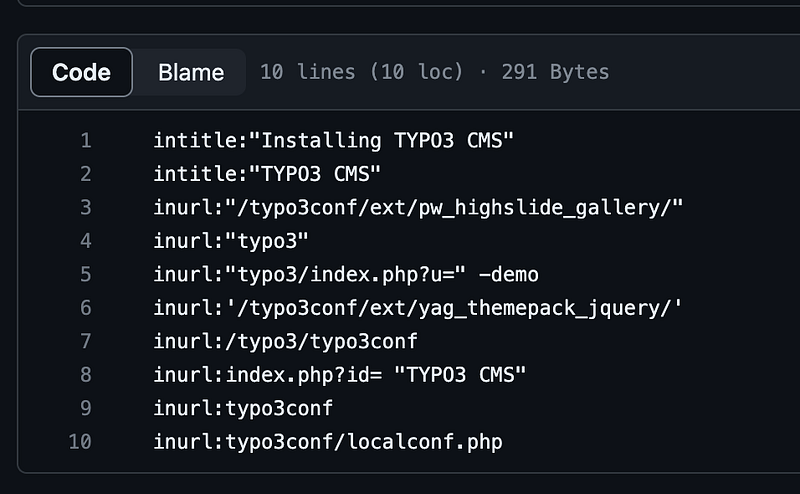
Google Dorks can be used to identify websites using Content Management Systems (CMS) such as WordPress, Drupal, and Joomla due to their known vulnerabilities. For testing:
WordPress: “is proudly powered by WordPress” https://github.com/Proviesec/google-dorks/blob/main/cms/google-dorks-for-wordpress.txt
Typo3: inurl:”/typo3conf/ext/pw_highslide_gallery/” https://github.com/Proviesec/google-dorks/blob/main/cms/google-dorks-for-typo3.txt
Reports / Infos / Google Dork List
For those interested in delving deeper into the topic of Google Dorks and bug bounty hunting, there are a range of resources worth exploring. The platform HackerOne provides a host of reports offering insights into successful bug bounty cases. Some notable examples include the following reports:
- https://hackerone.com/reports/1210043 — Enumerate all the class codes via google dorking
- https://hackerone.com/reports/672629 — Online training material disclosing username and password
- https://hackerone.com/reports/1817214 — 300$ — Mystery with a leaked token and Reusability of email confirmation link leading to Account Takeover
- https://infosecwriteups.com/my-first-reflected-xss-bug-bounty-google-dork-xxx-92ac1180e0d0 — My First Reflected XSS Bug Bounty — Google Dork — $xxx
- https://readmedium.com/400-bounty-again-using-google-dorks-6dc8e438f017
These reports and writeups can help to better understand the process of bug bounty hunting and develop potential strategies for the successful application of Google Dorks.
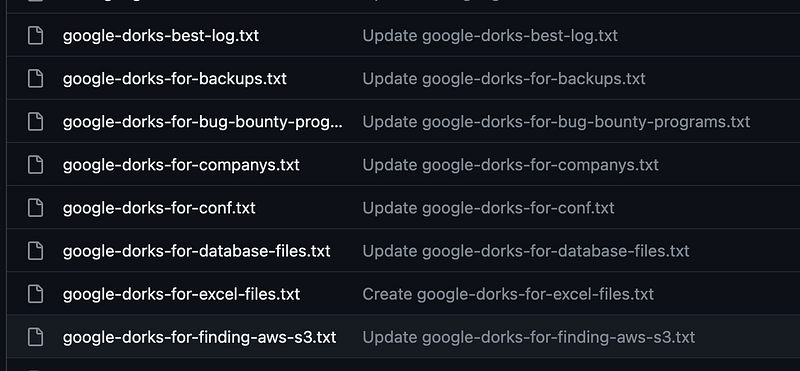
In addition, I’ve created a https://github.com/Proviesec/google-dorks featuring a variety of Google Dorks for browsing and experimentation. This repository is a fantastic resource for those in search of additional Google Dorks to expand their bug bounty pursuits.
Tool, Google Dorks generator: https://pentest-tools.com/information-gathering/google-hacking
Summary
Try to find more and more google dorks and test them all.
Please note that while Google Dorks can be a powerful technique, they should always be used ethically and responsibly. Make sure you’re only searching on targets where you have explicit permission from the site owner, and that any vulnerabilities discovered are responsibly and ethically reported in accordance with established guidelines
To ensure your online security while using Google Dorks, I heartily recommend NordVPN. Please use this affiliate link: https://go.nordvpn.net/aff_c?offer_id=15&aff_id=90078. It doesn’t cost you anything extra but it supports my work.
Here’s my Hackerone profile: https://hackerone.com/proviesec Here’s my Twitter: https://twitter.com/proviesec Here’s my Github: https://github.com/Proviesec
Please feel free to ask me and suggest changes I should consider next time. Thanks for reading 👋.
Interested in further reading? Check out this article: https://infosecwriteups.com/broken-link-hijacking-404-google-play-store-xxx-bounty-96e79a8dfd71


