
Google Colab: GPU without Costs

If you want to train Deep Learning or Machine Learning models, but don’t know how to set up your equipment, Google Colab is the solution to your problems.
What is Google Colab?
Google Colab is a free tool from Google that allows you to enjoy a testing environment based on Jupyter Notebook, enabling you to program in Python and test different models. It has become very popular in recent years, as it allows the use of a GPU to train Machine Learning and Deep Learning models much faster than on a CPU. In addition, the use of different frameworks to train neural networks is very simple, since there’s no need to worry about installing CUDA or external packages.
Jupyter Notebooks on Google
As we mentioned, Google Colaboratory allows you to write and execute Python code without having to worry about any system configuration issues. Just like in Jupyter, Google Colab allows code execution in cells. We’ll give a very simple example.
Imagine that you declare a variable and want to print it. It would be as simple as initializing it, writing the print statement, and then to execute it, you would just have to press ctrl + Enter or shift + Enter. With the first method, you execute the cell and move to the next one, while with the second, you execute and stay in the same cell.
Loading Data from Drive into Google Colab
One of the biggest advantages of this tool is that, being a Google product, it allows access to all the files in your Google Drive account. You can download and upload files to Drive without any problem.
from google.colab import drive
drive.mount('/content/gdrive')
When you enter the above command, a link will be displayed for you to authenticate and prove that it’s you, then a code will be shown which you must copy and paste.

After this, you will be able to access all the files in your account. If you wanted to see what files you have in your account, you would just go to a new cell in Colab and write the following command.
!ls gdrive/'My Drive'Here you can see your files and know which path you will have to use to access them.
Using GPU or TPU
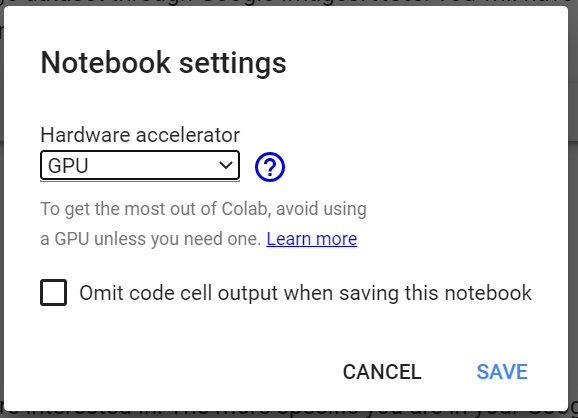
One of the great advantages of this system is that it allows you to use a GPU or TPU to train Deep Learning models at no cost. It would be as simple as clicking on Runtime or Execution Environment in the navigation bar, depending on the language your system is set to, and then on Change runtime type or Change execution environment type and then choose GPU or TPU depending on your requirements.
Limitations
Although Google Colab is a great tool, as it allows great computing power at no cost, it has an important limitation that you should keep in mind.
It has a maximum execution time of 12 hours, so if you needed more time to train your models, you would have to look for another system or save the model states to continue training when you start the session again.
Conclusions
We have seen what Colab is, its advantages, disadvantages, and how to use it and get the most out of it. If you want to keep investigating, here is the link to Colab so you can get started.
I hope you liked it. If you have any questions, do not hesitate to leave them in the comments.


