
Google Cloud Project Liens and Vulnerabilities
How to remove a lien and check your GCP account vulnerabilities
~~~~~~~~~~~~~~~~~~~~~~~~~~~~~~~~~~~~~~~~~~~~~~~~~~~~~
⚙️ Check out my series on Automating Cybersecurity Metrics | Code.
🔒 Related Stories: Google Security | Cybersecurity
💻 Free Content on Jobs in Cybersecurity | ✉️ Sign up for the Email List
~~~~~~~~~~~~~~~~~~~~~~~~~~~~~~~~~~~~~~~~~~~~~~~~~~~~~
Today I had to troubleshoot a problem with GCP liens on accounts that prevent them from shutting down. Since I had to deal with it, I figured I might as well write about it. Along the way I discovered something very odd, which shall remain a mystery, but I recommend you look for this oddity in your own accounts.
Why am I shutting down my GCP account? Well, an unused account suddenly doubled in cost. Don’t worry, the costs were small. But still, double? I already logged into this account and shut down all the resources.
Do I have something misconfigured? I don’t have time for that now as I’m trying to complete this series on AWS. Then perhaps I’ll explore GCP sometime again in the future. But for now AWS does what I need and it seems like it’s easier to control my networking and security policies the way I want.
But I remember setting up a GCP organization and thinking the step by step process was pretty nice. I also found the assignment of permissions more logical than AWS SSO. But for now, I have to put that on hold so I decided to shut down this account entirely. In the future, I plan to set up GCP under a different email address so I won’t be using this one anymore. I don’t even have time to figure out why the cost jumped. It said something about compute resources but I had shut down everything in that account.
I delete all but one of the projects. It was a project which apparently has a shared VPC in it that was, I’m guessing, set up when I walked through the GCP organizations setup.
What’s a lien? It’s a method of locking down a project so you don’t accidentally delete something used by another project. A project is kind of like an AWS account or a Microsoft Azure subscription.
Now liens are an interesting idea that might work for KMS better than randomly changing a customer’s policies — a problem I’ve written about before. But in this case, it was just a tad confusing as I didn’t put that lien on the project. It’s pretty obvious why it’s there though. If the project has a shared VPC and other resources in other projects are using that shared VPC you can’t delete it. Or, if there was no lien, I’m curious what sort of mess you’d have if you did. But I’ll save that test for another day.
Just as a side note — I hate the word lien. I would prefer the word dependencies because a lien has an ugly connotation. But I digress.
You can run the following command to see all the liens on a project.
gcloud alpha resource-manager liens listSo I fired up up CloudShell but it took forever to load since I haven’t used it in a while. That’s interesting. I thought Google was going to delete unused CloudShell contents and I haven’t been in this account for a long time.
And…it doesn’t work in incognito mode — because it needs third-party cookies??? I thought Google Chrome was on a path to disable third-party cookies??
And here is GCP CloudShell requiring them. That seems odd.
So I run the command above:
xxxx@cloudshell:~ (vpc-sandbox-xxxxxx)$ gcloud alpha resource-manager liens list
NAME: p771889098053-xxxxxxxxxxxx
ORIGIN: xpn.googleapis.com
REASON: This lien is added to prevent the deletion of this shared VPC host project. The host project should be disabled before it is deleted.
OK so I need to disable the project first. How do I do that when the only option is shutdown? I think that message might need some adjustment.

Anyway if we go back to the documentation it says you can delete a lien using this command, referencing the lien information we got back when we listed the liens.
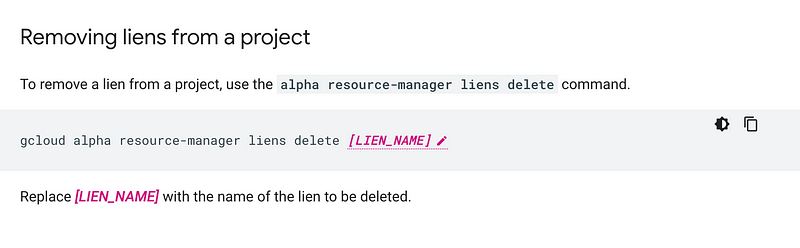
That worked perfectly and then I was able to delete the project.
Now just out of curiosity I went over to the security console and checked for any security issues. This is where I noticed something odd. Three vulnerabilities that were not there before.
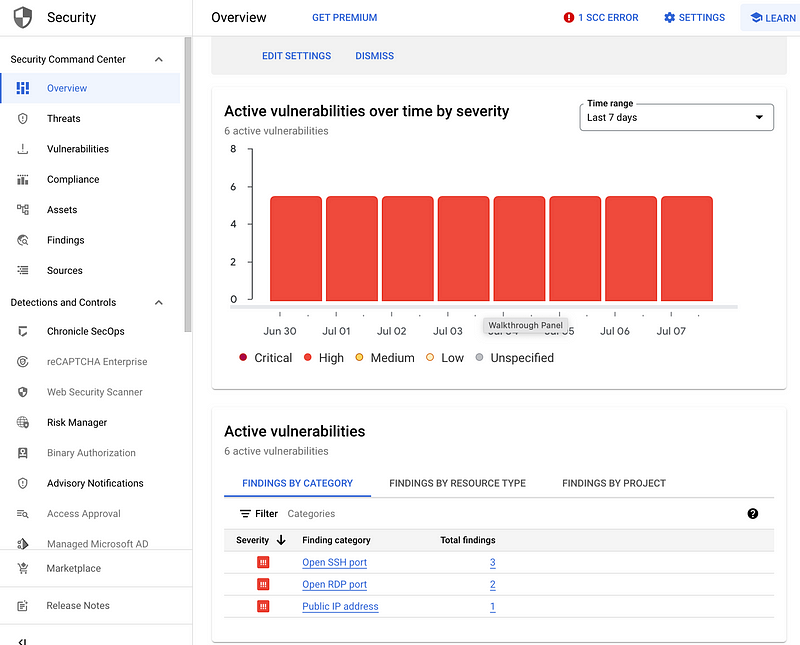
One was SSH open to the entire Internet.
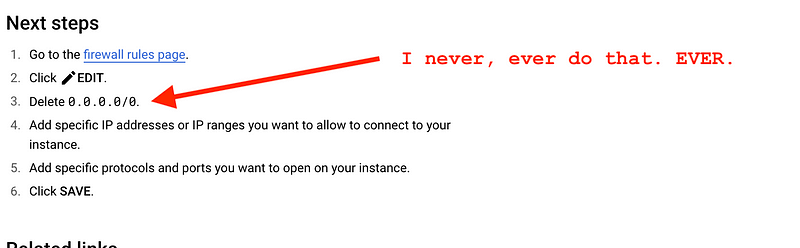
So how did that happen? We’ll never know since I deleted the project in which this existed, but I know I didn’t do it and I think three options:
- Someone got into my account with credentials that require MFA — and I haven’t been actively using those credentials except to check mail on a phone.
- I tested something like GKE and it added some resource that had SSH open to the world.
- GCP has a vulnerability that allowed someone to get into my account and fire up some resources.
The only recommendation I have at the moment is to take a look at your account and see if you notice any resource unexpectedly exposing SSH to the entire Internet — and investigate.
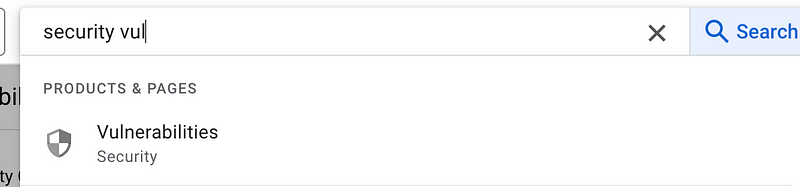
Click on Overview and check out the list.
I also noticed this error message along the way but I’m planning to just shut down this account and open another. So not going to worry about it for the moment. Perhaps it was due to projects being deleted.

Follow for updates.
Teri Radichel | © 2nd Sight Lab 2023
About Teri Radichel:
~~~~~~~~~~~~~~~~~~~~
⭐️ Author: Cybersecurity Books
⭐️ Presentations: Presentations by Teri Radichel
⭐️ Recognition: SANS Award, AWS Security Hero, IANS Faculty
⭐️ Certifications: SANS ~ GSE 240
⭐️ Education: BA Business, Master of Software Engineering, Master of Infosec
⭐️ Company: Penetration Tests, Assessments, Phone Consulting ~ 2nd Sight Lab
Need Help With Cybersecurity, Cloud, or Application Security?
~~~~~~~~~~~~~~~~~~~~~~~~~~~~~~~~~~~~~~~~~~~~~~~~~~~~~~~~~~~~~
🔒 Request a penetration test or security assessment
🔒 Schedule a consulting call
🔒 Cybersecurity Speaker for PresentationFollow for more stories like this:
~~~~~~~~~~~~~~~~~~~~~~~~~~~~~~~~~~~~~~~~~~~~~~~~~~~~~~~~~~~~~
❤️ Sign Up my Medium Email List
❤️ Twitter: @teriradichel
❤️ LinkedIn: https://www.linkedin.com/in/teriradichel
❤️ Mastodon: @teriradichel@infosec.exchange
❤️ Facebook: 2nd Sight Lab
❤️ YouTube: @2ndsightlab


