avatarChristianlauer

Free AI web copilot to create summaries, insights and extended knowledge, download it at here

956

Abstract

u. In addition, you no longer have to use MS products or load the data into a data warehouse beforehand if they come from Microsoft servers. The advantage for Google’s solution is of course that Data Studio is free of charge.</p><h2 id="081e">Status Quo</h2><p id="6ce8">Until now, Data Studio could not be directly connected to Microsoft databases. Either a solution such as the in-house product Power BI was used or the data had to be loaded into BigQuery via a data integration process. Only then was it possible to display the data with Google Data Studio.</p><h2 id="edc7">How to Connect</h2><p id="cc64">Connecting to an MSSQL database is actually pretty straight forward. Under the menu item “Add data to report” you can then select the connection Microsoft SQL Server. After that you have to enter the host, port, username etc. similar to an MySQL and data sources.</p><figure id="ccfd"><img src="https://cdn-images-1.readmedium.com/v2/resize:fit:8

Options

00/1*HYXlZO6vnnU4EmuuS-t_Bg.png"><figcaption>Data Studio Connectors — Image by Author</figcaption></figure><h2 id="6a35">Summary</h2><p id="a9d5">Many companies have MSSQL databases, now the widely used and free Data Studio from Google also offers a build in connector for it. Often the right and better way would be to make the data available via a Data Warehouse or Data Lake. But especially for smaller companies with only a handful of MSSQL databases, this direct way via Data Studio is probably the most efficient. For me, however, it is primarily a step in the direction of larger solutions that have already been on the market for some time, and thus a free alternative like MS Power BI.</p><h2 id="d1a4">Sources and Further Readings</h2><p id="65e5">[1] Data Studio Help, <a href="https://support.google.com/datastudio/answer/11283389#how-to-connect&amp;zippy=%2Cin-this-article">Connect to Microsoft SQL Server 2017</a> (2021)</p></article></body>

Google attacks Microsoft Power BI

Google Data Studio is now able to connect to Microsoft SQL Servers

Photo by Mitchell Luo on Unsplash

Maybe many of you have been waiting for this. Google Data Studio now also offers a connector to MSSQL servers — at least in the beta version. But you can already use it without any problems. For me this is a milestone and a direct attack on Microsoft Power BI. Because now Data Studio is again a bit closer to the top solutions like Power BI and Qlik or Tableau. In addition, you no longer have to use MS products or load the data into a data warehouse beforehand if they come from Microsoft servers. The advantage for Google’s solution is of course that Data Studio is free of charge.

Status Quo

Until now, Data Studio could not be directly connected to Microsoft databases. Either a solution such as the in-house product Power BI was used or the data had to be loaded into BigQuery via a data integration process. Only then was it possible to display the data with Google Data Studio.

How to Connect

Connecting to an MSSQL database is actually pretty straight forward. Under the menu item “Add data to report” you can then select the connection Microsoft SQL Server. After that you have to enter the host, port, username etc. similar to an MySQL and data sources.
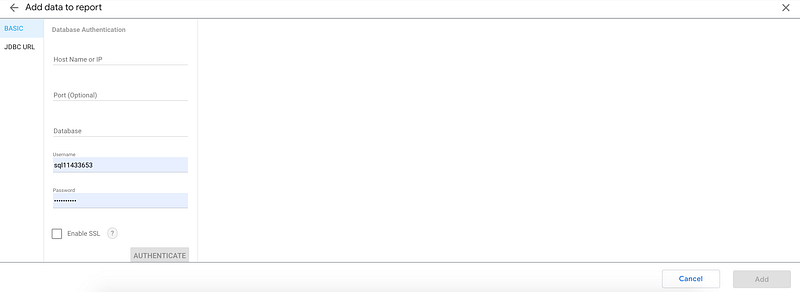
Data Studio Connectors — Image by Author

Summary

Many companies have MSSQL databases, now the widely used and free Data Studio from Google also offers a build in connector for it. Often the right and better way would be to make the data available via a Data Warehouse or Data Lake. But especially for smaller companies with only a handful of MSSQL databases, this direct way via Data Studio is probably the most efficient. For me, however, it is primarily a step in the direction of larger solutions that have already been on the market for some time, and thus a free alternative like MS Power BI.

Sources and Further Readings

[1] Data Studio Help, Connect to Microsoft SQL Server 2017 (2021)

Data Science
Technology
Google
Google Data Studio
Business
Recommended from ReadMedium