
Goodbye Google Workspace Gsuite: A Quick Guide to Switching

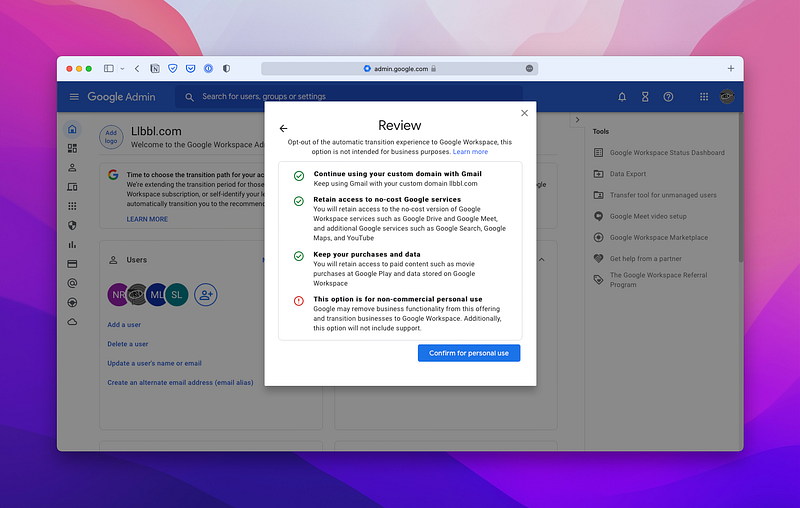
The Google Workspace (free edition) called the “G Suite legacy free edition” will no longer be available starting June 27, 2022. You will soon be forced to start paying for it or confirm that the account is for non-commercial use.
Previously, Google said they would let you keep everything but Gmail on your custom domain. However, they will let you keep everything the same, as long as it’s for non-commercial use.
So what are the alternatives if you have to start paying for it? 📨
Zoho Mail, Office 365, Fastmail, Protonmail, iCloud, and Hey.
Gmail is the most popular email service, with 1.5 billion users as of January 2018. However, for many of us who have been using Google as email for the last two decades, moving to something new is not trivial.
Zoho Mail is a good alternative. It has web-based email with end-to-end encryption, and they also have mobile apps. Zoho mail is free for up to 5 users. If you need more features such as desktop application access, it is the most affordable option, starting at $1 per user per month.
Office 365 is Microsoft’s answer to Google’s G Suite. It comes with many features, but it also costs $6 per user per month and has a pretty complicated licensing model. The family editions do not come with an email service.
Fastmail is another popular email service that offers paid plans ranging from $2-$10/month for 50 users. Unfortunately, Fastmail does not offer an unlimited plan, but it does offer advanced features like auto-responders, sub-addressing, and support for custom domains.
ProtonMail is an email provider/service that respects your privacy and puts people (not advertisers) first. Protonmail notably started as a “Kickstarter” (on Indiegogo) campaign that raised over $380k in funding. ProtonMail costs about $7 per user per month for similar features as Google Workspace.
The Hey email service now supports custom domains. It costs $12 per user per month. The service is an entirely new approach to email. The standout feature is email screening. It works by asking you to decide if you want to see more emails from the account or have them hidden.
I do not recommend iCloud. Doing so ties it directly to your AppleId and Account. Also, you cannot add accounts for people who are not in your Apple “Family Sharing” group.
This list of email provider options is long, so I encourage you to research the most important features for you and your business.
Making The Jump to Another Email Provider.
📫️ You should start working on switching to another provider soon if you are moving away from Google Workspace because you won’t have access to your old emails in less than a month.
If you want to keep all your old emails, the migration process requires you to export all your emails from Google Workspace and into a new provider or system.
Google offers a free download of all your emails, contacts, and calendar information. You can find this information by going to the Admin Console of Google Workspace and clicking on the Backup and migration tab.
Zoho Mail and some other providers will have a migration process that will connect to your existing Google account and migrate the data for you. In addition, other paid tools can assist in the migration process.
If you want to do this for a personal account, there are several Archival options. You could import your emails into another Gmail account. Another option is Outlook, downloading your emails into an Outlook “.pst” file.
If you are exporting, you will need to make sure that POP is turned on for “All Emails.” If you previously used POP before, re-select this option so that all your emails will be pulled into the other account.

What I Decided to Switch To
There are two free Gsuite accounts that I care about, with several people on each. I have had my personal email with Google since about 2006. Unfortunately, after having the same email for so long, the account gets so much junk mail that it is unbearable.
I have tried all the things Google-related on optimizing your inbox and categorizing this and that.👨🏻💻 I was (or am?) a hot-key master at selecting all, then deleting with just my keyboard. I have gone through so many desktop apps to stay on top of the emails, which deserves its own article, but it was all to no avail.
I needed something new to get rid of the junk and focus on the important stuff. So, I went with Hey for my email service. I still haven’t decided what to do about the other account. I might stick with Google, but Zoho is looking the most appealing.🍾
With Hey email service, there are some gotchas that maybe someday will be fixed or added, but overall the features outway the drawbacks. The first thing you will have to figure out how to deal with is that there is no Calendar.
The lack of iCal 📆 support is not as dire as it sounds. I decided to move over all my personal calendering events to the existing iCloud email that I haven’t ever used for anything before. The iCloud service is integrated into the macOS ecosystem, so I figured I should use what I already have?
So what to do about all the old emails? Unfortunately, the Hey email service does not allow you to import old emails from any account, so that wasn’t an option.
It is important to note here that you can set up forwarding for new emails on third-party email services with Hey. You can also send with third-party email services for some services that support primary username/password-based authentication.
So it’s not a massive deal for me to reply on a different account that got the email, but it might be for some people.
For archiving the more than 50,000 old emails, I decided to export them to Outlook. It was easy enough to get configured, but the process was not as quick as I expected. Outlook will only download 200 to 400 emails at a time, so it took a couple of days to pull everything.
I wanted all the emails in case I needed to look something up. You never know. I didn’t want to lose everything, but maybe some people would be okay with it? I guess I will need to set up a second email address if I want to forward the old emails out?
Are you in a similar place? It sucks that we are losing the free Google Workplace service for Commerical accounts. However, I think it’s time to give up on Google and move on to something different.
The last thing I should mention is an option of moving your email into Mailgun, or a service like it, which will enable you to set up custom receiving and forwarding. While this does cost money, it would give you complete control over where the emails go, giving you the time to update your website site accounts over to a Gmail, Yahoo, Outlook, or iCloud email account.
Happy emailing!
Give it a Clap 👏, Follow on Twitter, Signup for Medium, and Join the DevOps Community on phpops.


