About the State Management of a Contenteditable Element in React
Controlled input, onInput event, e.target.innerHTML, and more

I worked for several weeks on a feature involving the use of a content-editable element in React. During this time I learned a few things regarding the usage of such an element, and I will share these lessons learned in this post.
In HTML, elements can be editable. This approach transforms the page into a rich text editor.
Set the contenteditable attribute on an HTML element to make it editable.
Basically, this page in Medium is a content editable element.

Editable div
In React we need to use the contentEditable attribute to make an element editable. Below is a simple <div> element whose contents can be editable.
<div contentEditable />Controlled textarea
You may remember that the default way of handling inputs in React is the controlled input approach. In that case, the input has an associated state variable that is connected using both the value and the onChange attributes.
Here is such a simple controlled textarea input.
import { useState } from "react";
function Contenteditable() {
  const [value, setValue] = useState("");
  return (
    <textarea
      type="text"
      value={value}
      onChange={(e) => setValue(e.target.value)}
    />
  );
}
export default Contenteditable;
When dealing with a content editable element neither of those two attributes work.
A content editable element
Let’s start by adding a content editable div element on the screen. Notice the contentEditable attribute on the div tag.
function Contenteditable() {
  return <div contentEditable />;
}
export default Contenteditable;It is not clear where the content editable element is unless it gets focused. For a better marking of its border, we can add styling.
function Contenteditable() {
  return <div contentEditable
          style={{ border: "1px solid black" }} />;
}
export default Contenteditable;State management
What if we want to have the current value of the editable content in a state variable?
Start by adding such a state variable.
const [value, setValue] = useState();The onChange event does not work but we have other events at our disposal: onInput and onBlur. The onInput event is triggered when the user types something and the onBlur event happens when the focus on the element is lost.
The current HTML of the element can be accessed using the e.target.innerHTML property.
import { useState } from "react";function Contenteditable() {
const [value, setValue] = useState(); return (
<div>
<div
contentEditable
style={{ border: "1px solid black" }}
onInput={(e) => setValue(e.target.innerHTML)}
/>
<pre>{value}</pre>
</div>
);
}export default Contenteditable;When having a state variable that reflects the current value of an editable element that variable should not be used as a child of the editable element.
The following approach will lead to duplicates, wrong values, cursor mismatch, and more errors, and should not be used.
import { useState } from "react";function Contenteditable() {
const [value, setValue] = useState(); return (
<div>
<div
contentEditable
style={{ border: "1px solid black" }}
onInput={(e) => setValue(e.target.innerHTML)}
>
{value}
</div>
<pre>{value}</pre>
</div>
);
}export default Contenteditable;Setting an Initial Value
How can we set an initial value for the editable element then?
We need to use a different variable that does not change inside the component. It can be a parameter for example.
In the next example, the initialValue is a parameter of the function component and is used as the default value for the editable content element.
import { useState } from "react";function Contenteditable({ value: initialValue }) {
const [value, setValue] = useState(initialValue); return (
<div>
<div
contentEditable
suppressContentEditableWarning
style={{ border: "1px solid black" }}
onInput={(e) => setValue(e.target.innerHTML)}
>
{initialValue}
</div>
<pre>{value}</pre>
</div>
);
}export default Contenteditable;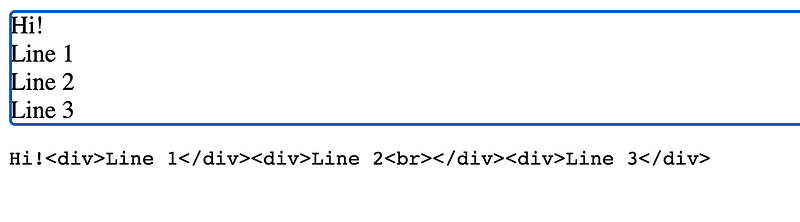
Again do not use the state variable as a child for the editable element. The following code will lead to errors.
function Contenteditable({ value: initialValue }) {
  const [value, setValue] = useState(initialValue);
return (
<div>
<div
contentEditable
suppressContentEditableWarning
style={{ border: "1px solid black" }}
onInput={(e) => setValue(e.target.innerHTML)}
>
{value}
</div>
<pre>{value}</pre>
</div>
);
}Final Thoughts
In the end, let’s draw some conclusions about such an approach.
- The content editable element does not have the
valueandonChangeattributes - The
onInput,onBlurevents can be used to detect changes in the editable element - The current HTML from the editable element can be reflected in a state variable
- Even if the editable content has an associated state variable, it is not a controlled component. It does not work like that. The state variable reflects the element value but changing it from some other part of the app will not change the value in the editable element.
- Don’t put the state variable as a child of the content editable element, that will create several issues
Below is the full code.
Thanks for reading!