
Golang Kafka 101: Extract and Calculate our Consumer Lag
Second part of our series in managing our Golang Kafka consumers with the custom metric that matters the most: consumer lag. Here we will explain and show the code section to calculate and expose our consumer lag from our services
TL;DR
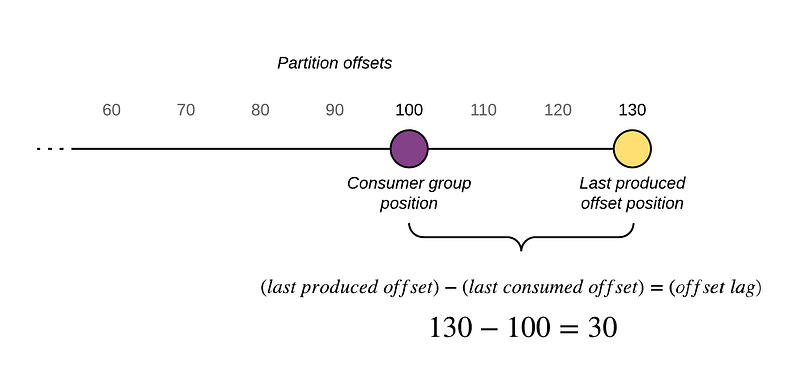
Essentially the code works as a local calculator for the specific consumer instance that is running and its specific partition assigned. We calculate the difference between the highest offset (last message produced) and the current offset of the consumer, the difference is what we call consumer lag or backlog. This info then it is exposed through an endpoint to be accessed dynamically.
Introduction
In this article I will explain technically the different methods and code snippets used to calculate and exposed our consumer lag for our future steps.
- Intro: Managing Golang Kafka Consumer Lag
- Extract and Calculate our Consumer Lag
- Building and Using our Custom HPA
- Deep Dive Into Our Kubernetes Controller
The Problem with the Golang Kafka Consumer
After working more than a couple of years with Golang and its Confluence Kafka package, I can affirm that after all the amazing things it provides and how fast and easy can be to implement; it lacks of one of the essential things that the Java Kafka Consumer provides out of the box, in this case: metrics.
Even though there are several ways to aggregate and export these metrics, you do need to have an extensive knowledge of the package to target the specifics. Which I did my research for my use case and that’s the reason I am sharing it with you. We engineers help each other to make ours life easier.
First Step
As a rule of thumb every time I code, I organize my preliminary models and create the structs. We will have two simple struct that will represent all our consumer lag information.
Our “Calculator”
Our calculator is simple, we will create a function to calculate our lag called “Backlog” that will return our “Lag” object and an error in case it happens. Inside our function we will do a two step process:
- Grab our topic/partition information through the methods from the Kafka package
- Grab the watermark offset from the assigned partition, calculate our lag using the highest offset produced (highOffset) and the last offset committed (offset). We save this into our struct and add the lag per partition to the totalLag variable
Exposing Our Metric
Great! We have added our logic for our lag calculator now it is time to use it. For this we will expose it through our router. In this case I am using go-chi for our router:
Secondary Method
Another method to expose/visualize our metric would be through a Kafka event. Even though this method can not be triggered manually, it can be used to export it in a constant manner through a log exporter as the ELK stack (that’s how we use it).
For this you would require to change a bit your configuration of the Kafka consumer and to handle the events properly:
And this is the function in which we calculate the lag through the info retrieved from the stats event:
Wrapping Up
At this point we have our consumer lag exposed and ready to be utilize, but there’s a catch, this will only show the consumer lag for the specific instance of the consumer (or consumer group). This means that if you have 10 pods/instances of consumers running and reading, you would have to hit each one of them and aggregate the lag to have the complete consumer lag for the group. Don’t you worry because, as I have found a solution for this and it will take a little bit more set up with the another service: our Kubernetes Controller.
The next article will focus in our Custom HPA for Golang Kafka Consumers! (Finally, I know)


