
GitHub Actions: Woes with Private Repos
and how to solve them with ssh-agent GitHub Action?
You can utilize Repository Deploy Keys to access your private or internal repositories on GitHub from the workflow instances of another repository. This is useful if you are using Git submodules or private Golang modules in your projects. The procedure is rather simple an SSH key-pair is created and the private part is embedded to your target repository Deploy Keys and the public part is added as a repository/organization secret under the action secrets.
Let’s demonstrate how this works with a single setup.
We have two repositories:
- main-project
- subproject-1
Let’s create them using gh
brew install gh
gh repo create <USERNAME>/main-project --private --add-readme && gh clone <USERNAME>/main-project
gh repo create <USERNAME>/subproject-1 --private --add-readme && gh clone <USERNAME>/subproject-1
Add subproject-1 as a submodule
cd main-project
git submodule add ../<USERNAME>/subproject-1
Create a dummy action in main-project and try performing recursive clone
name: "Workflow"

on:
  push:

jobs:
  clone:
    runs-on: ubuntu-22.04
    timeout-minutes: 10
    steps:
      - uses: actions/checkout@v3
        with:
          submodules: recursive
And..
  Error: fatal: repository 'https://github.com/<USERNAME>/subproject-1/' not found
  Error: fatal: clone of 'https://github.com/<USERNAME>/subproject-1' into submodule path '/home/runner/work/main-project/main-project/subproject-1' failed
  Failed to clone 'subproject-1'. Retry scheduled
This fails because you have no mechanism to authenticate yourself.
One way to get around this is to use a Personal Access Token (PAT) created for a service/machine account and pass it as a token
(Do not use PATs of members of your organization as they may leave breaking your workflows)
The other mechanism is using Deploy Keys to perform authentication. Let’s actually see it in action. Add the public key to Deploy Keys of the subproject
ssh-keygen -t ed25519 -f test
gh repo deploy-key add test.pub --repo <USERNAME>/subproject-1 -t SUBPROJECT_PUBLIC_KEY
You can now view your Deploy Key in the Settings -> Deploy Keys of your repository.
Add the private key to the Action secrets of the main project:
gh secret -R <USERNAME>/main-project set SUBPROJECT_1_PRIVATE_KEY < testTo utilize this key during the checkout you need to inform git that this key exists. There are several ways of achieving this:
- Override
GIT_SSH_COMMANDwith a wrapper that pulls the private key viassh -i secret. Same as the above, this does not scale very well. - Modify your
.ssh/configto have an entry that targets the subproject URL and passes in the location of your private key. This requires changes to.gitmodulesdefinitions. - Use
ssh-agent(and of coursessh-add) to add the private key, so that it is passed to the SSH server of GitHub.
Let’s utilize the third option:
name: "Workflow"

on:
  push:

jobs:
  clone:
    runs-on: ubuntu-22.04
    timeout-minutes: 10
    steps:
      - name: Add SSH key
        env:
            SSH_AUTH_SOCK: /tmp/ssh_agent.sock
        run: |
            ssh-agent -a $SSH_AUTH_SOCK > /dev/null
            ssh-add - <<< "${{ secrets.SUBPROJECT_1_PRIVATE_KEY }}"
            git config --global --add url."[email protected]:<USERNAME>/subproject-1".insteadOf "https://github.com/<USERNAME>/subproject-1"
      - uses: actions/checkout@v3
        env:
          SSH_AUTH_SOCK: /tmp/ssh_agent.sock
        with:
          submodules: recursive
And re-execute the GitHub action.
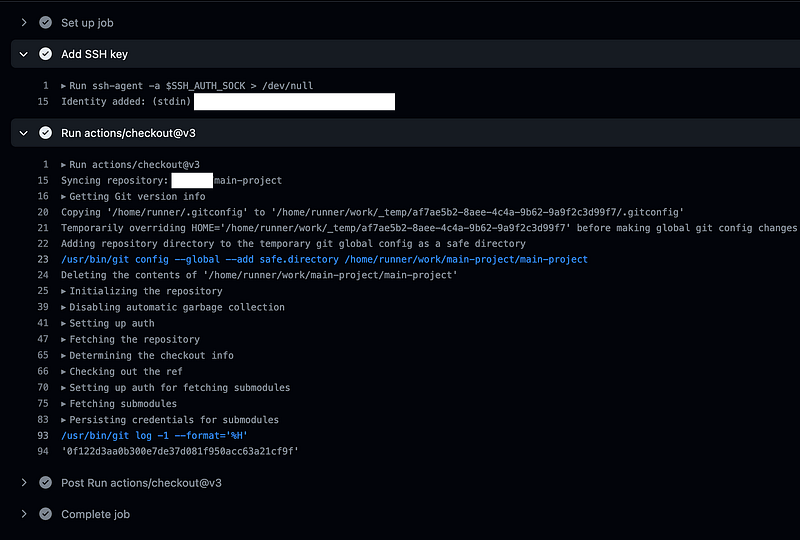
Voila! You have a successful run.
How about Multiple Submodules?
What happens when we have multiple submodules (or multiple private Golang module dependencies) as you would normally have?
Let’s expand our scenario:
# Go back to your workspace root
cd ..
# Create another subproject
gh repo create <USERNAME>/subproject-2 --private --add-readme && gh clone <USERNAME>/subproject-2
# Go back
cd main-project
# Add the submodule
git submodule add ../<USERNAME>/subproject-2
# Create an SSH key pair
ssh-keygen -t ed25519 -f test-2
# Add the public part as the Deploy Key
gh repo deploy-key add test-2.pub --repo <USERNAME>/subproject-2 -t SUBPROJECT_PUBLIC_KEY
# Add the private part as the repository secret
gh secret -R <USERNAME>/main-project set SUBPROJECT_2_PRIVATE_KEY < test-2
We cannot use the same key-pair as Deploy Keys have to be unique.
Change the pipeline definition:
name: "Workflow"

on:
  push:

jobs:
  clone:
    runs-on: ubuntu-22.04
    timeout-minutes: 10
    steps:
      - name: Add SSH key
        env:
            SSH_AUTH_SOCK: /tmp/ssh_agent.sock
        run: |
            ssh-agent -a $SSH_AUTH_SOCK > /dev/null
            ssh-add - <<< "${{ secrets.SUBPROJECT_1_PRIVATE_KEY }}"
            ssh-add - <<< "${{ secrets.SUBPROJECT_2_PRIVATE_KEY }}"
            git config --global --add url."[email protected]:<USERNAME>/subproject".insteadOf "https://github.com/<USERNAME>/subproject"
      - uses: actions/checkout@v3
        env:
          SSH_AUTH_SOCK: /tmp/ssh_agent.sock
        with:
          submodules: recursive
Rerun the pipeline:
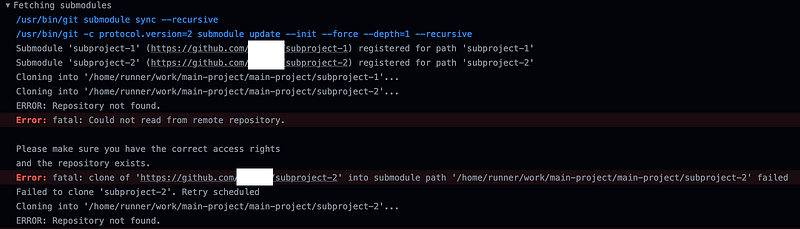
And it fails. Why though?
As it turns out GitHub has a strict SSH server and if you have a multiple SSH keys to choose from the retries get rejected after several tries. In this case we have two private keys to the SSH server, for subproject-2 we provide the private key for the subproject-1 and the server rejects further communication.
What is the workaround here?
Enter ssh-agent Action
webfactory created this action to initially get the single SSH Key by creating a wrapper script and using that as GIT_SSH_COMMAND. But, the situation with GitHub Deploy Keys reduces the value of the action. So the author came up with the idea to inspect the Comments section of keys to actually match up with the target repository so there is no need to retry all of the available keys, enabling us to work with GitHub Actions for projects with multiple private dependencies.
Before we adopt our solution to this new 3rd party action, let’s see how it works which should come in handy trying to understand the setup that comes with it.
The script extracts the comment sections from SSH private keys to associate them with GitHub URLs:
To switch our setup to accommodate multiple subprojects, let’s modify the workflow definition accordingly:
ssh-keygen -t ed25519 -f test-with-comment-1 -C "https://github.com/<USERNAME>/subproject-1"
ssh-keygen -t ed25519 -f test-with-comment-2 -C "https://github.com/<USERNAME>/subproject-2"
gh repo deploy-key add test-with-comment-1.pub --repo <USERNAME>/subproject-1 -t SUBPROJECT_1_PUBLIC_KEY
gh repo deploy-key add test-with-comment-2.pub --repo <USERNAME>/subproject-2 -t SUBPROJECT_2_PUBLIC_KEY
gh secret -R <USERNAME>/main-project set SUBPROJECT_1_PRIVATE_KEY < test-with-comment-1
gh secret -R <USERNAME>/main-project set SUBPROJECT_2_PRIVATE_KEY < test-with-comment-2
Change our workflow definition to:
name: "Workflow"

on:
  push:

jobs:
  clone:
    runs-on: ubuntu-22.04
    timeout-minutes: 10
    steps:
      - uses: webfactory/[email protected]
        with:
          ssh-private-key: |
            ${{ secrets.SUBPROJECT_1_PRIVATE_KEY }}
            ${{ secrets.SUBPROJECT_2_PRIVATE_KEY }}
      - uses: actions/checkout@v3
        with:
          submodules: recursive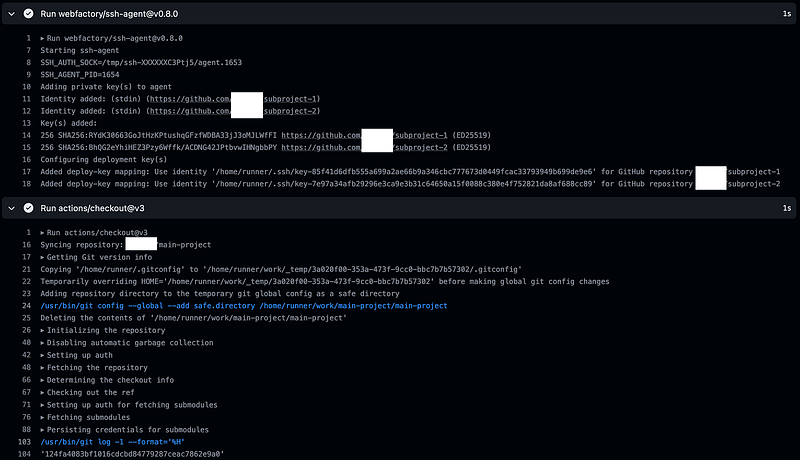
How does this work though?
First of all we will get roughly the following ruleset for Git URL overrides:
git config --global --add url."[email protected]:<USERNAME>/subproject-1".insteadOf "https://github.com/<USERNAME>/subproject-1"
git config --global --add url."[email protected]:<USERNAME>/subproject-2".insteadOf "https://github.com/<USERNAME>/subproject-2"
This will be complemented by the SSH Config
Host key-hash-1.github.com
  HostName github.com
  IdentityFile ~/key-hash-1
  IdentitiesOnly yes

Host key-hash-2.github.com
  HostName github.com
  IdentityFile ~/key-hash-2
  IdentitiesOnly yes
So, whenever we want to fetch the submodule the URL will be replaced with the SSH URL that adds individual identifiable sections to each URL. This then goes through the rules we have defined under SSH Config. This targets the normal github.com URL but passes in separate private key, in essence bypassing the restriction from the GitHub side.
Example with Private Golang Modules
Let’s revert everything we have done so far and turn these repositories we have created into simple Golang projects.
cd your-workspace-folder
pushd main-project && go mod init module github.com/<USERNAME>/main-project && popd
pushd subproject-1 && go mod init module github.com/<USERNAME>/subproject-1 && popd
pushd subproject-2 && go mod init module github.com/<USERNAME>/subproject-2 && popd
cd main-project
go env -w GOPRIVATE=github.com/<USERNAME>
go env -w GONOSUMDB=github.com/<USERNAME>
go env -w GONOPROXY=github.com/<USERNAME>
go get github.com/<USERNAME>/subproject-1 github.com/<USERNAME>/subproject-2
The way we are using the ssh-agent with private Golang Modules are exactly the same:
name: "Workflow"

env:
  GOPRIVATE: github.com/${{ github.repository_owner }}
  GONOSUMDB: github.com/${{ github.repository_owner }}
  GONOPROXY: github.com/${{ github.repository_owner }}

on:
  push:

jobs:
  clone:
    runs-on: ubuntu-22.04
    timeout-minutes: 10
    steps:
      - uses: webfactory/[email protected]
        with:
          ssh-private-key: |
            ${{ secrets.SUBPROJECT_1_PRIVATE_KEY }}
            ${{ secrets.SUBPROJECT_2_PRIVATE_KEY }}

      - uses: actions/checkout@v3

      - name: Setup Go
        uses: actions/setup-go@v4
        with:
          go-version-file: go.mod

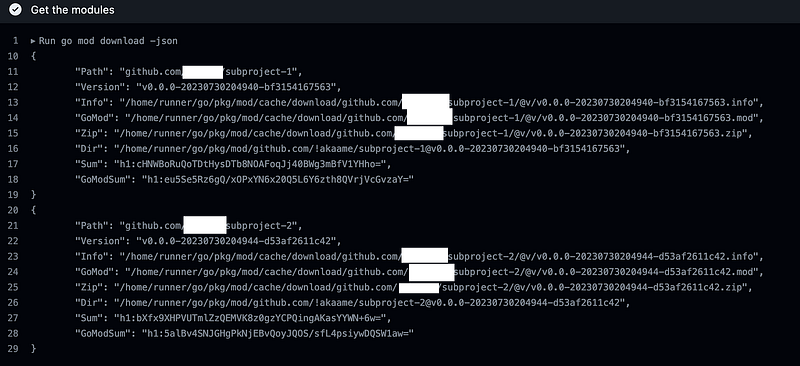
      - name: Get the modules
        run: go mod download -json
Observe the results of this action:
References
Thanks for taking the time to read this write-up. Any suggestions or corrections are welcome.


