
GitHub Actions
ACM.255 Triggering an update to a website when code gets checked into GitHub — by you or attackers
~~~~~~~~~~~~~~~~~~~~~~~~~~~~~~~~~~~~~~~~~~~~~~~~~~~~~~~~~~~
⚙️ Part of my series on Automating Cybersecurity Metrics. The Code.
🔒 Related Stories: GitHub Security | Application Security | Secure Code
💻 Free Content on Jobs in Cybersecurity | ✉️ Sign up for the Email List
~~~~~~~~~~~~~~~~~~~~~~~~~~~~~~~~~~~~~~~~~~~~~~~~~~~~~~~~~~~
In the last post I explained what CloudFront is and why we might want to use it.
Before CloudFront can serve up any content we need to have some content in our S3 bucket. Now I could manually copy contents into the bucket but that’s not aligned with our automation agenda. Wouldn’t it be great if we could automatically update our S3 bucket every time a change got deployed to our repository?
Well, in an enterprise environment we’d design a whole work flow that involved first testing in a development environment, then pushing that to a QA environment and then possibly a staging environment that mimics production to validate our deployment to production is going to work. But to keep it simple let’s see if we can trigger pushing code to an S3 bucket when a change occurs in GitHub.
Now I’ll be honest. This type of thing is a bit frightening because many breaches have occurred when attackers infiltrate automated pipelines. So I’m not sure if I’m going to use the GitHub actions model or not. I might opt for a different approach. But let’s try it out and evaluate the functionality.
You can find the documentation on GitHub actions here:
Essentially an event in GitHub can trigger an action. In our case, I want to push content to our S3 bucket when code gets committed to the GitHub repository I created with automation in an earlier post.
Here are some of the key terms.
Workflow — some process or steps that occur when a particular event occurs in GitHub. Workflows are defined in YAML and stored in your GitHub repository and will execute when triggered by an event.
Event — triggers a workflow. Events that can trigger workflows:
Jobs — Workflows consist of jobs that carry out one or more steps in the workflow.
Steps — a step in a workflow can run a script or use a built in extension to carry out some task within a job.
Action — a resuable extension that can carry out a step within a job. More on creating actions here.
Runner — Each job runs inside of it’s own virtual machine or container called a runner. GitHub provides Ubuntu Linux, Microsoft Windows, and macOS runners to run your workflows.
You can also host your own runner. << Interesting.
.github/workflows — The directory in a repository where the workflows Yaml files exists. You can have multiple workflows, and a workflow can reference another workflow.
There’s a really simple example of a runner that triggers any time someone pushes code to the repository in the above documentation:
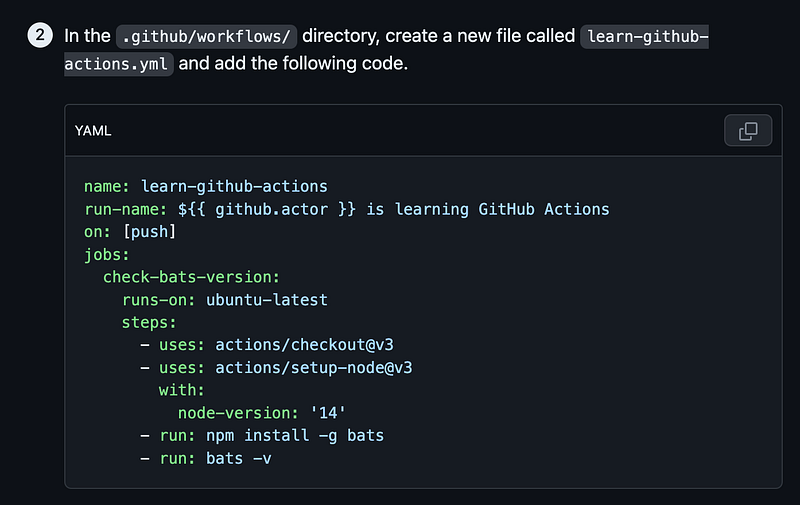
The challenge we have is that in order to push code to our S3 bucket, we need to have credentials somewhere that allow this action to occur. Where should we put those credentials?
Therein lies my problem with GitHub Actions. You have this action that is very easy to trigger should anyone obtain access to your GitHub repository. Let’s say someone wanted to deface your website. They got a handle on your active GitHub session and push some nasty code up to your repository and bang! It’s on your website.
Or perhaps the attacker wants to deploy a cryptominer instead:
Or perhaps a vulnerability in GitHub Actions allows attackers to infect your pipelines.
In December 2022…
In July 2022…
In 2020…
We’ll take a look at security best practices for GitHub actions next and see what our options are for locking down credentials used to trigger updates to our AWS S3 bucket.
Follow for updates.
Teri Radichel | © 2nd Sight Lab 2023
About Teri Radichel:
~~~~~~~~~~~~~~~~~~~~
⭐️ Author: Cybersecurity Books
⭐️ Presentations: Presentations by Teri Radichel
⭐️ Recognition: SANS Award, AWS Security Hero, IANS Faculty
⭐️ Certifications: SANS ~ GSE 240
⭐️ Education: BA Business, Master of Software Engineering, Master of Infosec
⭐️ Company: Penetration Tests, Assessments, Phone Consulting ~ 2nd Sight Lab
Need Help With Cybersecurity, Cloud, or Application Security?
~~~~~~~~~~~~~~~~~~~~~~~~~~~~~~~~~~~~~~~~~~~~~~~~~~~~~~~~~~~~~
🔒 Request a penetration test or security assessment
🔒 Schedule a consulting call
🔒 Cybersecurity Speaker for PresentationFollow for more stories like this:
~~~~~~~~~~~~~~~~~~~~~~~~~~~~~~~~~~~~~~~~~~~~~~~~~~~~~~~~~~~~~
❤️ Sign Up my Medium Email List
❤️ Twitter: @teriradichel
❤️ LinkedIn: https://www.linkedin.com/in/teriradichel
❤️ Mastodon: @teriradichel@infosec.exchange
❤️ Facebook: 2nd Sight Lab
❤️ YouTube: @2ndsightlab