
avatarsimbu

Free AI web copilot to create summaries, insights and extended knowledge, download it at here

4318

Abstract

an class="hljs-keyword">a</span> branch.

If you want <span class="hljs-built_in">to</span> <span class="hljs-built_in">create</span> <span class="hljs-keyword">a</span> <span class="hljs-built_in">new</span> branch <span class="hljs-built_in">to</span> retain commits you <span class="hljs-built_in">create</span>, you may <span class="hljs-built_in">do</span> so (now <span class="hljs-keyword">or</span> later) <span class="hljs-keyword">by</span> <span class="hljs-keyword">using</span> -c <span class="hljs-keyword">with</span> <span class="hljs-keyword">the</span> <span class="hljs-keyword">switch</span> command. Example:

git <span class="hljs-keyword">switch</span> -c <<span class="hljs-built_in">new</span>-branch-name>

Or undo this operation <span class="hljs-keyword">with</span>:

git <span class="hljs-keyword">switch</span> -

Turn off this advice <span class="hljs-keyword">by</span> setting config <span class="hljs-built_in">variable</span> advice.detachedHead <span class="hljs-built_in">to</span> <span class="hljs-literal">false</span>

HEAD is now <span class="hljs-keyword">at</span> <span class="hljs-number">102</span>f226 MSAL <span class="hljs-keyword">for</span> Android</pre></div><p id="abe0">I then switched back to the latest code by checking out the branch:</p><div id="cbf2"><pre>git checkout <span class="hljs-selector-tag">main</span></pre></div><p id="c119">The next step was to investigate what changed in commit that caused the error:</p><div id="7d24"><pre>git <span class="hljs-keyword">show</span> <span class="hljs-comment">--stat a4ab89a</span></pre></div><figure id="3e98"><img src="https://cdn-images-1.readmedium.com/v2/resize:fit:800/1*iS4kzTn0_XhuJqSq3wlXrw.png"><figcaption>The output on the right shows the number of lines affected or bytes if its a binary file (Bin), pluses ++++ indicate adding lines and minuses — removing, those with both are files you have modified, those with just +++ tend to indicate new files.</figcaption></figure><p id="58b4">You can then view the changes for a particular file with this command:</p><div id="324e"><pre><span class="hljs-attribute">git</span> diff <span class="hljs-number">102</span>f226 a4ab89a pubspec.yaml</pre></div><figure id="0084"><img src="https://cdn-images-1.readmedium.com/v2/resize:fit:800/1*JpS7YxeFnFMA_fAj-4zDdg.png"><figcaption></figcaption></figure><p id="85bf">Which is good if you want to cover a period i.e. more than 1 commit for a file, but for a single commit I usually use the GUI in the online repository, in this case GitLab:</p><figure id="bf06"><img src="https://cdn-images-1.readmedium.com/v2/resize:fit:800/1*GjAZ7BtPtKVeXXbnfPg8Fw.png"><figcaption></figcaption></figure><p id="cf3d">Eventually there is no substitute for understanding when getting to the bottom of something, other than backing out files.</p><p id="5da8">In my case I can ignore all the files related to change for flutter_native_splash: and for the BDD acceptance tests which left just a few files to look into:</p><figure id="e9ef"><img src="https://cdn-images-1.readmedium.com/v2/resize:fit:800/1*nqxvcsX-MvCUpuFP8n1gzw.png"><figcaption>Files to look at after exclusions</figcaption></figure><p id="d32e">Based on the error about untranslatable dart.js I started by removing changes to a file that added the reference to the js packages: lib/security/service/msal_js_authentication_service.dart 0 → 100644_</p><p id="c195">import ‘package:msal_js/msal_js.dart’;</p><p id="9aae">And we are back in business!</p><p id="349a">Fixing it required some research which led me to Flutters condition import ability, details below.</p><h1 id="aab3">XP</h1><h2 id="08c7">Conditional Imports</h2><p id="e945">You cannot reference anything that loads dart.js if you want to compile your application for iOS, which gives you a multiple platform issue when you need to use it for the web, luckily Flutter supports conditional Imports:</p><div id="db23"><pre><span class="hljs-keyword">import</span> <span class="hljs-string">'msal_authentication_service.dart'</span> <span class="hljs-keyword">if</span> (dart.<span class="hljs-keyword">library</span>.js) <span class="hljs-string">'msal_js_authentication_service.dart'</span>;</pre></div><p id="58a5">Next, declare the same method in both implementations, msal_authent

Options

ication_service.dart & msal_js_authentication_service.dart:</p><div id="765e"><pre><span class="hljs-comment">// Mobile Implementation</span> AuthenticationService getAuthenticationService() => MsalAuthenticationService();

<span class="hljs-keyword">class</span> <span class="hljs-symbol">MsalAuthenticationService</span> <span class="hljs-symbol">implements</span> <span class="hljs-symbol">AuthenticationService</span> {

<span class="hljs-comment">// Web Implementation</span> AuthenticationService getAuthenticationService() => MsalJsAuthenticationService();

<span class="hljs-keyword">class</span> <span class="hljs-symbol">MsalJsAuthenticationService</span> <span class="hljs-symbol">implements</span> <span class="hljs-symbol">AuthenticationService</span> {</pre></div><p id="9b69">And use it in code you are writing:</p><div id="bbd4"><pre><span class="hljs-keyword">static</span> AuthenticationService <span class="hljs-keyword">get</span> instance { <span class="hljs-keyword">return</span> getAuthenticationService(); }</pre></div><p id="5572">Be sure to notice that in the implementations the method is outside of the class.</p><p id="70f4">Thx, <a href="https://medium.com/@realmerlyn">Randal</a> for the simplification suggestion, original it was more complicated:</p><figure id="a28a"><img src="https://cdn-images-1.readmedium.com/v2/resize:fit:800/1*O8uV4JY9uj7wAq8iFM_jWw.png"><figcaption></figcaption></figure><h2 id="6628">Git Time Travel</h2><p id="f4e2">Stash any changes first as using the git reset — hard option resets the current branch tip, and also deletes any changes in the working directory and staging area.</p><div id="e208"><pre>git reset <span class="hljs-attr">--hard</span> HEAD@{<span class="hljs-number">5</span><span class="hljs-selector-class">.minutes</span><span class="hljs-selector-class">.ago</span>}

<span class="hljs-comment">// Other periods</span>

HEAD@{<span class="hljs-number">1</span><span class="hljs-selector-class">.day</span><span class="hljs-selector-class">.2</span><span class="hljs-selector-class">.hours</span><span class="hljs-selector-class">.ago</span>}, HEAD@{yesterday}, HEAD@{<span class="hljs-number">2020</span>-<span class="hljs-number">01</span>-<span class="hljs-number">01</span> <span class="hljs-number">18</span>:<span class="hljs-number">30</span>:<span class="hljs-number">00</span>}, HEAD@{<span class="hljs-number">12</span>:<span class="hljs-number">43</span>}</pre></div><ul><li>Only works for your local terminal — your reflog and gitrevisions are stored locally, but aren’t shared when you push to a remote repository</li><li>Only works for committed files — if you’ve deleted uncommitted files, these aren’t stored in Git anywhere. Good reason to commit early and often</li></ul><h2 id="ccfc">Detached Head</h2><p id="bd98"><b>detached head state</b> where you can make changes and it will allow you to make commits, but nothing will be saved and any commits you make will be lost. HEAD answers the question, “Where am I right now?” Most of the time, HEAD points to a branch. This is the detached HEAD state; HEAD is pointing directly to a commit instead of a branch. Its good for investigation a bug as you can run the previous version and make changes that will not be saved.</p><figure id="a015"><img src="https://cdn-images-1.readmedium.com/v2/resize:fit:800/1*XN9YMfStGGBB388v-8ZnWQ.png"><figcaption></figcaption></figure><p id="9706">If you want to keep changes made with a detached HEAD, just create a new branch and switch to it. You can create it right after arriving at a detached HEAD or after creating one or more commits. The result is the same.</p><div id="f458"><pre>git branch <span class="hljs-tag"><<span class="hljs-name">branch-name</span>></span></pre></div><h1 id="7c89">Links</h1><ul><li><a href="https://www.coderancher.us/2021/05/03/dart-flutter-conditional-imports/">Dart / Flutter Conditional Imports</a></li><li><a href="https://readmedium.com/conditional-imports-across-flutter-and-web-4b88885a886e">Conditional imports across Flutter and Web</a></li><li><a href="https://api.dart.dev/stable/2.19.0/dart-io/dart-io-library.html">dart:io library</a></li><li><a href="https://api.dart.dev/stable/2.19.0/dart-js/dart-js-library.html">dart.js library</a></li></ul></article></body>

Join Medium to view all my articles.

Git — Using Git & Flutter’s conditional import to solve the dart.js cross platform bug.

I recently made changes to a Flutter project to support Azure AD authentication for iOS, Android & the web in that order.

The code worked for each platform, but when I then tried to run the iOS version after completing all the platform integrations, I got this error:

Unhandled exception:
    FileSystemException(uri=org-dartlang-untranslatable-uri:dart%3Ajs;
    message=StandardFileSystem only supports file:* and data:* URIs)
    #0      StandardFileSystem.entityForUri
    (package:front_end/src/api_prototype/standard_file_system.dart:34:7)
    #1      asFileUri (package:vm/kernel_front_end.dart:659:37)
    #2      writeDepfile (package:vm/kernel_front_end.dart:799:21)

In this article I’m recording how I used git to turned back time and isolate where this issue was introduced and then fix it.

Starting with the simple option of listing the commits and working backwards reversing them until the issue disappeared:

git log --oneline
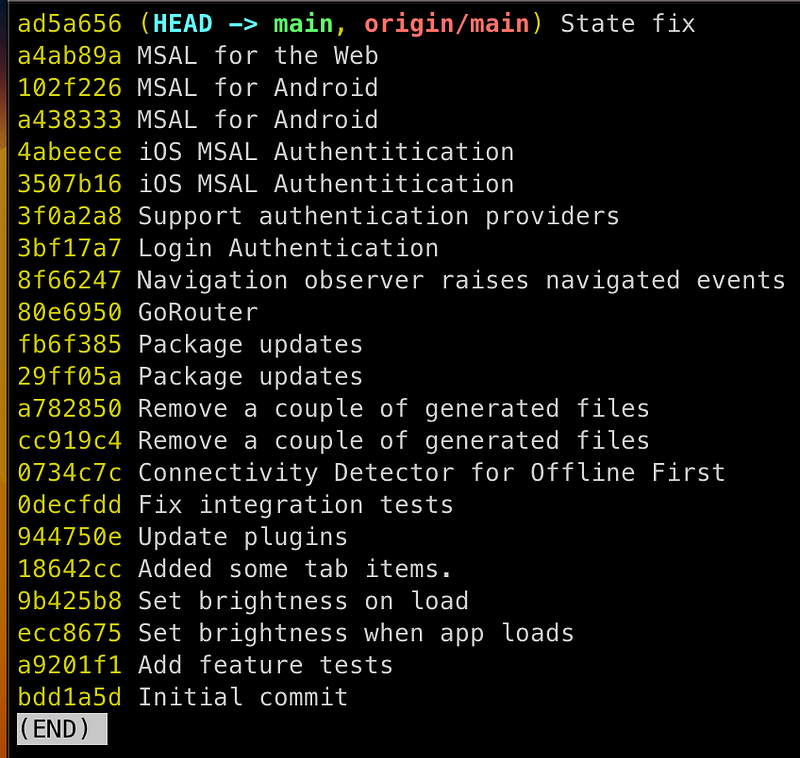
Then its just a case of going back 1 commit at a time:

git checkout <commit-id>

In this case backing out the “MSAL for the Web” change, by checking out MSAL for Android commit:

git checkout 102f226

And bingo the app is working again now the web changes are removed.
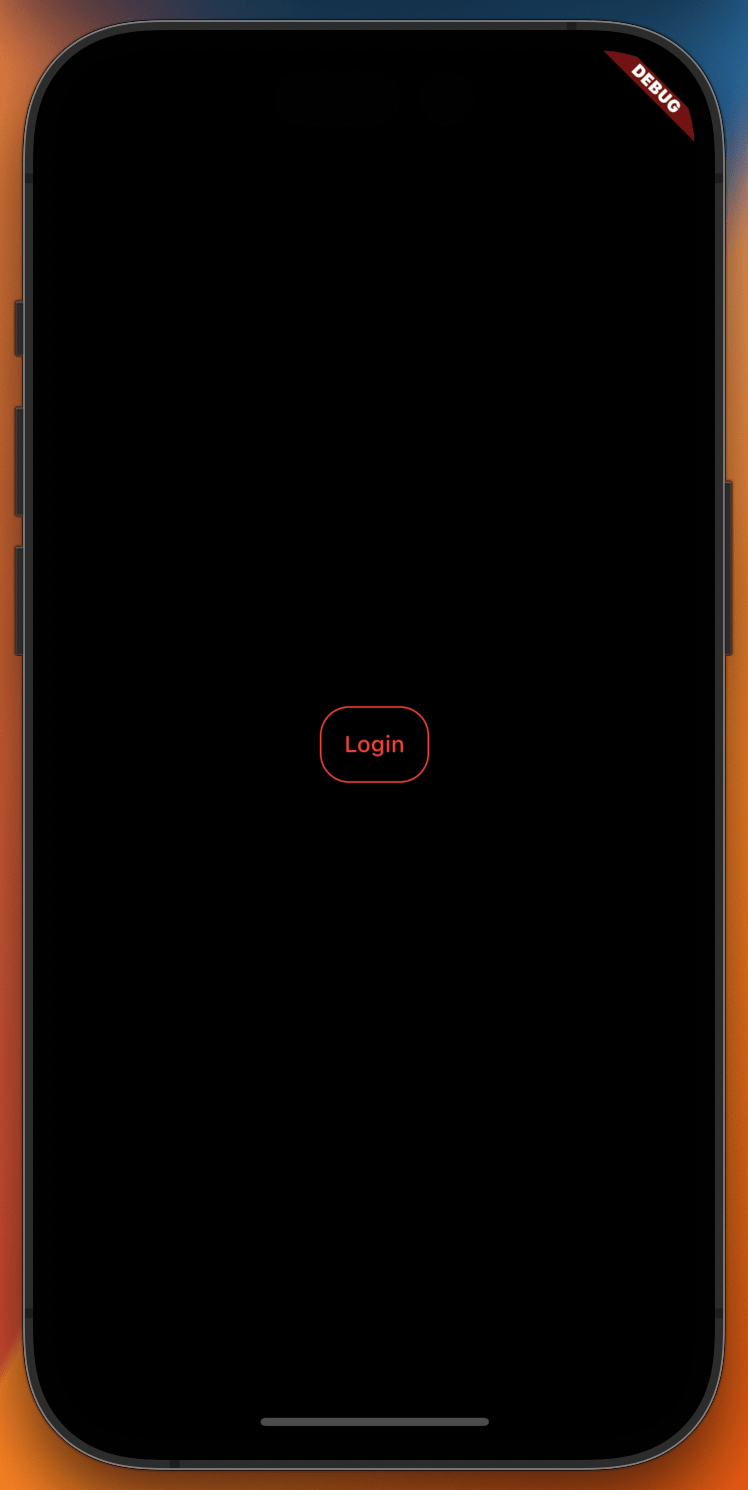
Login screen when the app runs

If you now do:

git status

You will notice the branch is detached:

Note: switching to '102f226'.

You are in 'detached HEAD' state. You can look around, make experimental
changes and commit them, and you can discard any commits you make in this
state without impacting any branches by switching back to a branch.

If you want to create a new branch to retain commits you create, you may
do so (now or later) by using -c with the switch command. Example:

  git switch -c <new-branch-name>

Or undo this operation with:

  git switch -

Turn off this advice by setting config variable advice.detachedHead to false

HEAD is now at 102f226 MSAL for Android

I then switched back to the latest code by checking out the branch:

git checkout main

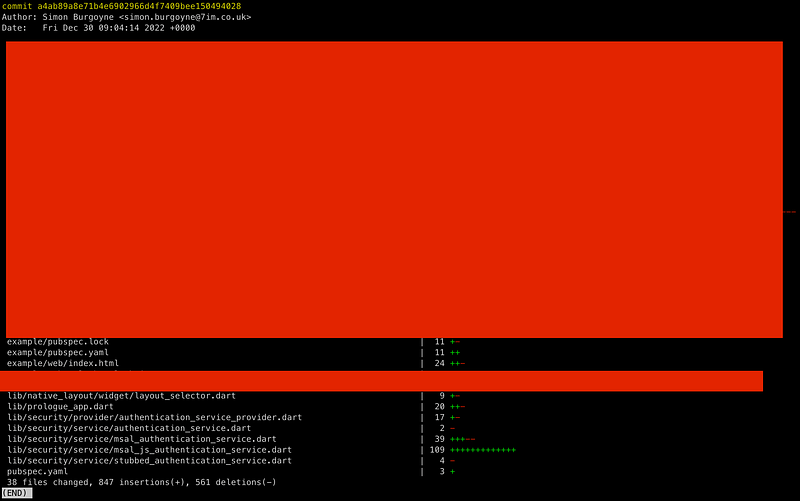
The next step was to investigate what changed in commit that caused the error:

git show --stat a4ab89a
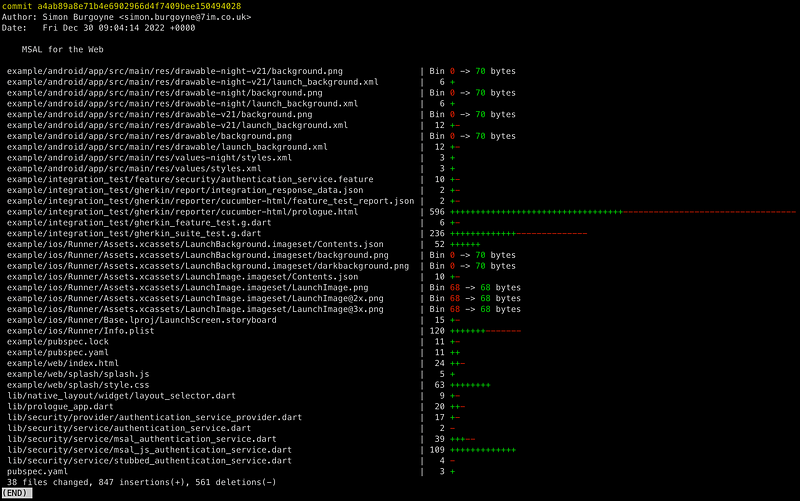
The output on the right shows the number of lines affected or bytes if its a binary file (Bin), pluses ++++ indicate adding lines and minuses — removing, those with both are files you have modified, those with just +++ tend to indicate new files.

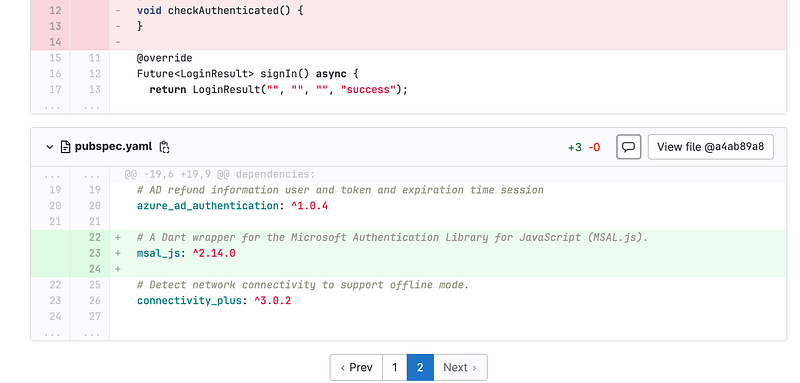
You can then view the changes for a particular file with this command:

git diff 102f226 a4ab89a pubspec.yaml
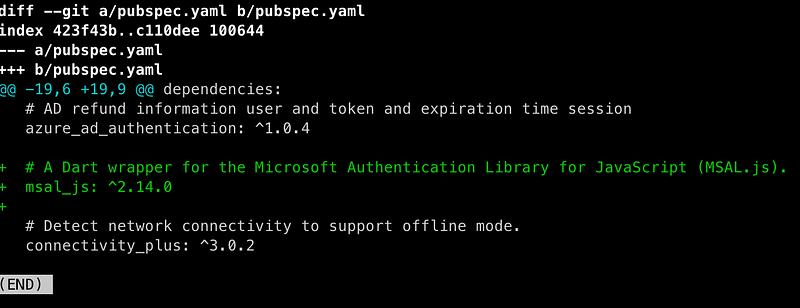
Which is good if you want to cover a period i.e. more than 1 commit for a file, but for a single commit I usually use the GUI in the online repository, in this case GitLab:
Eventually there is no substitute for understanding when getting to the bottom of something, other than backing out files.

In my case I can ignore all the files related to change for flutter_native_splash: and for the BDD acceptance tests which left just a few files to look into:
Files to look at after exclusions

Based on the error about untranslatable dart.js I started by removing changes to a file that added the reference to the js packages: lib/security/service/msal_js_authentication_service.dart 0 → 100644_

import ‘package:msal_js/msal_js.dart’;

And we are back in business!

Fixing it required some research which led me to Flutters condition import ability, details below.

XP

Conditional Imports

You cannot reference anything that loads dart.js if you want to compile your application for iOS, which gives you a multiple platform issue when you need to use it for the web, luckily Flutter supports conditional Imports:

import 'msal_authentication_service.dart'
    if (dart.library.js) 'msal_js_authentication_service.dart';

Next, declare the same method in both implementations, msal_authentication_service.dart & msal_js_authentication_service.dart:

// Mobile Implementation
AuthenticationService getAuthenticationService() => MsalAuthenticationService();

class MsalAuthenticationService implements AuthenticationService {

// Web Implementation
AuthenticationService getAuthenticationService() => MsalJsAuthenticationService();

class MsalJsAuthenticationService implements AuthenticationService {

And use it in code you are writing:

static AuthenticationService get instance {
    return getAuthenticationService();
}

Be sure to notice that in the implementations the method is outside of the class.

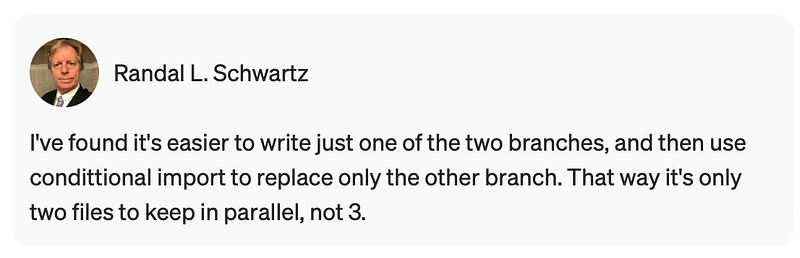
Thx, Randal for the simplification suggestion, original it was more complicated:
Git Time Travel

Stash any changes first as using the git reset — hard option resets the current branch tip, and also deletes any changes in the working directory and staging area.

git reset --hard HEAD@{5.minutes.ago}

// Other periods

HEAD@{1.day.2.hours.ago}, 
HEAD@{yesterday}, 
HEAD@{2020-01-01 18:30:00}, 
HEAD@{12:43}
  • Only works for your local terminal — your reflog and gitrevisions are stored locally, but aren’t shared when you push to a remote repository
  • Only works for committed files — if you’ve deleted uncommitted files, these aren’t stored in Git anywhere. Good reason to commit early and often

Detached Head

detached head state where you can make changes and it will allow you to make commits, but nothing will be saved and any commits you make will be lost. HEAD answers the question, “Where am I right now?” Most of the time, HEAD points to a branch. This is the detached HEAD state; HEAD is pointing directly to a commit instead of a branch. Its good for investigation a bug as you can run the previous version and make changes that will not be saved.
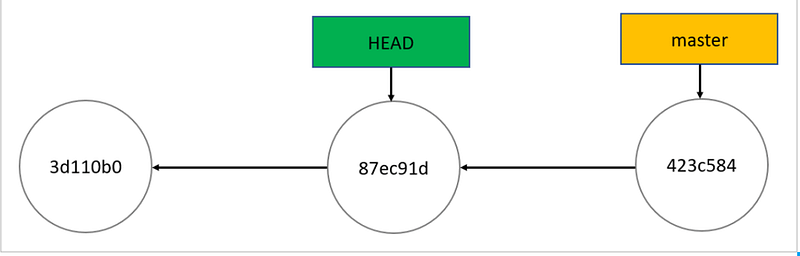
If you want to keep changes made with a detached HEAD, just create a new branch and switch to it. You can create it right after arriving at a detached HEAD or after creating one or more commits. The result is the same.

git branch <branch-name>

Links

Flutter
Git
Cross Platform
Mobile
Dart
Recommended from ReadMedium