
Git Branching Made Easy
This is the second article in the series of articles on Introduction to Git. The first article can be found here. Note that the first article is a prerequisite for this article.
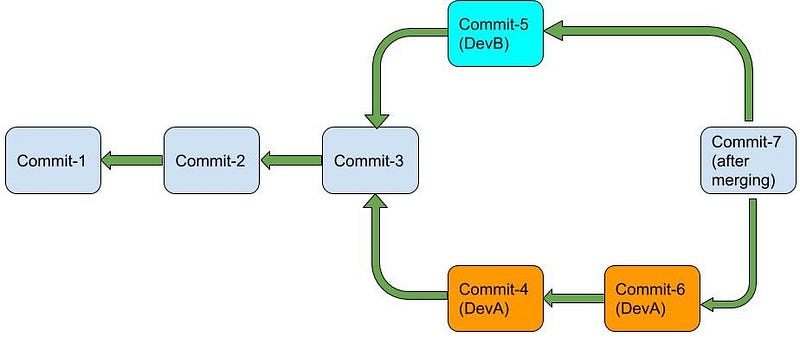
When working on a big project, several features of the project are being developed simultaneously. Git branching helps serve this purpose in an extremely efficient way. Let us try to understand it using an example. Suppose there are two developers — DevA and DevB. Both are working on a project together. This is how the commit history of their Git repository currently looks.

After some time they feel that it would be better if DevA start working on featureA and DevB starts working on featureB. In a world without branching both the developers would commit to the same line of development. DevA would see the commits and changes made by DevB and vice-versa. Won’t things become confusing? It would become extremely difficult to isolate the work of DevA from the work of DevB.
Git Branching provides an easy mechanism to develop several features of your project simultaneously and then later merge those features in the main project. It helps to isolate your work completely from that of other members of the team. I think we would better understand the power of Git Branching once we begin working with it. So let’s jump right into it.
In a nutshell, this is how Git branching works. Whenever you want to develop a certain feature in your project, you branch into another line of development. And once you finish implementing the feature, the feature branch can be merged into the original line of development (also called the master branch).
What is a Git Branch?
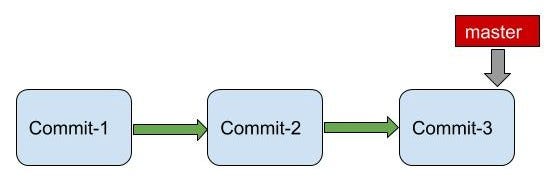
All this time (in the previous article) we were developing in a linear line, without any branches. Well, that was a lie! We were still on a branch, the master branch. This is the default branch that Git creates when you do a git init . Remember, when you did a git log , you would see a master written on your latest commit.
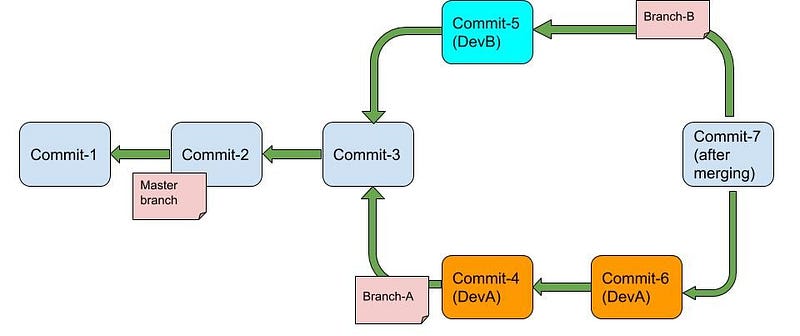
Generally, the master branch is considered the main line of development. For implementing a specific feature you branch into another feature branch and then later merge the feature branch into the master branch. Thus the master branch is meant to be permanent while other branches die after the purpose for which they were created has been fulfilled (after merging them into another branch).
How Git Branching works internally? How to create a Git Branch?
Currently, this is how our repository looks like -
>>> git log
commit e097d8da357fe97c36c7178f0b770ae44b1f1f3c (HEAD -> master)
Author: pprakarsh <prakarshparashar@gmail.com>
Date:   Thu May 21 10:24:55 2020 +0530
changed file2commit 6642a0de776b52bbe993555a4bf14aed060afea2
Author: pprakarsh <[email protected]>
Date: Sun May 3 22:14:12 2020 +0530added another line in file1
commit 155891ca19d94f67159a992c77923818b57d74a5
Author: pprakarsh <[email protected]>
Date:   Sun May 3 10:41:06 2020 +0530
created file1, created subDir1 and created file2 in itNotice master written on the latest commit.
To create a new branch feature1 , execute the following command
>>> git branch feature1
>>> git log
commit e097d8da357fe97c36c7178f0b770ae44b1f1f3c (HEAD -> master, feature1)
Author: pprakarsh <prakarshparashar@gmail.com>
Date:   Thu May 21 10:24:55 2020 +0530
changed file2commit 6642a0de776b52bbe993555a4bf14aed060afea2
Author: pprakarsh <[email protected]>
Date: Sun May 3 22:14:12 2020 +0530added another line in file1
commit 155891ca19d94f67159a992c77923818b57d74a5
Author: pprakarsh <[email protected]>
Date:   Sun May 3 10:41:06 2020 +0530
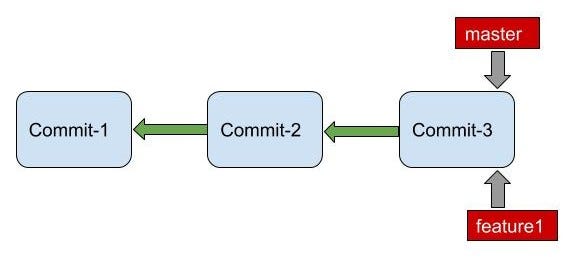
created file1, created subDir1 and created file2 in itYou will now notice master, feature1 written on the latest commit. Thus a new branch feature1 has been created which points to the same commit pointed by the master branch.
To see all git branches execute the command below.
>>> git branch
  feature1
* master
Notice the asterisk on the master. This denotes that the master is our current working branch.
So, to conclude:
- Create a new branch using
git branch branchname. - When a new branch is created, say, branch2 created from branch1, then branch2 points to the latest commit in branch1 as we just saw.
git branchto see all working branches in your repository
Diving Deep into Git References
Let us digress from the topic for a moment and talk about Git References. A good understanding of Git References helps a lot in the understanding of how Git Branches work internally.
So, What are Git References? And how are they useful?
References in Git provide a mechanism to mark important objects so that they can be easily referred to later. Suppose for a certain section of your project you would like to refer to the code in commit-2 frequently. This would require that we know the commit hash for the commit object. But, Instead of executing a git log and then searching for the commit hash repeatedly, we can use the reference that we have created to refer to that commit object. We will see how to create references in a while.
There are two types of references: 1. heads 2. tags
Execute the following command to see how these references are stored in the .git directory.
>>> tree .git/refs.git/refs
├── heads
│ ├── feature1
│ └── master
└── tagsLet us take a look into both heads and tags one by one -
heads
Remember when we executed git log earlier, we also saw HEAD -> master . What is this HEAD? The HEAD is nothing but a pointer to the branch we are currently working on. An exception to this is the detached HEAD state (Don't worry! We will talk about this in a while). If we are working in the master branch we will see HEAD -> master .
>>> git log
commit e097d8da357fe97c36c7178f0b770ae44b1f1f3c (HEAD -> master, feature1)
Author: pprakarsh <prakarshparashar@gmail.com>
Date:   Thu May 21 10:24:55 2020 +0530
changed file2commit 6642a0de776b52bbe993555a4bf14aed060afea2
Author: pprakarsh <[email protected]>
Date: Sun May 3 22:14:12 2020 +0530added another line in file1
commit 155891ca19d94f67159a992c77923818b57d74a5
Author: pprakarsh <[email protected]>
Date:   Sun May 3 10:41:06 2020 +0530
created file1, created subDir1 and created file2 in it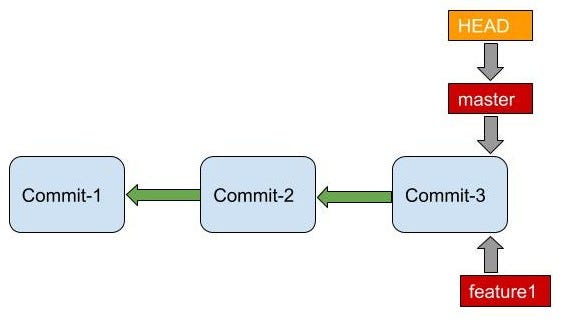
Suppose if we switch to feature1 branch. (We were currently on the master branch. We had created the feature1 branch but we were still on the master branch). To switch to feature1 branch execute the following command.
>>> git checkout feature1
Switched to branch 'feature1'
>>> git branch
* feature1
masterWe have changed our current working branch to feature1 .
>>> git log
commit e097d8da357fe97c36c7178f0b770ae44b1f1f3c (HEAD -> feature1, master)
Author: pprakarsh <prakarshparashar@gmail.com>
Date:   Thu May 21 10:24:55 2020 +0530
changed file2commit 6642a0de776b52bbe993555a4bf14aed060afea2
Author: pprakarsh <[email protected]>
Date: Sun May 3 22:14:12 2020 +0530added another line in file1
commit 155891ca19d94f67159a992c77923818b57d74a5
Author: pprakarsh <[email protected]>
Date:   Sun May 3 10:41:06 2020 +0530
created file1, created subDir1 and created file2 in itNotice that, instead of HEAD -> master , we now have HEAD -> feature1 on our latest snapshot. Since we switched to feature1 branch, our HEAD now points to feature1 . Thus HEAD is nothing but a pointer to the current branch in our git repository.
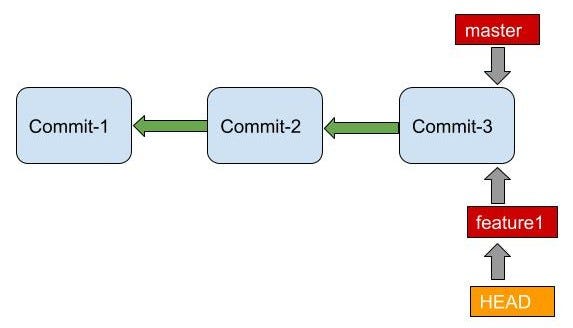
Now once again, a moment of truth! The branch we have been talking about all this while is also nothing but a reference object. It is a pointer to the latest commit in the branch. When a new commit object is created in a branch, the branch pointer is simply updated to point to the new commit object.
So, How is Git able to identify the current commit object that we are working on, it fetches the HEAD reference object, which provides the branch reference object (for the current working branch) and then the branch reference object provides the commit object. Hence the denotation HEAD -> branch .
In our git repository, currently, references — HEAD->feature1 , feature1 and master point to the same commit object. While the HEAD reference object points to the feature1 reference object.
To conclude: 1. branch reference objects keep track of our latest commit on the branch. The branch reference object is updated only when a new commit object is created in the branch. 2. HEAD reference object keeps track of our current working branch. The HEAD reference object is updated whenever the current working branch is switched to another branch.
tags
Tags are mainly used to mark important points (commits) in your Git commit history. While heads are inbuilt references, tags are required to be created.
Suppose commit-2 is an important commit and would be required to be referred to frequently. We can create a tag that points to commit-2. Whenever it would be required to refer to the commit-2 object, we can use this tag.
Since it is not required to know tags for understanding Git Branching. We will talk about it in another article. The link to the article would be available here.
Continuing with Git Branching
So, we looked at how to create branches, how to switch between branches, and list all branches. We also looked at what is a HEAD reference object and that the branch is nothing but a pointer (reference object) to the latest commit of the branch.
Now, let us make some changes and create some more commits in our new feature1 branch. Note that we are currently on our feature1 branch. Execute the following commands to create two new commits in the feature1 branch.
>>> echo "I have been created in feature1 branch." > file3
>>> git add file3
>>> git commit -m "added file3"
[feature1 693f09b] added file3
 1 file changed, 1 insertion(+)
>>> echo "Another commit in file3" >> file3
>>> git add file3
>>> git commit -m "change in file3"
[feature1 ef154d8] change in file3
1 file changed, 1 insertion(+)>>> git log
commit ef154d8ae3bac0e2bdcd8102381e49a3a5c480ee (HEAD -> feature1)
Author: pprakarsh <prakarshparashar@gmail.com>
Date: Sat Jul 18 12:23:49 2020 +0530change in file3commit 693f09b8c388a684156f9654d99ad5c4b8f2133c
Author: pprakarsh <[email protected]>
Date: Sat Jul 18 12:18:07 2020 +0530added file3commit e097d8da357fe97c36c7178f0b770ae44b1f1f3c (master)
Author: pprakarsh <[email protected]>
Date: Thu May 21 10:24:55 2020 +0530changed file2commit 6642a0de776b52bbe993555a4bf14aed060afea2
Author: pprakarsh <[email protected]>
Date: Sun May 3 22:14:12 2020 +0530added another line in file1
commit 155891ca19d94f67159a992c77923818b57d74a5
Author: pprakarsh <[email protected]>
Date:   Sun May 3 10:41:06 2020 +0530
created file1, created subDir1 and created file2 in itWe can see that the feature1 branch is 2 commits ahead of the master branch.
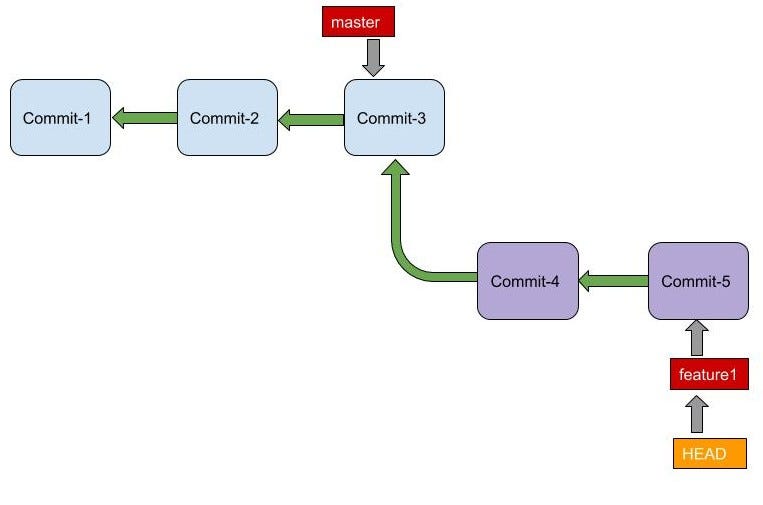
Now we would like to merge our feature1 branch into the master branch. So, How can we do this?
Merging Branches Overview:
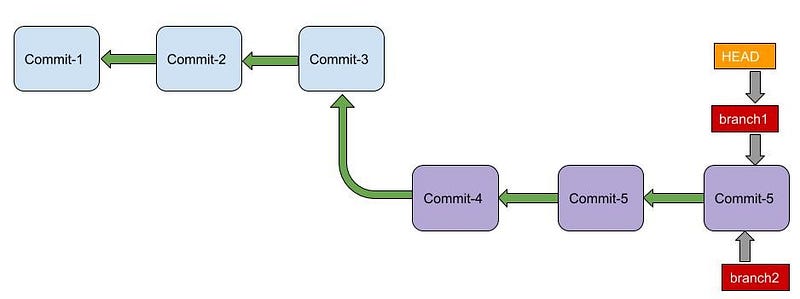
When we finish implementing a particular feature, we would want to merge it into the branch it originated from. When we want to merge branch2 into branch1, we have two possible scenarios:
Fast Forward Merge:
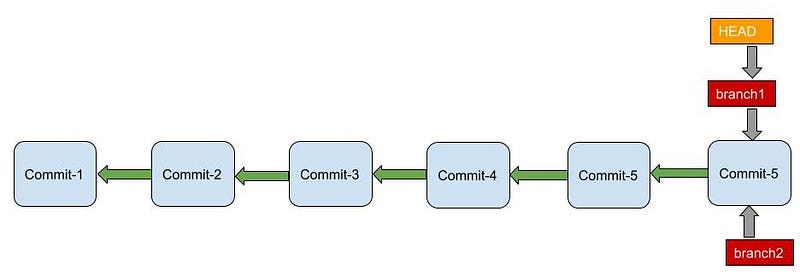
A Fast Forward merge is performed when the Lowest common Ancestor of branch1 (reference object) and branch2 (reference object) is branch1 (reference object).
Note that when we are talking about branch1/branch2 (reference object), we are talking about the latest commit on that branch.
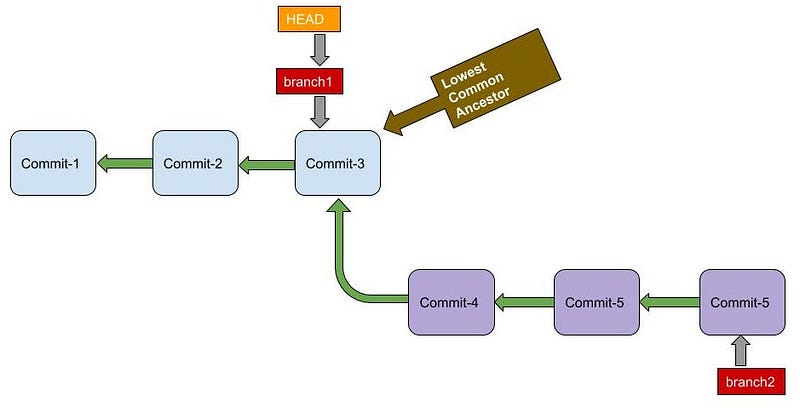
Note that the HEAD points to branch1. Thus if want to merge branch2 into branch1, our current working branch must be branch1.
Fast Forward merge is simple. During a Fast-Forward merge, the branch1 pointer is simply moved to the same commit where the branch2 pointer points.
3-way Merge:
The 3-way merge is performed when the Lowest Common Ancestor of branch1 (reference object) and branch2 (reference object) is some other commit object, not branch1 (reference object) or branch2 (reference object). This generally happens when some new commits have been added to the original branch after the new branch has been created.
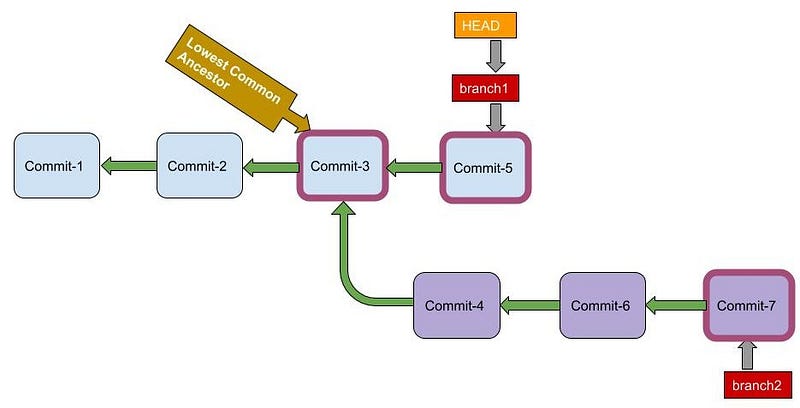
Instead of moving the branch pointer forward. A new commit is created — merge commit. This commit has two parents — one from branch1 and one from branch2. Changes in both branch1 and branch2 are merged and combined into this new merge commit.
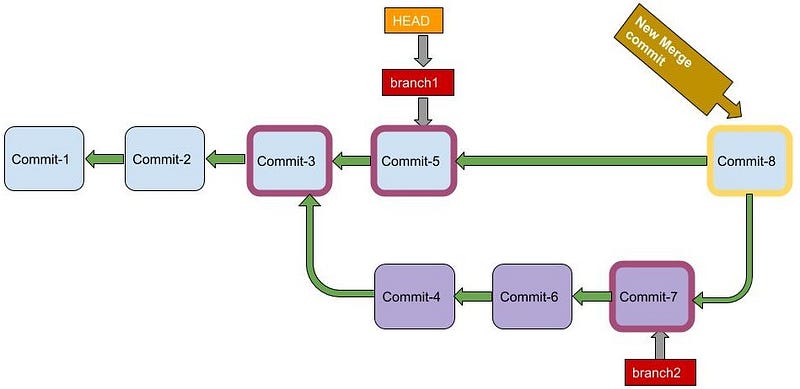
So, now we have a good idea about the two possible scenarios when merging branch2 into branch1. Let us now try out the fast-forward merge and the 3-way merge in our git repository.
Merging Branches Implementation:
Simply doing a git log may not be the best way when dealing with branches. A better command for visualizing git branches is shown below.
>>> git log --all --color --graph --pretty=format:'%Cred%h%Creset -%C(yellow)%d%Creset %s %Cgreen(%cr) %C(bold blue)<%an>%Creset' --abbrev-commit* ef154d8 - (HEAD -> feature1) change in file3 (5 days ago) <pprakarsh>
* 693f09b - added file3 (5 days ago) <pprakarsh>
* e097d8d - (master) changed file2 (9 weeks ago) <pprakarsh>
* 6642a0d - added another line in file1 (3 months ago) <pprakarsh>
* 155891c - created file1, created subDir1 and created file2 in it (3 months ago) <pprakarsh>The output becomes colorful and neat. You need not write this gigantic command repeatedly, you can set an alias for this command (to say git lg).
>>> git config --global alias.lg "log --all --color --graph --pretty=format:'%Cred%h%Creset -%C(yellow)%d%Creset %s %Cgreen(%cr) %C(bold blue)<%an>%Creset' --abbrev-commit"Now executing git lg will give us the same pretty output.
>>> git lg
* ef154d8 - (HEAD -> feature1) change in file3 (5 days ago) <pprakarsh>
* 693f09b - added file3 (5 days ago) <pprakarsh>
* e097d8d - (master) changed file2 (9 weeks ago) <pprakarsh>
* 6642a0d - added another line in file1 (3 months ago) <pprakarsh>
* 155891c - created file1, created subDir1 and created file2 in it (3 months ago) <pprakarsh>We see that the feature1 branch is two commits ahead of the master branch. The Lowest Common Ancestor of the feature1 branch and the master branch is the commit pointed by the master. Thus, this is the case of a Fast-Forward merge. We want to merge the feature1 branch into the master branch. Thus HEAD must point to master. So, the first step is to checkout to the master branch (the branch we want to merge into).
>>> git checkout master
Switched to branch 'master'
>>> git branch
  feature1
* master
>>> git lg
* ef154d8 - (feature1) change in file3 (5 days ago) <pprakarsh>
* 693f09b - added file3 (5 days ago) <pprakarsh>
* e097d8d - (HEAD -> master) changed file2 (9 weeks ago) <pprakarsh>
* 6642a0d - added another line in file1 (3 months ago) <pprakarsh>
* 155891c - created file1, created subDir1 and created file2 in it (3 months ago) <pprakarsh>
To merge the feature1 branch into the master branch, execute the following command.
>>> git merge feature1
Updating e097d8d..ef154d8
Fast-forward
 file3 | 2 ++
 1 file changed, 2 insertions(+)
 create mode 100644 file3
>>> git lg
* ef154d8 - (HEAD -> master, feature1) change in file3 (5 days ago) <pprakarsh>
* 693f09b - added file3 (5 days ago) <pprakarsh>
* e097d8d - changed file2 (9 weeks ago) <pprakarsh>
* 6642a0d - added another line in file1 (3 months ago) <pprakarsh>
* 155891c - created file1, created subDir1 and created file2 in it (3 months ago) <pprakarsh>
Observe the output of the git merge feature1 command. The output shows Fast-forward merge. On executing git lg we see that the master now points to the same commit object as feature1 and HEAD points to the master.
The feature1 branch pointer is now useless, so we can delete the feature1 branch.
>>> git branch -d feature1
Deleted branch feature1 (was ef154d8).
>>> git branch
* master
>>> git lg
* ef154d8 - (HEAD -> master) change in file3 (5 days ago) <pprakarsh>
* 693f09b - added file3 (5 days ago) <pprakarsh>
* e097d8d - changed file2 (9 weeks ago) <pprakarsh>
* 6642a0d - added another line in file1 (3 months ago) <pprakarsh>
* 155891c - created file1, created subDir1 and created file2 in it (3 months ago) <pprakarsh>
Notice that there is no feature1 branch anymore.
Let us now create a new branch branch1 and try doing a 3-way merge. For this, we would need to create some new commits as well. Execute the following commands to create a new branch branch1 .
>>> git branch branch1
>>> git branch
  branch1
* master
>>> git lg
* ef154d8 - (HEAD -> master, branch1) change in file3 (5 days ago) <pprakarsh>
* 693f09b - added file3 (5 days ago) <pprakarsh>
* e097d8d - changed file2 (9 weeks ago) <pprakarsh>
* 6642a0d - added another line in file1 (3 months ago) <pprakarsh>
* 155891c - created file1, created subDir1 and created file2 in it (3 months ago) <pprakarsh>
We are currently in the master branch. We will create a new commit object in the master branch. Currently, master and branch1 both point to the same commit object.
>>> echo "Another commit in master" >> file3
>>> git add file3
>>> git commit -m "file3 changes"
[master f614763] file3 changes
 1 file changed, 1 insertion(+)
>>> git lg
* f614763 - (HEAD -> master) file3 changes (10 seconds ago) <pprakarsh>
* ef154d8 - (branch1) change in file3 (5 days ago) <pprakarsh>
* 693f09b - added file3 (5 days ago) <pprakarsh>
* e097d8d - changed file2 (9 weeks ago) <pprakarsh>
* 6642a0d - added another line in file1 (3 months ago) <pprakarsh>
* 155891c - created file1, created subDir1 and created file2 in it (3 months ago) <pprakarsh>
Notice that the master now points to the new commit object. We will now switch to branch1 . The HEAD would now point to branch1.
>>> git checkout branch1
Switched to branch 'branch1'
>>> git branch
* branch1
  master
>>> git lg
* f614763 - (master) file3 changes (8 minutes ago) <pprakarsh>
* ef154d8 - (HEAD -> branch1) change in file3 (5 days ago) <pprakarsh>
* 693f09b - added file3 (5 days ago) <pprakarsh>
* e097d8d - changed file2 (9 weeks ago) <pprakarsh>
* 6642a0d - added another line in file1 (3 months ago) <pprakarsh>
* 155891c - created file1, created subDir1 and created file2 in it (3 months ago) <pprakarsh>
We will now create a new commit in branch1 .
>>> echo "creating file4" > file4
>>> git add file4
>>> git commit -m "created file4"
[branch1 9e2566a] created file4
 1 file changed, 1 insertion(+)
 create mode 100644 file4
>>> git lg
* 9e2566a - (HEAD -> branch1) created file4 (3 seconds ago) <pprakarsh>
| * f614763 - (master) file3 changes (10 minutes ago) <pprakarsh>
|/
* ef154d8 - change in file3 (5 days ago) <pprakarsh>
* 693f09b - added file3 (5 days ago) <pprakarsh>
* e097d8d - changed file2 (9 weeks ago) <pprakarsh>
* 6642a0d - added another line in file1 (3 months ago) <pprakarsh>
* 155891c - created file1, created subDir1 and created file2 in it (3 months ago) <pprakarsh>
Notice the divergence at the commit object ef154d8 . Both commit objects f614763 (belonging to the master branch) and 9e2566a (belonging to the branch1 branch) contains a reference to the same parent commit object ef154d8.
Creating another commit object in branch1 .
>>> echo "another line in file4" >> file4
>>> git add file4
>>> git commit -m "file4 changes"
[branch1 0b17834] file4 changes
 1 file changed, 1 insertion(+)
>>> git lg
* 0b17834 - (HEAD -> branch1) file4 changes (7 seconds ago) <pprakarsh>
* 9e2566a - created file4 (14 minutes ago) <pprakarsh>
| * f614763 - (master) file3 changes (24 minutes ago) <pprakarsh>
|/
* ef154d8 - change in file3 (5 days ago) <pprakarsh>
* 693f09b - added file3 (5 days ago) <pprakarsh>
* e097d8d - changed file2 (9 weeks ago) <pprakarsh>
* 6642a0d - added another line in file1 (3 months ago) <pprakarsh>
* 155891c - created file1, created subDir1 and created file2 in it (3 months ago) <pprakarsh>
We can see that new commit object 0b17834 has been created in branch1.
Let us now merge branch1 into the master branch. Notice that the Lowest Common Ancestor of the branch1 reference object (0b17834) and the master reference object (f614763) is a different commit object (ef154d8). Therefore, it is a 3-way merge.
But, first, we need to switch to the master branch.
>>> git checkout master
Switched to branch 'master'
>>> ls
subDir1  file1  file3
>>> git lg
* 0b17834 - (branch1) file4 changes (11 minutes ago) <pprakarsh>
* 9e2566a - created file4 (24 minutes ago) <pprakarsh>
| * f614763 - (HEAD -> master) file3 changes (34 minutes ago) <pprakarsh>
|/
* ef154d8 - change in file3 (5 days ago) <pprakarsh>
* 693f09b - added file3 (5 days ago) <pprakarsh>
* e097d8d - changed file2 (9 weeks ago) <pprakarsh>
* 6642a0d - added another line in file1 (3 months ago) <pprakarsh>
* 155891c - created file1, created subDir1 and created file2 in it (3 months ago) <pprakarsh>
Notice that the content of the repository does not show file4 , because file4 blob object cannot be accessed via the current commit object f614763 .
Execute the following command to merge branch1 into the master branch.
>>> git merge branch1
Merge made by the 'recursive' strategy.
 file4 | 2 ++
 1 file changed, 2 insertions(+)
 create mode 100644 file4
>>> git lg
* 15357ad - (HEAD -> master) Merge branch 'branch1' (15 seconds ago) <pprakarsh>
|\
| * 0b17834 - (branch1) file4 changes (15 minutes ago) <pprakarsh>
| * 9e2566a - created file4 (29 minutes ago) <pprakarsh>
* | f614763 - file3 changes (39 minutes ago) <pprakarsh>
|/
* ef154d8 - change in file3 (5 days ago) <pprakarsh>
* 693f09b - added file3 (5 days ago) <pprakarsh>
* e097d8d - changed file2 (9 weeks ago) <pprakarsh>
* 6642a0d - added another line in file1 (3 months ago) <pprakarsh>
* 155891c - created file1, created subDir1 and created file2 in it (3 months ago) <pprakarsh>The merge can be seen clearly by executing the git lg command. A new merge commit object (15357ad ) has been created, which contains changes in both the master branch and branch1. The master now points to this commit object.
If we are certain that branch1 servers no further purpose, we can delete branch1 by executing the git branch -d branch1 command. I choose not to delete it.
The case of Merge Conflicts
Now, we understand how a Git merge works and we also know how to do a Git merge. If we are merging two branches, changes in both the branches are incorporated in the merge. But, what if we change in the same part of the same file in the two branches. Clearly, both changes cannot be incorporated in the final merge. This results in a merge conflict. How do we resolve these merge conflicts?
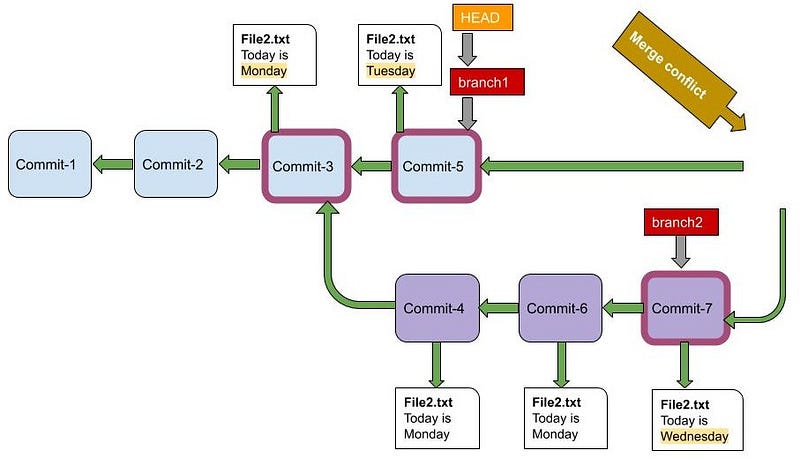
An important point to consider here is that merge conflicts can happen only in the case of a 3-way Merge. In the case of a Fast-Forward merge, changes are made in only one branch, thus merge conflict is not possible.
Let us see how to resolve a merge conflict.
Firstly, we will create a new branch branch2 in our git repository.
>>> git branch branch2
>>> git branch
  branch1
  branch2
* master
>>> git lg
*   15357ad - (HEAD -> master, branch2) Merge branch 'branch1' (3 hours ago) <pprakarsh>
|\
| * 0b17834 - (branch1) file4 changes (3 hours ago) <pprakarsh>
| * 9e2566a - created file4 (3 hours ago) <pprakarsh>
* | f614763 - file3 changes (3 hours ago) <pprakarsh>
|/
* ef154d8 - change in file3 (5 days ago) <pprakarsh>
* 693f09b - added file3 (5 days ago) <pprakarsh>
* e097d8d - changed file2 (9 weeks ago) <pprakarsh>
* 6642a0d - added another line in file1 (3 months ago) <pprakarsh>
* 155891c - created file1, created subDir1 and created file2 in it (3 months ago) <pprakarsh>
Notice that a new branch branch2 has been created which points to the same commit object as master (15357ad). Also, note that we are currently in the master branch. We will create another commit object in the master branch.
>>> echo "Today is Tuesday" > file5
>>> git add file5
>>> git commit -m "file5 added, Tuesday"
[master 2a4af24] file5 added, Tuesday
 1 file changed, 1 insertion(+)
 create mode 100644 file5
>>> git lg
* 2a4af24 - (HEAD -> master) file5 added, Tuesday (11 minutes ago) <pprakarsh>
* 15357ad - (branch2) Merge branch 'branch1' (3 hours ago) <pprakarsh>
|\
| * 0b17834 - (branch1) file4 changes (3 hours ago) <pprakarsh>
| * 9e2566a - created file4 (4 hours ago) <pprakarsh>
* | f614763 - file3 changes (4 hours ago) <pprakarsh>
|/
* ef154d8 - change in file3 (5 days ago) <pprakarsh>
* 693f09b - added file3 (5 days ago) <pprakarsh>
* e097d8d - changed file2 (9 weeks ago) <pprakarsh>
* 6642a0d - added another line in file1 (3 months ago) <pprakarsh>
* 155891c - created file1, created subDir1 and created file2 in it (3 months ago) <pprakarsh>We can see that a new commit object has been created in the master branch. We will switch to branch2 now and create a new commit in branch2 . On switching to branch2 , we will see that there is no file5 in the working directory. This is because we are currently on a different commit object (15357ad).
>>> git checkout branch2
Switched to branch 'branch2'
>>> git branch
  branch1
* branch2
  master
>>> git lg
* 2a4af24 - (master) file5 added, Tuesday (16 minutes ago) <pprakarsh>
* 15357ad - (HEAD -> branch2) Merge branch 'branch1' (3 hours ago) <pprakarsh>
|\
| * 0b17834 - (branch1) file4 changes (3 hours ago) <pprakarsh>
| * 9e2566a - created file4 (4 hours ago) <pprakarsh>
* | f614763 - file3 changes (4 hours ago) <pprakarsh>
|/
* ef154d8 - change in file3 (5 days ago) <pprakarsh>
* 693f09b - added file3 (5 days ago) <pprakarsh>
* e097d8d - changed file2 (9 weeks ago) <pprakarsh>
* 6642a0d - added another line in file1 (3 months ago) <pprakarsh>
* 155891c - created file1, created subDir1 and created file2 in it (3 months ago) <pprakarsh>>>> ls
subDir1 file1 file3 file4We will now create a new commit object in branch2 . We will create file5 in branch2 as well, with the same content as in the master branch but the name of the day.
>>> echo "Today is Wednesday" > file5
>>> git add file5
>>> git commit -m "file5 added, Wednesday"
[branch2 206760e] file5 added, Wednesday
 1 file changed, 1 insertion(+)
 create mode 100644 file5
>>> git lg
* 206760e - (HEAD -> branch2) file5 added, Wednesday (31 seconds ago) <pprakarsh>
| * 2a4af24 - (master) file5 added, Tuesday (18 minutes ago) <pprakarsh>
|/
* 15357ad - Merge branch 'branch1' (3 hours ago) <pprakarsh>
|\
| * 0b17834 - (branch1) file4 changes (3 hours ago) <pprakarsh>
| * 9e2566a - created file4 (4 hours ago) <pprakarsh>
* | f614763 - file3 changes (4 hours ago) <pprakarsh>
|/
* ef154d8 - change in file3 (5 days ago) <pprakarsh>
* 693f09b - added file3 (5 days ago) <pprakarsh>
* e097d8d - changed file2 (9 weeks ago) <pprakarsh>
* 6642a0d - added another line in file1 (3 months ago) <pprakarsh>
* 155891c - created file1, created subDir1 and created file2 in it (3 months ago) <pprakarsh>A new commit object 206760e has been created in the branch2 branch. We can see a divergence at commit 15357ad . This commit object 15357ad serves as a parent for commit objects — 2a4af24 (in themaster branch) and 206760e (in the branch2 branch). Now let us switch back to the master branch and try to merge branch2 into the the master branch.
>>> git checkout master
Switched to branch 'master'
>>> git merge branch2
Auto-merging file5
CONFLICT (add/add): Merge conflict in file5
Automatic merge failed; fix conflicts and then commit the result.On executing the git merge command, we will see that our merge has failed. This is because git cannot resolve the conflict on its own. We will have to manually resolve the conflict.
Run git status , this will provide the name of the files which have conflicts.
>>> git status
On branch master
You have unmerged paths.
  (fix conflicts and run "git commit")
  (use "git merge --abort" to abort the merge)
Unmerged paths:
(use "git add <file>..." to mark resolution)both added: file5no changes added to commit (use "git add" and/or "git commit -a")We will see that file5 is causing a merge conflict. Now open file5 using the editor of your choice. You will see something like this. Everything below <<<<<<< HEAD and above ======= belongs to the latest commit in the current working branch (master in this case) while everything between ======= and >>>>>>> branch2 belongs to the latest commit of the other branch (branch2 in this case).
<<<<<<< HEAD
Today is Tuesday
=======
Today is Wednesday
>>>>>>> branch2
Edit the file and resolve the conflict. Now your file would look something like this.
Today is WednesdayThen execute git add filename to mark the file as resolved and finally execute git commit to commit the changes and complete the branch merging process.
>>> git add file5
>>> git commit
[master 4cf897d] Merge branch 'branch2'
>>> git lg
*   4cf897d - (HEAD -> master) Merge branch 'branch2' (2 minutes ago) <pprakarsh>
|\
| * 206760e - (branch2) file5 added, Wednesday (32 minutes ago) <pprakarsh>
* | 2a4af24 - file5 added, Tuesday (49 minutes ago) <pprakarsh>
|/
*   15357ad - Merge branch 'branch1' (4 hours ago) <pprakarsh>
|\
| * 0b17834 - (branch1) file4 changes (4 hours ago) <pprakarsh>
| * 9e2566a - created file4 (4 hours ago) <pprakarsh>
* | f614763 - file3 changes (4 hours ago) <pprakarsh>
|/
* ef154d8 - change in file3 (5 days ago) <pprakarsh>
* 693f09b - added file3 (5 days ago) <pprakarsh>
* e097d8d - changed file2 (9 weeks ago) <pprakarsh>
* 6642a0d - added another line in file1 (3 months ago) <pprakarsh>
* 155891c - created file1, created subDir1 and created file2 in it (3 months ago) <pprakarsh>
On running git lg we can clearly see that the branch2 has been successfully merged into the master branch. A new commit object has been created (4cf897d) which incorporates the changes of both the branches after the merge conflict resolution.
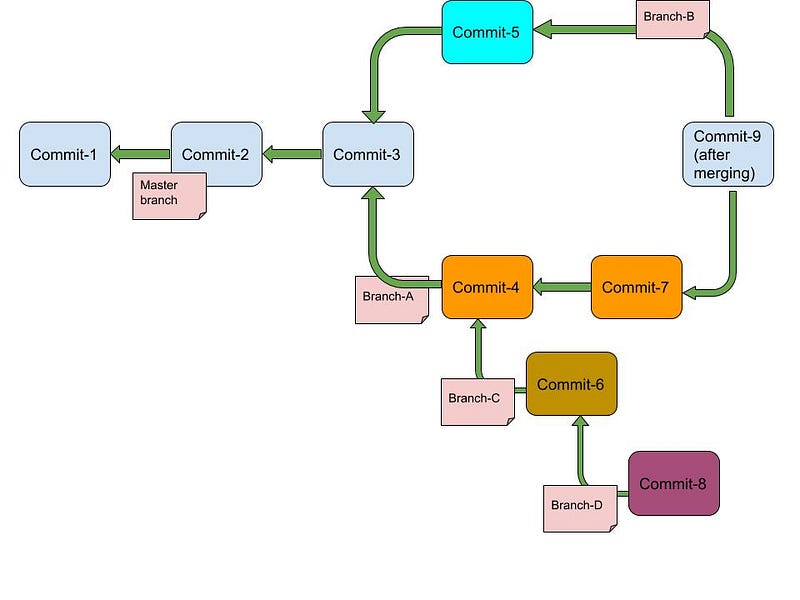
This completes our discussion on Git Branching. An important point to consider is that although we have discussed only two branches at a time, however in practice there can be nesting of multiple branches. The idea is that we consider only two branches at a time, merge them into one and then pick another two branches and so on.
Detached HEAD state
From our earlier discussion in the beginning of the article about Git references, we understand, branch is nothing but a reference (pointer) to the latest commit in the branch. We also talked about HEAD being a pointer to the current branch (HEAD-><branchname>).
In a detached HEAD state, the HEAD points to some other commit (not the branch). This enables developers to move the HEAD to a different commit object and re-create the state of working directory same as that of another commit.
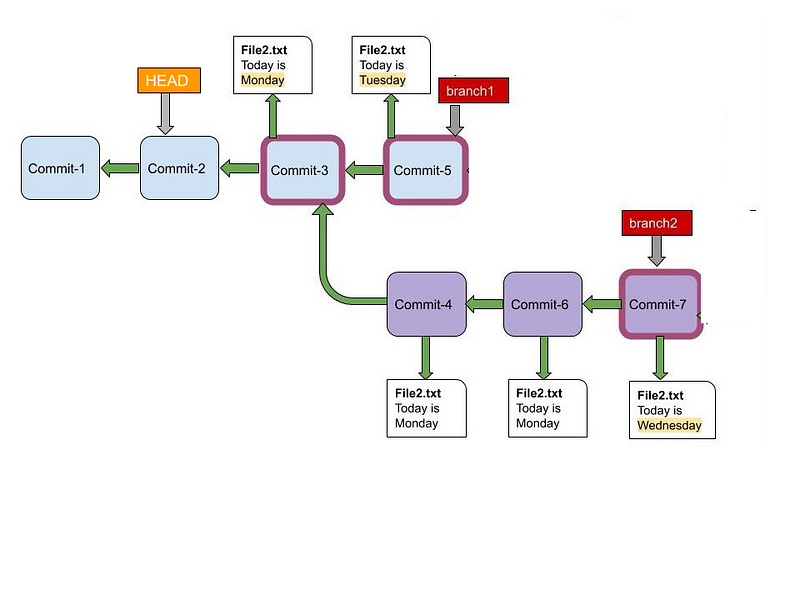
You can execute this command to move HEAD to another commit object.
git checkout <commit-hash>
You can further make changes to your repository in detached HEAD state by branching to a new branch, allowing you to play around with the commit snapshots that you have saved.
This concludes our discussion of Git branching. Hope you found this article helpful! Let me know your thoughts in the comments below. Next article, we will learn in depth about tracking changes in Git repository.
The first article in this series (on Git Internals) can be found here.