
Introducing the latest MongoDB Atlas Vector Search feature
Getting Started with MongoDB Atlas for Semantic Search
A quick tutorial for advanced search with MongoDB & Hugging Face
On June 22nd, MongoDB launched Atlas Vector Search in preview mode.
I tried this new feature for you!
The idea is to store a small dataset of common English proverbs on MongoDB and ask something like:
Question: Things that look good outwardly may not be as valuable or good.
Answer: All that glitters is not gold.
The inspiration for this post was taken from the official MongoDB Atlas Vector Search tutorial.
Introduction to MongoDB Atlas Vector Search
Vector search is an advanced technique used to perform semantic searches, where data is searched based on its meaning rather than the data itself.
This search method utilizes Machine Learning models to effectively search unstructured data, including text, audio, video, and images. It allows finding items that are similar or related to the search item. It is used for several use cases, like recommendation systems, chatbots, or search engines.
When dealing with text data, vector search makes finding words or phrases of similar meaning possible, even if the exact query words are not in the searched sentences.
Vector search is based on the concept of embedding.
Embeddings
Vector Search employs sophisticated Machine Learning models, known as encoders, to produce vector embeddings that provide a numerical representation of unstructured input data.
Vector embeddings transform unstructured data, which is typically incomprehensible to computers, into a numerical format that the machine can easily interpret.
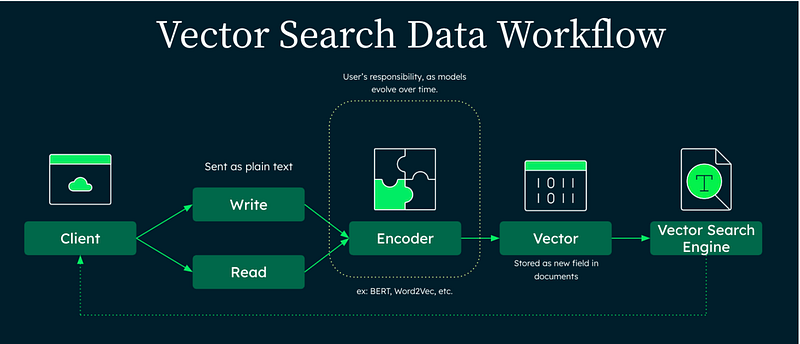
Embeddings are high-dimensional vectors that are essentially arrays of numerical values. These vectors possess the ability to encapsulate the contextual and semantic information of the data, enabling us to perform meaningful comparisons and computations.
For instance, text embedding models (encoders) can learn the relationship between the words in a phrase, generating embeddings that capture the semantic and contextual information of the sentences.
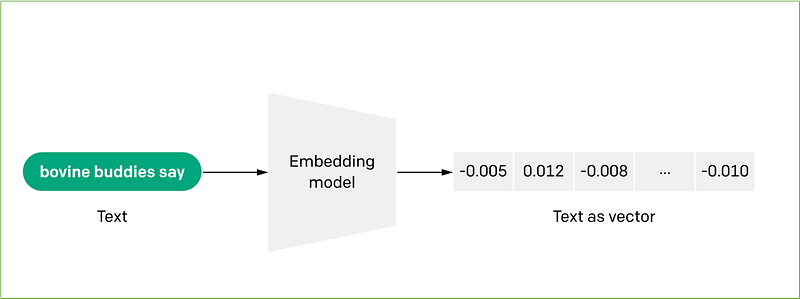
In the above image, the phrase “bovine buddies say” has been encoded in an array of floating point numbers ([-0.005, 0.012, -0.008, …, -0.010]).
The dimensionality of the vector depends on the embedding model and can be high (up to thousands of elements).
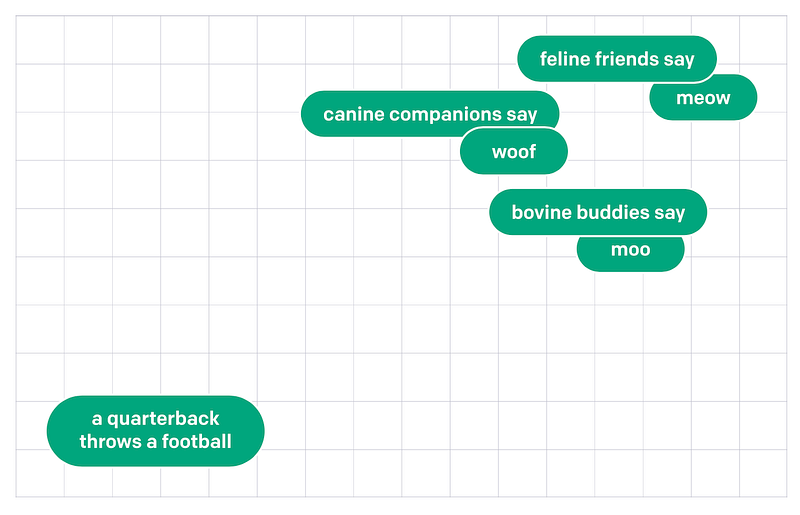
Text embedding models assign similar numerical representations to phrases that have similar meanings.
Representing items as vectors in multi-dimensional space, it is possible to determine if two or more sentences have similar meanings by their distance.
Embeddings are not limited to text. You can even create an embedding of an image and compare it with a text embedding to verify if the sentence accurately describes the image.
Atlas Vector Search
Atlas Vector Search is the new MongoDB Atlas feature that extends the MongoDB search capabilities to the next level.
MongoDB Atlas Vector Search provides:
- a vector store to persist embedding vectors generated by external ML models of your choice (OpenAI, Hugging Face, and more);
- a vector store index for indexing the stored embedding vectors;
- a search operation that implements an Approximate Nearest Neighbor (ANN) algorithm to perform semantic searches on the stored vectors.
With MongoDB Atlas Search, users can expand their information search capabilities beyond basic keyword matching. This innovative tool enables context-aware semantic search, allowing for inferring meaning from the user’s search term.
Atlas Vector Search in action
Now let’s try the MongoDB Atlas Vector Search new feature.
We’ll execute the following steps to complete this tutorial:
- Create a free MongoDB ATLAS cluster.
- Create MongoDB collections for proverbs and queries.
- Generate a Hugging Face API token.
- Import Hugging Face API token into Atlas
- Create Atlas Database Triggers and functions to invoke HF APIs.
- Create the Vector Search Index.
- Insert the proverbs dataset into MongoDB.
- Run the semantic queries.
We are going to use the Atlas UI only for performing the tasks of this tutorial.
1. Create a free MongoDB ATLAS cluster
The first step is to deploy our MongoDB Atlas free cluster (M0 cluster).
For this tutorial, feel free to use any already available Atlas cluster instead of creating a new one.
2. Create MongoDB collections for proverbs and queries
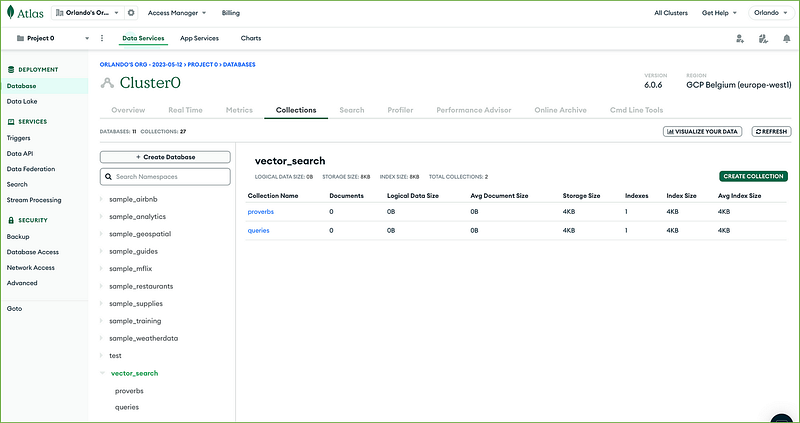
We’ll use two collections belonging to the same database in this tutorial:
- vector_search.proverbs for storing proverbs and their embeddings
- vector_search.queries for storing queries and answers.
Database and collection will be created from the Atlas UI.
From your database deployment, click the Browse Collections button:
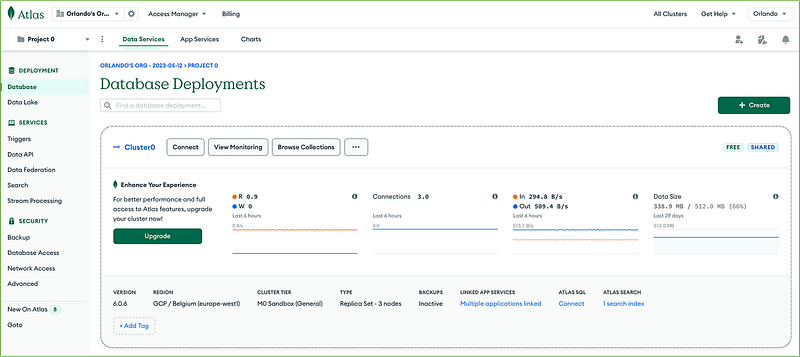
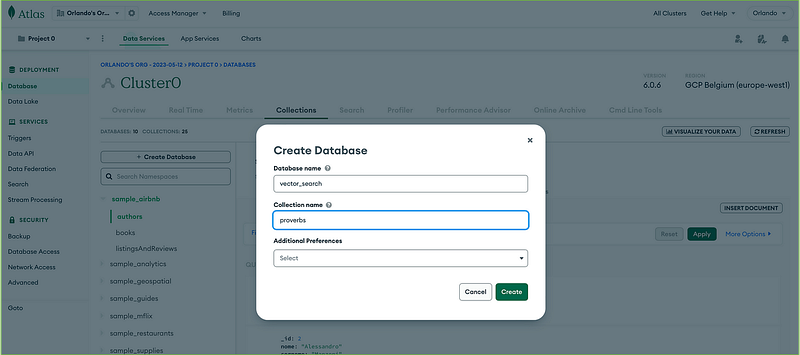
Then click + Create Database on the Collections tab, insert the database name (vector_search), first collection name (proverbs), and click the Create button.
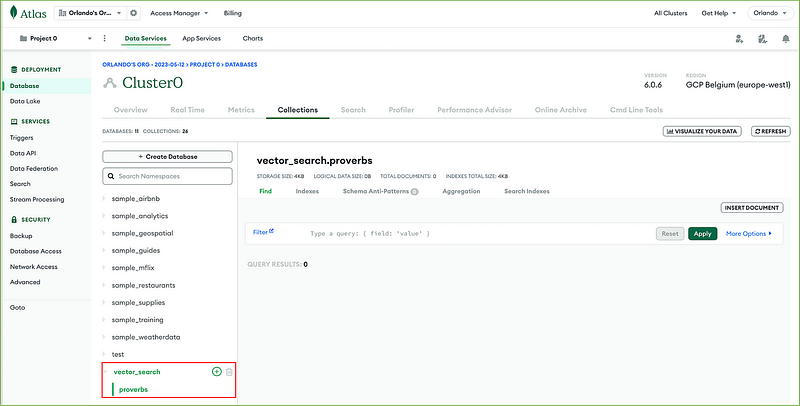
Select or hover over the database vector_search to create the second collection and click the plus sign + icon.
Then create the queries collection inside the database vector_search:
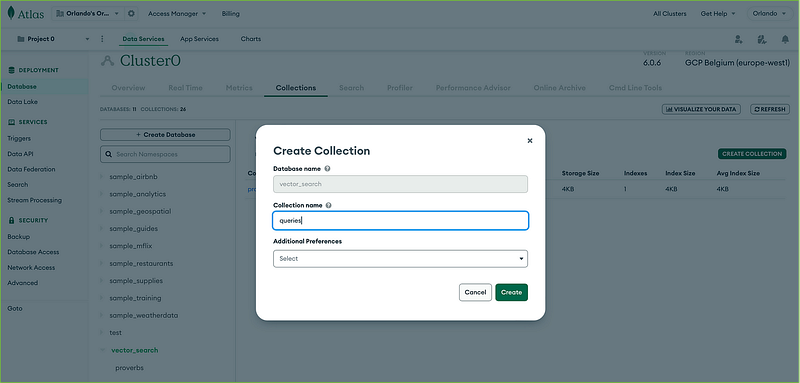
You now have your collections ready.
3. Generate a Hugging Face API token
We will use the free public Hugging Face Inference API to obtain the vector embeddings for our proverbs.
We must create a read access token on the Hugging Face site before invoking the text embedding API.
Go to the Hugging Face website and Log In or Sign Up.
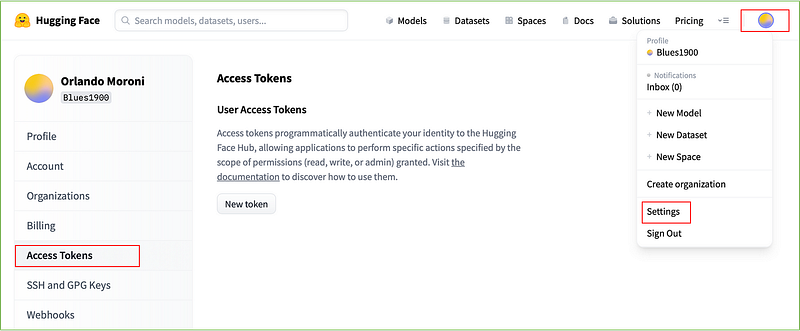
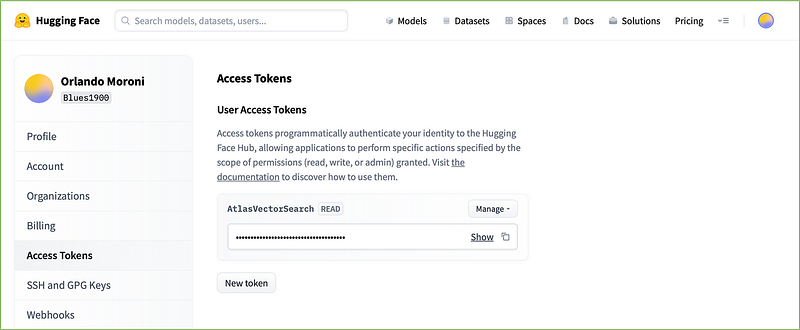
After the login, go to the upper right corner, click the Profile icon, and select Settings. Then on the left side of the Profile Settings page, click on Access Tokens and press the New Token button.
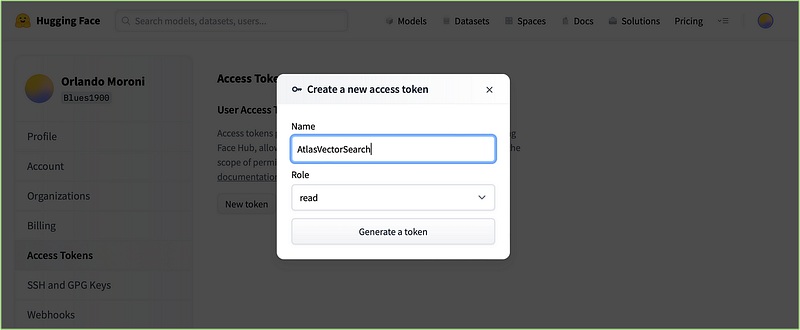
Give a name to your token, select the read Role, and click Generate a token.
Copy and save the generated token in a safe position.
4. Import Hugging Face API token into Atlas
We have to import the Hugging Face token previously generated into Atlas before invoking the HF APIs.
Go to the App Services page on the Atlas UI:
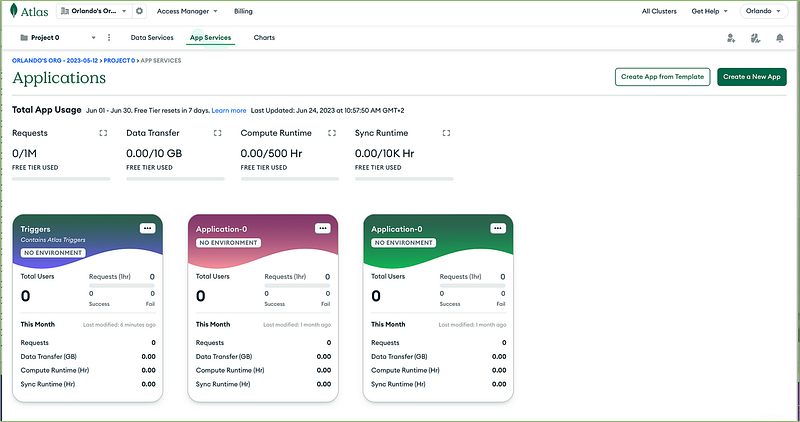
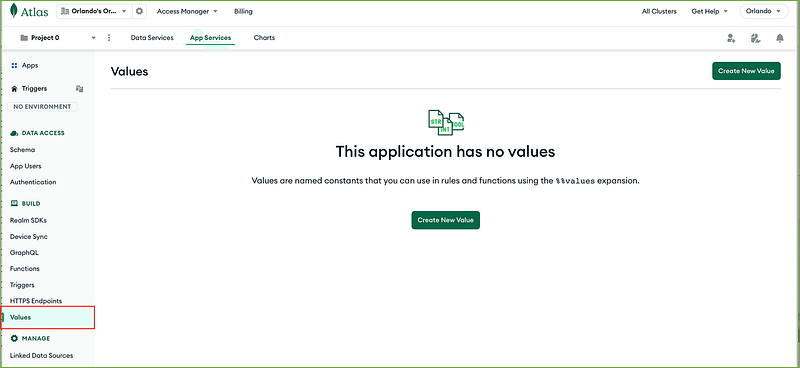
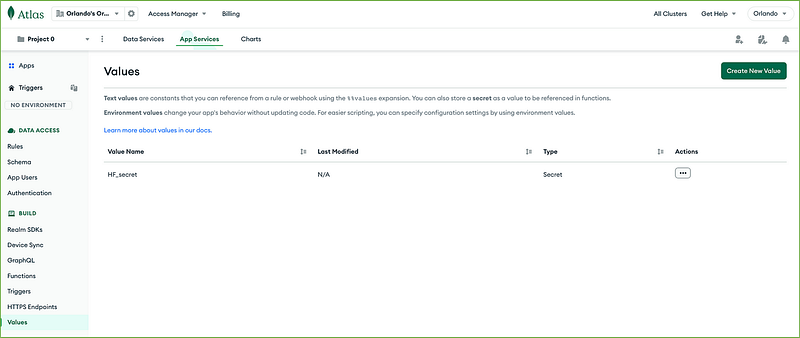
Click on the Triggers application (the leftmost box), select Values in the menu on the left, then click the Create New Value button.
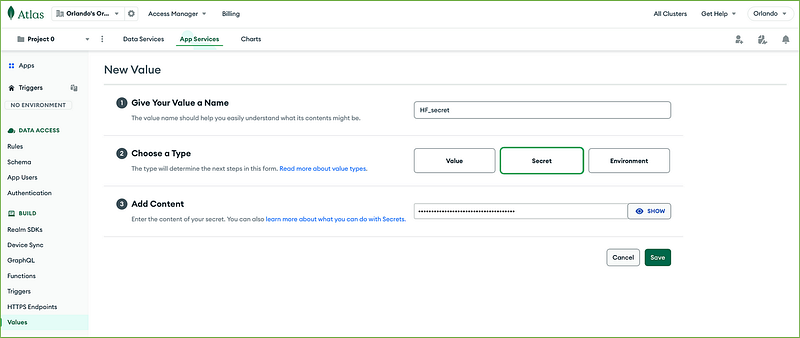
The first thing to create is a secret. Give the name HF_secret to your value, choose Secret as type, and paste the Hugging Face token into the Add Content field. Then click Save.
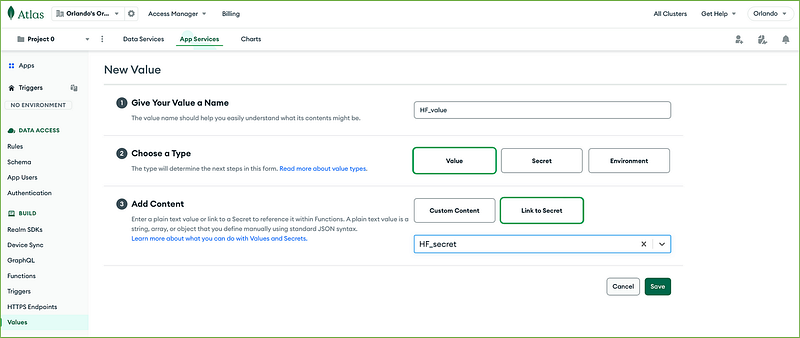
It is then necessary to create a new environment variable to use in our functions, so click again on Create New Value on the right upper corner button.
Create a value named HF_value of type Value and Link to Secret HF_secret, then press Save. Do follow precisely what has been done below.
5. Create Atlas Database Triggers and functions to invoke HF APIs
From the Atlas UI, we can define database triggers on our proverbs and queries collections to invoke the Hugging Face APIs each time a new document is inserted in those collections.
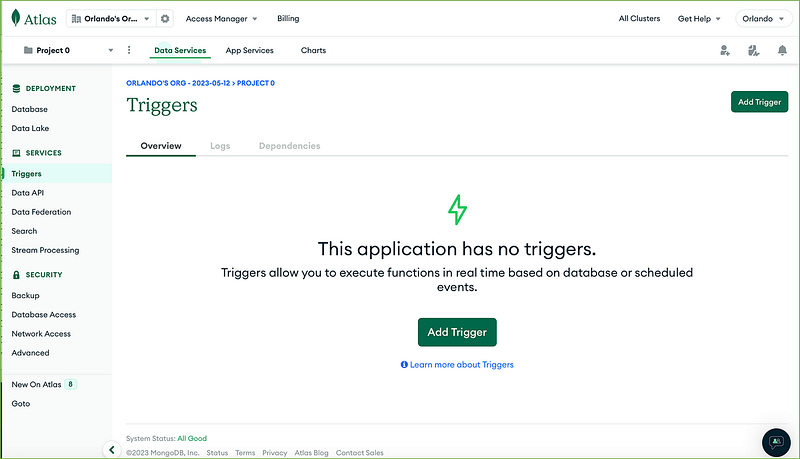
To create a Database Trigger, navigate to your Database Deployment and click Triggers in the left navigation menu.
Clicking on the Add Trigger button, you can configure your new trigger.
HF_Create_Embeddings trigger
We build the first trigger on our vector_search.proverbs collection, naming it HF_Create_Embeddings. Configure the trigger as shown below:
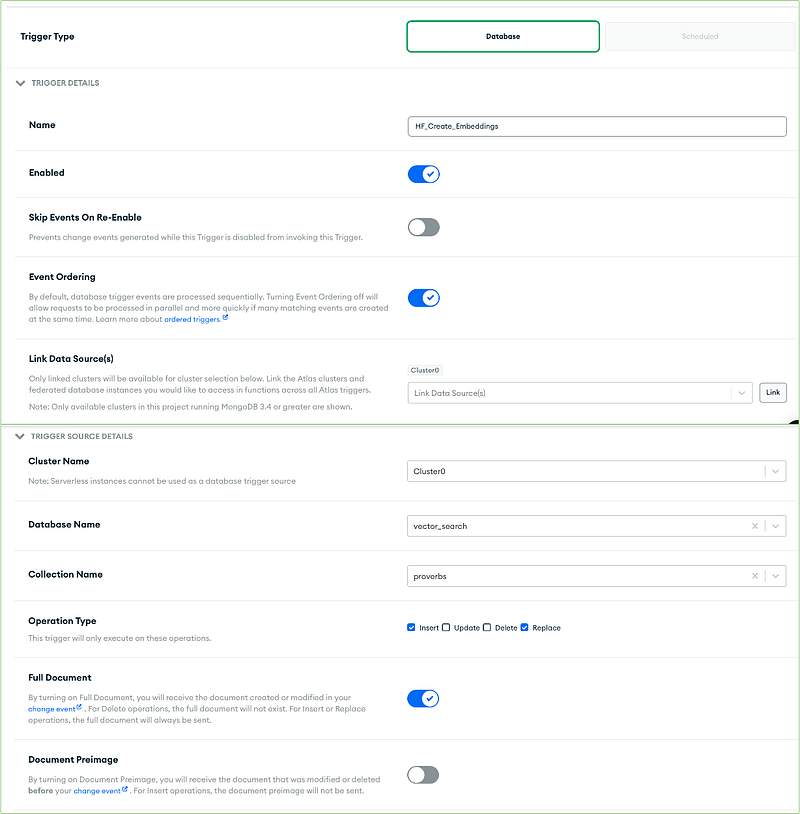
Select Function as the event type in the function section, and paste the Javascript function code reported on the following code block.
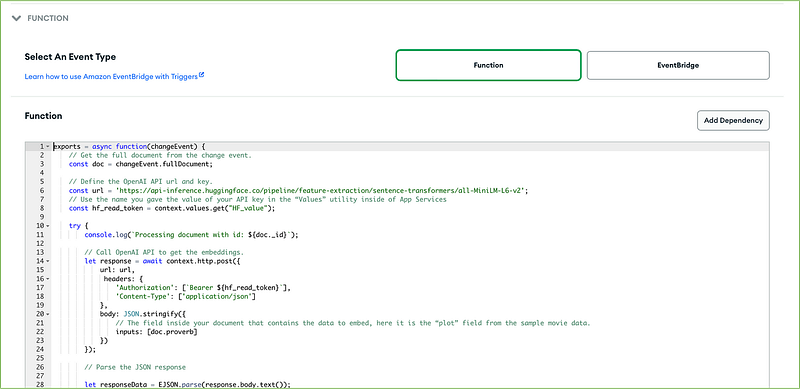
The code to be pasted on the above form is the following:
exports = async function(changeEvent) {
    // Get the full document from the change event.
    const doc = changeEvent.fullDocument;

    // Define the Hugging Face API url and key.
    const url = 'https://api-inference.huggingface.co/pipeline/feature-extraction/sentence-transformers/all-MiniLM-L6-v2';
    // Use the name you gave the value of your API key in the “Values” utility inside of App Services
    const hf_read_token = context.values.get("HF_value");

    try {
        console.log(`Processing document with id: ${doc._id}`);

        // Call Hugging Face API to get the embeddings.
        let response = await context.http.post({
            url: url,
             headers: {
                'Authorization': [`Bearer ${hf_read_token}`],
                'Content-Type': ['application/json']
            },
            body: JSON.stringify({
                // The field inside your document that contains the data to embed, here it is the “proverb” field from the sample proverbs data.
                inputs: [doc.proverb]
            })
        });

        // Parse the JSON response

        let responseData = EJSON.parse(response.body.text());

        // Check the response status.
        if(response.statusCode === 200) {
            console.log("Successfully received embedding.");

            const embedding = responseData[0];

            // Get the cluster in MongoDB Atlas.
            const mongodb = context.services.get('Cluster0');
            const db = mongodb.db('vector_search'); // Replace with your database name.
            const collection = db.collection('proverbs'); // Replace with your collection name.

            // Update the document in MongoDB.
            const result = await collection.updateOne(
                { _id: doc._id },
                // The name of the new field you’d like to contain your embeddings.
                { $set: { proverb_embedding: embedding }}
            );

            if(result.modifiedCount === 1) {
                console.log("Successfully updated the document.");
            } else {
                console.log("Failed to update the document.");
            }
        } else {
            console.log(`Failed to receive embedding. Status code: ${response.statusCode}`);
        }

    } catch(err) {
        console.error(err);
    }
};
The trigger HF_Create_Embeddings will invoke the Hugging Face all-MiniLM-L6-v2 model API to get the vector embedding for each proverb inserted into the proverbs collection.
Semantic_Query trigger
The second trigger will be created on the queries collection. From the trigger’s function, we’ll invoke the Hugging Face embedding model to get the embedding of the user query, and then we’ll execute the vector search through the MongoDB aggregate command.
The result of the vector search we’ll be saved on the queries collection itself.
To create the second trigger, follow the same process we used for the first one, but make sure to adjust the parameters as outlined below (all other parameter values remain the same):
Name Semantic_Query
Collection Name queries
For the function’s code, paste the following block:
exports = async function(changeEvent) {
    // Get the full document from the change event.
    const doc = changeEvent.fullDocument;

    // Define the Hugging Face API url and key.
    const url = 'https://api-inference.huggingface.co/pipeline/feature-extraction/sentence-transformers/all-MiniLM-L6-v2';
    // Use the name you gave the value of your API key in the “Values” utility inside of App Services
    const hf_read_token = context.values.get("HF_value");

    try {
        console.log(`Processing document with id: ${doc._id}`);

        // Call Hugging Face API to get the embeddings of the query.
        let response = await context.http.post({
            url: url,
             headers: {
                'Authorization': [`Bearer ${hf_read_token}`],
                'Content-Type': ['application/json']
            },
            body: JSON.stringify({
                // The field inside your document that contains the data to embed, here it is the “query” field from the "queries" collection.
                inputs: [doc.query]
            })
        });

        // Parse the JSON response

        let responseData = EJSON.parse(response.body.text());

        // Check the response status.
        if(response.statusCode === 200) {
            console.log("Successfully received embedding.");

            const embedding = responseData[0];

            // Get the cluster in MongoDB Atlas.
            const mongodb = context.services.get('Cluster0');
            const db = mongodb.db('vector_search'); // Replace with your database name.
            const proverbs_collection = db.collection('proverbs'); // Replace with your collection name.
            const queries_collection = db.collection('queries'); // Replace with your collection name.


            // Query for similar documents.
            const documents = await proverbs_collection.aggregate([
            {
             "$search": {
                   "index": "vector_search_index",
                   "knnBeta": {
                       "vector": embedding,
                       "path": "proverb_embedding",
                       "k": 2
                       }
                   }
            },
            {
             "$project":{
                  "_id":0,
                  "proverb":1
                 }
            }
            ]).toArray();

           // Update the document in MongoDB.
           const result = await queries_collection.updateOne(
                  { _id: doc._id },
             // The "answer" field will contain the query result.
                { $set: { query_embedding: embedding , answer: documents  }}
              );

        } else {
            console.log(`Failed to receive embedding. Status code: ${response.statusCode}`);
        }

    } catch(err) {
        console.error(err);
    }
};
6. Create the Vector Search Index
We must create a vector search index on the proverbs collection to enable the vector searches. The proverbs collection will contain the embedding of our proverb sentences (proverb_embedding field) that we’ll be searched to respond to our queries.
To create the index, go to Atlas Search: from the Database Deployments page, click on Search on the left menu, then select your cluster in the Select data source drop-down menu, and press the Go to Atlas Search button.
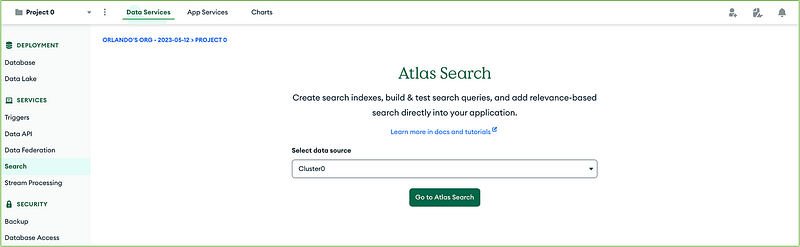
Click on Create Search Index button to configure the new search index:
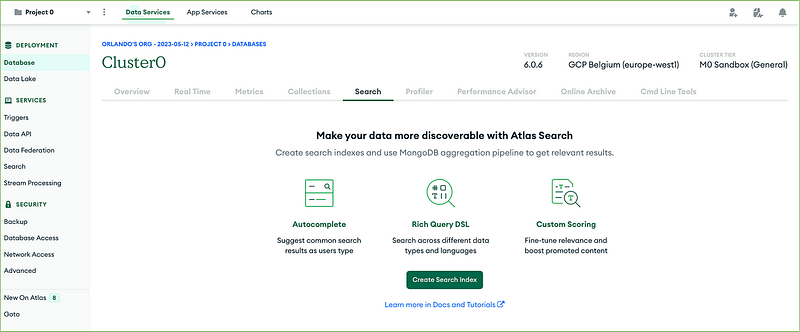
On the following page, select the JSON Editor box and press the Next button:
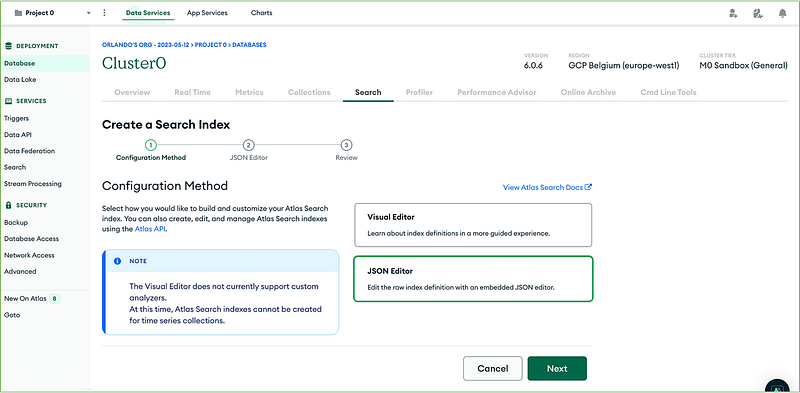
Select the vector_search database and the proverbs collection in the Database and Collection area, and name the index vector_search_index in the Index Name field.
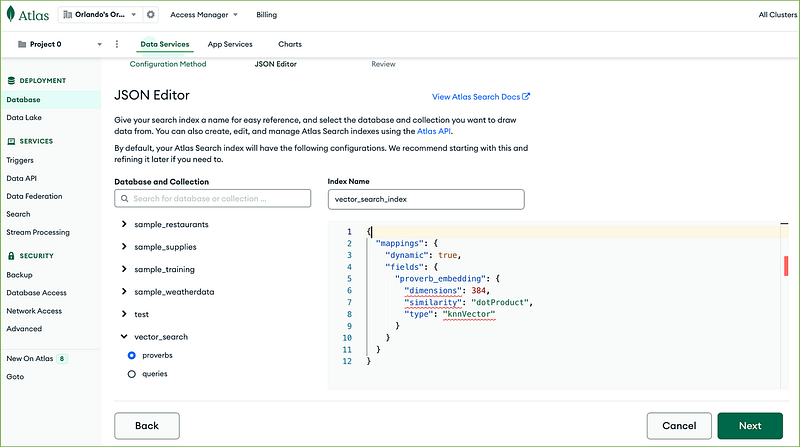
Paste the following JSON document into the text area, and click the Next button.
{
  "mappings": {
    "dynamic": true,
    "fields": {
      "proverb_embedding": {
        "dimensions": 384,
        "similarity": "dotProduct",
        "type": "knnVector"
      }
    }
  }
}
Clicking the Create Search Index, you start the index creation.
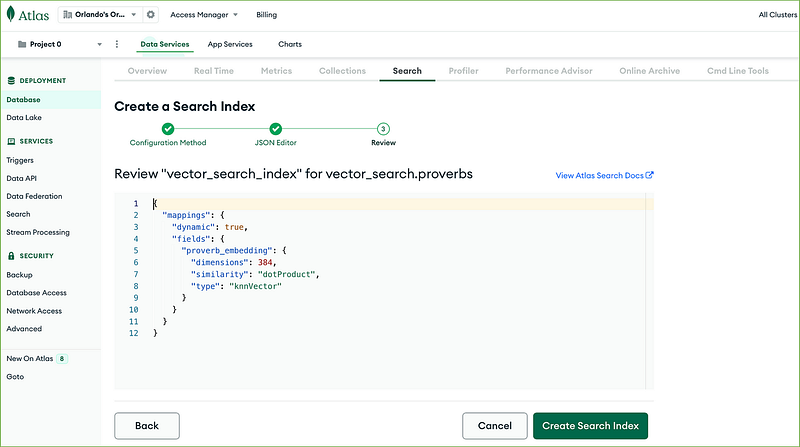
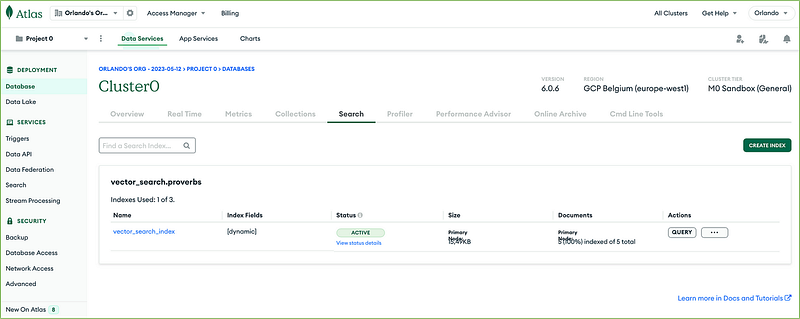
The new index will be available in the ACTIVE state shortly.
7. Insert the proverbs dataset into MongoDB
We will insert some English proverbs in the proverbs collection to populate our embedding store. We’ll add one proverb at a time from the Atlas UI.
The first proverb we are inserting says:
A jack of all trades is master of none
To insert a proverb:
- navigate to Browse Collections from the Database Deployments page;
- select the proverbs collection under the vector_search database
- add a single-field document having “proverb” as field name and the proverb sentence as field value;
- then press Insert.
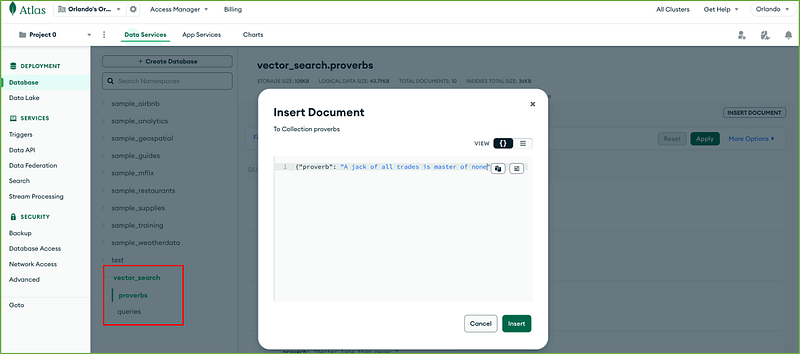
Magically a new field called proverb_embedding will be added to the document:
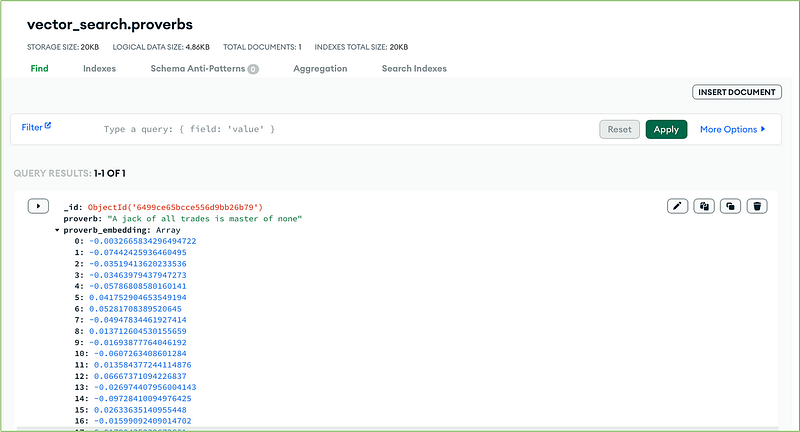
The proverb_embedding field contains the embedding vector (an array with 384 floating point elements) generated by the Hugging Face text embedding model API invoked by the HF_Create_Embeddings trigger.
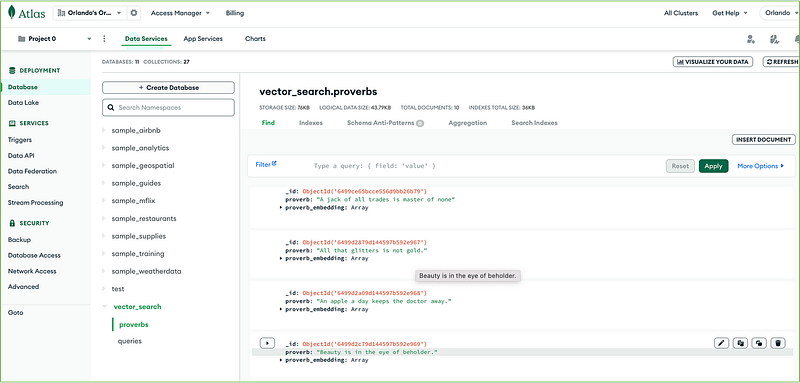
You can insert any English proverbs of your choice into the proverbs collection. In our test, we inserted the following ten proverbs, randomly picked from the web:
A jack of all trades is master of none.
All that glitters is not gold.
An apple a day keeps the doctor away.
Better late than never.
Curiosity killed the cat.
If you play with fire, you’ll get burned.
Justice delayed is justice denied.
Night brings counsel.
Rome wasn’t built in a day.
The grass is greener on the other side of fence.
We have ten documents in our proverbs collection.
8. Run the semantic queries
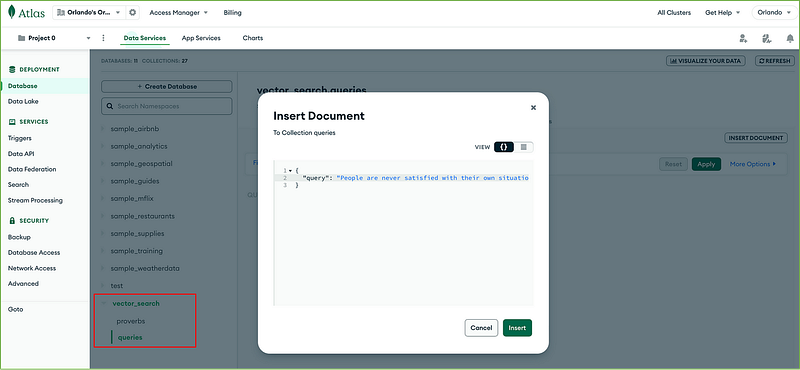
We’ll insert a single-field document in the queries collection to execute our search. The field name will be “query”, and the value will be the text of our search:
{ “query”: “Things that look good outwardly may not be as valuable or good.”}
As soon as a new document is inserted into the queries collection, the Semantic_Query trigger:
- invokes the Hugging Face API to get the embedding of the query, passing the proverb sentence;
- store the received embedding vector into the document itself (query_embedding field);
- executes the vector search on the vector_search_index, through the MongoDB aggregate command;
- save the search results into the document itself (answer field).
To test the query, go to the Collections tab and insert our query on the queries collection:
Here is the answer:
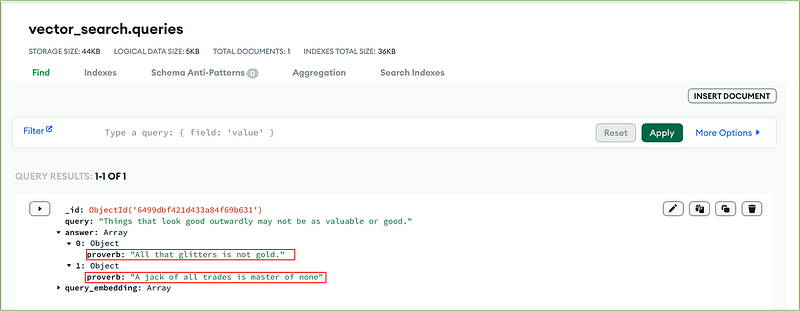
The two proverbs with the most similar meaning to our query are:
“All that glitters is not gold.” and “A jack of all trades is master of none”.
The answer looks fine! You can experiment with your dataset and your queries. Additionally, you could test out different embedding models, such as the OpenAI text embedding API, to assess the accuracy of the responses.
References
- MongoDB Atlas Manual
- MongoDB Atlas Vector Search
- MongoDB Atlas Search Tutorial
- Common English Proverbs
- Hugging Face Text Embedding Model
If you wish to expand your knowledge of MongoDB, look at my articles on How MongoDB Works.
If you appreciate the stories I write and would like to show your support, you can become a Medium member. For just $5 a month, you’ll have unlimited access to all the stories on Medium. By using my referral link to sign up, I’ll receive a small commission. Thank you for considering!