
TECH BASICS
Getting Started with Firecracker
AWS Firecracker Virtual Machine Monitor (VMM)

Firecracker is a virtual machine monitor (VMM) that uses the Linux Kernel-based Virtual Machine (KVM) to create and manage microVMs!
What is VMM?
A VMM Virtual Machine Monitor also knows as Hypervisor is software that creates and runs virtual machines. There are two main types VMM , referred to as Type 1 (bare-metal) and Type 2 (hosted).
What is KVM?
Kernel-based Virtual Machine (KVM) is open source virtualization technology built into Linux. Installing KVM on top of your Linux will convert your system into Hypervisor.
KVM converts Linux into a type-1 (bare-metal) hypervisor.
What is Serverless computing?
Serverless computing is a cloud computing execution model that deploys cloud-native applications on-demand in a cost-effective way. Serverless does not mean that there are no servers running, the difference is when you deploy your app, no resources you have to manage or configure, the cloud provider will do the magic on demand! It eliminates the need for server software and hardware management by the developer.
For cloud providers, the economics of serverless poses challenges in terms of selecting tech to achieve it with minimal overhead. They have a choice between using virtualization or Containers! Virtualization comes with security benefits but management overheads. Containers, on the other hand, have min overhead but lacks security aspects!
What is Firecracker?
Firecracker is virtualization tech based on KVM. It was developed at AWS and then open-sourced using Apache 2.0 Licence. Firecracker is written in Rust. AWS deployed Firecracker in two publically-available serverless compute services at Amazon Web Services (Lambda and Fargate).Using Firecracker you can launch MicroVMs in non virtualized environments. Firecracker has also been integrated into container runtimes, for example, Kata Containers and Weaveworks Ignite.
Doubt? When world is going mad on containers then why VMs?
Ans:
Firecrackeroffers the best of both worlds: the security of workload isolation similar to hardware-virtualization-based virtual machines(traditional VMs) and the resource efficiency and fast startup time of containers.
Firecracker only runs on Linux!(It uses KVM)
Firecracker provides a REST-based configuration API over a Linux Socket. This API is used for configuring the MicroVMs. It can start and stop them too. One Firecracker process runs per MicroVM, providing a simple model for security isolation.
Firecracker is designed to be run securely, inside an execution jail, carefully set up by the
jailerbinary.
Firecracker Security...
In terms of security, Firecracker has a powerful bouquet. Few of them are—
- Simple Guest Model
- Process Jail
- Static Linking
How to deploy?
We have discussed AWS Firecracker and its features. It's time for a quick demo now -
Step 1: Make sure you have access to KVM.
root@master:# sudo apt install cpu-checkerroot@master:# kvm-ok
INFO: /dev/kvm exists
KVM acceleration can be used# You can check if you have access to /dev/kvm with:root@master:# [ -r /dev/kvm ] && [ -w /dev/kvm ] && echo "OK" || echo "FAIL"
OK# if you have any other user then use -sudo setfacl -m u:${USER}:rw /dev/kvmStep 2: Make sure you have Docker installed and running.
Step 3: You have 2 options to deploy Firecracker, either build It from source or you can download prebuild binaries -
$ mkdir /home/arun/firecracker
$ git clone https://github.com/firecracker-microvm/firecracker
$ cd firecracker
$ tools/devtool build
$ toolchain="$(uname -m)-unknown-linux-musl"
The above build will place the two Firecracker binaries at:
build/cargo_target/${toolchain}/debug/firecrackerandbuild/cargo_target/${toolchain}/debug/jailer.

So, in this case, my binaries are available at:
/home/arun/firecracker/firecracker/firecracker/build/cargo_target/x86_64-unknown-linux-musl/debug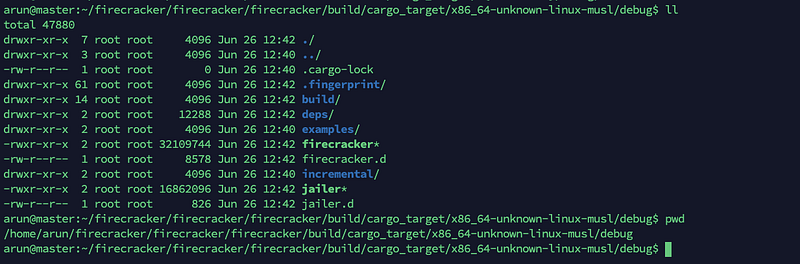
If You want to download pre-built binaries

Step 4: Now you need an uncompressed Linux kernel binary, and an ext4 file system image (to use as rootfs)
x86_64guest download from here — kernel and rootfs.aarch64guest, download from here — kernel and rootfs.

Step 5: Open Two Shell prompt from the same folder where Firecracker binary and these above mentioned Kernal and file system image resides
First Shell —Run Firecracker,
$ sudo ./firecracker --api-sock /tmp/firecracker.socketSecond Shell — for sending API requests to Firecracker for managing MicroVMs!
Step 6: Now its time to tell firecracker about setting the guest kernel and rootfs
$ arch=`uname -m`
$ kernel_path=$(pwd)"/hello-vmlinux.bin"
$ curl --unix-socket /tmp/firecracker.socket -i \
-X PUT 'http://localhost/boot-source' \
-H 'Accept: application/json' \
-H 'Content-Type: application/json' \
-d "{
\"kernel_image_path\": \"${kernel_path}\",
\"boot_args\": \"console=ttyS0 reboot=k panic=1 pci=off\"
}"$ rootfs_path=$(pwd)"/hello-rootfs.ext4"$ curl --unix-socket /tmp/firecracker.socket -i \
-X PUT 'http://localhost/drives/rootfs' \
-H 'Accept: application/json' \
-H 'Content-Type: application/json' \
-d "{
\"drive_id\": \"rootfs\",
\"path_on_host\": \"${rootfs_path}\",
\"is_root_device\": true,
\"is_read_only\": false
}"Step 7: By default Firecracker will assign default resources to your VM but if you want to update, use the following API call,
curl --unix-socket /tmp/firecracker.socket -i  \
  -X PUT 'http://localhost/machine-config' \
  -H 'Accept: application/json'            \
  -H 'Content-Type: application/json'      \
  -d '{
      "vcpu_count": 2,
      "mem_size_mib": 1024,
      "ht_enabled": false
  }'
There is an option of using config files as well.
./firecracker --api-sock /tmp/firecracker.socket --config-file <path_to_the_configuration_file><path_to_the_configuration_file> -> JSON format file with all configStep 8: We are all set now, Let’s start the guest machine!
That’s it, Now go back to your first shell and you can see a prompt on the new machine. We have used hello-rootfs.ext4 image, so log in as root, using the password root.

While performing this demo, I must say that MicroVM did not take more than few seconds to come up. Another good feature is the Rest interface which will allow any language to communicate and work with Firecracker APIs.
I have a strong feeling that the future of Firecracker and related development tech is bright. Its powerful security features and resource efficiency gives a good head start against containers.
That’s it for this post.
Stay Safe and Keep Learning!


