
Getting ready to React with AWS
Elastic Beanstalk, Amazon S3, Amazon CloudFront, Amazon RDS (Aurora) and API Gateway are a powerful combination

This post focuses on the infrastructure used to support our upcoming react website.
Before diving straight into the infrastructure I’m using for React, I thought it was worth highlighting the technology I was using previously.
What was the previous technology stack?
Up until recently, my go-to had always been a LAMP stack — Linux, Apache, MySql and PHP. I taught myself how to build my own CMS when I was 16, while other people I knew were learning how to customise Joomla or WordPress websites.
Initially, I was hosting everything on a dedicated server, which definitely cost a fair bit. I could have opted for a VPS (Virtual Private Server), but I didn’t like the idea that someone else on the same hardware could bring everything crashing down. However, there was quite a fair bit of downtime. Often the result of a failed automatic cPanel upgrade, but more often than not it was due to “a hardware issue”.
After nearly 5 years of using the same hardware and running into an increasing amount of downtime, I was given the option to migrate to a more powerful dedicated server (which was also much more expensive). So in 2013, I did some extensive research before biting the bullet and moving everything to an AWS EC2 instance.
At first, I chose an EC2 instance that gave me similar specifications to the dedicated hardware I was previously using. As it turned out, not only was it much more reliable, but it was more powerful than what was required. One of the best features of using an EC2 instance is scalability, as I was able to dramatically downgrade the instance to something that was much more cost effective.
Let’s get ready to React
Since learning React in the last few years, I quickly realised that I could dramatically bring the infrastructure costs down, by moving away from a “monolithic” EC2 instance and leveraging AWS’s auto-scaling services.
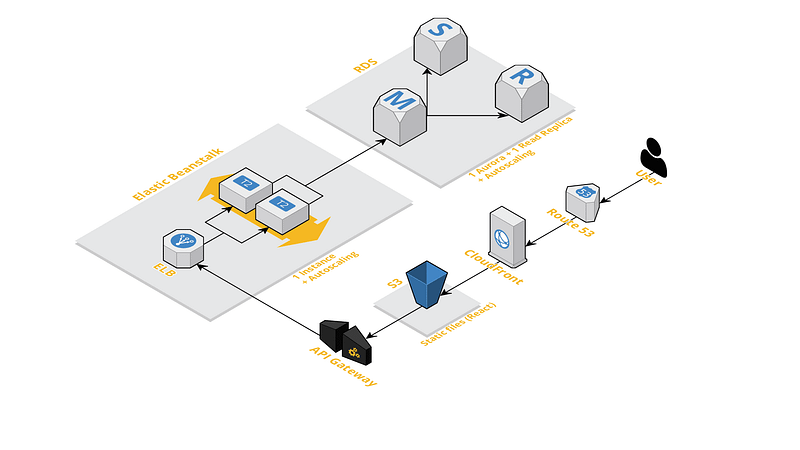
Below is a diagram which illustrates the design of the new architecture, using a powerful combination of AWS services such as Elastic Beanstalk, Amazon RDS and Amazon S3.
Let’s break it down
Amazon RDS (Aurora)
We use RDS for our database.
Amazon RDS offers a wide range of database solutions, including Microsoft SQL, MySQL, MongoDB etc. Amazon has created it’s own variant of MySQL called Amazon Aurora, which is designed for scalability.
We can configure Aurora to automatically scale for us by launching more instances when under load. You can also spin up new instances to act as backups in a few clicks. It replicates the data for us efficiently.
If there is one thing I have learnt since switching to Amazon RDS, is that the database should be on an instance with no other responsibilities.
Amazon S3 + Cloudfront
We use S3 and Cloudfront to host our React website.
S3 is essentially where we are hosting static assets, including our compiled react website. It is entirely possible to host a website directly out of S3, but it’s best to use Cloudfront as a Content Delivery Network, as it provides low latency and caching. Both of these together offer a cost effective solution for delivering a static website.
Elastic Beanstalk
We use Elastic Beanstalk to host our API.
This is essentially an all-in-one package when it comes to deploying scalable web applications. It handles everything from provisioning, load balancing, auto-scaling and health monitoring. It can even be configured to handle zero-downtime deployments, which is an absolute must.
When you deploy your code in a load-balanced configuration, you can configure a “rolling deployment” which means that it will split the running environments up into batches. Each batch will be taken out of service one at a time to be updated, leaving the rest of the instances running the older version. Once a batch has completed it’s update, it will rejoin service… which results in both old and new code running, until the last batch has been updated.
You can also configure a “rolling deployment with additional batches”, which spins up new instances instead of taking existing ones out of service to maintain capacity. Again, this works in batches so once a batch is complete it will replace a batch that is currently in service.
If you’re making breaking changes or your web application isn’t backwards compatible, a rolling deployment might not be the best solution.
In this case, there is an option to run “immutable deployments”, which means that it will spin up enough new instances behind the scenes to match the current capacity, with the new code, and essentially swap the instances once the new instances are ready.
Amazon API Gateway
We use API Gateway as a caching layer for our API
The API Gateway is essentially CloudFront, but for server-side applications. You can configure certain endpoints to be cached, resulting in less load on your application instances, as well as the database. For instance, we don’t change villa details very often, so we may as well cache them.
All in all these services are extremely cost effective, meaning that our estimated running costs will be much, much less than our previous monolithic stack.
The prospect of shutting down the old server is very, very exciting…
If you would like to know how to connect some of these services together, why not give us a follow!
If you would like to support our family run business, check out our website https://perfectlychilled.com. Use the promo code “MEDIUM18” for a special discounted rate.