
Get your App talking to ChatGPT in JSON in under 3 minutes
LLMs read and write plain text. But you can get them to output JSON. Learn how in under 3 minutes, with runnable code examples in Python, Java!

This article inspired by the Free DeepLearning.AI Course on Prompt Engineering by Andrew Ng and his team.
1. Beyond ChatGPT Web UI
Although the ChatGPT Web UI is widely known, it isn’t the only way to use GPT-3.5 or GPT-4. OpenAI provides an API that allows programmatic interaction with these large language models (LLMs). In essence, LLMs are all about completing text. You “prompt” the LLM with context, it generates the next token or tokens for you. This technique, known as prompt engineering, is the fundamental way to interact with all LLMs.
2. The Problem
Mixing code and natural language may seem like trying to blend oil and water. The structure of information in natural language can be ambiguous or abstract, while code requires information to be structured meticulously. Most interactions with external software, such as APIs, involve exchanging data in formats like JSON or XML.
Unfortunately, Chat Completion APIs return plain text. If LLMs could return JSON, it would open a new world of possibilities… But wait, they can! And it’s simple!
3. The Prompt
Let’s create an example prompt that requests the output to be in JSON format. Your example prompt must do three things:
- Declare three attributes to be extracted from a natural text.
- Request the response to be formatted in JSON.
- Specify the text from which the attributes will be extracted.
Before we get fancy, let’s test our prompt using the ChatGPT Web UI. It should be something like the following.
Extract the following attributes from the blog post:
- Main Topic of the Post
- Overall, does the post express a positive or negative view?
- If available, what is the call to action?

The blog post is delimited with triple hashes. \
Format your response as a JSON object with \
"main_topic", "sentiment_polarity" and "call_to_action"as the keys.

If the information isn't present, use `null` as the value.

Make your response as short as possible.

Format the "sentiment_polarity" value as a range between -1 for negative and 1 for positive.

Blog Post: ###{blog_post}###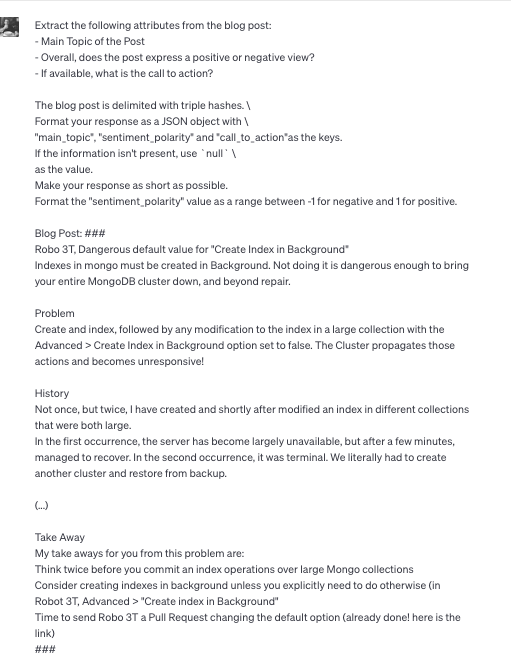
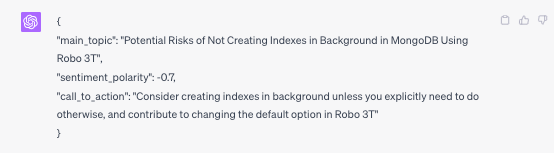
The screenshots above were slightly shortened to improve visualisation, but here is the link to the full chat & here is the link to the blog post used in the analysis.
4. Prompt for JSON in Python
You can find runnable python code for this example in this Demo.ipynb Notebook.
It’s time to see the theory in action. Let’s demonstrate how to use the OpenAI API in Python to create the same prompt from section 3.
import os
import openai
from string import Template

openai.api_key = os.getenv("OPENAI_API_KEY")

prompt_template = Template("""
Extract the following attributes from the blog post:
- Main Topic of the Post
- Overall, does the post express a positive or negative view?
- If available, what is the call to action?

The blog post is delimited with triple hashes.

Format your response as a JSON object with \
"main_topic", "sentiment_polarity" and "call_to_action" as the keys.

If the information isn't present, use `null` as the value.

Make your response as short as possible.

Format the "sentiment_polarity" value as a range between -1 for negative and 1 for positive.

Blog Post: ###${text}###
""")

blog_post = """
Your Blog Post Here
"""

completion = openai.ChatCompletion.create(
 model="gpt-3.5-turbo",
 messages=[
 {"role": "system", "content": "You are an information extraction system."},
 {"role": "user", "content": prompt_template.substitute(text=blog_post)}
 ]
)

print(completion.choices[0].message)
5. Prompt for JSON in Java
You can find runnable Java + Spring Boot Code in this Java Project here.
Python is not the only game in town, of course. Let’s look at how to use the OpenAI API in Java to create the same prompt from section 3.
Add the OpenAI dependency to your project with the following maven snippet:
<dependency>
 <groupId>com.theokanning.openai-gpt3-java</groupId>
 <artifactId>service</artifactId>
 <version>version</version>
</dependency>
Now prompt the LLM using the following code:
final var yourPrompt = "/*…*/";

final var req = ChatCompletionRequest
  .builder()
  .model("gpt-3.5-turbo-0613")
  .temperature(0.0)
  .messages(List.of(
      new ChatMessage(ChatMessageRole.USER.value(), "You are an information extraction system"),
      new ChatMessage(ChatMessageRole.USER.value(), yourPrompt)
   ))
  .build();
final var res = service.createChatCompletion(chatCompletionRequest);
final var json = res.getChoices().get(0).getMessage().getContent();
final var yourRecord = objectMapper.readValue(json, YourRecord.class);
System.out.println(yourRecord);
6. Retry Logic: Watch out for Edge Cases
Not all is smooth sailing when dealing with LLMs and JSON. LLMs may start or end the response with text outside the JSON or might not return JSON at all. You must ensure that the response retrieved produces a valid JSON. Furthermore, it’s essential to handle situations where it doesn’t.
If your application allows it, retrying automatically with a different temperature can sometimes help when the LLM’s response is not as expected.
7. Temperature Zero for Predictability
In the realm of LLMs, the ‘temperature’ parameter plays a critical role in controlling the randomness of the model’s responses. At a high temperature, say 1.0, the output becomes increasingly random and diverse. Conversely, a low temperature, such as 0.1, results in a more deterministic and focused response.
Setting the temperature to zero, however, makes the output completely deterministic, offering a single possible output. This is an advantageous feature for certain applications where predictability is vital.
8. Conclusion
We’ve travelled quite a distance, from the basics of LLMs and the issues with mixing code and natural language, to creating prompts that request JSON output and handling edge cases. We even demonstrated how to use the OpenAI API in both Python and Java to achieve our goal.
The potential that this type of prompt engineering holds for unlocking the utility of AI for applications is enormous. As developers and engineers, we’re at the brink of an exciting frontier. The road may have its challenges, but with knowledge, creativity and the right tools, we’re well-equipped to explore it.
Wanna keep in Touch? LinkedIn!
My name is Hudson Mendes (@hudsonmendes), I’m a 38 years old coder, husband, father of 3, ex Startup Founder, ex-Peloton L7 Staff Tech Lead/Manager, nearly BSc in Computer Science by the University of London & Senior AI/ML Engineering Manager.

I’ve been on the Software Engineering road for 22+ years, and occasionally write about topics of interest to other Senior Engineering Managers and Staff Machine Learning Engineering with a bit of focus (but not exclusively) on Natural Language Processing.
Join me there, and I will keep you in the loop with my new learnings in AI/ML/LLMs and beyond!