
Get started with AWK

I have recently (re)discovered AWK through using GoAWK, a POSIX-compliant AWK interpreter written in Go, with CSV support — courtesy of Ben Hoyt. This inspired me to (re)acquaint myself with AWK itself…
What is AWK?
AWK is a true GNU/Linux classic, designed by Alfred Aho, Peter Weinberger, and Brian Kernighan — three of the biggest names in UNIX development and computer science in general. It is a convenient and expressive programming language that can be applied to a wide variety of computing and data-manipulation tasks.
Of course this tutorial is only a brief overview of the basics of AWK. There are several more elaborated tutorials to be found online, as well as the original (and delightfully-terse, as Ben Hoyt calls it) manual The AWK Programming Language written by the designers…
Workflow and structure
Starting out, we need to understand the workflow and program structure of AWK.
An AWK program follows this outline:
- execute commands from
BEGINblock - read a line from input stream
- execute commands on a line or rather ‘record’
- repeat if end of file has not been reached
- execute commands from
ENDblock
Not all steps are necessary. For instance, a valid AWK instruction can be:
echo -e 'one\ntwo\nthree' | awk '/o/ {print}'one
twoThis only uses the middle or “body” block.
AWK commands take the form of pattern-action statements with the syntax pattern { action }.
If there is a match for the pattern, the action is performed. If there is no pattern, the action is performed for every input line, for instance:
echo -e 'one\ntwo\nthree' | awk '{print}'one
two
threeTogether with the BEGINand ENDblock, this becomes:
echo -e 'one\ntwo\nthree' | awk 'BEGIN{print "STARTING\n"} {print} END{print "READY"}'STARTING
one
two
three
READYBy default, AWK separates input into ‘records’ using newlines, but this can be changed (see below).
Running an AWK program
There are several ways to run an AWK program.
We can use AWK as a command-line application, as in the examples above, but we can also provide AWK commands in a script file and use the -f flag:
cat input.txt | awk -f script.awkWe can use input that is piped to awk, like in the example above, or we can specify a source file (or several) for the text input, e.g.
awk '{print}' input.txtBuilt-in variables
FS, $0, $1, …
As a text processing utility, AWK is designed to split lines into fields. To do this, it uses a built-in variable FSwhich defaults to space but which you can change with the -Fflag, like so:
echo 'a b c' | awk '{print $1}'aecho 'a,b,c' | awk -F "," '{print $1}'a(Similarly, built-in variable RS, record separator, allows to change the default record separator, which defaults to newline).
AWK has many such variables, not only the above-mentioned $n(nth field) or $0(the entire record), but also, for instance:
NF
This represents the number of fields in the current record, which can be used as a pattern to match the input to, for instance:
echo -e 'a b c\nd e' | awk 'NF > 2'a b cNR
This represents the index number of the ‘record’ (in this case, line) from the input:
echo -e 'a b c\nd e' | awk '{print NR}'1 2
IGNORECASE
Some variables are specific for certain versions of AWK, such as GAWK (GNU AWK), which is the default awk on many Linux systems. One of those is IGNORECASEwhich can be used when matching records to certain patterns (note the / / syntax for patterns, see below):
echo -e 'a b c' | awk '{IGNORECASE = 1} /A/'a b cOperators
This overview is too short to discuss AWK operators in full, but let’s look at some examples.
Arithmetic
There are only two types of data in awk: strings of characters and numbers. Awk converts strings into numbers using a conversion format (which can be changed using built-in variable CONVFMT ):
echo -e 'a 1 1' | awk '{print ($2 + $3)}'2
Increment and decrement
echo -e '1 1 1' | awk '{print (++$1)}'2
Relational
echo -e '1\n0\n7\n0\n3\n0\n4\n2\n3' | awk '$0 != 0'1 7 3 4 2 3
Assignment
awk 'BEGIN { name = "Tom"; printf "My name is %s", name }'My name is TomBy the way, notice how this is an AWK instruction that does not have a body, only a BEGIN block. Hence it does not need an input to function either… It also uses formatted printing printf instead of the regular print .
Patterns and regular expressions
AWK’s bread and butter is pattern matching. Moreover, it is very powerful and efficient in handling regular expressions.
A basic example of this is:
echo -e 'one\ntwo\nthree' | awk '/one/ {print}'onewhich we can also write using a relational operator for the pattern:
echo -e 'one\ntwo\nthree' | awk '$0 == "one" {print}'AWK uses the POSIX regular expression syntax (as do other UNIX utilities, like sed ):
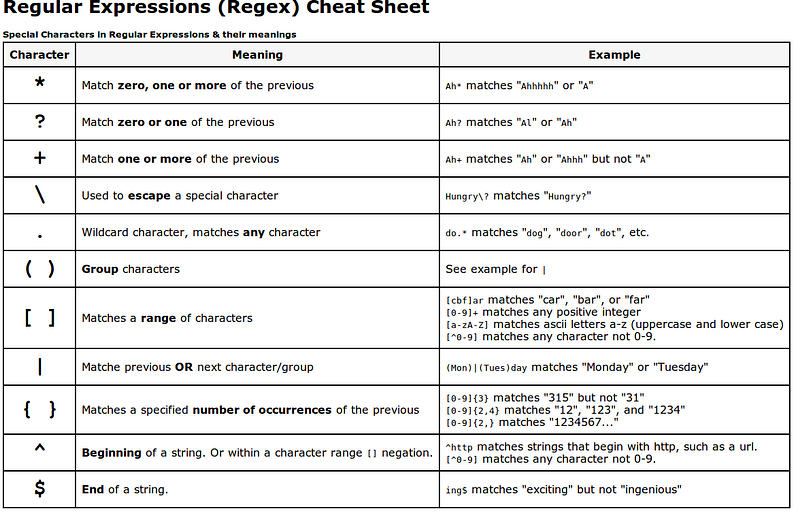
Patterns can be combined with parentheses and the logical operators &&, ||
and !, which stand for AND, OR, and NOT.
echo -e 'one\ntwo\nthree' | awk '(/one/) || (/two/) {print}'
one
two
Patterns are AWK’s true strength, even the keywords BEGIN and END mentioned above are, in fact, just patterns…
Computing with AWK
Besides text, AWK also handles numerical data well, and is a formidable tool for performing calculations, generating reports, and so on.
For computations it is often handy to make use of user-created variables, which you do not need to define, like so:
echo -e '1\n1\n1' | awk '{total+=$0} END {print total}'3
Functions
Built-in functions
We have already seen that awk provides built-in variables. Similarly, there are built-in functions for computing useful values. There are several kinds of functions such as functions for arithmetic, time, bit manipulation and also text functions. One of these is length, which counts the number of characters in a string:
echo -e 'one\ntwo\nthree' | awk '{print length($0)}'3 3 5
User-defined functions
You can also define your own functions with the following syntax:
function function_name(arg1, arg2, ...){function body}Returning value with return is optional.
A basic example is a function that returns the minimum number:
echo -e '1 2\n4 3\n5 7' | awk 'function min(num1,num2){if (num1 < num2) return num1 else return num2}{print min($1,$2)}'
1
3
5
Of course, such an example would be more legible in an AWK script than a oneliner.
Control-flow
The previous example already showed that AWK is also capable of if-else statements for making decisions:
if (condition)
action-1
else
action-2
It also has the ability to create for loops:
for (initialization; condition; increment/decrement)
action
(Both are modeled on the syntax of the C programming language)
awk 'BEGIN { for (i = 1; i <= 5; ++i) print i }'1 2 3 4 5
Arrays
Awk provides arrays for storing groups of related values. These are very powerful as they can even be multidimensional.
A simple example:
echo -e 'Tom 1\nHarry 2\nTom 3\nHarry 4\nJimmy 5' | awk '{total[$1]+=$2} END {print total["Tom"]}'5
AWK as a scripting language
A more elaborate example shows how AWK can be a valid alternative for Python or other scripting languages. (Also keep in mind that in some programming environments (servers, for instance) you might not have access to Python or your favourite scripting language, or limited possibilities to upload source code files!)
Let’s count all .json , .xml and .csv files in my Dropbox folder.
Let’s first gather all files recursively into a source file:
find /home/tdeneire/Dropbox/. -not -type d > files.txt
wc -l files.txt
132899 files.txtThis amounts to some 130K files.
In Python we could do something like this:
total = {}with open("/home/tdeneire/Dropbox/files.txt", "r") as reader:
for line in reader:
line = line.strip()
extension = line.split(".")[-1]
total.setdefault(extension, 0)
total[extension] += 1for key in ["json", "xml", "csv"]:
print(key, total[key])In AWK:
awk -F "." '{extension=$(NF); total[extension]+=1} END {wanted["json"]; wanted["csv"]; wanted["xml"]; for (ext in wanted){print ext,total[ext]}}' /home/tdeneire/Dropbox/files.txtIn this particular example, AWK is much slower than Python (about 2.5 times slower), but if we play to AWK’s strengths, i.e. pattern matching, for instance, searching for ten consecutive digits, matters are quickly reversed.
In Python
import rewith open("/home/tdeneire/Dropbox/files.txt", "r") as reader:
for line in reader:
line = line.strip()
if re.match('.*[0-9]{10}', line):
print(line)With AWK:
awk -F "." '/.*[0-9]{10}/' /home/tdeneire/Dropbox/files.txtDifference:
time py3 test.pyreal 0m1.296s
user 0m0.693s
sys 0m0.143stime awk -F "." '/.*[0-9]{10}/' /home/tdeneire/Dropbox/files.txtreal 0m0.659s
user 0m0.105s
sys 0m0.113sThis just goes to show the importance of picking the right tool for the job for scripting.
But in some cases that tool might just be AWK, even if it’s over 40 years old!
Sources
- https://www.tutorialspoint.com/awk
- Aho, Alfred V.; Kernighan, Brian W.; Weinberger, Peter J., The AWK programming language (Reading, Mass.: 1988), ISBN-10 0-201-07981-X
Hi! 👋 I’m Tom. I’m a software engineer, a technical writer and IT burnout coach. If you want to get in touch, check out https://tomdeneire.github.io