
Get More Work Done — Without Meetings. Here is How!
How are you sabotaging your workplace with meetings?
Last week, a new client wanted to chat about improving their work approach as they transition to a more collaborative setup, especially between different departments. They’re also operating in a hybrid model with offices in various cities, which might sound familiar to you. The main issue they’re facing is that meetings have become deeply ingrained in their culture. The client often feels that meetings are now a way to procrastinate and delay important work and decisions. Whenever there’s a need for progress or a decision, the team habitually schedules a meeting for everyone, resulting in a delays.
The CEO felt that in the last year, even though they have been hiring new employees, the company has not increased its velocity or the amount of work that gets done. In a way, he felt stuck and didn’t know how to start leading change.
“Everyone is so comfortable with this that unproductive and constant delays have become the norm,” — he said.
How do we start changing our meeting culture? — he asked.
This is probably not surprising.
What’s your experience with meetings?

Let me share some interesting insights with you.
Some say that all started with the rascally spies of OSS, the predecessor to the Central Intelligence Agency (CIA). They knew a thing or two about mischief making, especially when it came to undermining America’s enemies in World War II. One of their more imaginative ideas was to train everyday citizens in the art of simple sabotage. They wrote the ‘sabotaging meetings’ guide to instruct and guide to delay and cancel the chances to get work done and make decisions.
This rebellious guidance from nearly 80 years ago resonates strongly today with all of us:
“Make ‘speeches’ — talk as frequently as possible and at great length. Illustrate your ‘points’ by long anecdotes and accounts of personal experiences.”
— OSS (CIA) field manual, 1944
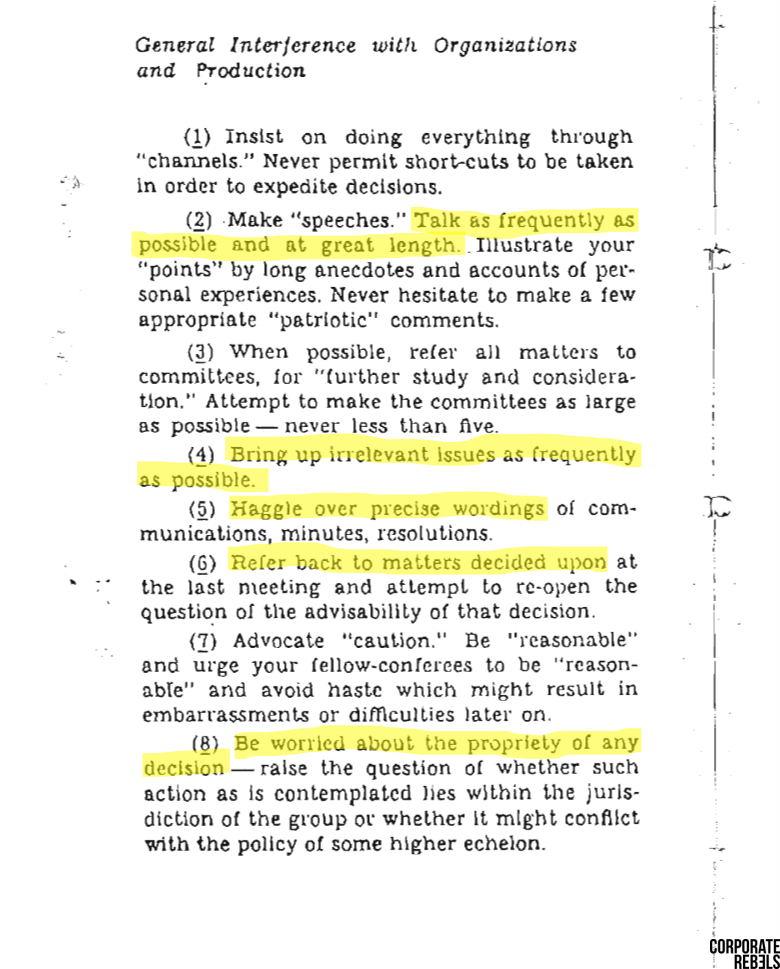
Unsurprisingly, this is a universal pain that every organization is suffering, and often remains the same not because there are no alternative solutions that work, but because change often means that you will get some resistance, and it will be uncomfortable.
But is this a way to sabotage work?
We know that since the COVID pandemic, many organizations became comfortable with meetings. This created a habit, and now changing that habit may take a few weeks, maybe even a month, but wouldn’t that be worth it?
“What’s dangerous is not to evolve.” — Jeff Bezos
But what if you didn’t have to wait for a meeting to make a decision? What if your meetings were productive, and you could effectively collaborate and make decisions collectively?
You probably know that large and multinational organizations like Shopify and Figma have already changed the way they approach meetings. Not to mention how excellent leaders like Jeff Bezos have already restructured meetings in the past to ensure meetings were productive (his 6-page memo).
To mention a few interesting ideas, in 2019, the director of the pharmaceutical organization that created the COVID vaccine classified meetings into three categories: 1) Informative meetings: Meetings used to share information about a topic and update, etc. These meetings were fully canceled, and other methods had to be used to inform the team or stakeholders. 2) Opinions: Meetings to discuss initial opinions, these are canceled or reduced to a minimum, and 3) Decisions: These can be maintained. On the other hand, Shopify, at the beginning of 2023, decided to remove all their recurring meetings, that means over 12,000 meetings. After a few months, they evaluated if any had to be re-added to their calendar and after a deep evaluation, they were able to eliminate 30% of those recurring meetings.
Since then, our team has helped organizations reduce the amount of meetings they have, improve the way they collaborate, and ensure the meetings that are run are productive. The success of the organizations that have reached out and shared their wins with us makes us extremely excited for the things to come.
So…
Could you remove some of your meetings and gain that time back to get work done? Could you do that while staying as collaborative as you are today?
The answer is YES!
Meetings can be easily removed or changed to asynchronous meetings that are even more effective than meetings and will help you improve velocity and team and stakeholder engagement without jeopardizing decisions, collaboration, or communication.
“Comfort and the fear of change are the greatest enemies of success.” ― Jeanette Coron
Let’s follow the categories mentioned above and evaluate which meetings you can keep, remove, or change.
Let’s start with informative meetings.
Informative meetings.
Meetings that have the sole objective to inform a team or stakeholders about a new proposal, changes in the project or organization, updates, etc. Overall, one person tends to share the information while everyone is listening (actively or passively), and often there is no participation required from the participants in the meeting.
You probably have a few informative meetings on your calendar on a monthly basis where you share information.
These meetings can be easily canceled and moved into other formats. You can consider the following.
- Email: Send an email to team members and stakeholders to inform them. The PROS about this are that it is easy to implement and everyone is familiar with the format. The CONS are that it is not easy to track who has read it or has a general idea of who is informed. Additionally, it is difficult to share complex information with this method, like you can’t share your screen, etc. Another alternative is Slack or other messaging systems.
- Loom or any other video recording platform: Send a video recording sharing the information. This lets you share information in a similar way you will share that information during a meeting. You can share your screen and speak during the video. The PROs are that it is easy for those who have to be informed to follow a format that is similar to a meeting; the difference is that they can choose when to watch it. The CONS are that team members have to become comfortable creating quick videos to share information, and it’s hard to track who has watched it or even hold people accountable or have control over WHEN stakeholders watch it.
- Nova + video recording platform (Loom): Send an informative session and invite team members and stakeholders to join during a specific period; for example, you can schedule it that stakeholders watch it before Wednesday next week, and additionally, you can track who has watched it and even ask questions and add a space for comments. The PROS are that this method is ideal when you want to ensure people stay informed before a specific date or you want to know who is informed. Additionally, it is good if you want to make it part of a process or want to make it more collaborative and want to ask questions or even encourage people to ask questions. The CONS are that team members have to become familiar with the format and two platforms are needed.
In this video, you can see how Nova is integrated with Loom, for example, and how easily team members can watch the video, share how they feel about the update, and even ask questions. The whole space can be customizable so you can ask additional questions.
So review all the informative meetings that you have on your calendar and cancel (REMOVE) those meetings or change (CHANGE) them to a different format.
Informative meetings = Emails or other async formats
Opinion meeting.
These meetings can be categorized as those where you are gathering ideas, learning about different opinions and needs, discussing, and helping move gather information or input to get something done.
This can include meetings like the ones mentioned below:
- Brainstorming meetings: Meetings in which team members or stakeholders are sharing ideas. Often the ideas tend to be raw and need further evaluation and considerations.
- Discussion meetings: Meetings where you are discussing the “problem” to better define a solution, where you are discussing the plan, discussing or exploring multiple alternatives, etc.
- Feedback meetings: Meetings in which you have a proposal, idea, project, plan, design, etc., and you want to share it to gather input and feedback, to evaluate if there is anything missing, if you are moving in the right direction and even to reduce risks. Often also have the intention to get stakeholders involved to get their buy-in.
Opinion meetings can often be canceled and moved to other formats. Because these meetings require the collaboration of other team members, maybe some other departments and stakeholders have to be moved into asynchronous meetings.
Asynchronous meetings (we call them asynchronous sessions) help you collaborate and lead meetings without having to add another meeting to your calendar. The space is collaborative and lets you share your screen and provide information about the topic you want to share during the “meeting” and encourages team members and stakeholders to provide input. It’s extremely effective because everyone tends to participate, so you can leverage your collective knowledge and also you can easily lead the “discussion” ensuring people don’t start a new topic or things unrelated to it, keeping the conversation on track and helping better achieve the objective of the “meeting”.
Decision meetings.
In general, these are meetings aimed at reaching a decision within the session. Some of them happen in last-minute discussions. Calls added to your calendar to finalize details and make a decision on ongoing work, while others involve a more structured agenda covering risks, considerations, and potential alternatives before arriving at a decision. These meetings automatically create a sense of progress, as team members and stakeholders typically pause their work until a decision is reached.
In other words, Meetings, especially those meant to make decisions, can either be a source of progress or a bottleneck in your workflow. How can you ensure they contribute to forward momentum? Let’s break it down.
Decision-Making Meetings: The Basics
Decision-making meetings can either happen in real-time (traditional meetings) or asynchronously (flexible timing). When you have everyone in the same room, it’s a good idea to take notes — a digital trail of decisions ensures transparency, especially when multiple voices are involved. In general, it is advisable to take notes to record decisions and facilitate a retrospective understanding of the contributing factors, especially in larger groups where not everyone actively participates for transparency purposes.
Here is something to consider.
The Shift to Asynchronous: Key Considerations
Now, imagine moving these decision-making sessions to an asynchronous format, allowing flexibility for your team. The leader’s role becomes pivotal here — sharing all vital information is a must — the more transparent the preparation, the smoother the decision-making process.
To give you more context — the meeting leader can share the context and pertinent information about the topic that all participants will be discussing, followed by asking questions to assess priorities and garner agreement from stakeholders. In this context, it is essential to avoid vague questions or minimal information that might lead stakeholders to agree without thoughtful consideration. On the contrary, clarity in communication and questions aimed at ensuring nothing is overlooked becomes essential to success, offering participants the chance to challenge assumptions and prevent potential issues during implementation.
We could say that if you are leading the meeting, especially async you will set the stage by sharing context and information, asking questions, and encouraging thoughtful responses. This isn’t about hasty agreements; it’s an opportunity for each team member to contribute their unique perspective and challenge assumptions.
Choosing Your Approach: Live vs. Asynchronous
When deciding which meetings to conduct live or asynchronously, consider the nature of the decision or the discussion.
Any one-on-one discussions might thrive in a traditional setting for quick, and effective communication. On the other hand, complex decisions with multiple stakeholder benefit from asynchronous discussions, giving everyone the time to mull over details.
Recurring meetings.
Additionally, I have mentioned other meetings, for example, recurring meetings, that often tend to be check-in meetings, 1-on-1s, and informative meetings need to be reevaluated. In general, check-in meetings can be easily replaced by an automatic notification on Slack asking “how are things going? Give me an update on the project. What are you working on? What’s done? etc. Can also be easily replaced if you leverage task management platforms effectively or even a bi-weekly or weekly async session.
Other recurring meetings have some team health and team building purposes, so those often need to be run following the usual format. In general, you want to always keep as traditional meetings:
Other meetings.
- Relational gatherings or Team building meetings. This is time dedicated to creating connections and relationships between employees.
- 1-on-1s: Time dedicated between two people to improve their relationship, empower each other, and build their career path.
Change Management — How to start changing the way you team works?
So, how can you lead change? The challenge with meetings is often the perception that you need to convince an entire organization to alter their work dynamics, which can be a daunting task. However, it doesn’t always have to start with a grand organizational shift. Sometimes, it begins with an individual showcasing a more effective way to lead meetings, and that someone could be you!
“Change cannot be put on people. The best way to instill change is to do it with them. Create it with them.” — Lisa Bodell
Meetings have evolved into a significant problem within organizations, so anyone bold enough to share an alternative approach to the team will be welcome, likely earning gratitude in the process. So, why not take the first step by transitioning a few of your meetings to asynchronous? You can acknowledge the collaborative effort of those involved and articulate your reasons for trying this new approach.
Here’s a sample script you could use:
“Hi everyone, over the next few weeks, I’ll be moving some of our meetings to asynchronous formats. Recognizing how busy we all are and the time consumed by meetings, I aim to support the team and give you back some valuable time for focused work. This session is as collaborative as a traditional meeting — you can even see each other’s cursors and react to everyone’s input. I can also add a due date to ensure timely contributions. For instance, this asynchronous session is set for [date] so try to participate within that timeline.
I’d appreciate it if you join me, and if you have any questions about how you can also implement or test this, I’ll be happy to assist you.”
Give it a shot, run an asynchronous meeting, and share your experience with us!
We want to hear about your experiences. Share your thoughts, questions, and insights in the comments below.
Feel free to spread the word by sharing this post with your colleagues.
Together, let’s empower each other to embrace innovative meeting strategies and drive positive change in how we collaborate.
If you have any questions or if you’d like to share your own success stories, don’t hesitate to reach out.
Resources:


