
Programming
How to Generate a Token for Telegram Bot API
Generate tokens to build Telegram bots using the Bot API

Telegram is a cross-platform, encrypted instant messaging platform that has seen its user-base grow significantly over the last few years. The application offers two APIs for developers; the Bot API that lets you create anc connect bots to the messaging platform and the Telegram API and TDLib that allows developers build customised Telegram clients.
Creating Telegram bots is straight-forward however, you will need to register your bot and generate a token that you can then use when performing HTTP requests to teh Telegram Bot API endpoint.
Your bot token is its unique identifier — store it in a secure place, and only share it with people who need direct access to the bot. Everyone who has your token will have full control over your bot.
In this article, we will demonstrate how you can quickly generate a token before start the process of creating your own Telegram bot.
Step 1: Find BotFather account
Open Telegram app (either on Desktop or mobile application) and search for the BodFather account — just make sure you click on the verified account.

You can see all the options available that this particular bot offers by typing /start:

Step 2: Create a new bot and generate token
Now in order to generate a token, we first need to create a new bot. To do so, type /newbot in the chat and press enter to send the message.

You will then be prompted to name your newly created bot.
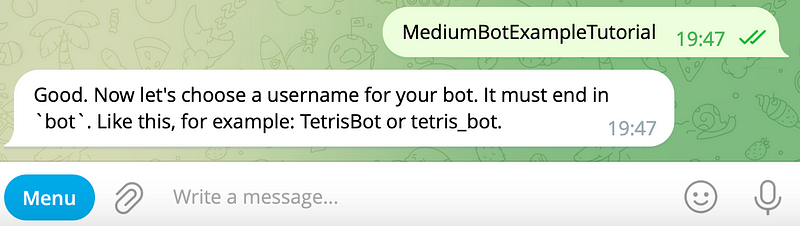
Then you will be prompted to pick a username of the bot that must be unique and also end in bot.

If you’ve provided a valid username, BodFather will reply with the generated token that you can now use to access the HTTP API.
Step 3: Test that token works
In the chat with the newly created bot, send a message. Then head to the terminal and run the following curl command:
curl https://api.telegram.org/bot<your-bot-token>/getUpdates
Then look fot the chat object, and copy the id field that we will then use as the chat_id for the subsequent call:
curl -X POST \
     -H 'Content-Type: application/json' \
     -d '{"chat_id": "<your-chat-id>", "text": "This is a test from curl", "disable_notification": true}' \
     https://api.telegram.org/bot<your-bot-token>/sendMessage
If the curl command was executed successfully, you should now see the message we’ve sent in the chat.
Final Thoughts
In this tutorial we demonstrated how to create a new Telegram bot and generate a token using the BotFather Telegram bot. Additionally, we showcased how to test the token and get started by sending a message.
Become a member and read every story on Medium. Your membership fee directly supports me and other writers you read. You’ll also get full access to every story on Medium.
Related articles you may also like


