avatarAmandeep Saluja

Summary

The article outlines a process for transferring data from Google Cloud Storage (GCS) to BigQuery using Cloud Composer (Apache Airflow) within the Google Cloud Platform (GCP) ecosystem, detailing the technologies and steps involved in the ETL (Extract, Transform, Load) workflow.

Abstract

The article introduces a project that aims to create a pipeline for moving Excel files from GCS to BigQuery. It provides an overview of the technologies used, which include GCP services like BigQuery, Cloud Functions, Cloud Storage, Cloud Composer (Apache Airflow), and Workload Identity Federation, as well as tools like GitHub Actions, Python, and Terraform. The ETL flow is described in three main steps: dropping Excel files into a GCS bucket, triggering a Cloud Function to initiate an Apache Airflow DAG, and processing the data through a series of sub-steps that convert the XLSX to CSV, read the CSV, and load the data into BigQuery. The article is the first in a series that will cover the setup of the Cloud Composer environment, the creation and deployment of the Airflow DAG, and the creation of a Cloud Function to trigger the DAG. The author concludes by inviting readers to try out an AI service, ZAI.chat, as a cost-effective alternative to ChatGPT Plus (GPT-4).

Opinions

  • The author expresses enthusiasm about the project, starting with a friendly "Konnichiwa" and ending with "Sayōnara," indicating a personal and engaging approach to technical content.
  • The author recommends ZAI.chat as a more affordable AI service option compared to ChatGPT Plus (GPT-4), suggesting a belief in the value and performance of this service.
  • The use of a step-by-step approach in both the ETL process and the series of articles indicates a structured and methodical mindset, likely aimed at providing clarity and ease of understanding for the reader.

GCS to BigQuery via Cloud Composer: Part 1 (Overview)
Konnichiwa 👋

As part of our GCS to BigQuery Pipeline via Different GCP Services project, we will be using Cloud Composer (Apache Airflow) to process our Excel File.

In this article, we will focus on understanding the flow of our process. So, lets get started :)

Technologies Used

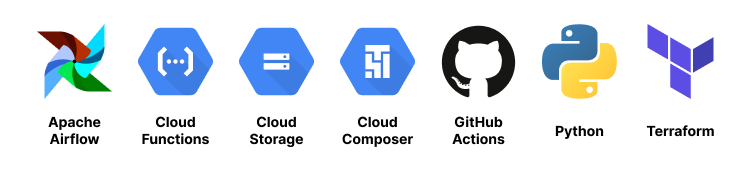
  1. GCP Services - BigQuery - Cloud Functions - Cloud Storage - Cloud Composer (Apache Airflow) - Workload Identity Federation
  2. GitHub Actions
  3. Python
  4. Terraform

ETL Flow

Okay. Lets see what we are trying to do here.

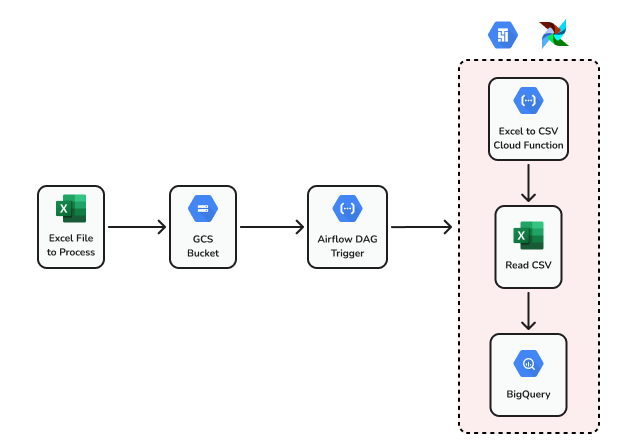
Step 1: We will be dropping Excel files to a GCS bucket.

Step 2: The Excel file dropped will trigger a Cloud Function to trigger an Apache Airflow DAG.

Step 3: Once the DAG gets triggered, it goes through 3 steps:

Step 3.1: XLSX to CSV cloud function is triggered which we developed in this post.

Step 3.2: Reads the CSV file which is the output of Step 3.1.

Step 3.3: Now that we have the CSV available, the data will be loaded to BigQuery.

Now that we have our steps laid out, lets jump into the development. We will do it in 3 steps:

  1. Overview (this post)
  2. Setup Cloud Composer Environment
  3. Create and Deploy Airflow DAG
  4. Create Cloud Function to Trigger Airflow DAG

Sayōnara 👋

Cloud Composer
Airflow
Github Actions
Cloud Functions
Google Cloud Platform
Recommended from ReadMedium