
Artificial Intelligence, Coding & Game Design
Game Changer: Using GPT-4’s Coding Capabilities in Game Development
From Prompts to Play: Coding a Pacman-like game using GPT-4
Yesterday I posted a game I coded entirely using GPT-4. It was 750 lines of code—short, but longer than chat could keep in any one output—and while it was a fun no-code coding experience (a paradoxical experience, like creating a sculpture without touching the clay), it required some serious maneuvering, clever prompt engineering, and out-of-the-box thinking:
I learned a lot about coding, GPT-4 prompting, and game design doing it. So here for your elucidation is my process, including prompts and code!
Getting started: the first prompt
First off, I have to thank Kris Kashtanov for the impetus to use GPT-4 to make code. Kris made a fast simple wall-breaker game; I took it to the logical conclusion of building a full game out of that kernel of an idea.
Here’s Kris’ prompt that started it all:
write p5.js code for arkanoid game let the the mouse move the paddleThis inspired me to do my own interpretation of another classic: Pac-Man. The first codes I ran were proof of concept for the character’s movement:
let pacMan;

function setup() {
  createCanvas(800, 600);
  pacMan = new PacMan();
}

function draw() {
  background(0);
  pacMan.update(mouseX, mouseY);
  pacMan.display();
}

class PacMan {
  constructor() {
    this.x = width / 2;
    this.y = height / 2;
    this.size = 50;
    this.angle = 0;
    this.mouthOpen = false;
    this.mouthSpeed = 10; // Controls how fast the mouth opens and closes
    this.prevDirection = "";
  }

  update(targetX, targetY) {
    let dx = targetX - this.x;
    let dy = targetY - this.y;
    let distance = dist(this.x, this.y, targetX, targetY);

    // Determine the primary direction of movement
    if (abs(dx) > abs(dy)) {
      this.prevDirection = dx > 0 ? "right" : "left";
    } else {
      this.prevDirection = dy > 0 ? "down" : "up";
    }

    // Update Pac-Man's position
    this.x = lerp(this.x, targetX, 0.1);
    this.y = lerp(this.y, targetY, 0.1);

    // Set Pac-Man's angle based on the primary direction if at rest, otherwise follow the mouse smoothly
    if (distance < 10) {
      if (this.prevDirection === "right") {
        this.angle = 0;
      } else if (this.prevDirection === "left") {
        this.angle = PI;
      } else if (this.prevDirection === "down") {
        this.angle = HALF_PI;
      } else {
        this.angle = -HALF_PI;
      }
    } else {
      this.angle = atan2(dy, dx);
    }

    this.mouthOpen = (frameCount % this.mouthSpeed) < (this.mouthSpeed / 2);
  }

display() {
  push();
  translate(this.x, this.y);
  rotate(this.angle);
  fill(255, 255, 0);
  if (this.mouthOpen) {
    arc(0, 0, this.size, this.size, QUARTER_PI, TWO_PI - QUARTER_PI);
  } else {
    ellipse(0, 0, this.size);
  }
  fill(0);
  ellipse(this.size / 10, -this.size / 4, this.size / 8); // Corrected eye position
  pop();
}
}
You can have a play of that very first draft here:
Next was getting the game character to eat cherries:
let pacMan;
let cherries = [];
let cherryDropRate = 120; // Drop rate (in frames)

function setup() {
  createCanvas(800, 600);
  pacMan = new PacMan();
}

function draw() {
  background(0);
  pacMan.update(mouseX, mouseY);
  pacMan.display();

  // Spawn cherries at random intervals
  if (frameCount % cherryDropRate === 0) {
    cherries.push(new Cherry());
  }

  // Display cherries and check for collisions
  for (let i = cherries.length - 1; i >= 0; i--) {
    cherries[i].display();

    if (cherries[i].collision(pacMan)) {
      cherries.splice(i, 1);
    }
  }
}

class PacMan {
  constructor() {
    this.x = width / 2;
    this.y = height / 2;
    this.size = 50;
    this.angle = 0;
    this.mouthOpen = false;
    this.mouthSpeed = 10; // Controls how fast the mouth opens and closes
    this.prevDirection = "";
  }

  update(targetX, targetY) {
    let dx = targetX - this.x;
    let dy = targetY - this.y;
    let distance = dist(this.x, this.y, targetX, targetY);

    // Determine the primary direction of movement
    if (abs(dx) > abs(dy)) {
      this.prevDirection = dx > 0 ? "right" : "left";
    } else {
      this.prevDirection = dy > 0 ? "down" : "up";
    }

    // Update Pac-Man's position
    this.x = lerp(this.x, targetX, 0.1);
    this.y = lerp(this.y, targetY, 0.1);

    // Set Pac-Man's angle based on the primary direction if at rest, otherwise follow the mouse smoothly
    if (distance < 10) {
      if (this.prevDirection === "right") {
        this.angle = 0;
      } else if (this.prevDirection === "left") {
        this.angle = PI;
      } else if (this.prevDirection === "down") {
        this.angle = HALF_PI;
      } else {
        this.angle = -HALF_PI;
      }
    } else {
      this.angle = atan2(dy, dx);
    }

    this.mouthOpen = (frameCount % this.mouthSpeed) < (this.mouthSpeed / 2);
  }

  display() {
    push();
    translate(this.x, this.y);
    rotate(this.angle);
    fill(255, 255, 0);
    if (this.mouthOpen) {
      arc(0, 0, this.size, this.size, QUARTER_PI, TWO_PI - QUARTER_PI);
    } else {
      ellipse(0, 0, this.size);
    }
    fill(0);
    ellipse(this.size / 10, -this.size / 4, this.size / 8); // Corrected eye position
    pop();
  }
}

class Cherry {
  constructor() {
    this.x = random(width);
    this.y = random(height);
    this.size = 20;
  }

  display() {
    fill(255, 0, 0);
    ellipse(this.x, this.y, this.size);
  }

 collision(pacMan) {
    let distance = dist(this.x, this.y, pacMan.x, pacMan.y);
    return distance < (this.size / 2 + pacMan.size / 2);
  }
}
Then I wanted it to change color. This was my favorite; it’s very soothing:
let pacMan;
let cherries = [];
let cherryDropRate = 30; // Drop rate (in frames)

function setup() {
  createCanvas(800, 600);
  pacMan = new PacMan();
}

function draw() {
  background(0);
  pacMan.update(mouseX, mouseY);
  pacMan.display();

  // Spawn cherries at random intervals
  if (frameCount % cherryDropRate === 0) {
    cherries.push(new Cherry());
  }

  // Display cherries and check for collisions
  for (let i = cherries.length - 1; i >= 0; i--) {
    cherries[i].display();

    if (cherries[i].collision(pacMan)) {
      pacMan.changeColor(cherries[i].color);
      cherries.splice(i, 1);
    }
  }
}

class PacMan {
  constructor() {
    this.x = width / 2;
    this.y = height / 2;
    this.size = 50;
    this.angle = 0;
    this.mouthOpen = false;
    this.mouthSpeed = 10; // Controls how fast the mouth opens and closes
    this.prevDirection = "";
    this.color = color(255, 255, 0);
  }

  changeColor(newColor) {
    this.color = newColor;
  }

  update(targetX, targetY) {
    let dx = targetX - this.x;
    let dy = targetY - this.y;
    let distance = dist(this.x, this.y, targetX, targetY);

    // Determine the primary direction of movement
    if (abs(dx) > abs(dy)) {
      this.prevDirection = dx > 0 ? "right" : "left";
    } else {
      this.prevDirection = dy > 0 ? "down" : "up";
    }

    // Update Pac-Man's position
    this.x = lerp(this.x, targetX, 0.1);
    this.y = lerp(this.y, targetY, 0.1);

    // Set Pac-Man's angle based on the primary direction if at rest, otherwise follow the mouse smoothly
    if (distance < 10) {
      if (this.prevDirection === "right") {
        this.angle = 0;
      } else if (this.prevDirection === "left") {
        this.angle = PI;
      } else if (this.prevDirection === "down") {
        this.angle = HALF_PI;
      } else {
        this.angle = -HALF_PI;
      }
    } else {
      this.angle = atan2(dy, dx);
    }

    this.mouthOpen = (frameCount % this.mouthSpeed) < (this.mouthSpeed / 2);
  }

  display() {
    push();
    translate(this.x, this.y);
    rotate(this.angle);
    fill(this.color);
    if (this.mouthOpen) {
      arc(0, 0, this.size, this.size, QUARTER_PI, TWO_PI - QUARTER_PI);
    } else {
      ellipse(0, 0, this.size);
    }
    fill(0);
    ellipse(this.size / 10, -this.size / 4, this.size / 8); // Corrected eye position
    pop();
  }
}

class Cherry {
  constructor() {
    this.x = random(width);
    this.y = random(height);
    this.size = 20;
    this.color = color(random(255), random(255), random(255)); // Assign a random color to each cherry
    this.color = color(random(255), random(255), random(255));
  }

  display() {
    fill(this.color);
    ellipse(this.x, this.y, this.size);
  }

  collision(pacMan) {
    let distance = dist(this.x, this.y, pacMan.x, pacMan.y);
    return distance < (this.size / 2 + pacMan.size / 2);
  }
}
This was going to work! But I had bigger aspirations in mind: a proper game, with puzzle elements and variable gameplay. Something new.
Behold the final product: Rainbow Cherry Chomp!
The challenges of writing longer code with GPT-4
With Chomp, I wanted to push the capabilities of writing code in Chat GPT-4, and write a long game (but still based on early-era video gaming).
The challenges I encountered were the same as generating text: consistency, a tendency to go off-topic, and hallucinations. For example, the AI started to hallucinate attributes, classes, and functions that were not in the code.
I also found that variables were often incorrect and had to be corrected by hand. Thankfully syntax was pretty good, but it added an occasional extra }
It would cap responses at about 100 lines of code. I found that prompting GPT-4 to continue coding into a second output was inconsistent, and a recipe for going off the rails. Most of the hallucinations started in replies.
Of course, it would be possible to take over writing code myself, but that wasn’t the point of the experiment. How much could I cram into GPT-4?

The limitations of max tokens in writing code
The main issue was handling the size of the code before it collapsed under its own weight/exceeded the GPT-4 token limits. The game ended up being 750 lines for four levels with shifting gameplay—for example, the mouse moves “Chomper” in Levels 1–2, but from Level 3 it is possible to disable Chomper’s movement and switch the gameplay so that the player instead grabs cherries and hand feeds them to a rotating Chomper (for a change).
Having worked in copywriting for 10 years and being an early adopter of AI copywriting, I pride myself as a professional prompt engineer for content:
But getting AI to code required a whole new mindset as a prompt engineer.
What I found: best practice for coding in GPT-4
- Break Requests into Steps. This also is just good planning. As you’ll see in the above examples, I broke down logically which mechanics were needed next. I found prompting GPT-4 to “write code for a Pac-Man that is moved by the mouse, eats berries that randomly drop, changes color, and is chased by ghostly enemies that target both Pac-Man and the berries” was not as efficient as introducing each element one-by-one, and building code.
- Break Code into Sections. Whenever I wanted to show GPT-4 the draft code—either to troubleshoot or to add to it in a meaningful way—it was best to get around the Token limit by snipping elements that were not essential to the current discussion. For example, when I was prompting Chomper’s new movement in Level 3 (or how Chomper would respond to the laser maze in Level 4), it was useful to feed GPT-4 an abridged version that removed all references to the enemy movement, etc.
- Start a New Conversation. Whenever it got unwieldy or started to make habitual mistakes, it was best to start over with a fresh conversation. I’d restart each chat with “Can you help me enhance code I wrote in P5.JS?”
The Golden Prompt:
The true key was asking GPT-4 to self-reflect. By having it describe what the code did, it was able to better troubleshoot and continue. “Can you describe what might be happening first, really try to understand it, then come up with a creative solution?” worked well, as did “Please really think on this and come up with an accurate and simple solution that does not interfere with the rest of the code”. By prompting GPT-4 to self-invigilate, not only did it require less intervention, but the subsequent output was improved.
Final Word from GPT-4: Debriefing as Good Practice
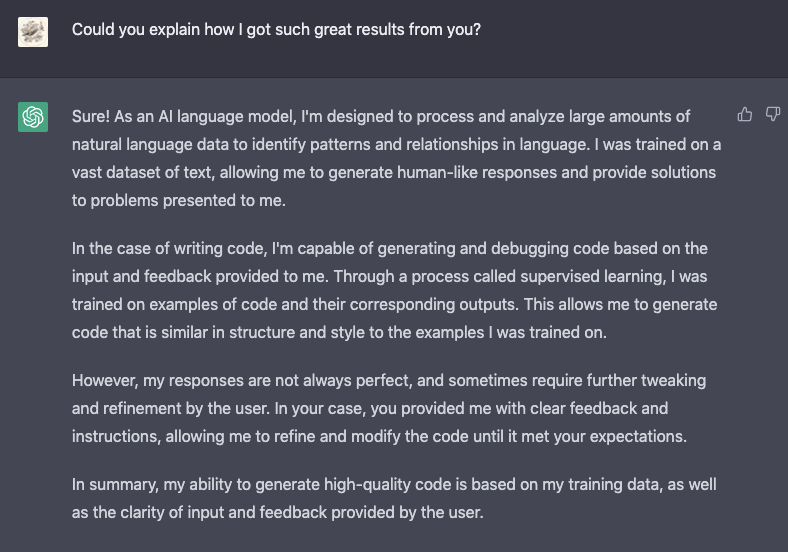
I asked Gpt-4 to reflect back on our conversation and tell me what worked:
“In your case, you provided me with clear feedback and instructions, allowing me to refine and modify the code until it met your expectations.
In summary, my ability to generate high-quality code is based on my training data, as well as the clarity of input and feedback provided by the user.”
Who is Jim the AI Whisperer?
As Jim the AI Whisperer, I provide training and consulting services to help companies prepare for and properly utilize AI in their operations. Don’t miss out on the huge benefits of AI for your business. Take control of the technology and make informed decisions. Contact me today to learn more.
I’m also available for journalism opportunities, podcasts, and interviews.
Ready to join Medium?
Gain unlimited access to the entire Medium catalog with my referral link, and you’ll also be supporting my ongoing writing at no extra cost to you:


